로딩중...
검색중...
일치하는것 없음
Dreamine.UI.Wpf.Controls.DreamineListBox 클래스 참조
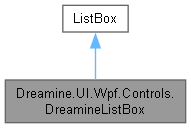
Dreamine.UI.Wpf.Controls.DreamineListBox에 대한 상속 다이어그램 :
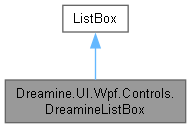
Dreamine.UI.Wpf.Controls.DreamineListBox에 대한 협력 다이어그램:
Public 멤버 함수 | |
| DreamineListBox () | |
정적 Public 멤버 함수 | |
| static void | SetCommandTriggerName (DependencyObject obj, string value) |
| static string | GetCommandTriggerName (DependencyObject obj) |
| static void | SetCommand (DependencyObject obj, ICommand value) |
| static ICommand | GetCommand (DependencyObject obj) |
| static void | SetCommandParameter (DependencyObject obj, object value) |
| static object | GetCommandParameter (DependencyObject obj) |
정적 Public 속성 | |
| static readonly DependencyProperty | CommandProperty |
| static readonly DependencyProperty | CommandParameterProperty |
| static readonly DependencyProperty | CommandTriggerNameProperty |
정적 Private 멤버 함수 | |
| static | DreamineListBox () |
| static void | TryMergeStyleOnce () |
| static void | OnCommandChanged (DependencyObject d, DependencyPropertyChangedEventArgs e) |
| static void | TryExecuteCommand (DependencyObject d, string eventName, RoutedEventArgs eventArgs) |
상세한 설명
전용 스타일과 항목 상호작용 이벤트용 연결 명령을 제공하는 사용자 지정 목록 상자입니다.
DreamineListBox.cs 파일의 16 번째 라인에서 정의되었습니다.
생성자 & 소멸자 문서화
◆ DreamineListBox() [1/2]
|
inlinestaticprivate |
기본 스타일 키를 한 번 재정의하고 목록 상자 테마 리소스를 병합합니다.
DreamineListBox.cs 파일의 26 번째 라인에서 정의되었습니다.
27 {
28 // \brief Default style key override (one-time per type)
29 DefaultStyleKeyProperty.OverrideMetadata(typeof(DreamineListBox),
30 new FrameworkPropertyMetadata(typeof(DreamineListBox)));
31
32 // \brief Merge style dictionary once
33 var uri = new Uri("/Dreamine.UI.Wpf.Themes;component/DreamineListBoxStyle.xaml", UriKind.RelativeOrAbsolute);
34
35 if (Application.Current != null)
36 {
37 bool alreadyAdded = Application.Current.Resources.MergedDictionaries
38 .OfType<ResourceDictionary>()
39 .Any(x => x.Source != null && x.Source.Equals(uri));
40
41 if (!alreadyAdded)
42 {
43 var dict = new ResourceDictionary { Source = uri };
44 Application.Current.Resources.MergedDictionaries.Add(dict);
45 }
46 }
47 }
다음을 참조함 : DreamineListBox().
다음에 의해서 참조됨 : DreamineListBox().
이 함수 내부에서 호출하는 함수들에 대한 그래프입니다.:
이 함수를 호출하는 함수들에 대한 그래프입니다.:
◆ DreamineListBox() [2/2]
|
inline |
목록 상자를 만들고 스타일 리소스가 병합되었는지 다시 확인합니다.
DreamineListBox.cs 파일의 57 번째 라인에서 정의되었습니다.
58 {
59 TryMergeStyleOnce();
60 }
다음을 참조함 : TryMergeStyleOnce().
이 함수 내부에서 호출하는 함수들에 대한 그래프입니다.:

멤버 함수 문서화
◆ GetCommand()
|
inlinestatic |
설정된 연결 명령을 가져옵니다.
- 매개변수
-
obj 값을 읽을 개체입니다.
- 반환값
- 구성된 명령입니다.
- 예외
-
ArgumentNullException obj 가 null이면 발생합니다. InvalidCastException 저장된 값이 명령이 아니면 발생합니다.
DreamineListBox.cs 파일의 288 번째 라인에서 정의되었습니다.
288=> (ICommand)obj.GetValue(CommandProperty);
다음을 참조함 : CommandProperty.
다음에 의해서 참조됨 : TryExecuteCommand().
이 함수를 호출하는 함수들에 대한 그래프입니다.:

◆ GetCommandParameter()
|
inlinestatic |
연결 명령 매개변수를 가져옵니다.
- 매개변수
-
obj 값을 읽을 개체입니다.
- 반환값
- 구성된 명령 매개변수입니다.
- 예외
-
ArgumentNullException obj 가 null이면 발생합니다.
DreamineListBox.cs 파일의 357 번째 라인에서 정의되었습니다.
358 => obj.GetValue(CommandParameterProperty);
다음을 참조함 : CommandParameterProperty.
다음에 의해서 참조됨 : TryExecuteCommand().
이 함수를 호출하는 함수들에 대한 그래프입니다.:

◆ GetCommandTriggerName()
|
inlinestatic |
명령 트리거 이벤트 이름을 가져옵니다.
- 매개변수
-
obj 값을 읽을 개체입니다.
- 반환값
- 구성된 이벤트 이름입니다.
- 예외
-
ArgumentNullException obj 가 null이면 발생합니다. InvalidCastException 저장된 값이 문자열이 아니면 발생합니다.
DreamineListBox.cs 파일의 211 번째 라인에서 정의되었습니다.
212 => (string)obj.GetValue(CommandTriggerNameProperty);
다음을 참조함 : CommandTriggerNameProperty.
다음에 의해서 참조됨 : TryExecuteCommand().
이 함수를 호출하는 함수들에 대한 그래프입니다.:

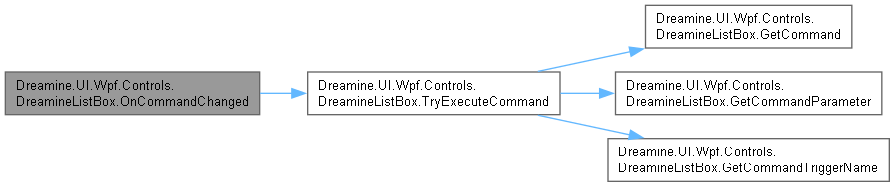
◆ OnCommandChanged()
|
inlinestaticprivate |
명령 값 변경 시 마우스, 키보드, 터치와 클릭 이벤트 처리기를 연결합니다.
- 매개변수
-
d 명령 값이 변경된 개체입니다. e 속성 변경 데이터입니다.
현재 구현은 명령이 다시 변경될 때 처리기를 중복 연결할 수 있습니다.
DreamineListBox.cs 파일의 392 번째 라인에서 정의되었습니다.
393 {
394 if (d is UIElement element)
395 {
396 // 마우스 클릭
397 element.AddHandler(UIElement.PreviewMouseUpEvent, new MouseButtonEventHandler((s, e) =>
398 {
399 TryExecuteCommand(d, "PreviewMouseUp", e);
400 }), true);
401 element.AddHandler(Control.MouseDoubleClickEvent, new MouseButtonEventHandler((s, e) =>
402 {
403 TryExecuteCommand(d, "MouseDoubleClick", e);
404 }), true);
405
406 // 키보드 입력
407 element.AddHandler(UIElement.PreviewKeyDownEvent, new KeyEventHandler((s, e) =>
408 {
409 TryExecuteCommand(d, "PreviewKeyUp", e);
410 }), true);
411
412 element.AddHandler(UIElement.TouchUpEvent, new EventHandler<TouchEventArgs>((s, e) =>
413 {
414 TryExecuteCommand(d, "TouchUp", e);
415 }));
416
417 element.AddHandler(ButtonBase.ClickEvent, new RoutedEventHandler((s, e) =>
418 {
419 TryExecuteCommand(d, "Click", e);
420 }));
421 }
422 }
다음을 참조함 : TryExecuteCommand().
이 함수 내부에서 호출하는 함수들에 대한 그래프입니다.:
◆ SetCommand()
|
inlinestatic |
실행할 연결 명령을 설정합니다.
- 매개변수
-
obj 값을 설정할 개체입니다. value 실행할 명령입니다.
- 예외
-
ArgumentNullException obj 가 null이면 발생합니다.
DreamineListBox.cs 파일의 246 번째 라인에서 정의되었습니다.
246=> obj.SetValue(CommandProperty, value);
다음을 참조함 : CommandProperty.
◆ SetCommandParameter()
|
inlinestatic |
연결 명령 매개변수를 설정합니다.
- 매개변수
-
obj 값을 설정할 개체입니다. value 명령 매개변수입니다.
- 예외
-
ArgumentNullException obj 가 null이면 발생합니다.
DreamineListBox.cs 파일의 322 번째 라인에서 정의되었습니다.
323 => obj.SetValue(CommandParameterProperty, value);
다음을 참조함 : CommandParameterProperty.
◆ SetCommandTriggerName()
|
inlinestatic |
명령 트리거 이벤트 이름을 설정합니다.
- 매개변수
-
obj 값을 설정할 개체입니다. value 쉼표 구분 이벤트 이름입니다.
- 예외
-
ArgumentNullException obj 가 null이면 발생합니다.
DreamineListBox.cs 파일의 168 번째 라인에서 정의되었습니다.
169 => obj.SetValue(CommandTriggerNameProperty, value);
다음을 참조함 : CommandTriggerNameProperty.
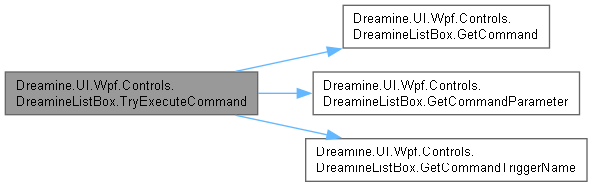
◆ TryExecuteCommand()
|
inlinestaticprivate |
발생한 이벤트 이름이 트리거 목록과 일치하면 연결 명령을 실행합니다.
- 매개변수
-
d 명령 설정을 보유한 개체입니다. eventName 발생한 이벤트 이름입니다. eventArgs 기본 명령 매개변수로 사용할 이벤트 데이터입니다.
DreamineListBox.cs 파일의 456 번째 라인에서 정의되었습니다.
457 {
458 var rawTrigger = GetCommandTriggerName(d);
459 if (string.IsNullOrEmpty(rawTrigger))
460 return;
461
462 var triggerList = rawTrigger.Split(',')
463 .Select(x => x.Trim())
464 .Where(x => !string.IsNullOrEmpty(x));
465
466 if (!triggerList.Contains(eventName, StringComparer.OrdinalIgnoreCase))
467 return;
468
469 var command = GetCommand(d);
470 var parameter = GetCommandParameter(d) ?? eventArgs;
471
472 if (command?.CanExecute(parameter) == true)
473 command.Execute(parameter);
474 }
다음을 참조함 : GetCommand(), GetCommandParameter(), GetCommandTriggerName().
다음에 의해서 참조됨 : OnCommandChanged().
이 함수 내부에서 호출하는 함수들에 대한 그래프입니다.:
이 함수를 호출하는 함수들에 대한 그래프입니다.:

◆ TryMergeStyleOnce()
|
inlinestaticprivate |
현재 애플리케이션에 목록 상자 스타일 리소스를 한 번만 병합합니다.
DreamineListBox.cs 파일의 70 번째 라인에서 정의되었습니다.
71 {
72 var app = Application.Current;
73 if (app == null)
74 return;
75
76 var uri = new Uri("/Dreamine.UI.Wpf.Themes;component/DreamineListBoxStyle.xaml", UriKind.RelativeOrAbsolute);
77
78 bool alreadyAdded =
79 app.Resources.MergedDictionaries
80 .OfType<ResourceDictionary>()
81 .Any(x => x.Source != null && x.Source.Equals(uri));
82
83 if (!alreadyAdded)
84 {
85 var dict = new ResourceDictionary { Source = uri };
86 app.Resources.MergedDictionaries.Add(dict);
87 }
88 }
다음에 의해서 참조됨 : DreamineListBox().
이 함수를 호출하는 함수들에 대한 그래프입니다.:

멤버 데이터 문서화
◆ CommandParameterProperty
|
static |
초기값:
=
DependencyProperty.RegisterAttached(
"CommandParameter",
typeof(object),
typeof(DreamineListBox),
new PropertyMetadata(null))
static DreamineListBox()
Definition DreamineListBox.cs:26
명령에 전달할 연결 매개변수 속성입니다. 값이 없으면 이벤트 데이터가 전달됩니다.
DreamineListBox.cs 파일의 114 번째 라인에서 정의되었습니다.
다음에 의해서 참조됨 : GetCommandParameter(), SetCommandParameter().
◆ CommandProperty
|
static |
초기값:
=
DependencyProperty.RegisterAttached(
"Command",
typeof(ICommand),
typeof(DreamineListBox),
static void OnCommandChanged(DependencyObject d, DependencyPropertyChangedEventArgs e)
Hooks internal event handlers once when Command changes.
Definition DreamineButton.cs:1368
구성된 입력 이벤트에서 실행할 연결 명령 속성입니다.
DreamineListBox.cs 파일의 99 번째 라인에서 정의되었습니다.
다음에 의해서 참조됨 : GetCommand(), SetCommand().
◆ CommandTriggerNameProperty
|
static |
초기값:
=
DependencyProperty.RegisterAttached(
"CommandTriggerName",
typeof(string),
typeof(DreamineListBox),
new PropertyMetadata(null))
명령을 실행할 쉼표 구분 이벤트 이름 목록 속성입니다.
DreamineListBox.cs 파일의 129 번째 라인에서 정의되었습니다.
다음에 의해서 참조됨 : GetCommandTriggerName(), SetCommandTriggerName().
이 클래스에 대한 문서화 페이지는 다음의 파일로부터 생성되었습니다.: