로딩중...
검색중...
일치하는것 없음
Dreamine.UI.Wpf.Controls.DreamineButton 클래스 참조
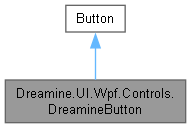
Dreamine.UI.Wpf.Controls.DreamineButton에 대한 상속 다이어그램 :
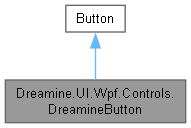
Dreamine.UI.Wpf.Controls.DreamineButton에 대한 협력 다이어그램:
Public 멤버 함수 | |
| DreamineButton () | |
| Constructor: subscribes to login changed event. | |
| override void | OnApplyTemplate () |
| Caches template parts and updates shadow effect after template is applied. | |
정적 Public 멤버 함수 | |
| static void | SetCommandParameter (DependencyObject obj, object value) |
| Sets CommandParameter attached property. | |
| static object | GetCommandParameter (DependencyObject obj) |
| Gets CommandParameter attached property. | |
| static void | SetCommandTriggerName (DependencyObject obj, string value) |
| Sets CommandTriggerName attached property. | |
| static string | GetCommandTriggerName (DependencyObject obj) |
| Gets CommandTriggerName attached property. | |
| static void | SetCommand (DependencyObject obj, ICommand value) |
| Attached Command helper set. | |
| static ICommand | GetCommand (DependencyObject obj) |
| Attached Command helper get. | |
정적 Public 속성 | |
| static readonly DependencyProperty | IconSizeProperty |
| DP for IconSize. | |
| static readonly DependencyProperty | IconMarginProperty |
| DP for IconMargin. | |
| static readonly DependencyProperty | IconStretchProperty |
| DP for IconStretch. | |
| static readonly DependencyProperty | UseShadowProperty |
| DP for UseShadow. | |
| static readonly DependencyProperty | ShadowBlurRadiusProperty |
| DP for ShadowBlurRadius. | |
| static readonly DependencyProperty | ShadowOpacityProperty |
| DP for ShadowOpacity. | |
| static readonly DependencyProperty | ShadowDepthProperty |
| DP for ShadowDepth. | |
| static readonly DependencyProperty | ShadowDirectionProperty |
| DP for ShadowDirection. | |
| static readonly DependencyProperty | ShadowColorProperty |
| DP for ShadowColor. | |
| static readonly DependencyProperty | SelectedVisualModeProperty |
| DP identifier for SelectedVisualMode. | |
| static readonly DependencyProperty | SelectedBorderBrushProperty |
| DP identifier for SelectedBorderBrush. | |
| static readonly DependencyProperty | SelectedBorderThicknessProperty |
| DP identifier for SelectedBorderThickness. | |
| static readonly DependencyProperty | SelectedBackgroundOverlayProperty |
| DP identifier for SelectedBackgroundOverlay. | |
| static readonly DependencyProperty | ImagePositionProperty |
| DP for ImagePosition. | |
| static readonly DependencyProperty | OnceLoginProperty |
| DP for OnceLogin. | |
| static readonly DependencyProperty | ImageSourceProperty |
| DP for ImageSource. | |
| static readonly DependencyProperty | IconPathProperty |
| DP for IconPath. | |
| static new readonly DependencyProperty | CommandProperty |
| Attached command (separate from Button.Command). | |
| static new readonly DependencyProperty | CommandParameterProperty |
| Attached command parameter. | |
| static readonly DependencyProperty | CommandTriggerNameProperty |
| Comma-separated trigger event names. | |
| static readonly DependencyProperty | BackgroundTopProperty |
| Gradient top color. | |
| static readonly DependencyProperty | ShineColorProperty |
| Shine top color. | |
| static readonly DependencyProperty | ShineColorBottomProperty |
| Shine bottom color. | |
| static readonly DependencyProperty | IsSelectedProperty |
| Selection state. | |
| static readonly DependencyProperty | IsFocusableExProperty |
| Extended Focusable flag. | |
| static readonly DependencyProperty | RestoreFocusTargetProperty |
| Focus restore target element. | |
| static readonly DependencyProperty | GradeProperty |
| Current user grade. | |
| static readonly DependencyProperty | MinimumGradeProperty |
| Minimum required grade. | |
| static readonly DependencyProperty | UseSolidBackgroundProperty |
| Enables solid background mode. | |
속성 | |
| double | IconSize [get, set] |
| Controls the default icon size (Width/Height) at once. | |
| Thickness | IconMargin [get, set] |
| Controls the icon margin. | |
| Stretch | IconStretch [get, set] |
| Icon stretch mode. | |
| bool | UseShadow [get, set] |
| Enables or disables DropShadowEffect. | |
| double | ShadowBlurRadius [get, set] |
| Shadow blur radius. | |
| double | ShadowOpacity [get, set] |
| Shadow opacity. | |
| double | ShadowDepth [get, set] |
| Shadow depth. | |
| double | ShadowDirection [get, set] |
| Shadow direction in degrees. 0=Left, 90=Down, 180=Right, 270=Up. | |
| Color | ShadowColor [get, set] |
| Shadow color. | |
| SelectedVisualMode | SelectedVisualMode [get, set] |
| Dependency property for selection visual presentation mode. | |
| Brush | SelectedBorderBrush [get, set] |
| Selected border brush. | |
| Thickness | SelectedBorderThickness [get, set] |
| Selected border thickness. | |
| Brush | SelectedBackgroundOverlay [get, set] |
| Selected background overlay brush (alpha recommended). | |
| IconPosition | ImagePosition [get, set] |
| Icon layout position. | |
| bool | OnceLogin [get, set] |
| Enables one-time login session reuse. | |
| ImageSource | ImageSource [get, set] |
| Bitmap icon source. | |
| Geometry | IconPath [get, set] |
| Vector icon geometry (Path). | |
| new ICommand | Command [get, set] |
| Command get/set. | |
| Brush | BackgroundTop [get, set] |
| Gets/sets BackgroundTop. | |
| Brush | ShineColor [get, set] |
| Gets/sets ShineColor. | |
| Brush | ShineColorBottom [get, set] |
| Gets/sets ShineColorBottom. | |
| bool | IsSelected [get, set] |
| Gets/sets IsSelected. | |
| bool | IsFocusableEx [get, set] |
| Gets/sets IsFocusableEx. | |
| IInputElement? | RestoreFocusTarget [get, set] |
| Gets/sets RestoreFocusTarget. | |
| int | Grade [get, set] |
| Gets/sets Grade. | |
| int | MinimumGrade [get, set] |
| Gets/sets MinimumGrade. | |
| bool | UseSolidBackground [get, set] |
| Gets/sets UseSolidBackground. | |
Private 멤버 함수 | |
| void | UpdateShadowEffect () |
| Applies shadow effect to ShadowHost. | |
정적 Private 멤버 함수 | |
| static void | OnShadowPropertyChanged (DependencyObject d, DependencyPropertyChangedEventArgs e) |
| Updates template Effect when any shadow DP changes. | |
| static void | OnOnceLoginChanged (DependencyObject d, DependencyPropertyChangedEventArgs e) |
| Updates global navigation helper when OnceLogin changes. | |
| static | DreamineButton () |
| Applies default style key and auto-merges ResourceDictionary. | |
| static bool | GetIsHandlersHooked (DependencyObject d) |
| Gets IsHandlersHooked attached property. | |
| static void | SetIsHandlersHooked (DependencyObject d, bool v) |
| Sets IsHandlersHooked attached property. | |
| static bool | GetIsExecuting (DependencyObject d) |
| Gets IsExecuting attached property. | |
| static void | SetIsExecuting (DependencyObject d, bool v) |
| Sets IsExecuting attached property. | |
| static void | OnCommandChanged (DependencyObject d, DependencyPropertyChangedEventArgs e) |
| Hooks internal event handlers once when Command changes. | |
| static async void | TryExecuteCommand (DependencyObject d, string eventName, RoutedEventArgs eventArgs) |
| Executes the command only when the trigger name matches. | |
Private 속성 | |
| Border? | _shadowHost |
| Shadow host of the current template. | |
정적 Private 속성 | |
| const string | PART_ShadowHost = "ShadowHost" |
| Template part name for the shadow host. | |
| static readonly DependencyProperty | IsHandlersHookedProperty |
| Prevents duplicate event handler hooking. | |
| static readonly DependencyProperty | IsExecutingProperty |
| Reentrancy guard flag. | |
상세한 설명
Custom button control for VsLibrary framework.
아이콘, 그림자, 선택 표시, 권한 검사 및 이벤트 기반 연결 명령을 제공하는 버튼입니다.
DreamineButton.cs 파일의 127 번째 라인에서 정의되었습니다.
생성자 & 소멸자 문서화
◆ DreamineButton() [1/2]
|
inlinestaticprivate |
Applies default style key and auto-merges ResourceDictionary.
기본 스타일 키를 등록하고 버튼 테마 리소스를 애플리케이션에 한 번 병합합니다.
DreamineButton.cs 파일의 773 번째 라인에서 정의되었습니다.
774 {
775 DefaultStyleKeyProperty.OverrideMetadata(
776 typeof(DreamineButton),
777 new FrameworkPropertyMetadata(typeof(DreamineButton)));
778
779 try
780 {
781 var uri = new Uri("/Dreamine.UI.Wpf.Themes;component/DreamineButtonStyle.xaml",
782 UriKind.RelativeOrAbsolute);
783
784 var app = Application.Current;
785 if (app != null)
786 {
787 bool alreadyAdded = app.Resources.MergedDictionaries
788 .OfType<ResourceDictionary>()
789 .Any(x => x.Source != null && x.Source.Equals(uri));
790
791 if (!alreadyAdded)
792 {
793 var dict = new ResourceDictionary { Source = uri };
794 app.Resources.MergedDictionaries.Add(dict);
795 }
796 }
797 }
798 catch
799 {
800 // \brief Guard for design-time / missing resources, etc.
801 }
802
803 }
다음을 참조함 : DreamineButton().
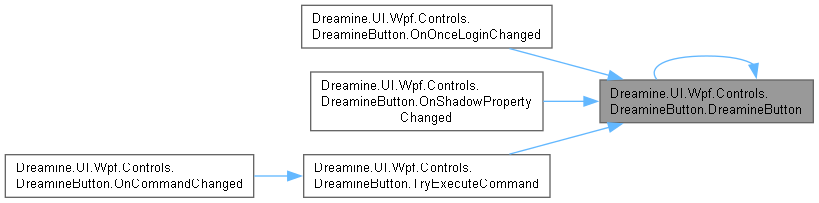
다음에 의해서 참조됨 : DreamineButton(), OnOnceLoginChanged(), OnShadowPropertyChanged(), TryExecuteCommand().
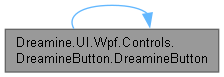
이 함수 내부에서 호출하는 함수들에 대한 그래프입니다.:
이 함수를 호출하는 함수들에 대한 그래프입니다.:
◆ DreamineButton() [2/2]
|
inline |
Constructor: subscribes to login changed event.
새 버튼 인스턴스를 초기화합니다.
DreamineButton.cs 파일의 816 번째 라인에서 정의되었습니다.
817 {
818 }
멤버 함수 문서화
◆ GetCommand()
|
inlinestatic |
Attached Command helper get.
지정한 객체의 연결 명령을 가져옵니다.
- 매개변수
-
obj 명령을 읽을 객체입니다.
- 반환값
- 연결된 명령입니다.
- 예외
-
ArgumentNullException obj 가 null일 때 발생합니다.
DreamineButton.cs 파일의 1205 번째 라인에서 정의되었습니다.
1205=> (ICommand)obj.GetValue(CommandProperty);
다음을 참조함 : CommandProperty.
다음에 의해서 참조됨 : TryExecuteCommand().
이 함수를 호출하는 함수들에 대한 그래프입니다.:

◆ GetCommandParameter()
|
inlinestatic |
Gets CommandParameter attached property.
지정한 객체의 명령 매개변수를 가져옵니다.
- 매개변수
-
obj 값을 읽을 객체입니다.
- 반환값
- 구성된 명령 매개변수입니다.
- 예외
-
ArgumentNullException obj 가 null일 때 발생합니다.
DreamineButton.cs 파일의 1046 번째 라인에서 정의되었습니다.
1047 => obj.GetValue(CommandParameterProperty);
다음을 참조함 : CommandParameterProperty.
다음에 의해서 참조됨 : TryExecuteCommand().
이 함수를 호출하는 함수들에 대한 그래프입니다.:

◆ GetCommandTriggerName()
|
inlinestatic |
Gets CommandTriggerName attached property.
지정한 객체의 명령 트리거 이름 목록을 가져옵니다.
- 매개변수
-
obj 값을 읽을 객체입니다.
- 반환값
- 쉼표 구분 이벤트 이름 목록입니다.
- 예외
-
ArgumentNullException obj 가 null일 때 발생합니다.
DreamineButton.cs 파일의 1134 번째 라인에서 정의되었습니다.
1135 => (string)obj.GetValue(CommandTriggerNameProperty);
다음을 참조함 : CommandTriggerNameProperty.
다음에 의해서 참조됨 : TryExecuteCommand().
이 함수를 호출하는 함수들에 대한 그래프입니다.:

◆ GetIsExecuting()
|
inlinestaticprivate |
Gets IsExecuting attached property.
명령 실행 중 여부를 가져옵니다.
- 매개변수
-
d 상태 소유 객체입니다.
- 반환값
- 실행 중 여부입니다.
DreamineButton.cs 파일의 1312 번째 라인에서 정의되었습니다.
1312=> (bool)d.GetValue(IsExecutingProperty);
다음을 참조함 : IsExecutingProperty.
다음에 의해서 참조됨 : TryExecuteCommand().
이 함수를 호출하는 함수들에 대한 그래프입니다.:

◆ GetIsHandlersHooked()
|
inlinestaticprivate |
Gets IsHandlersHooked attached property.
이벤트 처리기 연결 여부를 가져옵니다.
- 매개변수
-
d 상태 소유 객체입니다.
- 반환값
- 연결 여부입니다.
DreamineButton.cs 파일의 1245 번째 라인에서 정의되었습니다.
1245=> (bool)d.GetValue(IsHandlersHookedProperty);
다음을 참조함 : IsHandlersHookedProperty.
다음에 의해서 참조됨 : OnCommandChanged().
이 함수를 호출하는 함수들에 대한 그래프입니다.:

◆ OnApplyTemplate()
|
inline |
Caches template parts and updates shadow effect after template is applied.
템플릿 적용 후 그림자 호스트를 확인하고 효과를 갱신합니다.
DreamineButton.cs 파일의 831 번째 라인에서 정의되었습니다.
832 {
833 base.OnApplyTemplate();
834
835 _shadowHost = GetTemplateChild(PART_ShadowHost) as Border;
836
837 // \brief If template part name mismatches, _shadowHost can be null.
838 UpdateShadowEffect();
839 }
다음을 참조함 : _shadowHost, PART_ShadowHost, UpdateShadowEffect().
이 함수 내부에서 호출하는 함수들에 대한 그래프입니다.:

◆ OnCommandChanged()
|
inlinestaticprivate |
Hooks internal event handlers once when Command changes.
명령이 설정되면 지원되는 입력 및 클릭 이벤트 처리기를 한 번 연결합니다.
- 매개변수
-
d 명령이 변경된 객체입니다. e 이전 명령과 새 명령을 포함하는 변경 데이터입니다.
DreamineButton.cs 파일의 1368 번째 라인에서 정의되었습니다.
1369 {
1370 if (d is not UIElement element) return;
1371 if (GetIsHandlersHooked(d)) return;
1372
1373 element.AddHandler(UIElement.PreviewMouseUpEvent, new MouseButtonEventHandler((s, ev) =>
1374 {
1375 TryExecuteCommand(d, "PreviewMouseUp", ev);
1376 }), true);
1377
1378 element.AddHandler(Control.MouseDoubleClickEvent, new MouseButtonEventHandler((s, ev) =>
1379 {
1380 TryExecuteCommand(d, "MouseDoubleClick", ev);
1381 }), true);
1382
1383 element.AddHandler(UIElement.PreviewKeyUpEvent, new KeyEventHandler((s, ev) =>
1384 {
1385 TryExecuteCommand(d, "PreviewKeyUp", ev);
1386 }), true);
1387
1388 element.AddHandler(UIElement.TouchUpEvent, new EventHandler<TouchEventArgs>((s, ev) =>
1389 {
1390 TryExecuteCommand(d, "TouchUp", ev);
1391 }));
1392
1393 element.AddHandler(ButtonBase.ClickEvent, new RoutedEventHandler((s, ev) =>
1394 {
1395 TryExecuteCommand(d, "Click", ev);
1396 }));
1397
1398 SetIsHandlersHooked(d, true);
1399 }
다음을 참조함 : GetIsHandlersHooked(), SetIsHandlersHooked(), TryExecuteCommand().
이 함수 내부에서 호출하는 함수들에 대한 그래프입니다.:
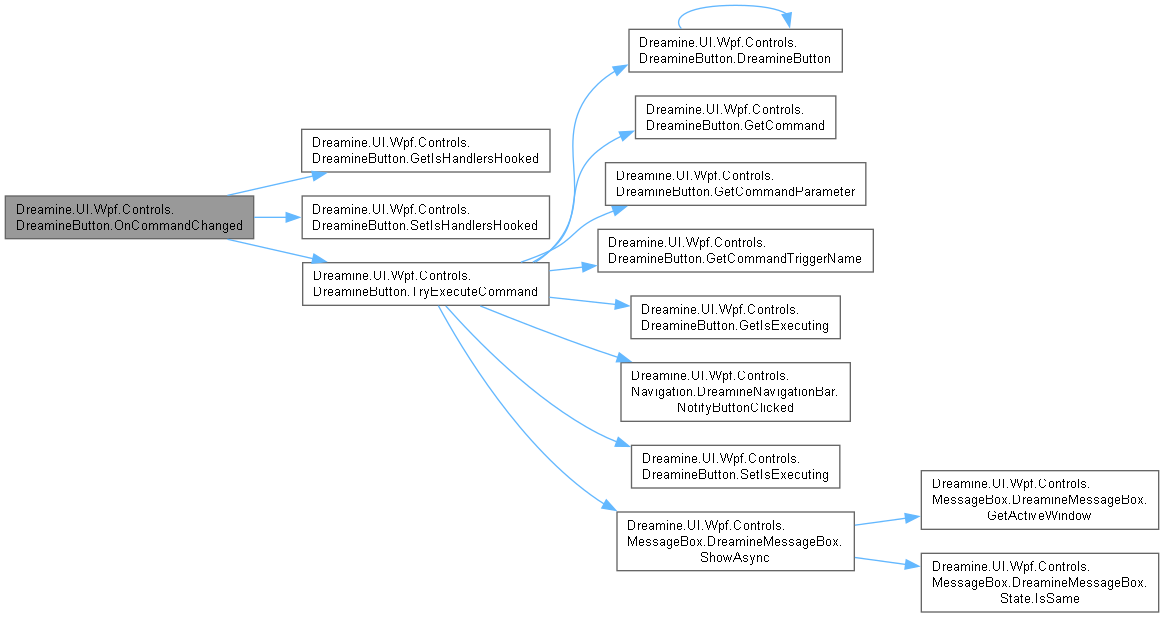
◆ OnOnceLoginChanged()
|
inlinestaticprivate |
Updates global navigation helper when OnceLogin changes.
한 번 로그인 설정 변경을 전역 탐색 도우미에 반영합니다.
- 매개변수
-
d 값이 변경된 객체입니다. e 새 값을 포함하는 변경 데이터입니다.
- 예외
-
InvalidCastException 새 값이 bool이 아닐 때 발생할 수 있습니다.
DreamineButton.cs 파일의 756 번째 라인에서 정의되었습니다.
757 {
758 if (d is DreamineButton)
759 VsNavigationHelper.IsOnceLoginEnabled = (bool)e.NewValue;
760 }
다음을 참조함 : DreamineButton(), Dreamine.UI.Wpf.Controls.Navigation.VsNavigationHelper.IsOnceLoginEnabled.
이 함수 내부에서 호출하는 함수들에 대한 그래프입니다.:

◆ OnShadowPropertyChanged()
|
inlinestaticprivate |
Updates template Effect when any shadow DP changes.
그림자 관련 값이 변경되면 해당 버튼의 템플릿 효과를 갱신합니다.
- 매개변수
-
d 값이 변경된 객체입니다. e 이전 값과 새 값을 포함하는 변경 데이터입니다.
DreamineButton.cs 파일의 505 번째 라인에서 정의되었습니다.
506 {
507 if (d is DreamineButton btn)
508 btn.UpdateShadowEffect();
509 }
다음을 참조함 : DreamineButton().
이 함수 내부에서 호출하는 함수들에 대한 그래프입니다.:

◆ SetCommand()
|
inlinestatic |
Attached Command helper set.
지정한 객체에 연결 명령을 설정합니다.
- 매개변수
-
obj 명령을 설정할 객체입니다. value 실행할 명령입니다.
- 예외
-
ArgumentNullException obj 가 null일 때 발생합니다.
DreamineButton.cs 파일의 1170 번째 라인에서 정의되었습니다.
1170=> obj.SetValue(CommandProperty, value);
다음을 참조함 : CommandProperty.
◆ SetCommandParameter()
|
inlinestatic |
Sets CommandParameter attached property.
지정한 객체의 명령 매개변수를 설정합니다.
- 매개변수
-
obj 값을 설정할 객체입니다. value 명령에 전달할 값입니다.
- 예외
-
ArgumentNullException obj 가 null일 때 발생합니다.
DreamineButton.cs 파일의 1010 번째 라인에서 정의되었습니다.
1011 => obj.SetValue(CommandParameterProperty, value);
다음을 참조함 : CommandParameterProperty.
◆ SetCommandTriggerName()
|
inlinestatic |
Sets CommandTriggerName attached property.
지정한 객체의 명령 트리거 이름 목록을 설정합니다.
- 매개변수
-
obj 값을 설정할 객체입니다. value 쉼표 구분 이벤트 이름 목록입니다.
- 예외
-
ArgumentNullException obj 가 null일 때 발생합니다.
DreamineButton.cs 파일의 1098 번째 라인에서 정의되었습니다.
1099 => obj.SetValue(CommandTriggerNameProperty, value);
다음을 참조함 : CommandTriggerNameProperty.
◆ SetIsExecuting()
|
inlinestaticprivate |
Sets IsExecuting attached property.
명령 실행 중 여부를 설정합니다.
- 매개변수
-
d 상태 소유 객체입니다. v 설정할 상태입니다.
DreamineButton.cs 파일의 1339 번째 라인에서 정의되었습니다.
1339=> d.SetValue(IsExecutingProperty, v);
다음을 참조함 : IsExecutingProperty.
다음에 의해서 참조됨 : TryExecuteCommand().
이 함수를 호출하는 함수들에 대한 그래프입니다.:

◆ SetIsHandlersHooked()
|
inlinestaticprivate |
Sets IsHandlersHooked attached property.
이벤트 처리기 연결 여부를 설정합니다.
- 매개변수
-
d 상태 소유 객체입니다. v 설정할 상태입니다.
DreamineButton.cs 파일의 1272 번째 라인에서 정의되었습니다.
1272=> d.SetValue(IsHandlersHookedProperty, v);
다음을 참조함 : IsHandlersHookedProperty.
다음에 의해서 참조됨 : OnCommandChanged().
이 함수를 호출하는 함수들에 대한 그래프입니다.:

◆ TryExecuteCommand()
|
inlinestaticprivate |
Executes the command only when the trigger name matches.
트리거 필터, 재진입 방지 및 버튼 권한 검사를 거쳐 연결 명령을 실행합니다.
- 매개변수
-
d 이벤트를 발생시킨 대상 객체입니다. eventName 라우트 이벤트 이름입니다. eventArgs 원래 라우트 이벤트 데이터입니다.
- 예외
-
ArgumentNullException d 또는 eventName 이 null일 때 비동기 처리 중 발생할 수 있습니다.NullReferenceException 명령 실행 후 eventArgs 가 null이면 발생합니다.
async void 이벤트 처리기이므로 호출자는 실행 예외를 직접 대기할 수 없습니다.
DreamineButton.cs 파일의 1460 번째 라인에서 정의되었습니다.
1461 {
1462 await Task.Yield();
1463
1464 var rawTrigger = GetCommandTriggerName(d);
1465 if (string.IsNullOrWhiteSpace(rawTrigger))
1466 return;
1467
1468 var triggers = rawTrigger
1469 .Split(',')
1470 .Select(s => s.Trim())
1471 .Where(s => !string.IsNullOrWhiteSpace(s))
1472 .ToArray();
1473
1474 if (triggers.Length > 0 &&
1475 !triggers.Contains(eventName, StringComparer.OrdinalIgnoreCase))
1476 return;
1477
1478 var command = GetCommand(d);
1479
1480 // Resolve command parameter with a clear priority:
1481 // 1) DreamineButton attached CommandParameter.
1482 // 2) WPF ButtonBase.CommandParameter.
1483 // 3) RoutedEventArgs fallback.
1484 object? parameter = null;
1485
1486 // 1) Attached CommandParameter (DreamineButton).
1487 parameter = GetCommandParameter(d);
1488
1489 // 2) Standard WPF CommandParameter (ButtonBase).
1490 if (parameter == null && d is ButtonBase bbForParam)
1491 parameter = bbForParam.CommandParameter;
1492
1493 // 3) Fallback to event args.
1494 if (parameter == null)
1495 parameter = eventArgs;
1496
1497 // Prevent double invocation when ButtonBase.Command is already wired to the same ICommand.
1498 if (d is ButtonBase bb && command != null && ReferenceEquals(bb.Command, command))
1499 return;
1500
1501 // Re-entrancy guard.
1502 if (GetIsExecuting(d))
1503 return;
1504
1505 SetIsExecuting(d, true);
1506
1507 try
1508 {
1509 if (d is DreamineButton btn)
1510 {
1511 if (btn.MinimumGrade > 0 && btn.Grade < btn.MinimumGrade)
1512 {
1513 DreamineMessageBox.ShowAsync(
1514 "권한이 부족합니다.",
1515 "Access Denied",
1516 autoClick: MessageBoxResult.OK,
1517 autoClickDelaySeconds: 3);
1518 return;
1519 }
1520
1521 if (btn.DataContext is ButtonData btnData)
1522 DreamineNavigationBar.NotifyButtonClicked(btnData);
1523 }
1524
1525 if (command == null)
1526 return;
1527
1528 // Execute the command when the parameter is accepted.
1529 if (command.CanExecute(parameter))
1530 {
1531 command.Execute(parameter);
1532 }
1533
1534 eventArgs.Handled = true;
1535 }
1536 finally
1537 {
1538 SetIsExecuting(d, false);
1539 }
1540 }
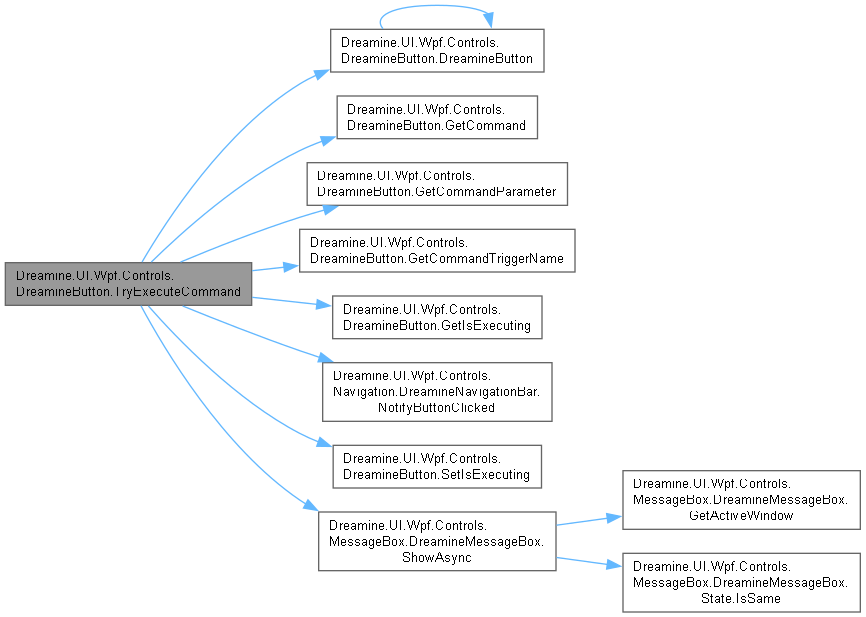
다음을 참조함 : DreamineButton(), GetCommand(), GetCommandParameter(), GetCommandTriggerName(), GetIsExecuting(), Dreamine.UI.Wpf.Controls.Navigation.DreamineNavigationBar.NotifyButtonClicked(), SetIsExecuting(), Dreamine.UI.Wpf.Controls.MessageBox.DreamineMessageBox.ShowAsync().
다음에 의해서 참조됨 : OnCommandChanged().
이 함수 내부에서 호출하는 함수들에 대한 그래프입니다.:
이 함수를 호출하는 함수들에 대한 그래프입니다.:

◆ UpdateShadowEffect()
|
inlineprivate |
Applies shadow effect to ShadowHost.
현재 그림자 설정을 템플릿 호스트에 적용하거나 효과를 제거합니다.
DreamineButton.cs 파일의 852 번째 라인에서 정의되었습니다.
853 {
854 if (_shadowHost == null)
855 return;
856
857 if (!UseShadow)
858 {
859 _shadowHost.Effect = null;
860 return;
861 }
862
863 // \brief Avoid background/brush interference: use Effect only on transparent host.
864 _shadowHost.Effect = new DropShadowEffect
865 {
866 BlurRadius = ShadowBlurRadius,
867 Opacity = ShadowOpacity,
868 ShadowDepth = ShadowDepth,
869 Direction = ShadowDirection,
870 Color = ShadowColor
871 };
872 }
다음을 참조함 : _shadowHost, ShadowBlurRadius, ShadowColor, ShadowDepth, ShadowDirection, ShadowOpacity, UseShadow.
다음에 의해서 참조됨 : OnApplyTemplate().
이 함수를 호출하는 함수들에 대한 그래프입니다.:

멤버 데이터 문서화
◆ _shadowHost
|
private |
Shadow host of the current template.
현재 템플릿에서 확인한 그림자 호스트를 보관합니다.
DreamineButton.cs 파일의 152 번째 라인에서 정의되었습니다.
다음에 의해서 참조됨 : OnApplyTemplate(), UpdateShadowEffect().
◆ BackgroundTopProperty
|
static |
초기값:
=
DependencyProperty.Register(nameof(BackgroundTop), typeof(Brush), typeof(DreamineButton), new PropertyMetadata(null))
static DreamineButton()
Applies default style key and auto-merges ResourceDictionary.
Definition DreamineButton.cs:773
Gradient top color.
그라데이션 위쪽 배경 브러시 속성을 식별합니다.
DreamineButton.cs 파일의 1551 번째 라인에서 정의되었습니다.
◆ CommandParameterProperty
|
static |
초기값:
=
DependencyProperty.RegisterAttached(
"CommandParameter",
typeof(object),
typeof(DreamineButton),
new PropertyMetadata(null))
Attached command parameter.
연결 명령 매개변수 속성을 식별합니다.
DreamineButton.cs 파일의 970 번째 라인에서 정의되었습니다.
다음에 의해서 참조됨 : GetCommandParameter(), SetCommandParameter().
◆ CommandProperty
|
static |
초기값:
=
DependencyProperty.Register(
nameof(Command),
typeof(ICommand),
typeof(DreamineButton),
static void OnCommandChanged(DependencyObject d, DependencyPropertyChangedEventArgs e)
Hooks internal event handlers once when Command changes.
Definition DreamineButton.cs:1368
Attached command (separate from Button.Command).
이벤트 트리거에서 실행할 버튼 명령 종속성 속성을 식별합니다.
DreamineButton.cs 파일의 939 번째 라인에서 정의되었습니다.
다음에 의해서 참조됨 : GetCommand(), SetCommand().
◆ CommandTriggerNameProperty
|
static |
초기값:
=
DependencyProperty.RegisterAttached(
"CommandTriggerName",
typeof(string),
typeof(DreamineButton),
new PropertyMetadata("PreviewMouseUp"))
Comma-separated trigger event names.
쉼표 구분 명령 트리거 이벤트 이름 속성을 식별합니다.
DreamineButton.cs 파일의 1058 번째 라인에서 정의되었습니다.
다음에 의해서 참조됨 : GetCommandTriggerName(), SetCommandTriggerName().
◆ GradeProperty
|
static |
초기값:
=
DependencyProperty.Register(nameof(Grade), typeof(int), typeof(DreamineButton), new PropertyMetadata(0))
Current user grade.
현재 사용자 등급 종속성 속성을 식별합니다.
DreamineButton.cs 파일의 1713 번째 라인에서 정의되었습니다.
◆ IconMarginProperty
|
static |
초기값:
=
DependencyProperty.Register(
nameof(IconMargin),
typeof(Thickness),
typeof(DreamineButton),
new FrameworkPropertyMetadata(
new Thickness(0, 0, 4, 0),
FrameworkPropertyMetadataOptions.AffectsMeasure |
FrameworkPropertyMetadataOptions.AffectsArrange))
DP for IconMargin.
IconMargin 종속성 속성을 식별합니다.
DreamineButton.cs 파일의 221 번째 라인에서 정의되었습니다.
◆ IconPathProperty
|
static |
초기값:
=
DependencyProperty.Register(nameof(IconPath), typeof(Geometry), typeof(DreamineButton),
new PropertyMetadata(null))
DP for IconPath.
IconPath 종속성 속성을 식별합니다.
DreamineButton.cs 파일의 926 번째 라인에서 정의되었습니다.
◆ IconSizeProperty
|
static |
초기값:
=
DependencyProperty.Register(
nameof(IconSize),
typeof(double),
typeof(DreamineButton),
new FrameworkPropertyMetadata(
20d,
FrameworkPropertyMetadataOptions.AffectsMeasure |
FrameworkPropertyMetadataOptions.AffectsArrange |
FrameworkPropertyMetadataOptions.AffectsRender))
double IconSize
Controls the default icon size (Width/Height) at once.
Definition DreamineButton.cs:170
DP for IconSize.
IconSize 종속성 속성을 식별합니다.
DreamineButton.cs 파일의 184 번째 라인에서 정의되었습니다.
◆ IconStretchProperty
|
static |
초기값:
=
DependencyProperty.Register(
nameof(IconStretch),
typeof(Stretch),
typeof(DreamineButton),
new FrameworkPropertyMetadata(
Stretch.Uniform,
FrameworkPropertyMetadataOptions.AffectsRender))
DP for IconStretch.
IconStretch 종속성 속성을 식별합니다.
DreamineButton.cs 파일의 257 번째 라인에서 정의되었습니다.
◆ ImagePositionProperty
|
static |
초기값:
=
DependencyProperty.Register(
nameof(ImagePosition),
typeof(IconPosition),
typeof(DreamineButton),
new FrameworkPropertyMetadata(
IconPosition.Left,
FrameworkPropertyMetadataOptions.AffectsMeasure |
FrameworkPropertyMetadataOptions.AffectsArrange))
DP for ImagePosition.
ImagePosition 종속성 속성을 식별합니다.
DreamineButton.cs 파일의 680 번째 라인에서 정의되었습니다.
◆ ImageSourceProperty
|
static |
초기값:
=
new PropertyMetadata(null))
DP for ImageSource.
ImageSource 종속성 속성을 식별합니다.
DreamineButton.cs 파일의 898 번째 라인에서 정의되었습니다.
◆ IsExecutingProperty
|
staticprivate |
초기값:
=
new PropertyMetadata(false))
Reentrancy guard flag.
명령 재진입 방지 플래그를 식별합니다.
DreamineButton.cs 파일의 1283 번째 라인에서 정의되었습니다.
다음에 의해서 참조됨 : GetIsExecuting(), SetIsExecuting().
◆ IsFocusableExProperty
|
static |
초기값:
=
DependencyProperty.Register(nameof(IsFocusableEx), typeof(bool), typeof(DreamineButton), new PropertyMetadata(true))
Extended Focusable flag.
확장 포커스 가능 상태 종속성 속성을 식별합니다.
DreamineButton.cs 파일의 1659 번째 라인에서 정의되었습니다.
◆ IsHandlersHookedProperty
|
staticprivate |
초기값:
=
new PropertyMetadata(false))
Prevents duplicate event handler hooking.
이벤트 처리기 중복 연결 방지 플래그를 식별합니다.
DreamineButton.cs 파일의 1216 번째 라인에서 정의되었습니다.
다음에 의해서 참조됨 : GetIsHandlersHooked(), SetIsHandlersHooked().
◆ IsSelectedProperty
|
static |
초기값:
=
DependencyProperty.Register(nameof(IsSelected), typeof(bool), typeof(DreamineButton), new PropertyMetadata(false))
Selection state.
선택 상태 종속성 속성을 식별합니다.
DreamineButton.cs 파일의 1632 번째 라인에서 정의되었습니다.
◆ MinimumGradeProperty
|
static |
초기값:
=
DependencyProperty.Register(nameof(MinimumGrade), typeof(int), typeof(DreamineButton), new PropertyMetadata(0))
Minimum required grade.
최소 요구 등급 종속성 속성을 식별합니다.
DreamineButton.cs 파일의 1740 번째 라인에서 정의되었습니다.
◆ OnceLoginProperty
|
static |
초기값:
=
DependencyProperty.Register(
nameof(OnceLogin),
typeof(bool),
typeof(DreamineButton),
static void OnOnceLoginChanged(DependencyObject d, DependencyPropertyChangedEventArgs e)
Updates global navigation helper when OnceLogin changes.
Definition DreamineButton.cs:756
DP for OnceLogin.
OnceLogin 종속성 속성을 식별합니다.
DreamineButton.cs 파일의 714 번째 라인에서 정의되었습니다.
◆ PART_ShadowHost
|
staticprivate |
Template part name for the shadow host.
그림자 효과를 적용할 템플릿 파트 이름입니다.
DreamineButton.cs 파일의 141 번째 라인에서 정의되었습니다.
다음에 의해서 참조됨 : OnApplyTemplate().
◆ RestoreFocusTargetProperty
|
static |
초기값:
=
DependencyProperty.Register(nameof(RestoreFocusTarget), typeof(IInputElement), typeof(DreamineButton), new PropertyMetadata(null))
Focus restore target element.
포커스 복귀 대상 종속성 속성을 식별합니다.
DreamineButton.cs 파일의 1686 번째 라인에서 정의되었습니다.
◆ SelectedBackgroundOverlayProperty
|
static |
초기값:
=
DependencyProperty.Register(
nameof(SelectedBackgroundOverlay),
typeof(Brush),
typeof(DreamineButton),
new PropertyMetadata(new SolidColorBrush(Color.FromArgb(0x30, 0x00, 0x7A, 0xFF))))
Brush SelectedBackgroundOverlay
Selected background overlay brush (alpha recommended).
Definition DreamineButton.cs:633
DP identifier for SelectedBackgroundOverlay.
SelectedBackgroundOverlay 종속성 속성을 식별합니다.
DreamineButton.cs 파일의 649 번째 라인에서 정의되었습니다.
◆ SelectedBorderBrushProperty
|
static |
초기값:
=
DependencyProperty.Register(
nameof(SelectedBorderBrush),
typeof(Brush),
typeof(DreamineButton),
new PropertyMetadata(Brushes.Blue))
DP identifier for SelectedBorderBrush.
SelectedBorderBrush 종속성 속성을 식별합니다.
DreamineButton.cs 파일의 578 번째 라인에서 정의되었습니다.
◆ SelectedBorderThicknessProperty
|
static |
초기값:
=
DependencyProperty.Register(
nameof(SelectedBorderThickness),
typeof(Thickness),
typeof(DreamineButton),
new PropertyMetadata(new Thickness(3)))
DP identifier for SelectedBorderThickness.
SelectedBorderThickness 종속성 속성을 식별합니다.
DreamineButton.cs 파일의 613 번째 라인에서 정의되었습니다.
◆ SelectedVisualModeProperty
|
static |
초기값:
=
DependencyProperty.Register(
nameof(SelectedVisualMode),
typeof(SelectedVisualMode),
typeof(DreamineButton),
new PropertyMetadata(SelectedVisualMode.BorderOnly))
SelectedVisualMode SelectedVisualMode
Dependency property for selection visual presentation mode.
Definition DreamineButton.cs:527
DP identifier for SelectedVisualMode.
SelectedVisualMode 종속성 속성을 식별합니다.
DreamineButton.cs 파일의 543 번째 라인에서 정의되었습니다.
◆ ShadowBlurRadiusProperty
|
static |
초기값:
=
DependencyProperty.Register(
nameof(ShadowBlurRadius),
typeof(double),
typeof(DreamineButton),
new FrameworkPropertyMetadata(
18d,
FrameworkPropertyMetadataOptions.AffectsRender,
static void OnShadowPropertyChanged(DependencyObject d, DependencyPropertyChangedEventArgs e)
Updates template Effect when any shadow DP changes.
Definition DreamineButton.cs:505
DP for ShadowBlurRadius.
ShadowBlurRadius 종속성 속성을 식별합니다.
DreamineButton.cs 파일의 330 번째 라인에서 정의되었습니다.
◆ ShadowColorProperty
|
static |
초기값:
=
DependencyProperty.Register(
nameof(ShadowColor),
typeof(Color),
typeof(DreamineButton),
new FrameworkPropertyMetadata(
Colors.Black,
FrameworkPropertyMetadataOptions.AffectsRender,
DP for ShadowColor.
ShadowColor 종속성 속성을 식별합니다.
DreamineButton.cs 파일의 468 번째 라인에서 정의되었습니다.
◆ ShadowDepthProperty
|
static |
초기값:
=
DependencyProperty.Register(
nameof(ShadowDepth),
typeof(double),
typeof(DreamineButton),
new FrameworkPropertyMetadata(
6d,
FrameworkPropertyMetadataOptions.AffectsRender,
DP for ShadowDepth.
ShadowDepth 종속성 속성을 식별합니다.
DreamineButton.cs 파일의 398 번째 라인에서 정의되었습니다.
◆ ShadowDirectionProperty
|
static |
초기값:
=
DependencyProperty.Register(
nameof(ShadowDirection),
typeof(double),
typeof(DreamineButton),
new FrameworkPropertyMetadata(
90d,
FrameworkPropertyMetadataOptions.AffectsRender,
double ShadowDirection
Shadow direction in degrees. 0=Left, 90=Down, 180=Right, 270=Up.
Definition DreamineButton.cs:420
DP for ShadowDirection.
ShadowDirection 종속성 속성을 식별합니다.
DreamineButton.cs 파일의 434 번째 라인에서 정의되었습니다.
◆ ShadowOpacityProperty
|
static |
초기값:
=
DependencyProperty.Register(
nameof(ShadowOpacity),
typeof(double),
typeof(DreamineButton),
new FrameworkPropertyMetadata(
0.55d,
FrameworkPropertyMetadataOptions.AffectsRender,
DP for ShadowOpacity.
ShadowOpacity 종속성 속성을 식별합니다.
DreamineButton.cs 파일의 364 번째 라인에서 정의되었습니다.
◆ ShineColorBottomProperty
|
static |
초기값:
=
DependencyProperty.Register(nameof(ShineColorBottom), typeof(Brush), typeof(DreamineButton), new PropertyMetadata(null))
Shine bottom color.
아래쪽 광택 브러시 속성을 식별합니다.
DreamineButton.cs 파일의 1575 번째 라인에서 정의되었습니다.
◆ ShineColorProperty
|
static |
초기값:
=
DependencyProperty.Register(nameof(ShineColor), typeof(Brush), typeof(DreamineButton), new PropertyMetadata(null))
Shine top color.
위쪽 광택 브러시 속성을 식별합니다.
DreamineButton.cs 파일의 1563 번째 라인에서 정의되었습니다.
◆ UseShadowProperty
|
static |
초기값:
=
DependencyProperty.Register(
nameof(UseShadow),
typeof(bool),
typeof(DreamineButton),
new FrameworkPropertyMetadata(
false,
FrameworkPropertyMetadataOptions.AffectsRender,
DP for UseShadow.
UseShadow 종속성 속성을 식별합니다.
DreamineButton.cs 파일의 296 번째 라인에서 정의되었습니다.
◆ UseSolidBackgroundProperty
|
static |
초기값:
=
DependencyProperty.Register(
nameof(UseSolidBackground),
typeof(bool),
typeof(DreamineButton),
new PropertyMetadata(false))
Enables solid background mode.
단색 배경 모드 종속성 속성을 식별합니다.
DreamineButton.cs 파일의 1769 번째 라인에서 정의되었습니다.
속성 문서화
◆ BackgroundTop
|
getset |
Gets/sets BackgroundTop.
그라데이션 위쪽 배경 브러시를 가져오거나 설정합니다.
DreamineButton.cs 파일의 1587 번째 라인에서 정의되었습니다.
1588 {
1589 get => (Brush)GetValue(BackgroundTopProperty);
1590 set => SetValue(BackgroundTopProperty, value);
1591 }
◆ Command
|
getset |
Command get/set.
이벤트 트리거에서 실행할 명령을 가져오거나 설정합니다.
DreamineButton.cs 파일의 955 번째 라인에서 정의되었습니다.
956 {
957 get => (ICommand)GetValue(CommandProperty);
958 set => SetValue(CommandProperty, value);
959 }
◆ Grade
|
getset |
Gets/sets Grade.
현재 사용자 등급을 가져오거나 설정합니다.
DreamineButton.cs 파일의 1725 번째 라인에서 정의되었습니다.
1726 {
1727 get => (int)GetValue(GradeProperty);
1728 set => SetValue(GradeProperty, value);
1729 }
◆ IconMargin
|
getset |
Controls the icon margin.
아이콘 여백을 가져오거나 설정합니다.
DreamineButton.cs 파일의 206 번째 라인에서 정의되었습니다.
207 {
208 get => (Thickness)GetValue(IconMarginProperty);
209 set => SetValue(IconMarginProperty, value);
210 }
◆ IconPath
|
getset |
Vector icon geometry (Path).
벡터 아이콘 기하 도형을 가져오거나 설정합니다.
DreamineButton.cs 파일의 911 번째 라인에서 정의되었습니다.
912 {
913 get => (Geometry)GetValue(IconPathProperty);
914 set => SetValue(IconPathProperty, value);
915 }
◆ IconSize
|
getset |
Controls the default icon size (Width/Height) at once.
아이콘의 기본 너비와 높이를 함께 가져오거나 설정합니다.
DreamineButton.cs 파일의 169 번째 라인에서 정의되었습니다.
170 {
171 get => (double)GetValue(IconSizeProperty);
172 set => SetValue(IconSizeProperty, value);
173 }
◆ IconStretch
|
getset |
Icon stretch mode.
아이콘 늘이기 방식을 가져오거나 설정합니다.
DreamineButton.cs 파일의 242 번째 라인에서 정의되었습니다.
243 {
244 get => (Stretch)GetValue(IconStretchProperty);
245 set => SetValue(IconStretchProperty, value);
246 }
◆ ImagePosition
|
getset |
Icon layout position.
아이콘 배치 위치를 가져오거나 설정합니다.
DreamineButton.cs 파일의 665 번째 라인에서 정의되었습니다.
666 {
668 set => SetValue(ImagePositionProperty, value);
669 }
◆ ImageSource
|
getset |
Bitmap icon source.
비트맵 아이콘 원본을 가져오거나 설정합니다.
DreamineButton.cs 파일의 883 번째 라인에서 정의되었습니다.
884 {
885 get => (ImageSource)GetValue(ImageSourceProperty);
886 set => SetValue(ImageSourceProperty, value);
887 }
◆ IsFocusableEx
|
getset |
Gets/sets IsFocusableEx.
클릭 후 선택 상태를 변경할 수 있는지 가져오거나 설정합니다.
DreamineButton.cs 파일의 1671 번째 라인에서 정의되었습니다.
1672 {
1673 get => (bool)GetValue(IsFocusableExProperty);
1674 set => SetValue(IsFocusableExProperty, value);
1675 }
◆ IsSelected
|
getset |
Gets/sets IsSelected.
버튼이 선택되었는지 가져오거나 설정합니다.
DreamineButton.cs 파일의 1644 번째 라인에서 정의되었습니다.
1645 {
1646 get => (bool)GetValue(IsSelectedProperty);
1647 set => SetValue(IsSelectedProperty, value);
1648 }
◆ MinimumGrade
|
getset |
Gets/sets MinimumGrade.
명령 실행에 필요한 최소 등급을 가져오거나 설정합니다.
DreamineButton.cs 파일의 1752 번째 라인에서 정의되었습니다.
1753 {
1754 get => (int)GetValue(MinimumGradeProperty);
1755 set => SetValue(MinimumGradeProperty, value);
1756 }
◆ OnceLogin
|
getset |
Enables one-time login session reuse.
한 번 로그인 세션 재사용 여부를 가져오거나 설정합니다.
DreamineButton.cs 파일의 699 번째 라인에서 정의되었습니다.
700 {
701 get => (bool)GetValue(OnceLoginProperty);
702 set => SetValue(OnceLoginProperty, value);
703 }
◆ RestoreFocusTarget
|
getset |
Gets/sets RestoreFocusTarget.
작업 후 포커스를 돌려보낼 입력 요소를 가져오거나 설정합니다.
DreamineButton.cs 파일의 1698 번째 라인에서 정의되었습니다.
1699 {
1700 get => (IInputElement?)GetValue(RestoreFocusTargetProperty);
1701 set => SetValue(RestoreFocusTargetProperty, value);
1702 }
◆ SelectedBackgroundOverlay
|
getset |
Selected background overlay brush (alpha recommended).
Template overlay uses this brush for BackgroundOnly/Both modes.
선택 배경 오버레이 브러시를 가져오거나 설정합니다.
DreamineButton.cs 파일의 632 번째 라인에서 정의되었습니다.
633 {
634 get => (Brush)GetValue(SelectedBackgroundOverlayProperty);
635 set => SetValue(SelectedBackgroundOverlayProperty, value);
636 }
◆ SelectedBorderBrush
|
getset |
Selected border brush.
선택 테두리 브러시를 가져오거나 설정합니다.
DreamineButton.cs 파일의 561 번째 라인에서 정의되었습니다.
562 {
563 get => (Brush)GetValue(SelectedBorderBrushProperty);
564 set => SetValue(SelectedBorderBrushProperty, value);
565 }
◆ SelectedBorderThickness
|
getset |
Selected border thickness.
선택 테두리 두께를 가져오거나 설정합니다.
DreamineButton.cs 파일의 596 번째 라인에서 정의되었습니다.
597 {
598 get => (Thickness)GetValue(SelectedBorderThicknessProperty);
599 set => SetValue(SelectedBorderThicknessProperty, value);
600 }
◆ SelectedVisualMode
|
getset |
Dependency property for selection visual presentation mode.
선택 상태의 시각적 표시 방식을 가져오거나 설정합니다.
DreamineButton.cs 파일의 526 번째 라인에서 정의되었습니다.
527 {
529 set => SetValue(SelectedVisualModeProperty, value);
530 }
◆ ShadowBlurRadius
|
getset |
Shadow blur radius.
그림자 흐림 반경을 가져오거나 설정합니다.
DreamineButton.cs 파일의 315 번째 라인에서 정의되었습니다.
316 {
317 get => (double)GetValue(ShadowBlurRadiusProperty);
318 set => SetValue(ShadowBlurRadiusProperty, value);
319 }
다음에 의해서 참조됨 : UpdateShadowEffect().
◆ ShadowColor
|
getset |
Shadow color.
그림자 색상을 가져오거나 설정합니다.
DreamineButton.cs 파일의 453 번째 라인에서 정의되었습니다.
454 {
455 get => (Color)GetValue(ShadowColorProperty);
456 set => SetValue(ShadowColorProperty, value);
457 }
다음에 의해서 참조됨 : UpdateShadowEffect().
◆ ShadowDepth
|
getset |
Shadow depth.
그림자 깊이를 가져오거나 설정합니다.
DreamineButton.cs 파일의 383 번째 라인에서 정의되었습니다.
384 {
385 get => (double)GetValue(ShadowDepthProperty);
386 set => SetValue(ShadowDepthProperty, value);
387 }
다음에 의해서 참조됨 : UpdateShadowEffect().
◆ ShadowDirection
|
getset |
Shadow direction in degrees. 0=Left, 90=Down, 180=Right, 270=Up.
그림자 방향을 각도로 가져오거나 설정합니다.
DreamineButton.cs 파일의 419 번째 라인에서 정의되었습니다.
420 {
421 get => (double)GetValue(ShadowDirectionProperty);
422 set => SetValue(ShadowDirectionProperty, value);
423 }
다음에 의해서 참조됨 : UpdateShadowEffect().
◆ ShadowOpacity
|
getset |
Shadow opacity.
그림자 불투명도를 가져오거나 설정합니다.
DreamineButton.cs 파일의 349 번째 라인에서 정의되었습니다.
350 {
351 get => (double)GetValue(ShadowOpacityProperty);
352 set => SetValue(ShadowOpacityProperty, value);
353 }
다음에 의해서 참조됨 : UpdateShadowEffect().
◆ ShineColor
|
getset |
Gets/sets ShineColor.
위쪽 광택 브러시를 가져오거나 설정합니다.
DreamineButton.cs 파일의 1602 번째 라인에서 정의되었습니다.
1603 {
1604 get => (Brush)GetValue(ShineColorProperty);
1605 set => SetValue(ShineColorProperty, value);
1606 }
◆ ShineColorBottom
|
getset |
Gets/sets ShineColorBottom.
아래쪽 광택 브러시를 가져오거나 설정합니다.
DreamineButton.cs 파일의 1617 번째 라인에서 정의되었습니다.
1618 {
1619 get => (Brush)GetValue(ShineColorBottomProperty);
1620 set => SetValue(ShineColorBottomProperty, value);
1621 }
◆ UseShadow
|
getset |
Enables or disables DropShadowEffect.
그림자 효과 사용 여부를 가져오거나 설정합니다.
DreamineButton.cs 파일의 281 번째 라인에서 정의되었습니다.
282 {
283 get => (bool)GetValue(UseShadowProperty);
284 set => SetValue(UseShadowProperty, value);
285 }
다음에 의해서 참조됨 : UpdateShadowEffect().
◆ UseSolidBackground
|
getset |
Gets/sets UseSolidBackground.
단색 배경 모드 사용 여부를 가져오거나 설정합니다.
DreamineButton.cs 파일의 1785 번째 라인에서 정의되었습니다.
1786 {
1787 get => (bool)GetValue(UseSolidBackgroundProperty);
1788 set => SetValue(UseSolidBackgroundProperty, value);
1789 }
이 클래스에 대한 문서화 페이지는 다음의 파일로부터 생성되었습니다.: