로딩중...
검색중...
일치하는것 없음
Dreamine.UI.Maui.DreamineLightBulb 클래스 참조sealed
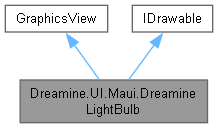
Dreamine.UI.Maui.DreamineLightBulb에 대한 상속 다이어그램 :
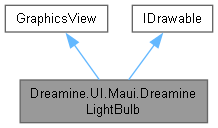
Dreamine.UI.Maui.DreamineLightBulb에 대한 협력 다이어그램:
Public 멤버 함수 | |
| DreamineLightBulb () | |
| void | Draw (ICanvas canvas, RectF dirtyRect) |
정적 Public 속성 | |
| static readonly BindableProperty | IsOnProperty |
| static readonly BindableProperty | DiameterProperty |
속성 | |
| bool | IsOn [get, set] |
| double | Diameter [get, set] |
Private 멤버 함수 | |
| void | ApplySize () |
정적 Private 멤버 함수 | |
| static PathF | CreateGlassPath (float cx, float top, float d) |
| static void | FillRib (ICanvas canvas, float cx, float y, float width) |
| static void | OnVisualChanged (BindableObject bindable, object oldValue, object newValue) |
| static void | OnDiameterChanged (BindableObject bindable, object oldValue, object newValue) |
상세한 설명
플랫폼 간 공통 API로 상태를 직접 그리는 MAUI 전구 표시 컨트롤입니다.
DreamineLightBulb.cs 파일의 11 번째 라인에서 정의되었습니다.
생성자 & 소멸자 문서화
◆ DreamineLightBulb()
|
inline |
전구 그리기 공급자와 초기 크기를 구성합니다.
DreamineLightBulb.cs 파일의 71 번째 라인에서 정의되었습니다.
72 {
73 Drawable = this;
74 InputTransparent = true;
75 ApplySize();
76 }
다음을 참조함 : ApplySize().
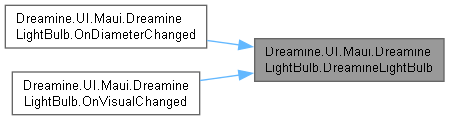
다음에 의해서 참조됨 : OnDiameterChanged(), OnVisualChanged().
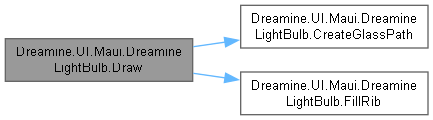
이 함수 내부에서 호출하는 함수들에 대한 그래프입니다.:

이 함수를 호출하는 함수들에 대한 그래프입니다.:
멤버 함수 문서화
◆ ApplySize()
|
inlineprivate |
최소 지름을 적용하여 그리기 뷰의 요청 너비와 높이를 계산합니다.
DreamineLightBulb.cs 파일의 339 번째 라인에서 정의되었습니다.
340 {
341 var d = Math.Max(32, Diameter);
342 WidthRequest = d * 1.25;
343 HeightRequest = d * 1.65;
344 }
다음을 참조함 : Diameter.
다음에 의해서 참조됨 : DreamineLightBulb().
이 함수를 호출하는 함수들에 대한 그래프입니다.:

◆ CreateGlassPath()
|
inlinestaticprivate |
전구 유리 외곽선을 나타내는 경로를 만듭니다.
- 매개변수
-
cx 전구 중심의 X 좌표입니다. top 전구 위쪽 Y 좌표입니다. d 기준 지름입니다.
- 반환값
- 닫힌 전구 유리 경로입니다.
DreamineLightBulb.cs 파일의 194 번째 라인에서 정의되었습니다.
195 {
196 var path = new PathF();
197 path.MoveTo(cx, top + d * .02f);
198 path.CurveTo(cx - d * .36f, top + d * .02f, cx - d * .52f, top + d * .27f, cx - d * .52f, top + d * .54f);
199 path.CurveTo(cx - d * .52f, top + d * .74f, cx - d * .35f, top + d * .87f, cx - d * .25f, top + d * .96f);
200 path.LineTo(cx + d * .25f, top + d * .96f);
201 path.CurveTo(cx + d * .35f, top + d * .87f, cx + d * .52f, top + d * .74f, cx + d * .52f, top + d * .54f);
202 path.CurveTo(cx + d * .52f, top + d * .27f, cx + d * .36f, top + d * .02f, cx, top + d * .02f);
203 path.Close();
204 return path;
205 }
다음에 의해서 참조됨 : Draw().
이 함수를 호출하는 함수들에 대한 그래프입니다.:

◆ Draw()
|
inline |
현재 켜짐 상태에 맞게 전구 유리, 필라멘트 및 소켓을 그립니다.
- 매개변수
-
canvas 전구를 그릴 MAUI 캔버스입니다. dirtyRect 다시 그려야 하는 영역입니다.
DreamineLightBulb.cs 파일의 102 번째 라인에서 정의되었습니다.
103 {
104 var d = (float)Math.Max(32, Diameter);
105 var cx = dirtyRect.Center.X;
106 var top = dirtyRect.Top + 2f;
107 var glassFill = IsOn ? Color.FromArgb("#FFD666") : Color.FromRgba(100, 116, 139, 42);
108 var glassStroke = IsOn ? Color.FromArgb("#FFC400") : Color.FromArgb("#66758B");
109 var filament = IsOn ? Color.FromArgb("#7A4B00") : Color.FromArgb("#64748B");
110 var baseFill = Color.FromArgb("#708098");
111
112 canvas.SaveState();
113 canvas.Antialias = true;
114
115 if (IsOn)
116 {
117 canvas.FillColor = Color.FromRgba(255, 214, 102, 72);
118 canvas.FillEllipse(cx - d * .62f, top + d * .50f - d * .62f, d * 1.24f, d * 1.24f);
119 }
120
121 var glass = CreateGlassPath(cx, top, d);
122 canvas.FillColor = glassFill;
123 canvas.StrokeColor = glassStroke;
124 canvas.StrokeSize = 4;
125 canvas.FillPath(glass);
126 canvas.DrawPath(glass);
127
128 var filamentPath = new PathF();
129 filamentPath.MoveTo(cx - d * .22f, top + d * .56f);
130 filamentPath.CurveTo(cx - d * .12f, top + d * .38f, cx - d * .02f, top + d * .72f, cx + d * .10f, top + d * .53f);
131 filamentPath.CurveTo(cx + d * .16f, top + d * .44f, cx + d * .21f, top + d * .49f, cx + d * .25f, top + d * .55f);
132 canvas.StrokeColor = filament;
133 canvas.StrokeSize = 4;
134 canvas.StrokeLineCap = LineCap.Round;
135 canvas.DrawPath(filamentPath);
136
137 var neckTop = top + d * .92f;
138 var neck = new PathF();
139 neck.MoveTo(cx - d * .30f, neckTop);
140 neck.LineTo(cx + d * .30f, neckTop);
141 neck.LineTo(cx + d * .20f, neckTop + d * .26f);
142 neck.LineTo(cx - d * .20f, neckTop + d * .26f);
143 neck.Close();
144
145 canvas.FillColor = baseFill;
146 canvas.FillPath(neck);
147 FillRib(canvas, cx, neckTop + d * .10f, d * .44f);
148 FillRib(canvas, cx, neckTop + d * .22f, d * .36f);
149 FillRib(canvas, cx, neckTop + d * .34f, d * .27f);
150
151 canvas.RestoreState();
152 }
다음을 참조함 : CreateGlassPath(), Diameter, FillRib(), IsOn.
이 함수 내부에서 호출하는 함수들에 대한 그래프입니다.:
◆ FillRib()
|
inlinestaticprivate |
전구 소켓의 둥근 가로 홈 하나를 채웁니다.
- 매개변수
-
canvas 홈을 그릴 캔버스입니다. cx 홈 중심의 X 좌표입니다. y 홈의 Y 좌표입니다. width 홈 너비입니다.
DreamineLightBulb.cs 파일의 247 번째 라인에서 정의되었습니다.
248 {
249 canvas.FillRoundedRectangle(cx - width / 2f, y, width, 7f, 3.5f);
250 }
다음에 의해서 참조됨 : Draw().
이 함수를 호출하는 함수들에 대한 그래프입니다.:

◆ OnDiameterChanged()
|
inlinestaticprivate |
지름 값 변경에 응답하여 컨트롤 크기를 갱신하고 다시 그리도록 요청합니다.
- 매개변수
-
bindable 값이 변경된 바인딩 가능 객체입니다. oldValue 이전 지름 값입니다. newValue 새 지름 값입니다.
DreamineLightBulb.cs 파일의 322 번째 라인에서 정의되었습니다.
323 {
324 if (bindable is DreamineLightBulb bulb)
325 {
326 bulb.ApplySize();
327 bulb.Invalidate();
328 }
329 }
다음을 참조함 : DreamineLightBulb().
이 함수 내부에서 호출하는 함수들에 대한 그래프입니다.:

◆ OnVisualChanged()
|
inlinestaticprivate |
켜짐 값 변경에 응답하여 전구를 다시 그리도록 요청합니다.
- 매개변수
-
bindable 값이 변경된 바인딩 가능 객체입니다. oldValue 이전 값입니다. newValue 새 값입니다.
DreamineLightBulb.cs 파일의 284 번째 라인에서 정의되었습니다.
285 {
286 if (bindable is DreamineLightBulb bulb)
287 bulb.Invalidate();
288 }
다음을 참조함 : DreamineLightBulb().
이 함수 내부에서 호출하는 함수들에 대한 그래프입니다.:

멤버 데이터 문서화
◆ DiameterProperty
|
static |
초기값:
= BindableProperty.Create(
nameof(Diameter), typeof(double), typeof(DreamineLightBulb), 96d, propertyChanged: OnDiameterChanged)
static void OnDiameterChanged(BindableObject bindable, object oldValue, object newValue)
Definition DreamineCheckLed.xaml.cs:307
DreamineLightBulb()
Definition DreamineLightBulb.cs:71
Diameter 바인딩 가능 속성을 식별합니다.
DreamineLightBulb.cs 파일의 32 번째 라인에서 정의되었습니다.
◆ IsOnProperty
|
static |
초기값:
= BindableProperty.Create(
static void OnVisualChanged(BindableObject bindable, object oldValue, object newValue)
Definition DreamineCheckLed.xaml.cs:269
IsOn 바인딩 가능 속성을 식별합니다.
DreamineLightBulb.cs 파일의 21 번째 라인에서 정의되었습니다.
속성 문서화
◆ Diameter
|
getset |
전구 유리 부분의 기준 지름을 가져오거나 설정합니다.
DreamineLightBulb.cs 파일의 57 번째 라인에서 정의되었습니다.
58 {
59 get => (double)GetValue(DiameterProperty);
60 set => SetValue(DiameterProperty, value);
61 }
다음에 의해서 참조됨 : ApplySize(), Draw().
◆ IsOn
|
getset |
전구가 켜져 있는지 여부를 가져오거나 설정합니다.
DreamineLightBulb.cs 파일의 43 번째 라인에서 정의되었습니다.
44 {
45 get => (bool)GetValue(IsOnProperty);
46 set => SetValue(IsOnProperty, value);
47 }
다음에 의해서 참조됨 : Draw().
이 클래스에 대한 문서화 페이지는 다음의 파일로부터 생성되었습니다.: