로딩중...
검색중...
일치하는것 없음
Dreamine.UI.Maui.DreamineCheckLed 클래스 참조
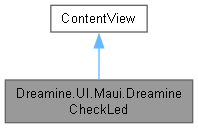
Dreamine.UI.Maui.DreamineCheckLed에 대한 상속 다이어그램 :
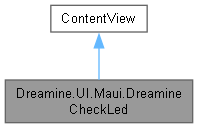
Dreamine.UI.Maui.DreamineCheckLed에 대한 협력 다이어그램:
Public 멤버 함수 | |
| DreamineCheckLed () | |
정적 Public 속성 | |
| static readonly BindableProperty | IsOnProperty |
| static readonly BindableProperty | IsPulseProperty |
| static readonly BindableProperty | DiameterProperty |
| static readonly BindableProperty | CornerProperty |
속성 | |
| bool | IsOn [get, set] |
| bool | IsPulse [get, set] |
| double | Diameter [get, set] |
| DreamineCheckLedCorner | Corner [get, set] |
Private 멤버 함수 | |
| void | ApplyCorner () |
| void | ApplyVisualState () |
정적 Private 멤버 함수 | |
| static void | OnCornerChanged (BindableObject bindable, object oldValue, object newValue) |
| static void | OnVisualChanged (BindableObject bindable, object oldValue, object newValue) |
| static void | OnDiameterChanged (BindableObject bindable, object oldValue, object newValue) |
상세한 설명
켜짐, 맥동, 크기 및 모서리 배치를 지원하는 MAUI LED 표시 컨트롤입니다.
DreamineCheckLed.xaml.cs 파일의 59 번째 라인에서 정의되었습니다.
생성자 & 소멸자 문서화
◆ DreamineCheckLed()
|
inline |
LED UI와 현재 시각 및 모서리 상태를 초기화합니다.
DreamineCheckLed.xaml.cs 파일의 170 번째 라인에서 정의되었습니다.
171 {
172 InitializeComponent();
173 ApplyVisualState();
174 ApplyCorner();
175
176 // 생성자 시점엔 펄스를 건너뛰었으니, 실제로 화면에 붙어 Handler가 생기면 다시 적용한다.
177 HandlerChanged += (_, _) => ApplyVisualState();
178 }
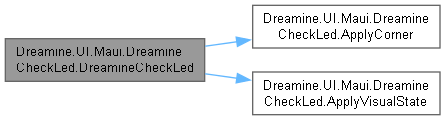
다음을 참조함 : ApplyCorner(), ApplyVisualState().
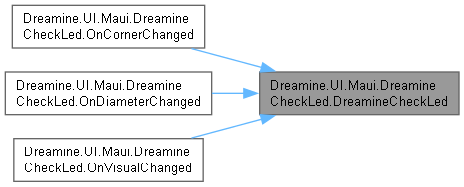
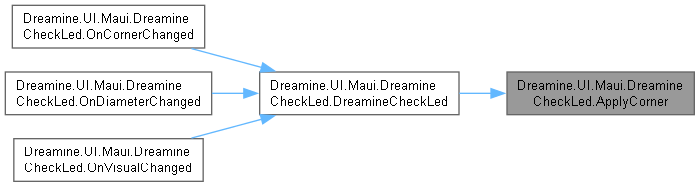
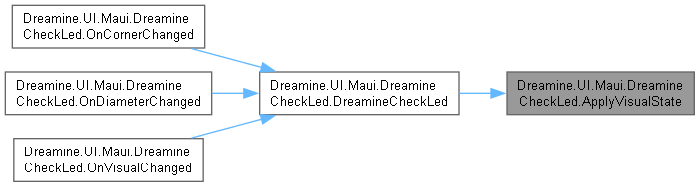
다음에 의해서 참조됨 : OnCornerChanged(), OnDiameterChanged(), OnVisualChanged().
이 함수 내부에서 호출하는 함수들에 대한 그래프입니다.:
이 함수를 호출하는 함수들에 대한 그래프입니다.:
멤버 함수 문서화
◆ ApplyCorner()
|
inlineprivate |
현재 모서리에 맞게 수평 및 수직 배치 옵션을 적용합니다.
DreamineCheckLed.xaml.cs 파일의 226 번째 라인에서 정의되었습니다.
227 {
228 HorizontalOptions = Corner is DreamineCheckLedCorner.TopLeft or DreamineCheckLedCorner.BottomLeft
229 ? LayoutOptions.Start
230 : LayoutOptions.End;
231
232 VerticalOptions = Corner is DreamineCheckLedCorner.TopLeft or DreamineCheckLedCorner.TopRight
233 ? LayoutOptions.Start
234 : LayoutOptions.End;
235 }
다음을 참조함 : Dreamine.UI.Maui.BottomLeft, Corner, Dreamine.UI.Maui.TopLeft, Dreamine.UI.Maui.TopRight.
다음에 의해서 참조됨 : DreamineCheckLed().
이 함수를 호출하는 함수들에 대한 그래프입니다.:
◆ ApplyVisualState()
|
inlineprivate |
현재 켜짐 및 맥동 상태에 맞게 색상, 불투명도와 애니메이션을 적용합니다.
DreamineCheckLed.xaml.cs 파일의 325 번째 라인에서 정의되었습니다.
326 {
327 Dot.BackgroundColor = IsOn ? Color.FromArgb("#1FD36B") : Color.FromArgb("#1A2A1A");
328 Dot.Stroke = IsOn ? Color.FromArgb("#7DD9B7") : Color.FromArgb("#556677");
329
330 // Handler가 아직 없으면(= 화면에 붙기 전, 보통 생성자에서 호출되는 경우) IAnimationManager가
331 // 없어서 AbortAnimation/Animation.Commit이 ArgumentException을 던진다. 그 시점엔 애니메이션을
332 // 건너뛰고 단순히 최종 Opacity만 맞춰둔다 — 실제 애니메이션은 화면에 붙은 뒤 토글될 때 적용된다.
333 if (Handler is null)
334 {
335 Dot.Opacity = 1.0;
336 return;
337 }
338
339 this.AbortAnimation("PulseAnimation");
340
341 if (IsOn && IsPulse)
342 {
343 var animation = new Animation(v => Dot.Opacity = v, 1.0, 0.4);
344 animation.Commit(this, "PulseAnimation", 16, 450, Easing.SinInOut, finished: null, repeat: () => IsOn && IsPulse);
345 }
346 else
347 {
348 Dot.Opacity = 1.0;
349 }
350 }
다음에 의해서 참조됨 : DreamineCheckLed().
이 함수를 호출하는 함수들에 대한 그래프입니다.:
◆ OnCornerChanged()
|
inlinestaticprivate |
모서리 바인딩 값 변경에 응답하여 컨트롤 배치를 갱신합니다.
- 매개변수
-
bindable 값이 변경된 바인딩 가능 객체입니다. oldValue 이전 모서리 값입니다. newValue 새 모서리 값입니다.
DreamineCheckLed.xaml.cs 파일의 212 번째 라인에서 정의되었습니다.
213 {
214 if (bindable is DreamineCheckLed led)
215 led.ApplyCorner();
216 }
다음을 참조함 : DreamineCheckLed().
이 함수 내부에서 호출하는 함수들에 대한 그래프입니다.:

◆ OnDiameterChanged()
|
inlinestaticprivate |
지름 값 변경에 응답하여 LED 크기와 원형 스트로크를 갱신합니다.
- 매개변수
-
bindable 값이 변경된 바인딩 가능 객체입니다. oldValue 이전 지름 값입니다. newValue 새 지름 값입니다.
DreamineCheckLed.xaml.cs 파일의 307 번째 라인에서 정의되었습니다.
308 {
309 if (bindable is DreamineCheckLed led)
310 {
311 led.Dot.WidthRequest = led.Diameter;
312 led.Dot.HeightRequest = led.Diameter;
313 led.Dot.StrokeShape = new Microsoft.Maui.Controls.Shapes.RoundRectangle { CornerRadius = led.Diameter / 2 };
314 }
315 }
다음을 참조함 : DreamineCheckLed().
이 함수 내부에서 호출하는 함수들에 대한 그래프입니다.:

◆ OnVisualChanged()
|
inlinestaticprivate |
켜짐 또는 맥동 값 변경에 응답하여 시각적 상태를 갱신합니다.
- 매개변수
-
bindable 값이 변경된 바인딩 가능 객체입니다. oldValue 이전 값입니다. newValue 새 값입니다.
DreamineCheckLed.xaml.cs 파일의 269 번째 라인에서 정의되었습니다.
270 {
271 if (bindable is DreamineCheckLed led)
272 led.ApplyVisualState();
273 }
다음을 참조함 : DreamineCheckLed().
이 함수 내부에서 호출하는 함수들에 대한 그래프입니다.:

멤버 데이터 문서화
◆ CornerProperty
|
static |
초기값:
= BindableProperty.Create(
nameof(Corner), typeof(DreamineCheckLedCorner), typeof(DreamineCheckLed), DreamineCheckLedCorner.TopLeft,
propertyChanged: OnCornerChanged)
DreamineCheckLedCorner Corner
Definition DreamineCheckLed.xaml.cs:157
DreamineCheckLed()
Definition DreamineCheckLed.xaml.cs:170
static void OnCornerChanged(BindableObject bindable, object oldValue, object newValue)
Definition DreamineCheckLed.xaml.cs:212
Corner 바인딩 가능 속성을 식별합니다.
DreamineCheckLed.xaml.cs 파일의 102 번째 라인에서 정의되었습니다.
◆ DiameterProperty
|
static |
초기값:
= BindableProperty.Create(
nameof(Diameter), typeof(double), typeof(DreamineCheckLed), 24d, propertyChanged: OnDiameterChanged)
static void OnDiameterChanged(BindableObject bindable, object oldValue, object newValue)
Definition DreamineCheckLed.xaml.cs:307
Diameter 바인딩 가능 속성을 식별합니다.
DreamineCheckLed.xaml.cs 파일의 91 번째 라인에서 정의되었습니다.
◆ IsOnProperty
|
static |
초기값:
= BindableProperty.Create(
static void OnVisualChanged(BindableObject bindable, object oldValue, object newValue)
Definition DreamineCheckLed.xaml.cs:269
IsOn 바인딩 가능 속성을 식별합니다.
DreamineCheckLed.xaml.cs 파일의 69 번째 라인에서 정의되었습니다.
◆ IsPulseProperty
|
static |
초기값:
= BindableProperty.Create(
IsPulse 바인딩 가능 속성을 식별합니다.
DreamineCheckLed.xaml.cs 파일의 80 번째 라인에서 정의되었습니다.
속성 문서화
◆ Corner
|
getset |
부모 영역에서 LED를 고정할 모서리를 가져오거나 설정합니다.
DreamineCheckLed.xaml.cs 파일의 156 번째 라인에서 정의되었습니다.
157 {
159 set => SetValue(CornerProperty, value);
160 }
다음에 의해서 참조됨 : ApplyCorner().
◆ Diameter
|
getset |
LED 지름을 장치 독립 단위로 가져오거나 설정합니다.
DreamineCheckLed.xaml.cs 파일의 142 번째 라인에서 정의되었습니다.
143 {
144 get => (double)GetValue(DiameterProperty);
145 set => SetValue(DiameterProperty, value);
146 }
◆ IsOn
|
getset |
LED가 켜져 있는지 여부를 가져오거나 설정합니다.
DreamineCheckLed.xaml.cs 파일의 114 번째 라인에서 정의되었습니다.
115 {
116 get => (bool)GetValue(IsOnProperty);
117 set => SetValue(IsOnProperty, value);
118 }
다음에 의해서 참조됨 : ApplyVisualState().
◆ IsPulse
|
getset |
켜진 LED에 맥동 애니메이션을 적용할지 여부를 가져오거나 설정합니다.
DreamineCheckLed.xaml.cs 파일의 128 번째 라인에서 정의되었습니다.
129 {
130 get => (bool)GetValue(IsPulseProperty);
131 set => SetValue(IsPulseProperty, value);
132 }
다음에 의해서 참조됨 : ApplyVisualState().
이 클래스에 대한 문서화 페이지는 다음의 파일로부터 생성되었습니다.: