로딩중...
검색중...
일치하는것 없음
Dreamine.Communication.Wpf.ViewModels.CommunicationMonitorViewModel 클래스 참조sealed
Dreamine.Communication.Wpf.ViewModels.CommunicationMonitorViewModel에 대한 상속 다이어그램 :
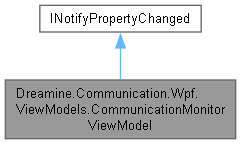
Dreamine.Communication.Wpf.ViewModels.CommunicationMonitorViewModel에 대한 협력 다이어그램:

Public 멤버 함수 | |
| CommunicationMonitorViewModel () | |
| void | AddChannel (string name, TransportKind kind, string description="") |
| void | UpdateChannelState (string name, ConnectionState state) |
| void | UpdateChannelDescription (string name, string description) |
| void | AddSendLog (string channelName, TransportKind kind, MessageEnvelope message) |
| void | AddReceiveLog (string channelName, TransportKind kind, MessageEnvelope message) |
| void | ClearLogs () |
속성 | |
| ObservableCollection< CommunicationChannelViewItem > | Channels = new() [get] |
| ObservableCollection< CommunicationMessageLogItem > | Logs = new() [get] |
| CommunicationChannelViewItem? | SelectedChannel [get, set] |
| ICommand | ClearLogsCommand [get] |
이벤트 | |
| PropertyChangedEventHandler? | PropertyChanged |
Private 멤버 함수 | |
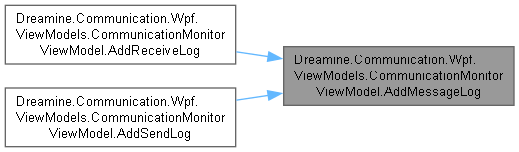
| void | AddMessageLog (string channelName, TransportKind kind, string direction, MessageEnvelope message) |
| void | SetProperty< T > (ref T storage, T value, [CallerMemberName] string? propertyName=null) |
정적 Private 멤버 함수 | |
| static string | CreatePayloadPreview (byte[] payload) |
Private 속성 | |
| CommunicationChannelViewItem? | _selectedChannel |
상세한 설명
통신 채널 상태와 송수신 메시지 로그를 WPF 바인딩에 제공하는 ViewModel입니다.
CommunicationMonitorViewModel.cs 파일의 21 번째 라인에서 정의되었습니다.
생성자 & 소멸자 문서화
◆ CommunicationMonitorViewModel()
|
inline |
로그 삭제 명령과 빈 채널·로그 컬렉션으로 ViewModel을 초기화합니다.
CommunicationMonitorViewModel.cs 파일의 41 번째 라인에서 정의되었습니다.
42 {
43 ClearLogsCommand = new DelegateCommand(_ => ClearLogs());
44 }
다음을 참조함 : ClearLogs(), ClearLogsCommand.
이 함수 내부에서 호출하는 함수들에 대한 그래프입니다.:

멤버 함수 문서화
◆ AddChannel()
|
inline |
같은 이름이 없는 경우 새 통신 채널을 추가합니다.
- 매개변수
-
name 고유한 채널 이름입니다. kind 채널 전송 방식입니다. description 선택적 채널 설명입니다.
- 예외
-
ArgumentException 이름이 비어 있는 경우 발생합니다.
CommunicationMonitorViewModel.cs 파일의 140 번째 라인에서 정의되었습니다.
141 {
142 ArgumentException.ThrowIfNullOrWhiteSpace(name);
143
144 if (Channels.Any(x => x.Name == name))
145 {
146 return;
147 }
148
149 Channels.Add(new CommunicationChannelViewItem
150 {
151 Name = name,
152 Kind = kind,
153 State = ConnectionState.Disconnected,
154 Description = description
155 });
156 }
다음을 참조함 : Channels.
◆ AddMessageLog()
|
inlineprivate |
메시지 메타데이터와 UTF-8 미리보기를 생성해 로그 컬렉션 앞에 삽입합니다.
- 매개변수
-
channelName 채널 이름입니다. kind 전송 방식입니다. direction 송수신 방향 표시입니다. message 로그로 변환할 메시지입니다.
CommunicationMonitorViewModel.cs 파일의 361 번째 라인에서 정의되었습니다.
366 {
367 ArgumentException.ThrowIfNullOrWhiteSpace(channelName);
368 ArgumentNullException.ThrowIfNull(message);
369
370 Logs.Insert(0, new CommunicationMessageLogItem
371 {
372 ChannelName = channelName,
373 Kind = kind,
374 Direction = direction,
375 MessageName = message.Name,
376 Route = message.Route,
377 PayloadLength = message.Payload.Length,
378 PayloadPreview = CreatePayloadPreview(message.Payload)
379 });
380 }
다음을 참조함 : CreatePayloadPreview(), Logs.
다음에 의해서 참조됨 : AddReceiveLog(), AddSendLog().
이 함수 내부에서 호출하는 함수들에 대한 그래프입니다.:

이 함수를 호출하는 함수들에 대한 그래프입니다.:
◆ AddReceiveLog()
|
inline |
수신 방향의 메시지 로그를 컬렉션 앞에 추가합니다.
- 매개변수
-
channelName 수신 채널 이름입니다. kind 전송 방식입니다. message 기록할 수신 메시지입니다.
CommunicationMonitorViewModel.cs 파일의 303 번째 라인에서 정의되었습니다.
304 {
305 AddMessageLog(channelName, kind, "RECV", message);
306 }
다음을 참조함 : AddMessageLog().
이 함수 내부에서 호출하는 함수들에 대한 그래프입니다.:

◆ AddSendLog()
|
inline |
송신 방향의 메시지 로그를 컬렉션 앞에 추가합니다.
- 매개변수
-
channelName 송신 채널 이름입니다. kind 전송 방식입니다. message 기록할 송신 메시지입니다.
CommunicationMonitorViewModel.cs 파일의 266 번째 라인에서 정의되었습니다.
267 {
268 AddMessageLog(channelName, kind, "SEND", message);
269 }
다음을 참조함 : AddMessageLog().
이 함수 내부에서 호출하는 함수들에 대한 그래프입니다.:

◆ ClearLogs()
|
inline |
메시지 로그 컬렉션의 모든 항목을 삭제합니다.
CommunicationMonitorViewModel.cs 파일의 316 번째 라인에서 정의되었습니다.
317 {
318 Logs.Clear();
319 }
다음을 참조함 : Logs.
다음에 의해서 참조됨 : CommunicationMonitorViewModel().
이 함수를 호출하는 함수들에 대한 그래프입니다.:

◆ CreatePayloadPreview()
|
inlinestaticprivate |
UTF-8 페이로드를 최대 120자로 잘라 화면 표시용 미리보기를 생성합니다.
- 매개변수
-
payload 미리보기로 변환할 바이트입니다.
- 반환값
- 비어 있거나 잘린 UTF-8 문자열입니다.
CommunicationMonitorViewModel.cs 파일의 406 번째 라인에서 정의되었습니다.
407 {
408 if (payload.Length == 0)
409 {
410 return string.Empty;
411 }
412
413 var text = Encoding.UTF8.GetString(payload);
414
415 if (text.Length <= 120)
416 {
417 return text;
418 }
419
420 return text[..120] + "...";
421 }
다음에 의해서 참조됨 : AddMessageLog().
이 함수를 호출하는 함수들에 대한 그래프입니다.:

◆ SetProperty< T >()
|
inlineprivate |
값이 변경된 경우에만 저장소를 갱신하고 속성 변경 이벤트를 발생시킵니다.
- 템플릿 파라메터
-
T 속성 값 형식입니다.
- 매개변수
-
storage 후방 저장소입니다. value 새 값입니다. propertyName 변경된 속성 이름입니다.
CommunicationMonitorViewModel.cs 파일의 463 번째 라인에서 정의되었습니다.
467 {
468 if (EqualityComparer<T>.Default.Equals(storage, value))
469 {
470 return;
471 }
472
473 storage = value;
474 PropertyChanged?.Invoke(this, new PropertyChangedEventArgs(propertyName));
475 }
다음을 참조함 : PropertyChanged.
◆ UpdateChannelDescription()
|
inline |
지정한 이름의 채널이 있으면 설명을 갱신합니다.
- 매개변수
-
name 찾을 채널 이름입니다. description 설정할 설명이며 null이면 빈 문자열입니다.
CommunicationMonitorViewModel.cs 파일의 220 번째 라인에서 정의되었습니다.
221 {
222 ArgumentException.ThrowIfNullOrWhiteSpace(name);
223
224 var channel = Channels.FirstOrDefault(x => x.Name == name);
225
226 if (channel is null)
227 {
228 return;
229 }
230
231 channel.Description = description ?? string.Empty;
232 }
다음을 참조함 : Channels.
◆ UpdateChannelState()
|
inline |
지정한 이름의 채널이 있으면 연결 상태를 갱신합니다.
- 매개변수
-
name 찾을 채널 이름입니다. state 설정할 연결 상태입니다.
CommunicationMonitorViewModel.cs 파일의 182 번째 라인에서 정의되었습니다.
183 {
184 ArgumentException.ThrowIfNullOrWhiteSpace(name);
185
186 var channel = Channels.FirstOrDefault(x => x.Name == name);
187
188 if (channel is null)
189 {
190 return;
191 }
192
193 channel.State = state;
194 }
다음을 참조함 : Channels.
멤버 데이터 문서화
◆ _selectedChannel
|
private |
selected Channel 값을 보관합니다.
CommunicationMonitorViewModel.cs 파일의 31 번째 라인에서 정의되었습니다.
속성 문서화
◆ Channels
|
get |
화면에 표시할 통신 채널 컬렉션을 가져옵니다.
CommunicationMonitorViewModel.cs 파일의 64 번째 라인에서 정의되었습니다.
64{ get; } = new();
다음에 의해서 참조됨 : AddChannel(), UpdateChannelDescription(), UpdateChannelState().
◆ ClearLogsCommand
|
get |
모든 메시지 로그를 삭제하는 명령을 가져옵니다.
CommunicationMonitorViewModel.cs 파일의 98 번째 라인에서 정의되었습니다.
98{ get; }
다음에 의해서 참조됨 : CommunicationMonitorViewModel().
◆ Logs
|
get |
최신 항목이 앞에 배치되는 메시지 로그 컬렉션을 가져옵니다.
CommunicationMonitorViewModel.cs 파일의 74 번째 라인에서 정의되었습니다.
74{ get; } = new();
다음에 의해서 참조됨 : AddMessageLog(), ClearLogs().
◆ SelectedChannel
|
getset |
현재 선택된 통신 채널을 가져오거나 설정합니다.
CommunicationMonitorViewModel.cs 파일의 84 번째 라인에서 정의되었습니다.
85 {
86 get => _selectedChannel;
87 set => SetProperty(ref _selectedChannel, value);
88 }
이벤트 문서화
◆ PropertyChanged
| PropertyChangedEventHandler? Dreamine.Communication.Wpf.ViewModels.CommunicationMonitorViewModel.PropertyChanged |
바인딩된 속성 값이 변경될 때 발생합니다.
CommunicationMonitorViewModel.cs 파일의 54 번째 라인에서 정의되었습니다.
다음에 의해서 참조됨 : SetProperty< T >().
이 클래스에 대한 문서화 페이지는 다음의 파일로부터 생성되었습니다.: