로딩중...
검색중...
일치하는것 없음
Dreamine.UI.Wpf.Controls.ViewRegion.ViewLoader 클래스 참조
클래스 | |
| class | LoadedViewInfo |
| class | EmbeddedHostControl |
정적 Public 멤버 함수 | |
| static LoadedViewInfo | LoadViewWithViewModel (string typeName, bool useSingletonView) |
정적 Private 멤버 함수 | |
| static string | StripViewSuffix (string name) |
| static ? Type | ResolveViewModelType_Strict (string actualTypeName, Type? viewType) |
| static FrameworkElement | ResolveFrameworkElement (Type? viewType, string typeName, bool resetDataContext) |
| static void | ApplyDataContext (FrameworkElement root, object vm) |
| static void | MergeResources (ResourceDictionary target, ResourceDictionary source) |
| static Type[] | GetTypesSafe (this Assembly asm) |
| static IEnumerable< T > | SelectManySafe< T > (this IEnumerable< Assembly > assemblies, Func< Assembly, IEnumerable< T > > selector) |
상세한 설명
이름 규칙과 DI를 이용해 뷰 및 뷰 모델을 만들고 임베드 가능한 요소로 연결합니다.
ViewLoader.cs 파일의 21 번째 라인에서 정의되었습니다.
멤버 함수 문서화
◆ ApplyDataContext()
|
inlinestaticprivate |
루트와 실제 호스트 콘텐츠에 뷰 모델을 데이터 컨텍스트로 적용합니다.
- 매개변수
-
root 데이터 컨텍스트를 받을 루트 요소입니다. vm 적용할 뷰 모델 인스턴스입니다.
프레임 콘텐츠가 아직 없으면 다음 탐색 또는 로드 시 한 번 적용하며, null 입력은 무시합니다.
ViewLoader.cs 파일의 594 번째 라인에서 정의되었습니다.
595 {
596 if (root == null || vm == null)
597 {
598 return;
599 }
600
601 // --- Frame 전용 처리: Page 로드 타이밍 보장 ---
602 if (root is Frame fr)
603 {
604 // Frame 자신에도 ViewModel 설정
605 fr.DataContext = vm;
606
607 // 로컬: 실제 컨텐츠에 주입
608#pragma warning disable CS1587 // Doxygen documents local functions; the C# compiler does not attach XML docs to them.
627 void TrySet(FrameworkElement fe)
628 {
629 if (fe != null)
630 {
631 fe.DataContext = vm;
632 }
633 }
634#pragma warning restore CS1587
635
636 // 로컬: Loaded 이후 1회성 주입
637#pragma warning disable CS1587 // Doxygen documents local functions; the C# compiler does not attach XML docs to them.
664 void OnLoaded(object? s, RoutedEventArgs e)
665 {
666 if (s is FrameworkElement fe)
667 {
668 fe.Loaded -= OnLoaded;
669 TrySet(fe);
670 }
671 }
672#pragma warning restore CS1587
673
674 // 로컬: 네비게이션 직후 1회성 주입
675#pragma warning disable CS1587 // Doxygen documents local functions; the C# compiler does not attach XML docs to them.
702 void OnNavigated(object? s, NavigationEventArgs e)
703 {
704 fr.Navigated -= OnNavigated;
705
706 if (fr.Content is FrameworkElement fe)
707 {
708 if (!fe.IsLoaded)
709 {
710 fe.Loaded += OnLoaded;
711 }
712
713 TrySet(fe);
714 }
715 }
716#pragma warning restore CS1587
717
718 // 현재 시점에 컨텐츠가 있으면 즉시/Loaded에서 주입
719 if (fr.Content is FrameworkElement current)
720 {
721 if (!current.IsLoaded)
722 {
723 current.Loaded += OnLoaded;
724 }
725
726 TrySet(current);
727 }
728 else
729 {
730 // 아직 Page가 없음 → 다음 네비게이션에서 주입
731 fr.Navigated += OnNavigated;
732 }
733
734 return;
735 }
736
737 // --- ContentControl 호스트 처리 ---
738 if (root is ContentControl cc && cc.Content is FrameworkElement innerCc)
739 {
740 cc.DataContext = vm;
741 innerCc.DataContext = vm;
742 return;
743 }
744
745 // --- 일반 FrameworkElement 처리 ---
746 root.DataContext = vm;
747 }
다음에 의해서 참조됨 : LoadViewWithViewModel().
이 함수를 호출하는 함수들에 대한 그래프입니다.:

◆ GetTypesSafe()
|
inlinestaticprivate |
로드 가능한 형식만 반환하여 부분적인 어셈블리 형식 로드 실패를 허용합니다.
- 매개변수
-
asm 형식을 열거할 어셈블리입니다.
- 반환값
- 어셈블리에서 성공적으로 로드된 형식 배열입니다.
- 예외
-
NullReferenceException asm 가 null일 때 발생합니다.
ViewLoader.cs 파일의 832 번째 라인에서 정의되었습니다.
833 {
834 try { return asm.GetTypes(); }
835 catch (ReflectionTypeLoadException ex) { return ex.Types.Where(t => t != null).ToArray()!; }
836 }
◆ LoadViewWithViewModel()
|
inlinestatic |
형식 이름으로 뷰를 만들고 규칙에 맞는 뷰 모델을 연결하여 로드 결과를 반환합니다.
- 매개변수
-
typeName 짧거나 정규화된 뷰 형식 이름이며 _Popup으로 끝날 수 있습니다.useSingletonView 컨테이너에서 싱글톤 뷰 모델을 확인하려면 true입니다.
- 반환값
- 임베드 가능한 뷰와 뷰 모델 메타데이터입니다.
- 예외
-
ArgumentNullException typeName 이 null일 때 발생합니다.MissingMethodException 비싱글톤 뷰 모델에 매개변수 없는 생성자가 없을 때 발생할 수 있습니다.
ViewLoader.cs 파일의 132 번째 라인에서 정의되었습니다.
133 {
134 // \brief Parse popup suffix
135 bool isPopup = typeName.EndsWith("_Popup", StringComparison.OrdinalIgnoreCase);
136 string actualTypeName = isPopup ? typeName[..^6] : typeName;
137
138 // \brief 1) Resolve View type
139 var viewType =
140 Type.GetType(actualTypeName, throwOnError: false, ignoreCase: true)
141 ?? AppDomain.CurrentDomain.GetAssemblies()
142 .SelectManySafe(a => a.GetTypesSafe())
143 .FirstOrDefault(t =>
144 t.FullName?.Equals(actualTypeName, StringComparison.OrdinalIgnoreCase) == true ||
145 t.Name.Equals(actualTypeName.Split('.').Last(), StringComparison.OrdinalIgnoreCase));
146
147 // \brief 2) Resolve ViewModel type (FIXED)
148 Type? viewModelType = ResolveViewModelType_Strict(actualTypeName, viewType);
149
150 // \brief ViewModel exists => reset DataContext strategy may differ
151 bool resetDataContext = viewModelType != null;
152
153 object? vmInstance = null;
154 string? uniqueKey = null;
155
156 // \brief 3) Create/Resolve ViewModel instance
157 if (viewModelType != null)
158 {
159 if (useSingletonView)
160 {
161 vmInstance = DMContainer.Resolve(viewModelType) ?? Activator.CreateInstance(viewModelType);
162 }
163 else
164 {
165 // \brief Multi instance unique key
166 long typeIndex = ViewModelKeyCache.GetOrIncrement(typeName);
167 uniqueKey = $"{typeName}_{typeIndex:D2}";
168
169 vmInstance = Activator.CreateInstance(viewModelType);
170 }
171 }
172
173 // \brief 4) Create FrameworkElement
174 FrameworkElement framework = ResolveFrameworkElement(viewType, actualTypeName, resetDataContext);
175
176 // \brief 5) Apply DataContext when VM exists
177 if (vmInstance != null)
178 {
179 ApplyDataContext(framework, vmInstance);
180 }
181
182 // \brief 6) Ensure wrapper as UserControl
183 UserControl wrapper;
184 if (framework is UserControl uc)
185 {
186 wrapper = uc;
187 }
188 else
189 {
190 wrapper = new EmbeddedHostControl(framework);
191
192 // \note Ensure wrapper has same DataContext as the hosted framework
193 if (wrapper.DataContext == null)
194 {
195 wrapper.DataContext = framework.DataContext;
196 }
197 }
198
199 return new LoadedViewInfo
200 {
201 View = wrapper,
202 FrameworkView = framework,
203 ViewModelType = viewModelType,
204 IsPopup = isPopup,
205 UniqueKey = uniqueKey
206 };
207 }
다음을 참조함 : ApplyDataContext(), Dreamine.UI.Wpf.Controls.ViewRegion.ViewModelKeyCache.GetOrIncrement(), ResolveFrameworkElement(), ResolveViewModelType_Strict().
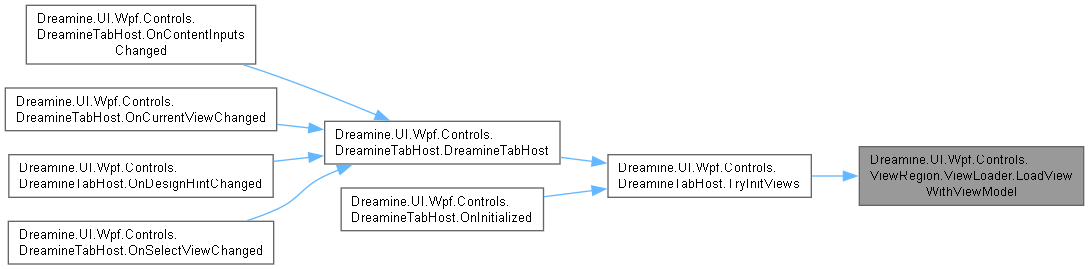
다음에 의해서 참조됨 : Dreamine.UI.Wpf.Controls.DreamineTabHost.TryInitViews().
이 함수 내부에서 호출하는 함수들에 대한 그래프입니다.:
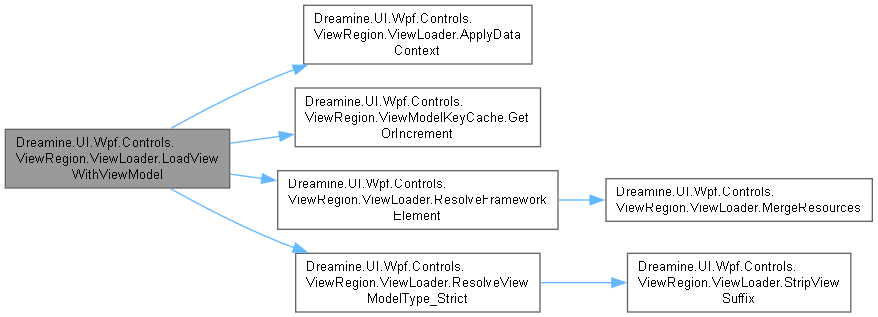
이 함수를 호출하는 함수들에 대한 그래프입니다.:
◆ MergeResources()
|
inlinestaticprivate |
원본 사전의 병합 사전과 중복되지 않는 리소스를 대상에 추가합니다.
- 매개변수
-
target 리소스를 받을 대상 사전입니다. source 복사할 원본 사전입니다.
- 예외
-
NullReferenceException target 또는 source 가 null일 때 발생합니다.ArgumentException 대상 사전에 추가할 수 없는 키가 있을 때 발생할 수 있습니다.
ViewLoader.cs 파일의 790 번째 라인에서 정의되었습니다.
791 {
792 foreach (var rd in source.MergedDictionaries)
793 target.MergedDictionaries.Add(rd);
794
795 foreach (var key in source.Keys)
796 if (!target.Contains(key))
797 target.Add(key, source[key]);
798 }
다음에 의해서 참조됨 : ResolveFrameworkElement().
이 함수를 호출하는 함수들에 대한 그래프입니다.:

◆ ResolveFrameworkElement()
|
inlinestaticprivate |
뷰 형식 인스턴스를 만들고 WPF 형식별 규칙에 따라 임베드 가능한 요소로 변환합니다.
- 매개변수
-
viewType 만들 뷰 형식이며 없으면 안내 요소를 반환합니다. typeName 오류 안내에 사용할 뷰 형식 이름입니다. resetDataContext 기존 데이터 컨텍스트를 제거하려면 true입니다.
- 반환값
- 사용자 컨트롤, 프레임, 콘텐츠 호스트 또는 안내 텍스트로 표현된 임베드 가능 요소입니다.
생성 실패는 안내용 TextBlock으로 변환되며 호출자에게 예외를 전파하지 않습니다.
ViewLoader.cs 파일의 433 번째 라인에서 정의되었습니다.
434 {
435 if (viewType == null || viewType.IsAbstract)
436 {
437 return new TextBlock
438 {
439 Text = $"[No View Type: {typeName}]",
440 Margin = new Thickness(8)
441 };
442 }
443
444 object? instance = null;
445
446 // 1차: VsControls를 통한 생성 시도 (항상 새 인스턴스)
447 try
448 {
449 instance = DMContainer.Resolve(viewType);
450 }
451 catch (Exception ex)
452 {
453 System.Diagnostics.Debug.WriteLine($"[ViewLoader] VsContainer.Resolve 실패: {typeName} - {ex.Message}");
454 }
455
456 // 2차: 컨테이너 생성 실패 시 Activator.CreateInstance로 폴백
457 if (instance == null)
458 {
459 try
460 {
461 instance = Activator.CreateInstance(viewType);
462 }
463 catch (Exception ex)
464 {
465 return new TextBlock
466 {
467 Text = $"[CreateInstance Failed: {typeName}] {ex.Message}",
468 Margin = new Thickness(8)
469 };
470 }
471 }
472
473 switch (instance)
474 {
475 // --- UserControl 그대로 사용 ---
476 case UserControl uc:
477 {
478 if (resetDataContext)
479 {
480 uc.DataContext = null;
481 }
482 return uc;
483 }
484
485 // --- Page → Frame 호스팅 ---
486 case Page page:
487 {
488 if (resetDataContext)
489 {
490 page.DataContext = null;
491 }
492
493 var frame = new Frame
494 {
495 Content = page,
496 NavigationUIVisibility = NavigationUIVisibility.Hidden,
497 JournalOwnership = JournalOwnership.OwnsJournal
498 };
499
500 if (resetDataContext)
501 {
502 frame.DataContext = null;
503 }
504
505 return frame;
506 }
507
508 // --- Window → ContentControl 호스팅 ---
509 case Window win:
510 {
511 if (win.Content is FrameworkElement content)
512 {
513 if (resetDataContext)
514 {
515 content.DataContext = null;
516 win.DataContext = null;
517 }
518
519 win.Content = null;
520 var host = new ContentControl
521 {
522 Content = content
523 };
524
525 if (resetDataContext)
526 {
527 host.DataContext = null;
528 }
529
530 MergeResources(host.Resources, win.Resources);
531 return host;
532 }
533
534 return new TextBlock
535 {
536 Text = $"[Window has no Content: {typeName}]",
537 Margin = new Thickness(8)
538 };
539 }
540
541 // --- 기타 FrameworkElement ---
542 case FrameworkElement fe:
543 {
544 if (resetDataContext)
545 {
546 fe.DataContext = null;
547 }
548 return fe;
549 }
550
551 default:
552 {
553 return new TextBlock
554 {
555 Text = $"[Unknown View Type: {viewType.FullName}]",
556 Margin = new Thickness(8)
557 };
558 }
559 }
560 }
다음을 참조함 : MergeResources().
다음에 의해서 참조됨 : LoadViewWithViewModel().
이 함수 내부에서 호출하는 함수들에 대한 그래프입니다.:

이 함수를 호출하는 함수들에 대한 그래프입니다.:

◆ ResolveViewModelType_Strict()
|
inlinestaticprivate |
네임스페이스 및 접미사 후보 중 구체적인 ViewModelBase 파생 형식을 찾습니다.
- 매개변수
-
actualTypeName _Popup접미사를 제거한 실제 뷰 형식 이름입니다.viewType 확인된 뷰 형식이며 찾지 못했으면 null입니다.
- 반환값
- 규칙과 기본 형식 조건을 만족하는 뷰 모델 형식이며 없으면
null입니다.
- 예외
-
ArgumentNullException actualTypeName 이 null일 때 발생합니다.
ViewLoader.cs 파일의 289 번째 라인에서 정의되었습니다.
290 {
291 // \brief Candidate full names
292 var candidates = new List<string>();
293
294 // \brief Common: same namespace + ViewModel suffix
295 candidates.Add(actualTypeName + "ViewModel");
296 candidates.Add(StripViewSuffix(actualTypeName) + "ViewModel");
297
298 // \brief Pages -> ViewModels convention
299 if (actualTypeName.Contains(".Pages.", StringComparison.OrdinalIgnoreCase))
300 {
301 var pagesToVm = actualTypeName.Replace(".Pages.", ".ViewModels.", StringComparison.OrdinalIgnoreCase);
302 candidates.Add(pagesToVm + "ViewModel");
303 candidates.Add(StripViewSuffix(pagesToVm) + "ViewModel");
304 }
305
306 // \brief Views -> ViewModels convention (optional, but common)
307 if (actualTypeName.Contains(".Views.", StringComparison.OrdinalIgnoreCase))
308 {
309 var viewsToVm = actualTypeName.Replace(".Views.", ".ViewModels.", StringComparison.OrdinalIgnoreCase);
310 candidates.Add(viewsToVm + "ViewModel");
311 candidates.Add(StripViewSuffix(viewsToVm) + "ViewModel");
312 }
313
314 // \brief If viewType is known, add "Namespace.ViewModels.{ViewName}ViewModel"
315 if (viewType != null)
316 {
317 string viewNs = viewType.Namespace ?? string.Empty;
318 string viewName = viewType.Name;
319 string viewNameNoSuffix = StripViewSuffix(viewName);
320 if (!string.IsNullOrWhiteSpace(viewNs))
321 {
322 candidates.Add($"{viewNs}.ViewModels.{viewName}ViewModel");
323 candidates.Add($"{viewNs}.ViewModels.{viewNameNoSuffix}ViewModel");
324 candidates.Add($"{viewNs}.{viewName}ViewModel");
325 candidates.Add($"{viewNs}.{viewNameNoSuffix}ViewModel");
326
327 // \brief Sibling "Views" -> "ViewModels" namespace swap
328 if (viewNs.Contains(".Views", StringComparison.OrdinalIgnoreCase))
329 {
330 string swappedNs = viewNs.Replace(".Views", ".ViewModels", StringComparison.OrdinalIgnoreCase);
331 candidates.Add($"{swappedNs}.{viewName}ViewModel");
332 candidates.Add($"{swappedNs}.{viewNameNoSuffix}ViewModel");
333 }
334 }
335
336 // \brief Short name candidates
337 candidates.Add(viewName + "ViewModel");
338 candidates.Add(viewNameNoSuffix + "ViewModel");
339 }
340
341 // \brief De-duplicate
342 candidates = candidates
343 .Where(x => !string.IsNullOrWhiteSpace(x))
344 .Distinct(StringComparer.OrdinalIgnoreCase)
345 .ToList();
346
347 // \brief Search with strict filtering
348 foreach (var cand in candidates)
349 {
350 var t = AppDomain.CurrentDomain.GetAssemblies()
351 .SelectManySafe(a => a.GetTypesSafe())
352 .FirstOrDefault(x =>
353 x.FullName?.Equals(cand, StringComparison.OrdinalIgnoreCase) == true ||
354 x.Name.Equals(cand.Split('.').Last(), StringComparison.OrdinalIgnoreCase));
355
356 if (t == null)
357 {
358 continue;
359 }
360
361 // \brief Must be a concrete class
362 if (!t.IsClass || t.IsAbstract)
363 {
364 continue;
365 }
366
367 // \brief Prevent selecting View type as ViewModel
368 if (typeof(FrameworkElement).IsAssignableFrom(t))
369 {
370 continue;
371 }
372
373 // \brief Strong filter: must be ViewModelBase (your framework)
374 if (!typeof(ViewModelBase).IsAssignableFrom(t))
375 {
376 continue;
377 }
378
379 return t;
380 }
381
382 return null;
383 }
다음을 참조함 : StripViewSuffix().
다음에 의해서 참조됨 : LoadViewWithViewModel().
이 함수 내부에서 호출하는 함수들에 대한 그래프입니다.:

이 함수를 호출하는 함수들에 대한 그래프입니다.:

◆ SelectManySafe< T >()
|
inlinestaticprivate |
동적 어셈블리를 건너뛰고 선택자 실패를 기록하면서 결과를 평탄화합니다.
- 템플릿 파라메터
-
T 선택자가 반환하는 요소 형식입니다.
- 매개변수
-
assemblies 검사할 어셈블리 시퀀스입니다. selector 각 어셈블리에서 요소를 선택할 함수입니다.
- 반환값
- 성공한 선택 결과의 지연 시퀀스입니다.
- 예외
-
NullReferenceException assemblies 또는 열거된 항목이 null일 때 발생할 수 있습니다.
ViewLoader.cs 파일의 886 번째 라인에서 정의되었습니다.
887 {
888 foreach (var a in assemblies)
889 {
890 if (a.IsDynamic) continue;
891 IEnumerable<T>? res = null;
892 try { res = selector(a); }
893 catch (Exception ex) { Debug.WriteLine($"[ViewLoader] Assembly scan 실패 ({a.FullName}): {ex.Message}"); }
894 if (res != null) foreach (var x in res) yield return x;
895 }
896 }
◆ StripViewSuffix()
|
inlinestaticprivate |
이름 끝의 View 접미사를 대소문자 구분 없이 제거합니다.
- 매개변수
-
name 검사할 형식 이름입니다.
- 반환값
- 접미사가 제거된 이름이며 접미사가 없으면 원래 이름입니다.
- 예외
-
NullReferenceException name 이 null일 때 발생합니다.
ViewLoader.cs 파일의 241 번째 라인에서 정의되었습니다.
242 {
243 const string suffix = "View";
244 if (name.Length > suffix.Length && name.EndsWith(suffix, StringComparison.OrdinalIgnoreCase))
245 return name[..^suffix.Length];
246 return name;
247 }
다음에 의해서 참조됨 : ResolveViewModelType_Strict().
이 함수를 호출하는 함수들에 대한 그래프입니다.:

이 클래스에 대한 문서화 페이지는 다음의 파일로부터 생성되었습니다.: