로딩중...
검색중...
일치하는것 없음
Dreamine.UI.Wpf.Controls.Navigation.ButtonData 클래스 참조
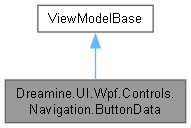
Dreamine.UI.Wpf.Controls.Navigation.ButtonData에 대한 상속 다이어그램 :
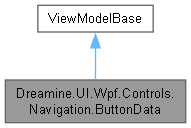
Dreamine.UI.Wpf.Controls.Navigation.ButtonData에 대한 협력 다이어그램:
속성 | |
| string | Content [get, set] |
| string | ImagePath [get, set] |
| ImageSource | ImageSource [get] |
| Brush | Foreground [get, set] |
| Brush | ShineColor [get, set] |
| Brush | ShineColorBottom [get, set] |
| Brush | BackgroundTop [get, set] |
| Brush | Background [get, set] |
| IconPosition | ImagePosition = IconPosition.Left [get, set] |
| bool | IsEnabled [get, set] |
| FontWeight | FontWeight = FontWeights.Normal [get, set] |
| Visibility | Visibility = Visibility.Visible [get, set] |
| Thickness | Margin = new Thickness(0, 0, 4, 0) [get, set] |
| object | CommandParameter = null! [get, set] |
| IInputElement | CommandTarget = null! [get, set] |
| ICommand? | Command [get, set] |
| bool | IsSelected [get, set] |
| bool | IsFocusableEx [get, set] |
| int | Grade [get, set] |
| int | MinimumGrade [get, set] |
Private 속성 | |
| string | _content = string.Empty |
| string | _imagePath = string.Empty |
| Brush | _foreground = Brushes.Black |
| Brush | _shineColor = Brushes.LightBlue |
| Brush | _shineColorBottom = Brushes.White |
| Brush | _backgroundTop = Brushes.Wheat |
| Brush | _background = Brushes.DarkBlue |
| bool | _isEnabled = true |
| ICommand? | _command |
| bool | _isSelected = false |
| bool | _isFocusableEx = true |
| int | _grade = 0 |
| int | _minimumGrade = 0 |
상세한 설명
동적 탐색 버튼의 콘텐츠, 스타일, 명령, 선택 및 권한 상태를 나타냅니다.
DreamineNavigationBar.xaml.cs 파일의 885 번째 라인에서 정의되었습니다.
멤버 데이터 문서화
◆ _background
|
private |
기본 배경 브러시의 저장 필드입니다.
DreamineNavigationBar.xaml.cs 파일의 1031 번째 라인에서 정의되었습니다.
◆ _backgroundTop
|
private |
위쪽 배경 브러시의 저장 필드입니다.
DreamineNavigationBar.xaml.cs 파일의 1012 번째 라인에서 정의되었습니다.
◆ _command
|
private |
명령의 저장 필드입니다.
DreamineNavigationBar.xaml.cs 파일의 1125 번째 라인에서 정의되었습니다.
◆ _content
|
private |
버튼 콘텐츠의 저장 필드입니다.
DreamineNavigationBar.xaml.cs 파일의 895 번째 라인에서 정의되었습니다.
◆ _foreground
|
private |
전경 브러시의 저장 필드입니다.
DreamineNavigationBar.xaml.cs 파일의 955 번째 라인에서 정의되었습니다.
◆ _grade
|
private |
현재 사용자 등급의 저장 필드입니다.
DreamineNavigationBar.xaml.cs 파일의 1182 번째 라인에서 정의되었습니다.
◆ _imagePath
|
private |
이미지 경로의 저장 필드입니다.
DreamineNavigationBar.xaml.cs 파일의 914 번째 라인에서 정의되었습니다.
◆ _isEnabled
|
private |
활성 상태의 저장 필드입니다.
DreamineNavigationBar.xaml.cs 파일의 1060 번째 라인에서 정의되었습니다.
◆ _isFocusableEx
|
private |
확장 포커스 가능 상태의 저장 필드입니다.
DreamineNavigationBar.xaml.cs 파일의 1163 번째 라인에서 정의되었습니다.
◆ _isSelected
|
private |
선택 상태의 저장 필드입니다.
DreamineNavigationBar.xaml.cs 파일의 1144 번째 라인에서 정의되었습니다.
◆ _minimumGrade
|
private |
최소 요구 등급의 저장 필드입니다.
DreamineNavigationBar.xaml.cs 파일의 1201 번째 라인에서 정의되었습니다.
◆ _shineColor
|
private |
위쪽 광택 브러시의 저장 필드입니다.
DreamineNavigationBar.xaml.cs 파일의 974 번째 라인에서 정의되었습니다.
◆ _shineColorBottom
|
private |
아래쪽 광택 브러시의 저장 필드입니다.
DreamineNavigationBar.xaml.cs 파일의 993 번째 라인에서 정의되었습니다.
속성 문서화
◆ Background
|
getset |
기본 배경 브러시를 가져오거나 설정합니다.
DreamineNavigationBar.xaml.cs 파일의 1040 번째 라인에서 정의되었습니다.
1040{ get => _background; set => SetProperty(ref _background, value); }
◆ BackgroundTop
|
getset |
위쪽 배경 브러시를 가져오거나 설정합니다.
DreamineNavigationBar.xaml.cs 파일의 1021 번째 라인에서 정의되었습니다.
1021{ get => _backgroundTop; set => SetProperty(ref _backgroundTop, value); }
◆ Command
|
getset |
버튼이 실행할 명령을 가져오거나 설정합니다.
DreamineNavigationBar.xaml.cs 파일의 1134 번째 라인에서 정의되었습니다.
1134{ get => _command; set => SetProperty(ref _command, value); }
◆ CommandParameter
|
getset |
명령에 전달할 매개변수를 가져오거나 설정합니다.
DreamineNavigationBar.xaml.cs 파일의 1106 번째 라인에서 정의되었습니다.
1106{ get; set; } = null!;
◆ CommandTarget
|
getset |
라우트 명령 대상을 가져오거나 설정합니다.
DreamineNavigationBar.xaml.cs 파일의 1115 번째 라인에서 정의되었습니다.
1115{ get; set; } = null!;
◆ Content
|
getset |
버튼에 표시할 텍스트를 가져오거나 설정하며 변경 시 이미지 원본 알림도 발생시킵니다.
DreamineNavigationBar.xaml.cs 파일의 904 번째 라인에서 정의되었습니다.
904{ get => _content; set { if (SetProperty(ref _content, value)) OnPropertyChanged(nameof(ImageSource)); } }
◆ FontWeight
|
getset |
버튼 텍스트의 글꼴 굵기를 가져오거나 설정합니다.
DreamineNavigationBar.xaml.cs 파일의 1079 번째 라인에서 정의되었습니다.
1079{ get; set; } = FontWeights.Normal;
◆ Foreground
|
getset |
버튼 전경 브러시를 가져오거나 설정합니다.
DreamineNavigationBar.xaml.cs 파일의 964 번째 라인에서 정의되었습니다.
964{ get => _foreground; set => SetProperty(ref _foreground, value); }
◆ Grade
|
getset |
현재 사용자 등급을 가져오거나 설정합니다.
DreamineNavigationBar.xaml.cs 파일의 1191 번째 라인에서 정의되었습니다.
1191{ get => _grade; set => SetProperty(ref _grade, value); }
◆ ImagePath
|
getset |
버튼 이미지 경로를 가져오거나 설정하며 변경 시 이미지 원본 알림을 발생시킵니다.
DreamineNavigationBar.xaml.cs 파일의 923 번째 라인에서 정의되었습니다.
924 {
925 get => _imagePath;
926 set { if (SetProperty(ref _imagePath, value)) OnPropertyChanged(nameof(ImageSource)); }
927 }
◆ ImagePosition
|
getset |
◆ ImageSource
|
get |
현재 이미지 경로에서 만든 이미지 원본을 가져오며 로드 실패 시 null을 반환합니다.
DreamineNavigationBar.xaml.cs 파일의 937 번째 라인에서 정의되었습니다.
938 {
939 get
940 {
941 if (string.IsNullOrWhiteSpace(ImagePath)) return null!;
942 try { return new BitmapImage(new Uri(ImagePath, UriKind.RelativeOrAbsolute)); }
943 catch (Exception ex) { Debug.WriteLine($"[ButtonData] ImageSource 로드 실패({ImagePath}): {ex.Message}"); return null!; }
944 }
945 }
◆ IsEnabled
|
getset |
버튼이 활성화되었는지 가져오거나 설정합니다.
DreamineNavigationBar.xaml.cs 파일의 1069 번째 라인에서 정의되었습니다.
1069{ get => _isEnabled; set => SetProperty(ref _isEnabled, value); }
◆ IsFocusableEx
|
getset |
클릭 시 선택을 유지할 수 있는지 가져오거나 설정합니다.
DreamineNavigationBar.xaml.cs 파일의 1172 번째 라인에서 정의되었습니다.
1172{ get => _isFocusableEx; set => SetProperty(ref _isFocusableEx, value); }
◆ IsSelected
|
getset |
버튼이 선택되었는지 가져오거나 설정합니다.
DreamineNavigationBar.xaml.cs 파일의 1153 번째 라인에서 정의되었습니다.
1153{ get => _isSelected; set => SetProperty(ref _isSelected, value); }
◆ Margin
|
getset |
버튼 외부 여백을 가져오거나 설정합니다.
DreamineNavigationBar.xaml.cs 파일의 1097 번째 라인에서 정의되었습니다.
1097{ get; set; } = new Thickness(0, 0, 4, 0);
◆ MinimumGrade
|
getset |
버튼 사용에 필요한 최소 등급을 가져오거나 설정합니다.
DreamineNavigationBar.xaml.cs 파일의 1210 번째 라인에서 정의되었습니다.
1210{ get => _minimumGrade; set => SetProperty(ref _minimumGrade, value); }
◆ ShineColor
|
getset |
위쪽 광택 색상을 가져오거나 설정합니다.
DreamineNavigationBar.xaml.cs 파일의 983 번째 라인에서 정의되었습니다.
983{ get => _shineColor; set => SetProperty(ref _shineColor, value); }
◆ ShineColorBottom
|
getset |
아래쪽 광택 색상을 가져오거나 설정합니다.
DreamineNavigationBar.xaml.cs 파일의 1002 번째 라인에서 정의되었습니다.
1002{ get => _shineColorBottom; set => SetProperty(ref _shineColorBottom, value); }
◆ Visibility
|
getset |
버튼 표시 상태를 가져오거나 설정합니다.
DreamineNavigationBar.xaml.cs 파일의 1088 번째 라인에서 정의되었습니다.
1088{ get; set; } = Visibility.Visible;
이 클래스에 대한 문서화 페이지는 다음의 파일로부터 생성되었습니다.: