로딩중...
검색중...
일치하는것 없음
Dreamine.UI.Wpf.Controls.DreamineLightBulb 클래스 참조
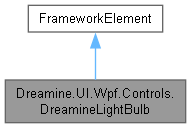
Dreamine.UI.Wpf.Controls.DreamineLightBulb에 대한 상속 다이어그램 :
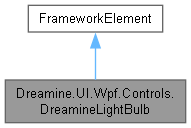
Dreamine.UI.Wpf.Controls.DreamineLightBulb에 대한 협력 다이어그램:
정적 Public 속성 | |
| static readonly DependencyProperty | IsOnProperty |
| static readonly DependencyProperty | DiameterProperty |
Protected 멤버 함수 | |
| override Size | MeasureOverride (Size availableSize) |
| override void | OnRender (DrawingContext dc) |
속성 | |
| bool | IsOn [get, set] |
| double | Diameter [get, set] |
정적 Private 멤버 함수 | |
| static StreamGeometry | CreateGlassGeometry (double cx, double top, double d) |
| static void | DrawBaseRib (DrawingContext dc, double cx, double y, double width, Color color) |
상세한 설명
여러 UI 플랫폼과 공통 API를 사용하는 전구 상태 표시 WPF 요소입니다.
DreamineLightBulb.cs 파일의 14 번째 라인에서 정의되었습니다.
멤버 함수 문서화
◆ CreateGlassGeometry()
|
inlinestaticprivate |
전구 유리 외곽선을 나타내는 고정된 스트림 기하 도형을 만듭니다.
- 매개변수
-
cx 전구 중심의 X 좌표입니다. top 전구 상단의 Y 좌표입니다. d 전구 기준 지름입니다.
- 반환값
- 고정된 유리 외곽선 기하 도형입니다.
DreamineLightBulb.cs 파일의 207 번째 라인에서 정의되었습니다.
208 {
209 var geometry = new StreamGeometry();
210 using var ctx = geometry.Open();
211
212 ctx.BeginFigure(new Point(cx, top + d * .02), true, true);
213 ctx.BezierTo(new Point(cx - d * .36, top + d * .02), new Point(cx - d * .52, top + d * .27), new Point(cx - d * .52, top + d * .54), true, false);
214 ctx.BezierTo(new Point(cx - d * .52, top + d * .74), new Point(cx - d * .35, top + d * .87), new Point(cx - d * .25, top + d * .96), true, false);
215 ctx.LineTo(new Point(cx + d * .25, top + d * .96), true, false);
216 ctx.BezierTo(new Point(cx + d * .35, top + d * .87), new Point(cx + d * .52, top + d * .74), new Point(cx + d * .52, top + d * .54), true, false);
217 ctx.BezierTo(new Point(cx + d * .52, top + d * .27), new Point(cx + d * .36, top + d * .02), new Point(cx, top + d * .02), true, false);
218
219 geometry.Freeze();
220 return geometry;
221 }
다음에 의해서 참조됨 : OnRender().
이 함수를 호출하는 함수들에 대한 그래프입니다.:

◆ DrawBaseRib()
|
inlinestaticprivate |
전구 베이스의 둥근 가로 리브 하나를 그립니다.
- 매개변수
-
dc 그리기 컨텍스트입니다. cx 리브 중심의 X 좌표입니다. y 리브 상단의 Y 좌표입니다. width 리브 너비입니다. color 리브 채우기 색입니다.
DreamineLightBulb.cs 파일의 271 번째 라인에서 정의되었습니다.
272 {
273 var rect = new Rect(cx - width / 2, y, width, 7);
274 dc.DrawRoundedRectangle(new SolidColorBrush(color), null, rect, 3.5, 3.5);
275 }
다음에 의해서 참조됨 : OnRender().
이 함수를 호출하는 함수들에 대한 그래프입니다.:

◆ MeasureOverride()
|
inlineprotected |
최소 지름을 적용하여 전구 전체가 들어갈 원하는 크기를 계산합니다.
- 매개변수
-
availableSize 부모 요소가 제공하는 사용 가능 크기입니다.
- 반환값
- 전구 렌더링에 필요한 크기입니다.
DreamineLightBulb.cs 파일의 92 번째 라인에서 정의되었습니다.
93 {
94 var d = Math.Max(32, Diameter);
95 return new Size(d * 1.25, d * 1.65);
96 }
다음을 참조함 : Diameter.
◆ OnRender()
|
inlineprotected |
현재 상태에 맞는 빛, 유리, 필라멘트와 전구 베이스를 그립니다.
- 매개변수
-
dc 그리기 명령을 받을 렌더링 컨텍스트입니다.
- 예외
-
FormatException 계산된 필라멘트 경로 문자열을 기하 도형으로 해석할 수 없으면 발생할 수 있습니다.
DreamineLightBulb.cs 파일의 122 번째 라인에서 정의되었습니다.
123 {
124 base.OnRender(dc);
125
126 var d = Math.Max(32, Diameter);
127 var cx = RenderSize.Width / 2;
128 var top = 2.0;
129 var glassFill = IsOn ? Color.FromRgb(255, 214, 102) : Color.FromArgb(42, 100, 116, 139);
130 var glassStroke = IsOn ? Color.FromRgb(255, 196, 0) : Color.FromRgb(102, 117, 139);
131 var filament = IsOn ? Color.FromRgb(122, 75, 0) : Color.FromRgb(100, 116, 139);
132 var baseFill = Color.FromRgb(112, 128, 152);
133 var glass = CreateGlassGeometry(cx, top, d);
134
135 if (IsOn)
136 {
137 dc.PushOpacity(0.35);
138 dc.DrawEllipse(new SolidColorBrush(Color.FromRgb(255, 214, 102)), null, new Point(cx, top + d * .50), d * .62, d * .62);
139 dc.Pop();
140 }
141
142 dc.DrawGeometry(
143 new SolidColorBrush(glassFill),
144 new Pen(new SolidColorBrush(glassStroke), 4),
145 glass);
146
147 var filamentGeometry = Geometry.Parse($"M {cx - d * .22:F1},{top + d * .56:F1} C {cx - d * .12:F1},{top + d * .38:F1} {cx - d * .02:F1},{top + d * .72:F1} {cx + d * .10:F1},{top + d * .53:F1} C {cx + d * .16:F1},{top + d * .44:F1} {cx + d * .21:F1},{top + d * .49:F1} {cx + d * .25:F1},{top + d * .55:F1}");
148 dc.DrawGeometry(null, new Pen(new SolidColorBrush(filament), 4) { StartLineCap = PenLineCap.Round, EndLineCap = PenLineCap.Round }, filamentGeometry);
149
150 var neckTop = top + d * .92;
151 var neck = new StreamGeometry();
152 using (var ctx = neck.Open())
153 {
154 ctx.BeginFigure(new Point(cx - d * .30, neckTop), true, true);
155 ctx.LineTo(new Point(cx + d * .30, neckTop), true, false);
156 ctx.LineTo(new Point(cx + d * .20, neckTop + d * .26), true, false);
157 ctx.LineTo(new Point(cx - d * .20, neckTop + d * .26), true, false);
158 }
159 neck.Freeze();
160 dc.DrawGeometry(new SolidColorBrush(baseFill), null, neck);
161
162 DrawBaseRib(dc, cx, neckTop + d * .10, d * .44, baseFill);
163 DrawBaseRib(dc, cx, neckTop + d * .22, d * .36, baseFill);
164 DrawBaseRib(dc, cx, neckTop + d * .34, d * .27, baseFill);
165 }
다음을 참조함 : CreateGlassGeometry(), Diameter, DrawBaseRib(), IsOn.
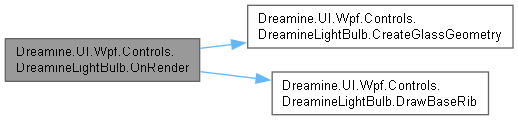
이 함수 내부에서 호출하는 함수들에 대한 그래프입니다.:
멤버 데이터 문서화
◆ DiameterProperty
|
static |
초기값:
=
new FrameworkPropertyMetadata(96.0, FrameworkPropertyMetadataOptions.AffectsMeasure | FrameworkPropertyMetadataOptions.AffectsRender))
전구 지름을 저장하는 종속성 속성입니다.
DreamineLightBulb.cs 파일의 36 번째 라인에서 정의되었습니다.
◆ IsOnProperty
|
static |
초기값:
=
new FrameworkPropertyMetadata(false, FrameworkPropertyMetadataOptions.AffectsRender))
전구의 켜짐 상태를 저장하는 종속성 속성입니다.
DreamineLightBulb.cs 파일의 24 번째 라인에서 정의되었습니다.
속성 문서화
◆ Diameter
|
getset |
전구 본체의 기준 지름을 가져오거나 설정합니다.
DreamineLightBulb.cs 파일의 62 번째 라인에서 정의되었습니다.
63 {
64 get => (double)GetValue(DiameterProperty);
65 set => SetValue(DiameterProperty, value);
66 }
다음에 의해서 참조됨 : MeasureOverride(), OnRender().
◆ IsOn
|
getset |
전구가 켜져 있는지 여부를 가져오거나 설정합니다.
DreamineLightBulb.cs 파일의 48 번째 라인에서 정의되었습니다.
49 {
50 get => (bool)GetValue(IsOnProperty);
51 set => SetValue(IsOnProperty, value);
52 }
다음에 의해서 참조됨 : OnRender().
이 클래스에 대한 문서화 페이지는 다음의 파일로부터 생성되었습니다.: