로딩중...
검색중...
일치하는것 없음
Dreamine.UI.Wpf.Controls.DreamineTabHost 클래스 참조
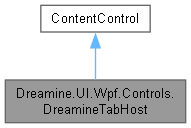
Dreamine.UI.Wpf.Controls.DreamineTabHost에 대한 상속 다이어그램 :
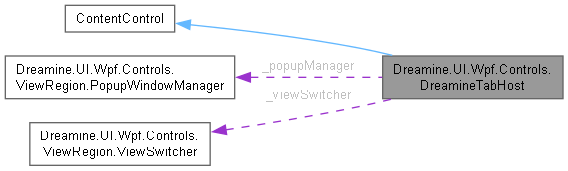
Dreamine.UI.Wpf.Controls.DreamineTabHost에 대한 협력 다이어그램:
Public 멤버 함수 | |
| DreamineTabHost () | |
정적 Public 속성 | |
| static readonly DependencyProperty | TargetAnalyzedProperty |
| static readonly DependencyProperty | IsCurrentTargetPopupProperty |
| static readonly DependencyProperty | ContentListProperty |
| static readonly DependencyProperty | ContentTypeListProperty |
| static readonly DependencyProperty | CurrentViewProperty |
| static readonly DependencyProperty | SelectViewProperty |
| static readonly DependencyProperty | UseSingletonViewProperty |
| static readonly DependencyProperty | DesignBaseNamespaceHintProperty |
| static readonly DependencyProperty | DesignAssemblyHintProperty |
| static readonly DependencyProperty | AutoWireDesignViewModelProperty |
Protected 멤버 함수 | |
| override void | OnInitialized (EventArgs e) |
속성 | |
| ObservableCollection< DreamineTabHostItem > | Items = new ObservableCollection<DreamineTabHostItem>() [get] |
| bool | TargetAnalyzed [get, set] |
| bool | IsCurrentTargetPopup [get, private set] |
| ObservableCollection< string > | ContentList [get, set] |
| ObservableCollection< string > | ContentTypeList [get, set] |
| string | CurrentView [get, set] |
| int | SelectView [get, set] |
| bool | UseSingletonView [get, set] |
| string | DesignBaseNamespaceHint [get, set] |
| string | DesignAssemblyHint [get, set] |
| bool | AutoWireDesignViewModel [get, set] |
Private 멤버 함수 | |
| void | ScheduleSwitch () |
| void | SwitchToViewInternal (string? targetKey) |
| void | UpdateVisibleView () |
| void | UpdateVisibleViewDesign () |
| void | OnRootIsVisibleChanged (object sender, DependencyPropertyChangedEventArgs e) |
| void | TryInitViews () |
| List<(string name, string typeName)> | BuildPairsFromItemsOrDps () |
| List<(string name, string typeName)> | BuildPairsFromItems () |
| string? | GetDeclaredRawEntryAt (int index) |
| void | InitDesignViews (List<(string name, string typeName)> pairs) |
| bool | IsInDesignMode () |
정적 Private 멤버 함수 | |
| static void | OnContentInputsChanged (DependencyObject d, DependencyPropertyChangedEventArgs e) |
| static void | OnDesignHintChanged (DependencyObject d, DependencyPropertyChangedEventArgs e) |
| static void | OnCurrentViewChanged (DependencyObject d, DependencyPropertyChangedEventArgs e) |
| static void | OnSelectViewChanged (DependencyObject d, DependencyPropertyChangedEventArgs e) |
| static List<(string name, string typeName)> | EnsureUniqueNames (List<(string name, string typeName)> pairs) |
| static List<(string name, string typeName)> | BuildNameTypePairs_NoMutation (ObservableCollection< string >? names, ObservableCollection< string >? types) |
| static string | DeriveSimpleKeyFromType (string raw) |
| static string[] | BuildDesignTypeCandidates (string raw, string baseNs, string asmHint) |
| static ? UserControl | TryCreateDesignView (string typeName) |
| static ? Type | FindTypeByName (string name) |
| static UserControl | MakeDesignPlaceholder (string title) |
| static void | AttachDesignViewModelIfEmpty (UserControl view) |
| static ? Type | ResolveDesignViewModelType (Type viewType) |
Private 속성 | |
| FrameworkElement? | _currentView |
| readonly Dictionary< string, FrameworkElement > | _views = new Dictionary<string, FrameworkElement>() |
| readonly List< string > | _order = new List<string>() |
| readonly PopupWindowManager | _popupManager = PopupWindowManager.Instance |
| ViewSwitcher? | _viewSwitcher |
| Grid | _containerGrid = null! |
| bool | _isSwitchScheduled |
| int | _designLastIndex = -1 |
| readonly Dictionary< FrameworkElement, bool > | _lastVisibilityState = new Dictionary<FrameworkElement, bool>() |
정적 Private 속성 | |
| static readonly DependencyPropertyKey | IsCurrentTargetPopupPropertyKey |
상세한 설명
문자열 키로 뷰를 동적 생성·전환하고 팝업 및 디자인 타임 표시를 지원하는 탭 호스트입니다.
Content control that dynamically loads and switches views by string keys. Details:
- IMPORTANT: XAML children are mapped to Items (NOT Content) via ContentPropertyAttribute.
- This enables: <DreamineTabHost> <DreamineTabHostItem Content="A"/> <DreamineTabHostItem Content="B"/> </DreamineTabHost>
- Views can be declared by: 1) XAML children (Items) 2) ContentList / ContentTypeList DPs
- Popup identification:
- Names ending with "_Popup" are treated as popups.
- When UseSingletonView is true, views are registered to RegionManager and reused.
- Design-time:
- No DI / RegionManager / PopupService usage.
- Views created by Activator and can auto-wire design VM.
DreamineControl.cs 파일의 61 번째 라인에서 정의되었습니다.
생성자 & 소멸자 문서화
◆ DreamineTabHost()
|
inline |
새 탭 호스트를 만들고 항목 모음 변경 시 뷰를 다시 초기화하도록 등록합니다.
DreamineControl.cs 파일의 248 번째 라인에서 정의되었습니다.
249 {
250 // \brief Keep default DP collections alive
251 ContentList = new ObservableCollection<string>();
252
253 // \brief When XAML children change, re-init
254 Items.CollectionChanged += (_, __) => TryInitViews();
255 }
다음을 참조함 : ContentList, TryInitViews().
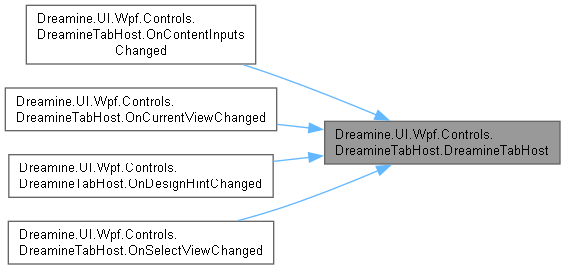
다음에 의해서 참조됨 : OnContentInputsChanged(), OnCurrentViewChanged(), OnDesignHintChanged(), OnSelectViewChanged().
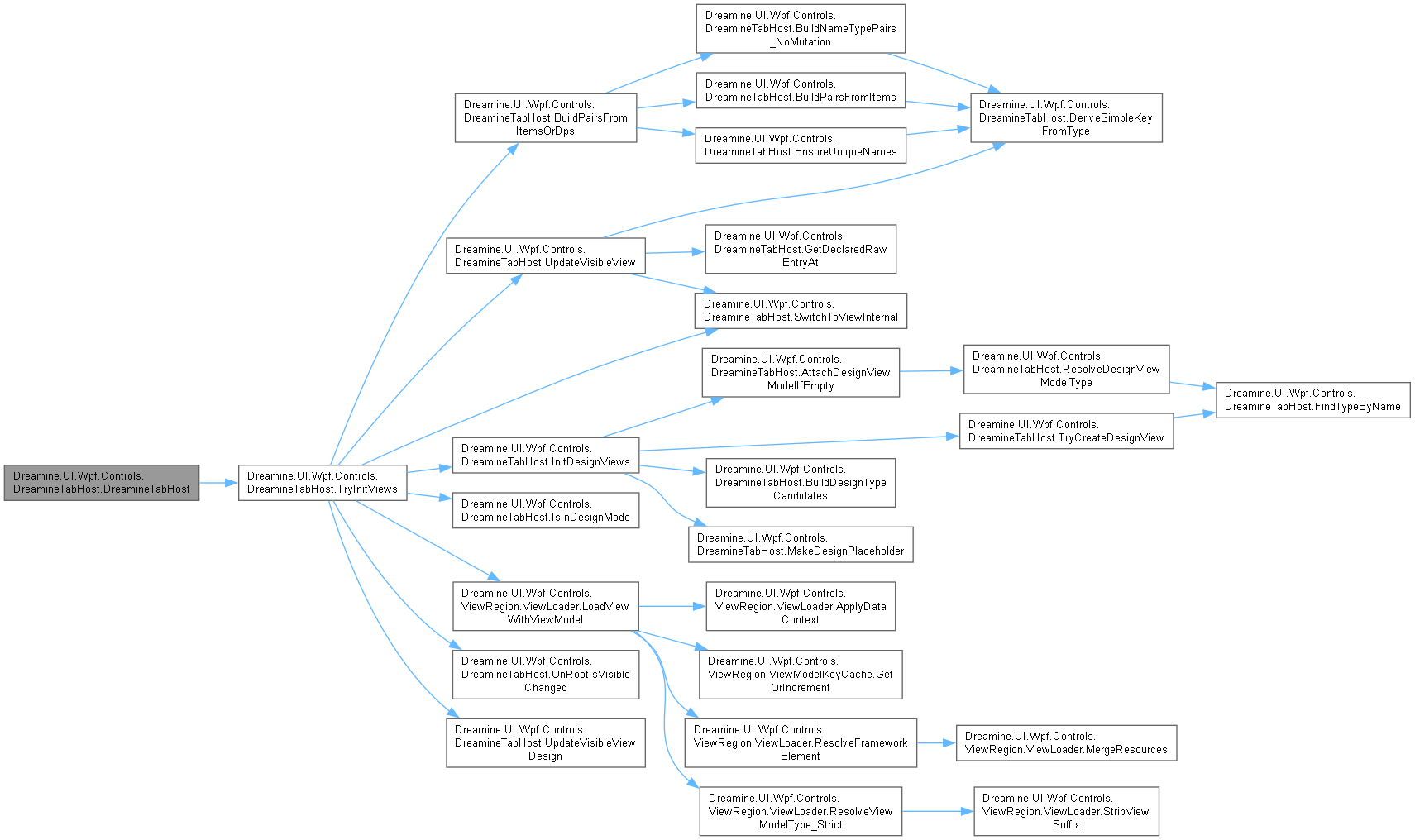
이 함수 내부에서 호출하는 함수들에 대한 그래프입니다.:
이 함수를 호출하는 함수들에 대한 그래프입니다.:
멤버 함수 문서화
◆ AttachDesignViewModelIfEmpty()
|
inlinestaticprivate |
데이터 컨텍스트가 비어 있으면 이름 규칙으로 디자인 뷰 모델을 확인하여 연결합니다.
- 매개변수
-
view 뷰 모델을 연결할 사용자 컨트롤입니다.
- 예외
-
NullReferenceException view 가 null일 때 발생합니다.
DreamineControl.cs 파일의 1612 번째 라인에서 정의되었습니다.
1613 {
1614 if (view.DataContext != null)
1615 {
1616 return;
1617 }
1618
1619 var vmType = ResolveDesignViewModelType(view.GetType());
1620 if (vmType == null)
1621 {
1622 return;
1623 }
1624
1625 try
1626 {
1627 var vm = DMContainer.Resolve(vmType);
1628 if (vm != null)
1629 {
1630 view.DataContext = vm;
1631 }
1632 }
1633 catch
1634 {
1635 // keep design resilient
1636 }
1637 }
다음을 참조함 : ResolveDesignViewModelType().
다음에 의해서 참조됨 : InitDesignViews().
이 함수 내부에서 호출하는 함수들에 대한 그래프입니다.:

이 함수를 호출하는 함수들에 대한 그래프입니다.:

◆ BuildDesignTypeCandidates()
|
inlinestaticprivate |
원시 이름과 선택적 네임스페이스·어셈블리 힌트로 디자인 타임 형식 후보를 만듭니다.
- 매개변수
-
raw 원시 형식 이름입니다. baseNs 기본 네임스페이스 힌트입니다. asmHint 어셈블리 힌트입니다.
- 반환값
- 중복이 제거된 형식 이름 후보 배열입니다.
DreamineControl.cs 파일의 1393 번째 라인에서 정의되었습니다.
1394 {
1395 var list = new List<string> { raw };
1396
1397 if (!string.IsNullOrWhiteSpace(asmHint) && !raw.Contains(","))
1398 {
1399 list.Add($"{raw}, {asmHint}");
1400 }
1401
1402 if (!raw.Contains('.') && !string.IsNullOrWhiteSpace(baseNs))
1403 {
1404 var full = $"{baseNs}.{raw}";
1405 list.Add(full);
1406
1407 if (!string.IsNullOrWhiteSpace(asmHint))
1408 {
1409 list.Add($"{full}, {asmHint}");
1410 }
1411 }
1412
1413 return list.Distinct().ToArray();
1414 }
다음에 의해서 참조됨 : InitDesignViews().
이 함수를 호출하는 함수들에 대한 그래프입니다.:

◆ BuildNameTypePairs_NoMutation()
|
inlinestaticprivate |
원본 모음을 변경하지 않고 이름 및 형식 모음에서 대응 쌍을 만듭니다.
- 매개변수
-
names 선택적 논리 이름 모음입니다. types 선택적 형식 이름 모음입니다.
- 반환값
- 사용 가능한 입력에서 만든 이름·형식 쌍입니다.
DreamineControl.cs 파일의 1275 번째 라인에서 정의되었습니다.
1278 {
1279 var result = new List<(string name, string typeName)>();
1280
1281 var hasNames = names is { Count: > 0 };
1282 var hasTypes = types is { Count: > 0 };
1283
1284 if (!hasNames && !hasTypes)
1285 {
1286 return result;
1287 }
1288
1289 if (hasNames && hasTypes)
1290 {
1291 var count = Math.Min(names!.Count, types!.Count);
1292 for (int i = 0; i < count; i++)
1293 {
1294 var typeName = types[i] ?? string.Empty;
1295 var name = string.IsNullOrWhiteSpace(names[i])
1296 ? DeriveSimpleKeyFromType(typeName)
1297 : names[i];
1298
1299 result.Add((name, typeName));
1300 }
1301 }
1302 else if (hasTypes)
1303 {
1304 foreach (var t in types!)
1305 {
1306 var typeName = t ?? string.Empty;
1307 var name = DeriveSimpleKeyFromType(typeName);
1308 result.Add((name, typeName));
1309 }
1310 }
1311 else
1312 {
1313 foreach (var n in names!)
1314 {
1315 var typeName = n ?? string.Empty;
1316 var name = DeriveSimpleKeyFromType(typeName);
1317 result.Add((name, typeName));
1318 }
1319 }
1320
1321 return result;
1322 }
다음을 참조함 : DeriveSimpleKeyFromType().
다음에 의해서 참조됨 : BuildPairsFromItemsOrDps().
이 함수 내부에서 호출하는 함수들에 대한 그래프입니다.:

이 함수를 호출하는 함수들에 대한 그래프입니다.:

◆ BuildPairsFromItems()
|
inlineprivate |
XAML 자식 항목의 콘텐츠·키·형식·팝업 설정에서 이름·형식 쌍을 만듭니다.
- 반환값
- 유효한 자식 항목에서 만든 이름·형식 쌍입니다.
DreamineControl.cs 파일의 1027 번째 라인에서 정의되었습니다.
1028 {
1029 var result = new List<(string name, string typeName)>();
1030
1031 if (Items == null || Items.Count == 0)
1032 {
1033 return result;
1034 }
1035
1036 foreach (var it in Items)
1037 {
1038 var raw = it?.Content?.ToString() ?? string.Empty;
1039 if (string.IsNullOrWhiteSpace(raw))
1040 {
1041 continue;
1042 }
1043
1044 // \brief If Popup flag is set, normalize to "*_Popup" convention.
1045 string typeName = it!.Popup && !raw.EndsWith("_Popup", StringComparison.OrdinalIgnoreCase)
1046 ? raw + "_Popup"
1047 : raw;
1048
1049 string name = !string.IsNullOrWhiteSpace(it.Key)
1050 ? it.Key
1051 : DeriveSimpleKeyFromType(typeName.EndsWith("_Popup", StringComparison.OrdinalIgnoreCase) ? typeName[..^6] : typeName);
1052
1053 // \brief If a separate Type is provided, use it as concrete type.
1054 if (!string.IsNullOrWhiteSpace(it.Type))
1055 {
1056 typeName = it.Type;
1057 if (it.Popup && !typeName.EndsWith("_Popup", StringComparison.OrdinalIgnoreCase))
1058 {
1059 typeName += "_Popup";
1060 }
1061 }
1062
1063 result.Add((name, typeName));
1064 }
1065
1066 return result;
1067 }
다음을 참조함 : DeriveSimpleKeyFromType(), Items.
다음에 의해서 참조됨 : BuildPairsFromItemsOrDps().
이 함수 내부에서 호출하는 함수들에 대한 그래프입니다.:

이 함수를 호출하는 함수들에 대한 그래프입니다.:

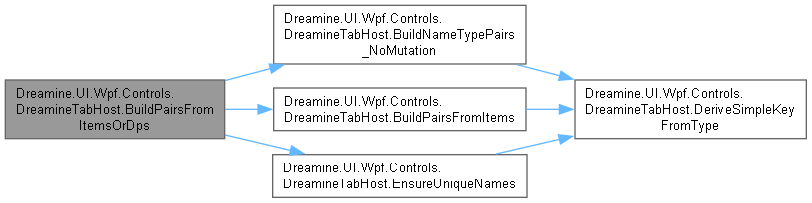
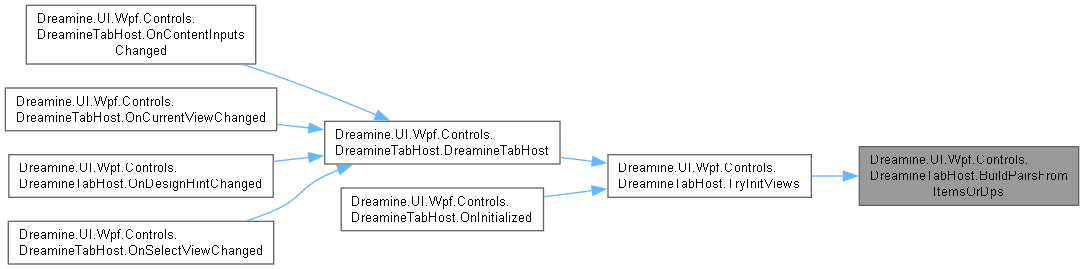
◆ BuildPairsFromItemsOrDps()
|
inlineprivate |
XAML 항목을 우선 사용하고 없으면 종속성 속성 모음에서 이름·형식 쌍을 만듭니다.
- 반환값
- 중복 없는 논리 이름과 형식 이름 쌍입니다.
DreamineControl.cs 파일의 997 번째 라인에서 정의되었습니다.
998 {
999 // \brief 1) Items (XAML children)
1000 var fromItems = BuildPairsFromItems();
1001 if (fromItems.Count > 0)
1002 {
1003 return EnsureUniqueNames(fromItems);
1004 }
1005
1006 // \brief 2) DPs (ContentList / ContentTypeList)
1007 var fromDps = BuildNameTypePairs_NoMutation(ContentList, ContentTypeList);
1008 return EnsureUniqueNames(fromDps);
1009 }
다음을 참조함 : BuildNameTypePairs_NoMutation(), BuildPairsFromItems(), ContentList, ContentTypeList, EnsureUniqueNames().
다음에 의해서 참조됨 : TryInitViews().
이 함수 내부에서 호출하는 함수들에 대한 그래프입니다.:
이 함수를 호출하는 함수들에 대한 그래프입니다.:
◆ DeriveSimpleKeyFromType()
|
inlinestaticprivate |
정규화된 형식 이름의 마지막 구간에서 단순 논리 키를 파생합니다.
- 매개변수
-
raw 원시 형식 이름입니다.
- 반환값
- 단순 키이며 입력이 비어 있으면 빈 문자열입니다.
DreamineControl.cs 파일의 1348 번째 라인에서 정의되었습니다.
1349 => string.IsNullOrWhiteSpace(raw)
1350 ? string.Empty
1351 : (raw.Contains('.') ? raw.Split('.').Last() : raw);
다음에 의해서 참조됨 : BuildNameTypePairs_NoMutation(), BuildPairsFromItems(), EnsureUniqueNames(), UpdateVisibleView().
이 함수를 호출하는 함수들에 대한 그래프입니다.:

◆ EnsureUniqueNames()
|
inlinestaticprivate |
빈 논리 이름을 파생하고 중복 이름에 순번 접미사를 붙입니다.
- 매개변수
-
pairs 정규화할 이름·형식 쌍입니다.
- 반환값
- 고유 논리 이름을 가진 새 목록입니다.
- 예외
-
ArgumentNullException pairs 가 null일 때 발생합니다.
DreamineControl.cs 파일의 1210 번째 라인에서 정의되었습니다.
1211 {
1212 var result = new List<(string name, string typeName)>(pairs);
1213 var seen = new HashSet<string>(StringComparer.Ordinal);
1214
1215 for (int i = 0; i < result.Count; i++)
1216 {
1217 var (n, t) = result[i];
1218 if (string.IsNullOrWhiteSpace(n))
1219 {
1220 n = DeriveSimpleKeyFromType(t);
1221 }
1222
1223 if (seen.Add(n))
1224 {
1225 result[i] = (n, t);
1226 continue;
1227 }
1228
1229 int k = 2;
1230 string c;
1231 do
1232 {
1233 c = $"{n}_{k++}";
1234 }
1235 while (!seen.Add(c));
1236
1237 result[i] = (c, t);
1238 }
1239
1240 return result;
1241 }
다음을 참조함 : DeriveSimpleKeyFromType().
다음에 의해서 참조됨 : BuildPairsFromItemsOrDps().
이 함수 내부에서 호출하는 함수들에 대한 그래프입니다.:

이 함수를 호출하는 함수들에 대한 그래프입니다.:

◆ FindTypeByName()
|
inlinestaticprivate |
로드된 어셈블리에서 정규화된 이름 또는 짧은 이름으로 형식을 찾습니다.
- 매개변수
-
name 찾을 형식 이름입니다.
- 반환값
- 찾은 형식이며 없으면
null입니다.
- 예외
-
NullReferenceException name 이 null일 때 발생합니다.
DreamineControl.cs 파일의 1508 번째 라인에서 정의되었습니다.
1509 {
1510 var asms = AppDomain.CurrentDomain.GetAssemblies();
1511
1512 if (name.Contains('.'))
1513 {
1514 foreach (var asm in asms)
1515 {
1516 var t = asm.GetType(name, throwOnError: false, ignoreCase: false);
1517 if (t != null)
1518 {
1519 return t;
1520 }
1521 }
1522 }
1523
1524 foreach (var asm in asms)
1525 {
1526 try
1527 {
1528 var t = asm.GetTypes().FirstOrDefault(x => x.Name == name);
1529 if (t != null)
1530 {
1531 return t;
1532 }
1533 }
1534 catch
1535 {
1536 // ignore reflection errors
1537 }
1538 }
1539
1540 return null;
1541 }
다음에 의해서 참조됨 : ResolveDesignViewModelType(), TryCreateDesignView().
이 함수를 호출하는 함수들에 대한 그래프입니다.:

◆ GetDeclaredRawEntryAt()
|
inlineprivate |
지정 인덱스의 원시 선언을 항목에서 우선 찾고 콘텐츠 목록을 대체 경로로 사용합니다.
- 매개변수
-
index 확인할 0 기반 인덱스입니다.
- 반환값
- 원시 선언 문자열이며 없으면
null입니다.
DreamineControl.cs 파일의 1093 번째 라인에서 정의되었습니다.
1094 {
1095 if (Items != null && Items.Count > 0)
1096 {
1097 var it = Items.ElementAtOrDefault(index);
1098 return it?.Content?.ToString();
1099 }
1100
1101 return ContentList?.ElementAtOrDefault(index);
1102 }
다음을 참조함 : ContentList, Items.
다음에 의해서 참조됨 : UpdateVisibleView().
이 함수를 호출하는 함수들에 대한 그래프입니다.:

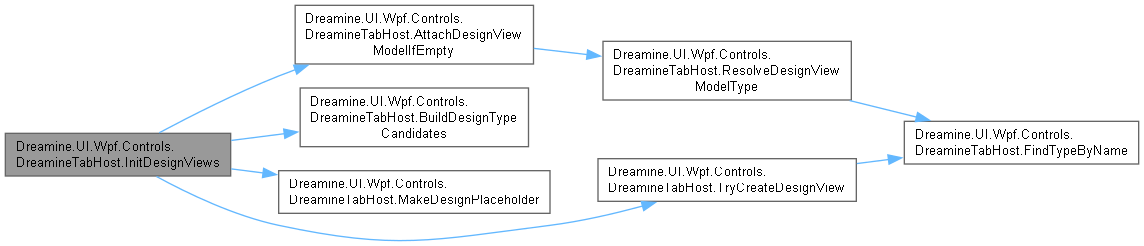
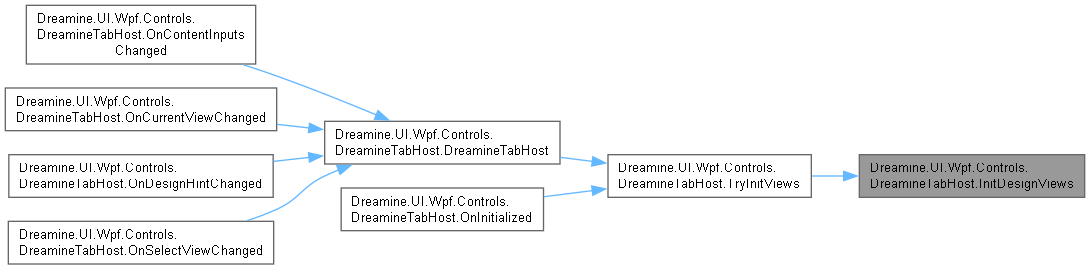
◆ InitDesignViews()
|
inlineprivate |
디자인 타임 형식 후보를 생성해 뷰 또는 자리표시자를 만들고 선택 항목을 표시합니다.
- 매개변수
-
pairs 만들 논리 이름과 형식 이름 쌍입니다.
DreamineControl.cs 파일의 1120 번째 라인에서 정의되었습니다.
1121 {
1122 foreach (var (name, typeName) in pairs)
1123 {
1124 var candidates = BuildDesignTypeCandidates(typeName, DesignBaseNamespaceHint, DesignAssemblyHint);
1125
1126 UserControl? view = null;
1127 foreach (var cand in candidates)
1128 {
1129 view = TryCreateDesignView(cand);
1130 if (view != null) break;
1131 }
1132
1133 view ??= MakeDesignPlaceholder(name);
1134
1135 if (AutoWireDesignViewModel && view.DataContext == null)
1136 {
1137 AttachDesignViewModelIfEmpty(view);
1138 }
1139
1140 _views[name] = view;
1141 _order.Add(name);
1142 }
1143
1144 _containerGrid.Children.Clear();
1145
1146 var idx = Math.Clamp(SelectView, 0, Math.Max(0, _order.Count - 1));
1147 if (_order.Count > 0)
1148 {
1149 var key = _order[idx];
1150 _containerGrid.Children.Add(_views[key]);
1151 _designLastIndex = idx;
1152 }
1153 }
다음을 참조함 : _containerGrid, _designLastIndex, _order, _views, AttachDesignViewModelIfEmpty(), AutoWireDesignViewModel, BuildDesignTypeCandidates(), DesignAssemblyHint, DesignBaseNamespaceHint, MakeDesignPlaceholder(), SelectView, TryCreateDesignView().
다음에 의해서 참조됨 : TryInitViews().
이 함수 내부에서 호출하는 함수들에 대한 그래프입니다.:
이 함수를 호출하는 함수들에 대한 그래프입니다.:
◆ IsInDesignMode()
|
inlineprivate |
현재 컨트롤이 디자이너에서 실행 중인지 확인합니다.
- 반환값
- 디자인 모드이면
true입니다.
DreamineControl.cs 파일의 1175 번째 라인에서 정의되었습니다.
1176 => DesignerProperties.GetIsInDesignMode(this);
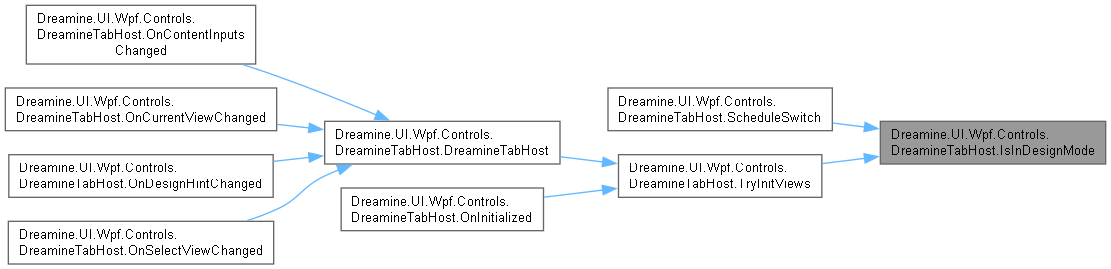
다음에 의해서 참조됨 : ScheduleSwitch(), TryInitViews().
이 함수를 호출하는 함수들에 대한 그래프입니다.:
◆ MakeDesignPlaceholder()
|
inlinestaticprivate |
디자인 타임 뷰를 만들 수 없을 때 표시할 자리표시자 컨트롤을 만듭니다.
- 매개변수
-
title 자리표시자에 표시할 제목입니다.
- 반환값
- 디자인 안내 콘텐츠를 포함하는 사용자 컨트롤입니다.
DreamineControl.cs 파일의 1567 번째 라인에서 정의되었습니다.
1568 {
1569 return new UserControl
1570 {
1571 Content = new Border
1572 {
1573 Background = System.Windows.Media.Brushes.White,
1574 BorderBrush = System.Windows.Media.Brushes.LightSteelBlue,
1575 BorderThickness = new Thickness(2),
1576 CornerRadius = new CornerRadius(6),
1577 Padding = new Thickness(8),
1578 Child = new TextBlock
1579 {
1580 Text = $"[design] {title}",
1581 FontSize = 16,
1582 Foreground = System.Windows.Media.Brushes.Black
1583 }
1584 }
1585 };
1586 }
다음에 의해서 참조됨 : InitDesignViews().
이 함수를 호출하는 함수들에 대한 그래프입니다.:

◆ OnContentInputsChanged()
|
inlinestaticprivate |
콘텐츠 입력이 변경되면 호스트 뷰를 다시 초기화합니다.
- 매개변수
-
d 입력이 변경된 객체입니다. e 속성 변경 데이터입니다.
DreamineControl.cs 파일의 526 번째 라인에서 정의되었습니다.
527 {
528 if (d is DreamineTabHost c)
529 {
530 c.TryInitViews();
531 }
532 }
다음을 참조함 : DreamineTabHost().
이 함수 내부에서 호출하는 함수들에 대한 그래프입니다.:
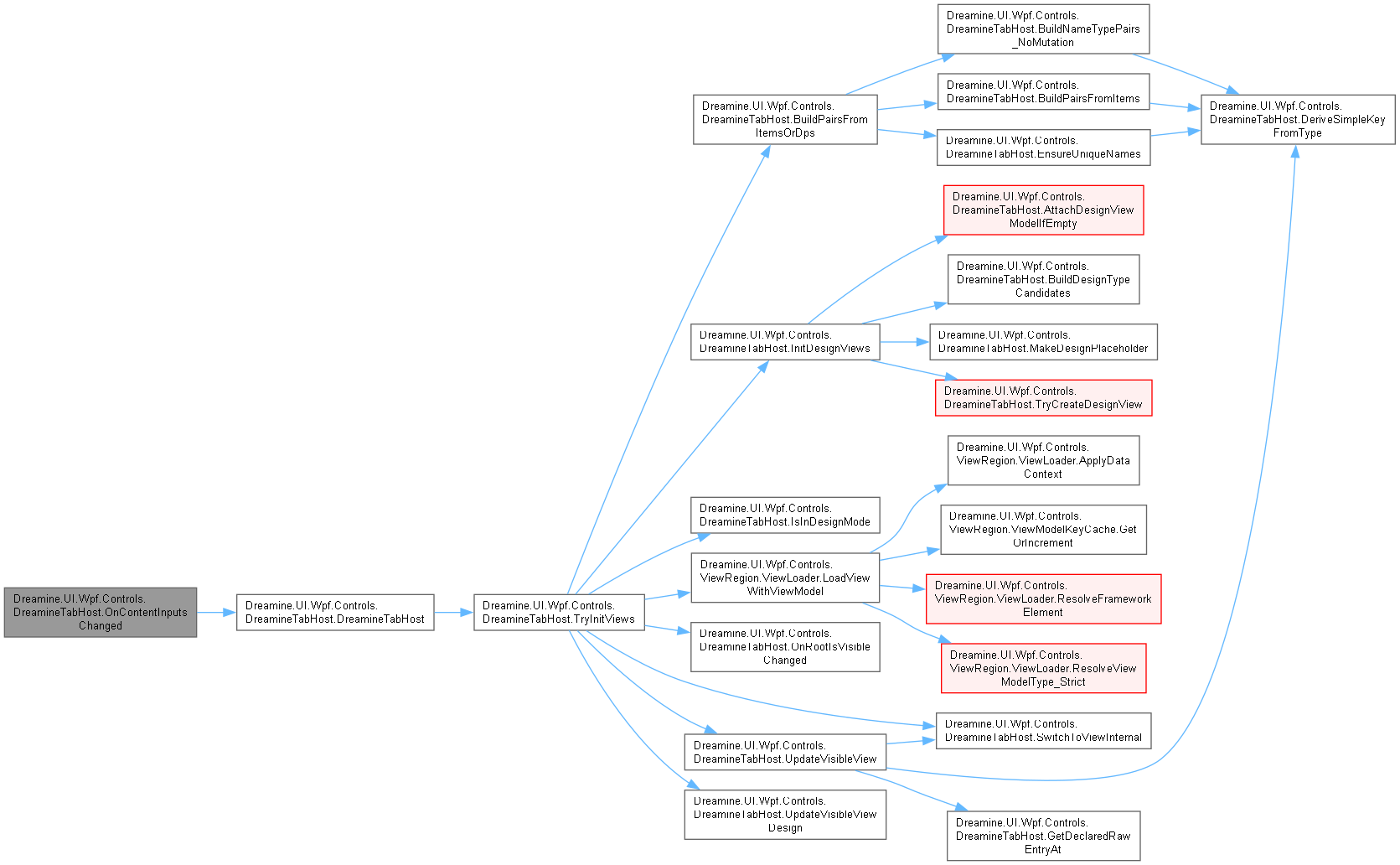
◆ OnCurrentViewChanged()
|
inlinestaticprivate |
현재 뷰 이름 변경을 디스패처에서 비동기 전환으로 예약합니다.
- 매개변수
-
d 현재 뷰가 변경된 객체입니다. e 새 뷰 이름을 포함하는 변경 데이터입니다.
DreamineControl.cs 파일의 590 번째 라인에서 정의되었습니다.
591 {
592 if (d is DreamineTabHost ctrl && e.NewValue is string viewName)
593 {
594 ctrl.Dispatcher.BeginInvoke(new Action(() =>
595 {
596 ctrl.SwitchToViewInternal(viewName);
597 }), DispatcherPriority.Background);
598 }
599 }
다음을 참조함 : DreamineTabHost().
이 함수 내부에서 호출하는 함수들에 대한 그래프입니다.:
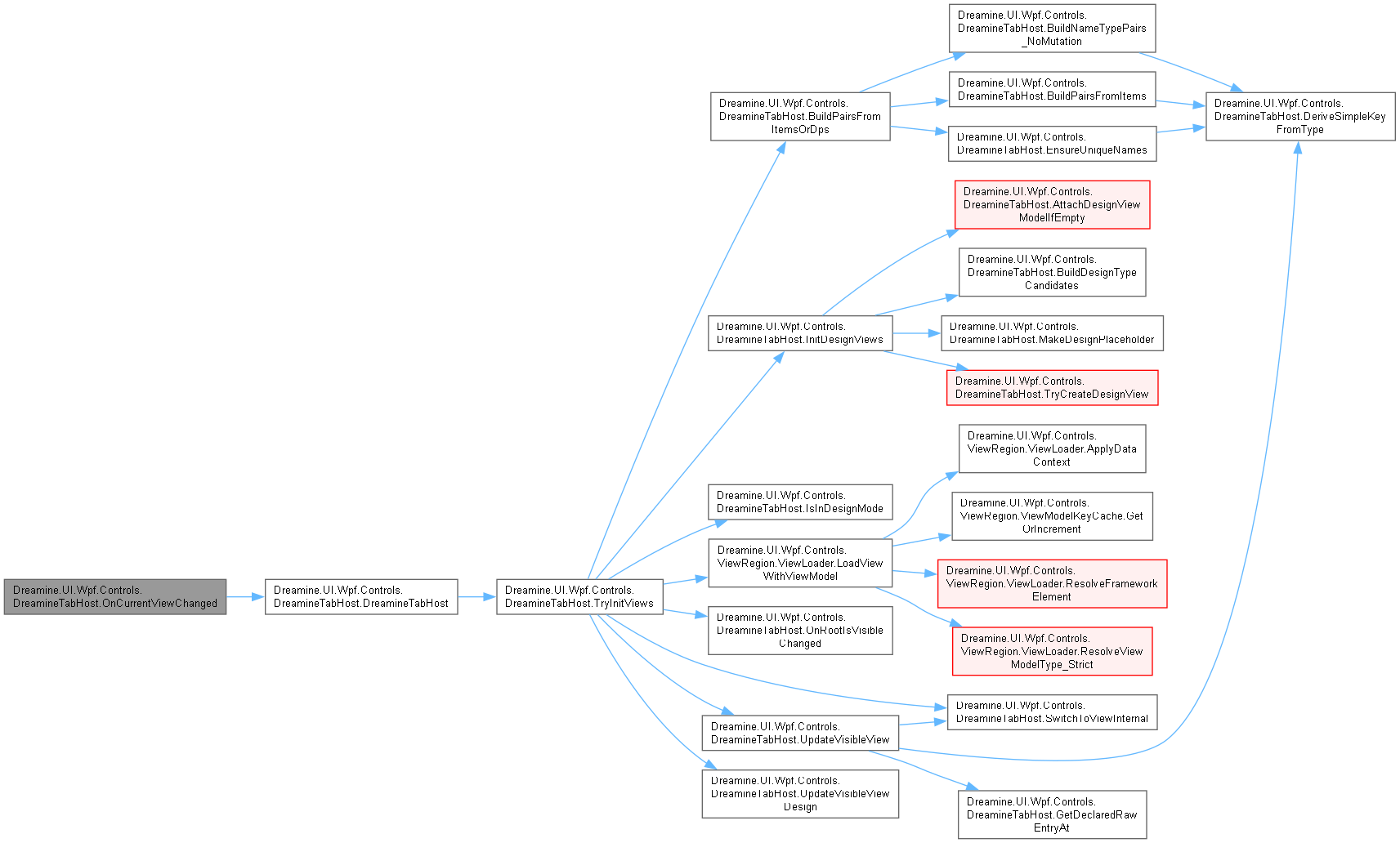
◆ OnDesignHintChanged()
|
inlinestaticprivate |
디자인 모드에서 힌트가 변경되면 호스트 뷰를 다시 초기화합니다.
- 매개변수
-
d 힌트가 변경된 객체입니다. e 속성 변경 데이터입니다.
DreamineControl.cs 파일의 558 번째 라인에서 정의되었습니다.
559 {
560 if (d is DreamineTabHost c && c.IsInDesignMode())
561 {
562 c.TryInitViews();
563 }
564 }
다음을 참조함 : DreamineTabHost().
이 함수 내부에서 호출하는 함수들에 대한 그래프입니다.:
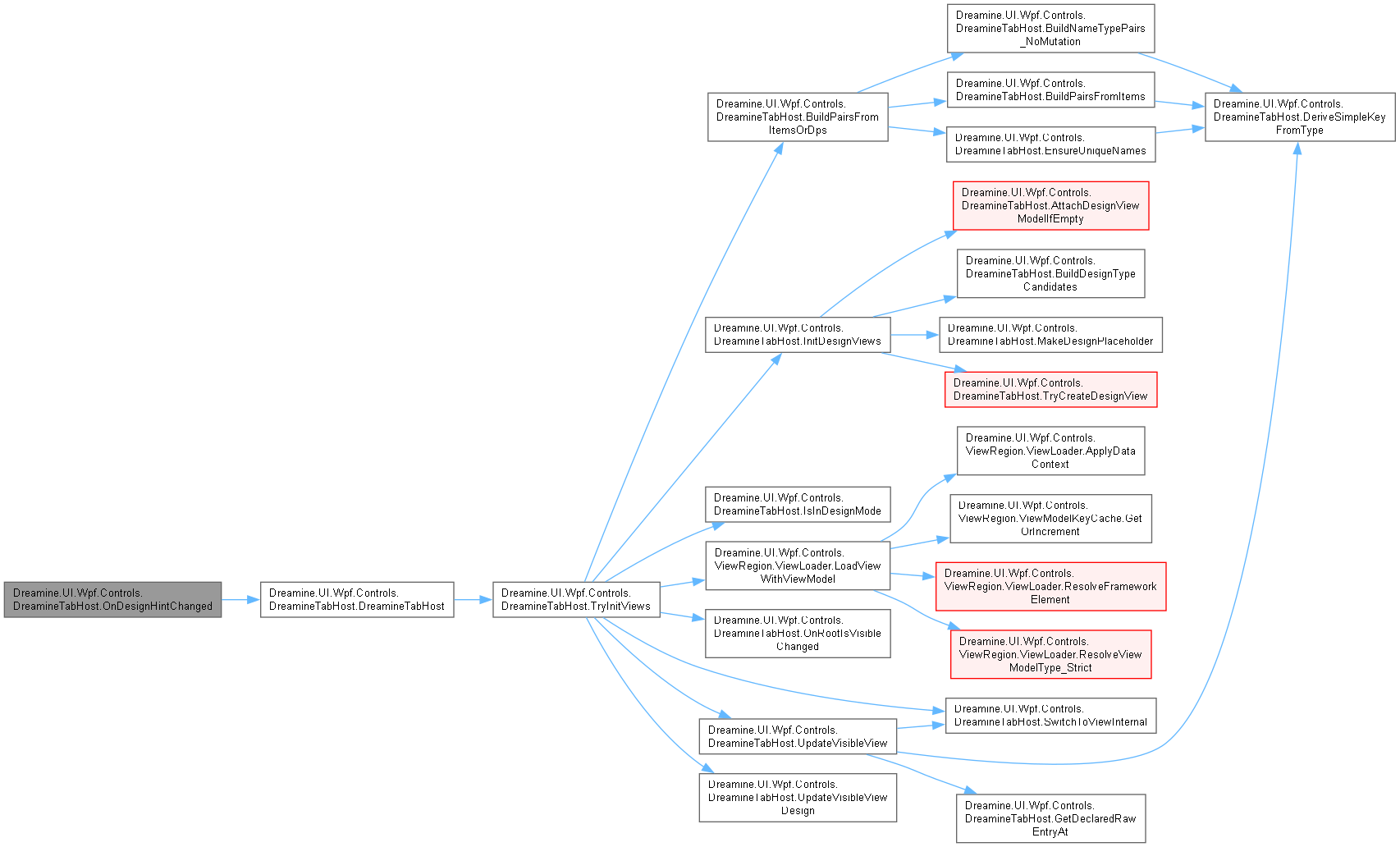
◆ OnInitialized()
|
inlineprotected |
XAML 자식 파싱이 끝난 뒤 컨텍스트 유휴 시점에 뷰 초기화를 예약합니다.
- 매개변수
-
e 초기화 이벤트 데이터입니다.
DreamineControl.cs 파일의 653 번째 라인에서 정의되었습니다.
654 {
655 base.OnInitialized(e);
656
657 // \brief Ensure initialization after XAML children (Items) are populated.
658 Dispatcher.InvokeAsync(() =>
659 {
660 TryInitViews();
661 }, DispatcherPriority.ContextIdle);
662 }
다음을 참조함 : TryInitViews().
이 함수 내부에서 호출하는 함수들에 대한 그래프입니다.:
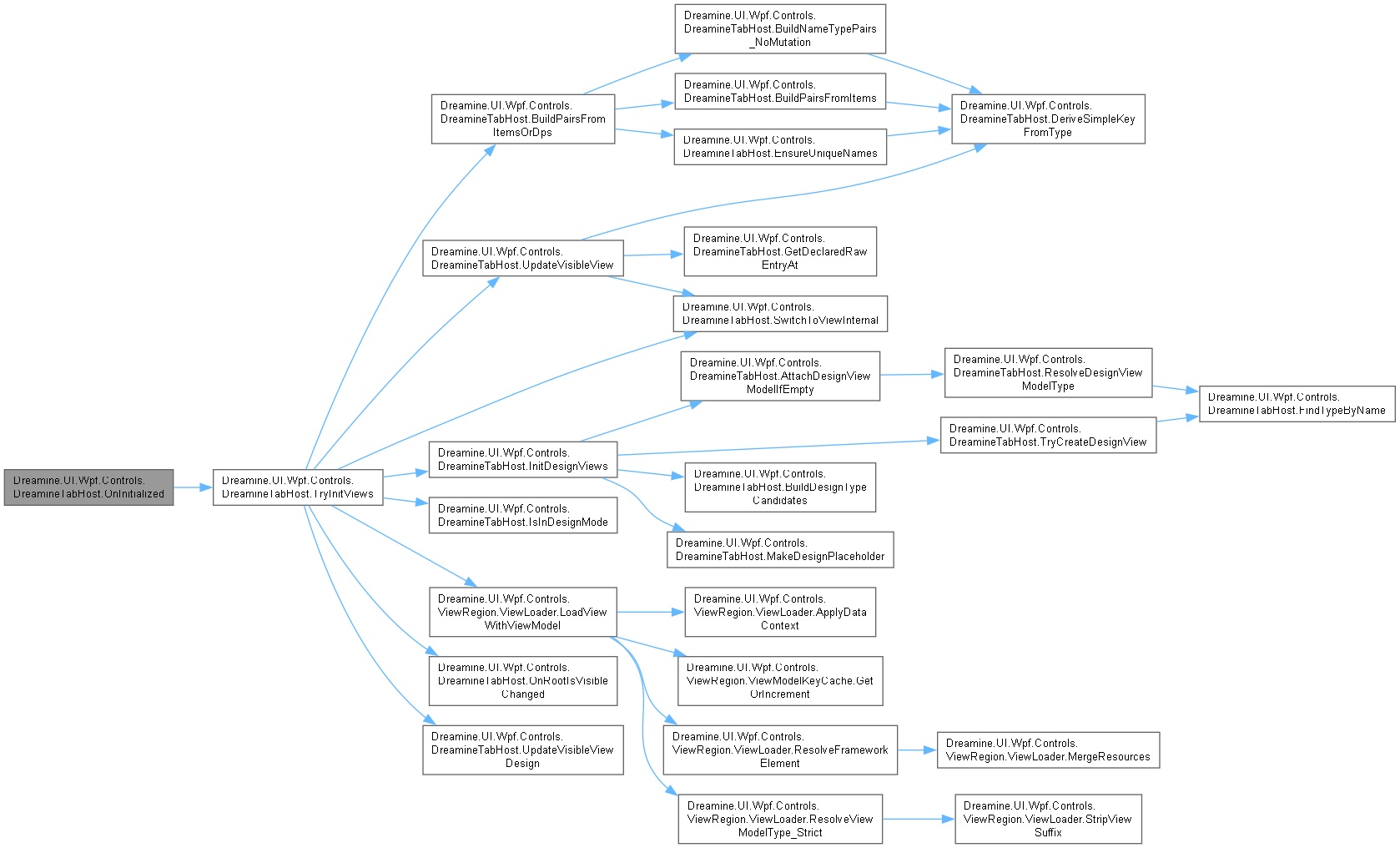
◆ OnRootIsVisibleChanged()
|
inlineprivate |
루트 뷰 표시 상태 변경을 중복 제거하여 IVisibilityAware 수명 콜백으로 전달합니다.
- 매개변수
-
sender 표시 상태가 변경된 루트 뷰입니다. e 새 표시 상태를 포함하는 변경 데이터입니다.
- 예외
-
InvalidCastException 새 값이 bool이 아닐 때 발생할 수 있습니다.
DreamineControl.cs 파일의 863 번째 라인에서 정의되었습니다.
864 {
865 if (sender is not FrameworkElement fe)
866 {
867 return;
868 }
869
870 if (fe.DataContext is not IVisibilityAware vm)
871 {
872 return;
873 }
874
875 bool isVisible = (bool)e.NewValue;
876
877 if (_lastVisibilityState.TryGetValue(fe, out bool last) && last == isVisible)
878 {
879 return;
880 }
881
882 _lastVisibilityState[fe] = isVisible;
883
884 if (isVisible)
885 {
886 vm.OnShown();
887 }
888 else
889 {
890 vm.OnHidden();
891 }
892 }
다음을 참조함 : _lastVisibilityState.
다음에 의해서 참조됨 : TryInitViews().
이 함수를 호출하는 함수들에 대한 그래프입니다.:
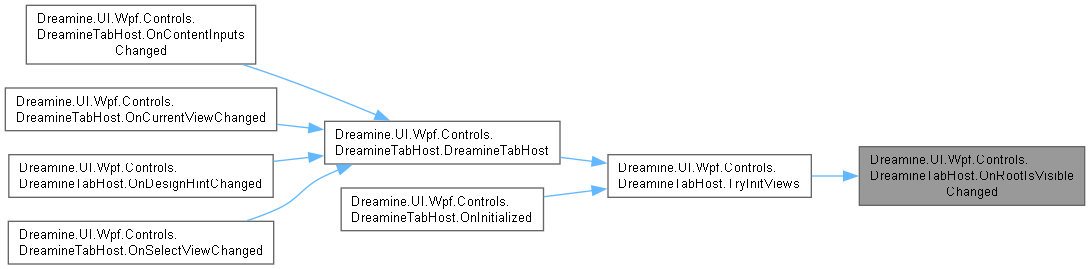
◆ OnSelectViewChanged()
|
inlinestaticprivate |
선택 인덱스 변경 시 뷰 전환을 예약합니다.
- 매개변수
-
d 선택이 변경된 객체입니다. e 선택 변경 데이터입니다.
DreamineControl.cs 파일의 625 번째 라인에서 정의되었습니다.
626 {
627 if (d is DreamineTabHost c)
628 {
629 c.ScheduleSwitch();
630 }
631 }
다음을 참조함 : DreamineTabHost().
이 함수 내부에서 호출하는 함수들에 대한 그래프입니다.:
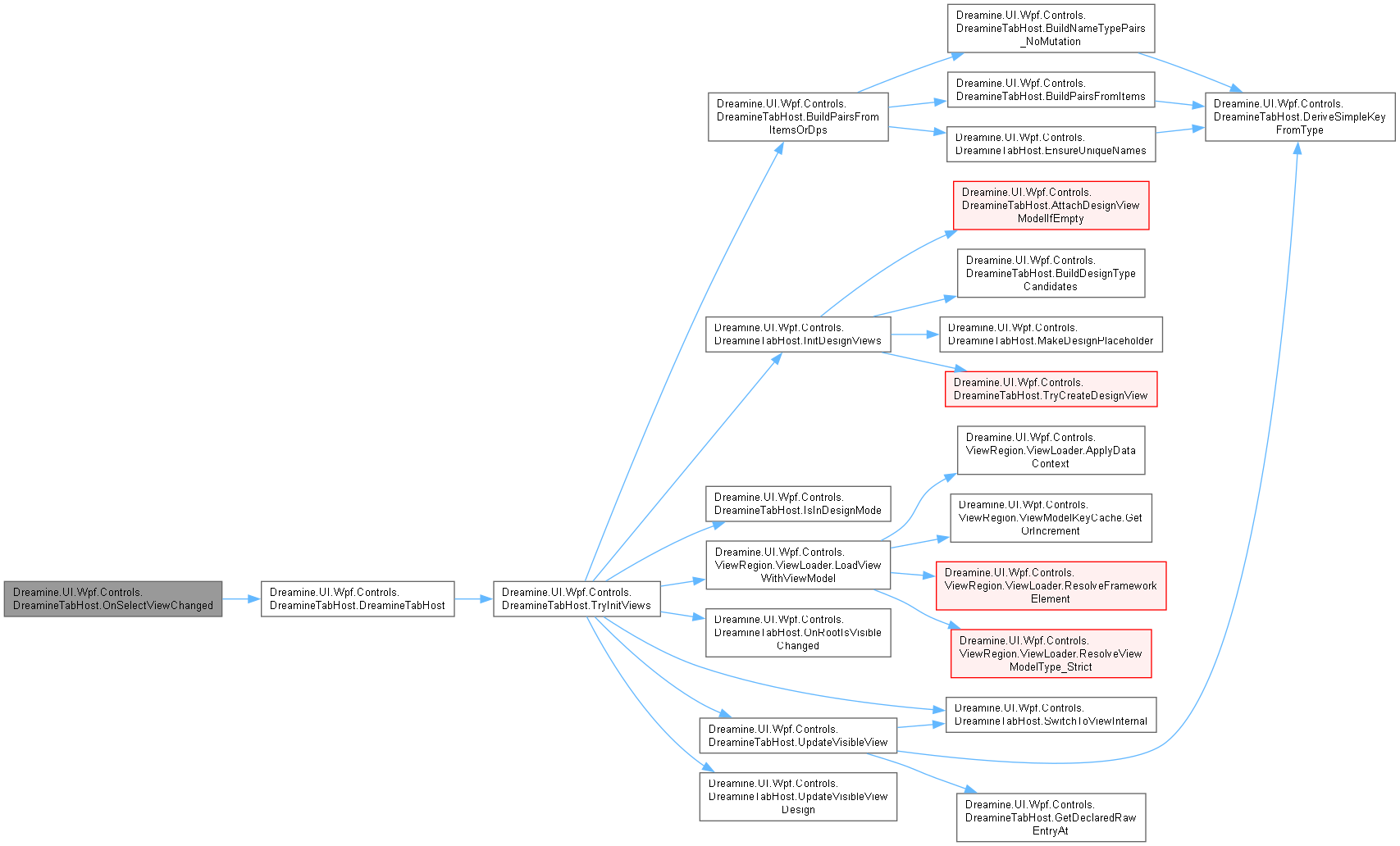
◆ ResolveDesignViewModelType()
|
inlinestaticprivate |
일반적인 이름 규칙으로 뷰 형식에 대응하는 뷰 모델 형식을 찾습니다.
- 매개변수
-
viewType 대응 뷰 모델을 찾을 뷰 형식입니다.
- 반환값
- 찾은 뷰 모델 형식이며 없으면
null입니다.
- 예외
-
NullReferenceException viewType 이 null일 때 발생합니다.
DreamineControl.cs 파일의 1671 번째 라인에서 정의되었습니다.
1672 {
1673 var fullCandidate = viewType.FullName + "ViewModel";
1674 var nsCandidate = $"{viewType.Namespace}.{viewType.Name}ViewModel";
1675 var shortCandidate = viewType.Name + "ViewModel";
1676
1677 var t = FindTypeByName(fullCandidate);
1678 if (t != null) return t;
1679
1680 t = FindTypeByName(nsCandidate);
1681 if (t != null) return t;
1682
1683 return FindTypeByName(shortCandidate);
1684 }
다음을 참조함 : FindTypeByName().
다음에 의해서 참조됨 : AttachDesignViewModelIfEmpty().
이 함수 내부에서 호출하는 함수들에 대한 그래프입니다.:

이 함수를 호출하는 함수들에 대한 그래프입니다.:

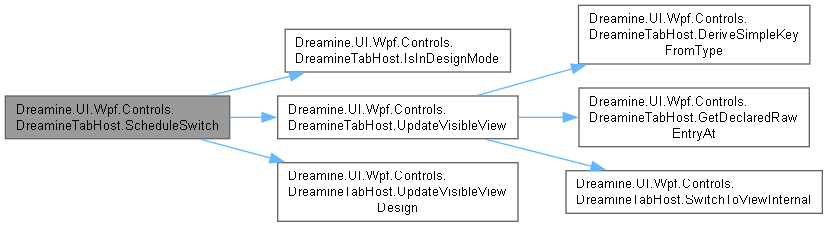
◆ ScheduleSwitch()
|
inlineprivate |
빠르게 연속된 선택 변경을 하나의 디스패처 전환으로 병합합니다.
DreamineControl.cs 파일의 676 번째 라인에서 정의되었습니다.
677 {
678 if (_isSwitchScheduled)
679 {
680 return;
681 }
682
683 _isSwitchScheduled = true;
684
685 Dispatcher.BeginInvoke(new Action(() =>
686 {
687 try
688 {
689 if (IsInDesignMode())
690 {
691 UpdateVisibleViewDesign();
692 }
693 else
694 {
695 UpdateVisibleView();
696 }
697 }
698 finally
699 {
700 _isSwitchScheduled = false;
701 }
702 }), DispatcherPriority.Input);
703 }
다음을 참조함 : _isSwitchScheduled, IsInDesignMode(), UpdateVisibleView(), UpdateVisibleViewDesign().
이 함수 내부에서 호출하는 함수들에 대한 그래프입니다.:
◆ SwitchToViewInternal()
|
inlineprivate |
논리 키로 일반 뷰 또는 팝업을 전환하고 현재 루트 뷰를 갱신합니다.
- 매개변수
-
targetKey 전환할 논리 뷰 키입니다.
DreamineControl.cs 파일의 721 번째 라인에서 정의되었습니다.
722 {
723 if (_viewSwitcher == null)
724 {
725 return;
726 }
727
728 if (string.IsNullOrWhiteSpace(targetKey))
729 {
730 return;
731 }
732
733 bool isPopup = _viewSwitcher.IsPopupName(targetKey);
734
735 if (TargetAnalyzed)
736 {
737 IsCurrentTargetPopup = isPopup;
738 }
739
740 // \note IMPORTANT:
741 // - We intentionally call Switch(key) WITHOUT extra named parameters,
742 // because your ViewSwitcher signature currently does not accept targetAnalyzed (CS1739).
743 _viewSwitcher.Switch(targetKey, isPopup);
744
745 if (!isPopup && _views.TryGetValue(targetKey, out var nextView))
746 {
747 _currentView = nextView;
748 }
749 }
다음을 참조함 : _currentView, _views, _viewSwitcher, IsCurrentTargetPopup, TargetAnalyzed.
다음에 의해서 참조됨 : TryInitViews(), UpdateVisibleView().
이 함수를 호출하는 함수들에 대한 그래프입니다.:

◆ TryCreateDesignView()
|
inlinestaticprivate |
디자인 타임에 형식 이름으로 사용자 컨트롤을 만들며 실패하면 null을 반환합니다.
- 매개변수
-
typeName 만들 형식 이름입니다.
- 반환값
- 만든 사용자 컨트롤이며 확인 또는 생성 실패 시
null입니다.
DreamineControl.cs 파일의 1440 번째 라인에서 정의되었습니다.
1441 {
1442 try
1443 {
1444 Type? t = null;
1445
1446 if (typeName.Contains(","))
1447 {
1448 t = Type.GetType(typeName, throwOnError: false, ignoreCase: false);
1449 }
1450
1451 if (t == null)
1452 {
1453 t = FindTypeByName(typeName);
1454 }
1455
1456 if (t == null || !typeof(UserControl).IsAssignableFrom(t))
1457 {
1458 return null;
1459 }
1460
1461 try
1462 {
1463 return Activator.CreateInstance(t) as UserControl;
1464 }
1465 catch
1466 {
1467 return Activator.CreateInstance(t, nonPublic: true) as UserControl;
1468 }
1469 }
1470 catch
1471 {
1472 return null;
1473 }
1474 }
다음을 참조함 : FindTypeByName().
다음에 의해서 참조됨 : InitDesignViews().
이 함수 내부에서 호출하는 함수들에 대한 그래프입니다.:

이 함수를 호출하는 함수들에 대한 그래프입니다.:

◆ TryInitViews()
|
inlineprivate |
항목 또는 종속성 속성 입력에서 뷰를 만들고 팝업·표시 수명·전환기를 초기화합니다.
DreamineControl.cs 파일의 906 번째 라인에서 정의되었습니다.
907 {
908 // \brief Prepare container
909 _containerGrid ??= new Grid();
910 Content = _containerGrid;
911
912 _containerGrid.Children.Clear();
913 _views.Clear();
914 _order.Clear();
915 _currentView = null;
916 _lastVisibilityState.Clear();
917
918 // \brief Build pairs from:
919 // 1) Items (XAML children) if present
920 // 2) otherwise DP collections (ContentList/ContentTypeList)
921 var pairs = BuildPairsFromItemsOrDps();
922
923 if (pairs.Count == 0)
924 {
925 return;
926 }
927
928 if (IsInDesignMode())
929 {
930 InitDesignViews(pairs);
931 UpdateVisibleViewDesign();
932 return;
933 }
934
935 // \brief Runtime initialization
936 foreach (var (name, typeName) in pairs)
937 {
938 var result = ViewLoader.LoadViewWithViewModel(typeName, UseSingletonView);
939
940 if (result.IsPopup)
941 {
942 string actualTypeName = typeName.EndsWith("_Popup", StringComparison.OrdinalIgnoreCase)
943 ? typeName[..^6]
944 : typeName;
945
946 _popupManager.CreatePopup(actualTypeName, result);
947 continue;
948 }
949
950 if (result.View is null)
951 {
952 continue;
953 }
954
955 _views[name] = result.View;
956 _order.Add(name);
957
958 // \brief Visibility hook attach (dedupe)
959 result.View.IsVisibleChanged -= OnRootIsVisibleChanged;
960 result.View.IsVisibleChanged += OnRootIsVisibleChanged;
961
962 _containerGrid.Children.Add(result.View);
963
964 // \brief Default visibility
965 result.View.Visibility = UseSingletonView ? Visibility.Collapsed : Visibility.Visible;
966 }
967
968 _viewSwitcher = new ViewSwitcher(_popupManager.Windows, _views, UseSingletonView);
969
970 // \brief Initial switch
971 if (!string.IsNullOrWhiteSpace(CurrentView) && _views.ContainsKey(CurrentView))
972 {
973 SwitchToViewInternal(CurrentView);
974 }
975 else
976 {
977 UpdateVisibleView();
978 }
979 }
다음을 참조함 : _containerGrid, _currentView, _lastVisibilityState, _order, _popupManager, _views, _viewSwitcher, BuildPairsFromItemsOrDps(), CurrentView, InitDesignViews(), IsInDesignMode(), Dreamine.UI.Wpf.Controls.ViewRegion.ViewLoader.LoadViewWithViewModel(), OnRootIsVisibleChanged(), SwitchToViewInternal(), UpdateVisibleView(), UpdateVisibleViewDesign(), UseSingletonView.
다음에 의해서 참조됨 : DreamineTabHost(), OnInitialized().
이 함수 내부에서 호출하는 함수들에 대한 그래프입니다.:
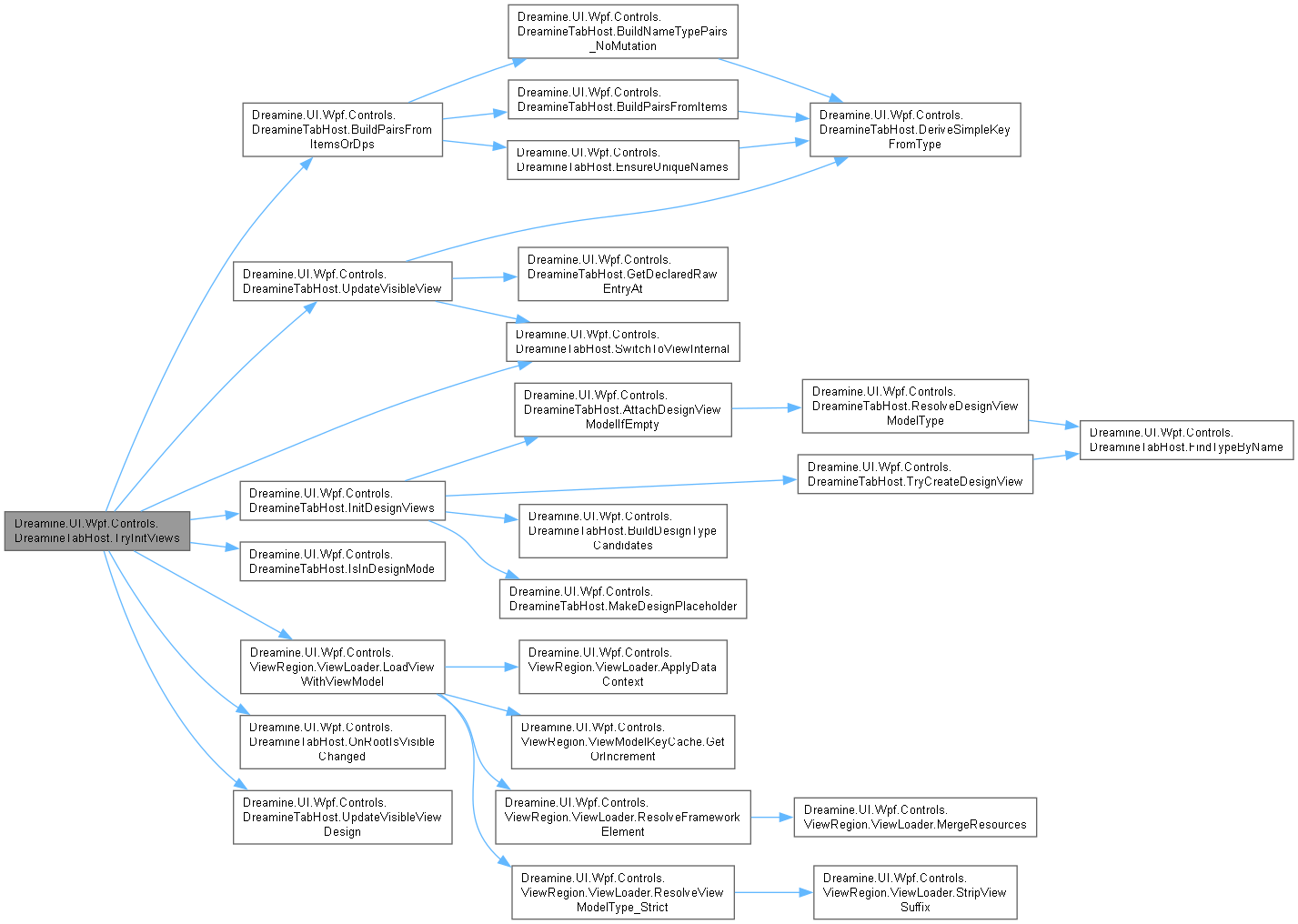
이 함수를 호출하는 함수들에 대한 그래프입니다.:
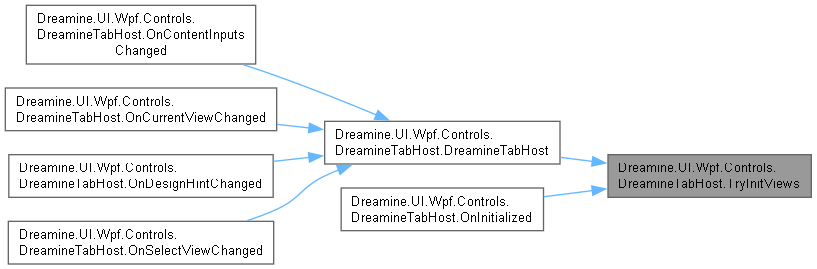
◆ UpdateVisibleView()
|
inlineprivate |
런타임에서 선택 인덱스를 안정된 키 순서로 변환해 뷰를 전환합니다.
DreamineControl.cs 파일의 759 번째 라인에서 정의되었습니다.
760 {
761 if (_viewSwitcher == null)
762 {
763 return;
764 }
765
766 // \brief Prefer ordered keys (stable), not Dictionary iteration.
767 string? targetKey = _order.ElementAtOrDefault(SelectView);
768
769 // \brief If missing, fallback: if the original declared entry is "*_Popup", map it.
770 if (string.IsNullOrWhiteSpace(targetKey))
771 {
772 var raw = GetDeclaredRawEntryAt(SelectView);
773 if (!string.IsNullOrWhiteSpace(raw) &&
774 raw.EndsWith("_Popup", StringComparison.OrdinalIgnoreCase))
775 {
776 string withoutSuffix = raw[..^6];
777 targetKey = DeriveSimpleKeyFromType(withoutSuffix);
778 }
779 }
780
781 if (string.IsNullOrWhiteSpace(targetKey))
782 {
783 return;
784 }
785
786 SwitchToViewInternal(targetKey);
787 }
다음을 참조함 : _order, _viewSwitcher, DeriveSimpleKeyFromType(), GetDeclaredRawEntryAt(), SelectView, SwitchToViewInternal().
다음에 의해서 참조됨 : ScheduleSwitch(), TryInitViews().
이 함수 내부에서 호출하는 함수들에 대한 그래프입니다.:
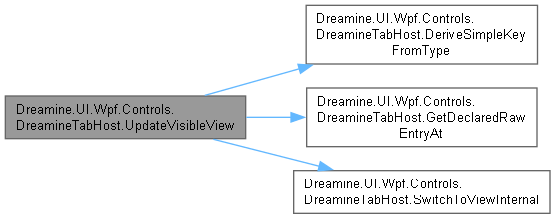
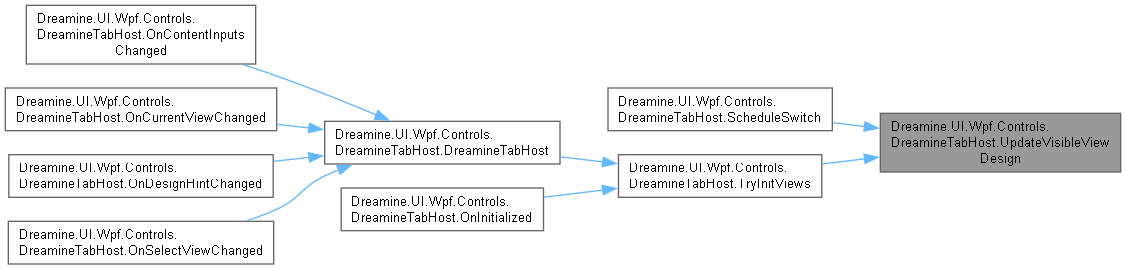
이 함수를 호출하는 함수들에 대한 그래프입니다.:
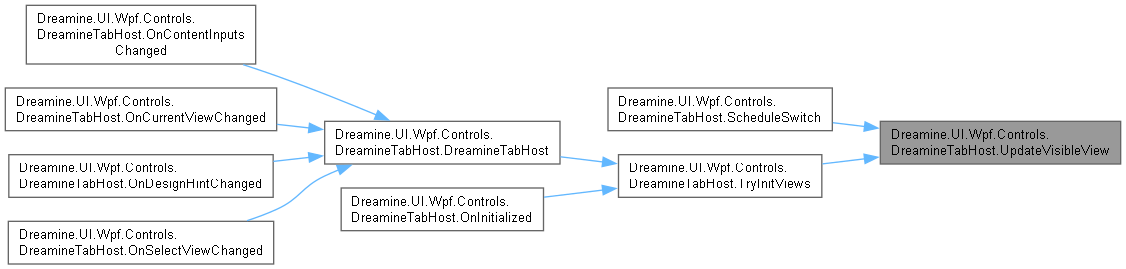
◆ UpdateVisibleViewDesign()
|
inlineprivate |
디자인 타임에 그리드의 단일 자식을 교체해 선택 뷰를 표시합니다.
DreamineControl.cs 파일의 797 번째 라인에서 정의되었습니다.
798 {
799 if (_containerGrid == null || _views.Count == 0)
800 {
801 return;
802 }
803
804 int newIndex = SelectView;
805 if (newIndex < 0) newIndex = 0;
806 if (newIndex >= _order.Count) newIndex = _order.Count - 1;
807
808 if (newIndex == _designLastIndex && _containerGrid.Children.Count == 1)
809 {
810 return;
811 }
812
813 var newKey = _order.ElementAtOrDefault(newIndex);
814 if (string.IsNullOrWhiteSpace(newKey))
815 {
816 return;
817 }
818
819 var newView = _views[newKey];
820
821 _containerGrid.Children.Clear();
822 _containerGrid.Children.Add(newView);
823
824 _designLastIndex = newIndex;
825 }
다음을 참조함 : _containerGrid, _designLastIndex, _order, _views, SelectView.
다음에 의해서 참조됨 : ScheduleSwitch(), TryInitViews().
이 함수를 호출하는 함수들에 대한 그래프입니다.:
멤버 데이터 문서화
◆ _containerGrid
|
private |
현재 뷰를 담는 시각적 그리드 호스트를 보관합니다.
DreamineControl.cs 파일의 135 번째 라인에서 정의되었습니다.
다음에 의해서 참조됨 : InitDesignViews(), TryInitViews(), UpdateVisibleViewDesign().
◆ _currentView
|
private |
마지막으로 활성화된 비팝업 루트 뷰를 보관합니다.
DreamineControl.cs 파일의 85 번째 라인에서 정의되었습니다.
다음에 의해서 참조됨 : SwitchToViewInternal(), TryInitViews().
◆ _designLastIndex
|
private |
디자인 타임에 마지막으로 선택된 인덱스를 보관합니다.
DreamineControl.cs 파일의 155 번째 라인에서 정의되었습니다.
다음에 의해서 참조됨 : InitDesignViews(), UpdateVisibleViewDesign().
◆ _isSwitchScheduled
|
private |
디스패처 틱에 뷰 전환이 예약되었는지 나타냅니다.
DreamineControl.cs 파일의 145 번째 라인에서 정의되었습니다.
다음에 의해서 참조됨 : ScheduleSwitch().
◆ _lastVisibilityState
|
private |
중복 콜백을 막기 위해 루트 뷰별 마지막 표시 상태를 보관합니다.
DreamineControl.cs 파일의 165 번째 라인에서 정의되었습니다.
다음에 의해서 참조됨 : OnRootIsVisibleChanged(), TryInitViews().
◆ _order
|
private |
인덱스 기반 전환에 사용할 논리 키 순서를 보관합니다.
DreamineControl.cs 파일의 105 번째 라인에서 정의되었습니다.
다음에 의해서 참조됨 : InitDesignViews(), TryInitViews(), UpdateVisibleView(), UpdateVisibleViewDesign().
◆ _popupManager
|
private |
◆ _views
|
private |
논리 뷰 이름별 런타임 또는 디자인 뷰를 보관합니다.
DreamineControl.cs 파일의 95 번째 라인에서 정의되었습니다.
다음에 의해서 참조됨 : InitDesignViews(), SwitchToViewInternal(), TryInitViews(), UpdateVisibleViewDesign().
◆ _viewSwitcher
|
private |
현재 뷰 및 팝업을 전환할 도우미를 보관합니다.
DreamineControl.cs 파일의 125 번째 라인에서 정의되었습니다.
다음에 의해서 참조됨 : SwitchToViewInternal(), TryInitViews(), UpdateVisibleView().
◆ AutoWireDesignViewModelProperty
|
static |
초기값:
=
DependencyProperty.Register(
nameof(AutoWireDesignViewModel),
typeof(bool),
typeof(DreamineTabHost),
DreamineTabHost()
Definition DreamineControl.cs:248
static void OnDesignHintChanged(DependencyObject d, DependencyPropertyChangedEventArgs e)
Definition DreamineControl.cs:558
bool AutoWireDesignViewModel
Definition DreamineControl.cs:493
디자인 뷰 모델 자동 연결 설정 종속성 속성을 식별합니다.
DreamineControl.cs 파일의 477 번째 라인에서 정의되었습니다.
◆ ContentListProperty
|
static |
초기값:
=
DependencyProperty.Register(
nameof(ContentList),
typeof(ObservableCollection<string>),
typeof(DreamineTabHost),
static void OnContentInputsChanged(DependencyObject d, DependencyPropertyChangedEventArgs e)
Definition DreamineControl.cs:526
ObservableCollection< string > ContentList
Definition DreamineControl.cs:288
논리 뷰 이름 목록 종속성 속성을 식별합니다.
DreamineControl.cs 파일의 269 번째 라인에서 정의되었습니다.
◆ ContentTypeListProperty
|
static |
초기값:
=
DependencyProperty.Register(
nameof(ContentTypeList),
typeof(ObservableCollection<string>),
typeof(DreamineTabHost),
ObservableCollection< string > ContentTypeList
Definition DreamineControl.cs:317
구체적인 뷰 형식 이름 목록 종속성 속성을 식별합니다.
DreamineControl.cs 파일의 301 번째 라인에서 정의되었습니다.
◆ CurrentViewProperty
|
static |
초기값:
=
DependencyProperty.Register(
nameof(CurrentView),
typeof(string),
typeof(DreamineTabHost),
static void OnCurrentViewChanged(DependencyObject d, DependencyPropertyChangedEventArgs e)
Definition DreamineControl.cs:590
string CurrentView
Definition DreamineControl.cs:346
현재 논리 뷰 이름 종속성 속성을 식별합니다.
DreamineControl.cs 파일의 330 번째 라인에서 정의되었습니다.
◆ DesignAssemblyHintProperty
|
static |
초기값:
=
DependencyProperty.Register(
nameof(DesignAssemblyHint),
typeof(string),
typeof(DreamineTabHost),
string DesignAssemblyHint
Definition DreamineControl.cs:464
디자인 타임 어셈블리 힌트 종속성 속성을 식별합니다.
DreamineControl.cs 파일의 448 번째 라인에서 정의되었습니다.
◆ DesignBaseNamespaceHintProperty
|
static |
초기값:
=
DependencyProperty.Register(
nameof(DesignBaseNamespaceHint),
typeof(string),
typeof(DreamineTabHost),
string DesignBaseNamespaceHint
Definition DreamineControl.cs:435
디자인 타임 기본 네임스페이스 힌트 종속성 속성을 식별합니다.
DreamineControl.cs 파일의 419 번째 라인에서 정의되었습니다.
◆ IsCurrentTargetPopupProperty
|
static |
초기값:
=
IsCurrentTargetPopupPropertyKey.DependencyProperty
static readonly DependencyPropertyKey IsCurrentTargetPopupPropertyKey
Definition DreamineControl.cs:206
대기 중인 대상의 팝업 여부를 나타내는 읽기 전용 종속성 속성을 식별합니다.
DreamineControl.cs 파일의 221 번째 라인에서 정의되었습니다.
◆ IsCurrentTargetPopupPropertyKey
|
staticprivate |
초기값:
=
DependencyProperty.RegisterReadOnly(
nameof(IsCurrentTargetPopup),
typeof(bool),
typeof(DreamineTabHost),
new PropertyMetadata(false))
bool IsCurrentTargetPopup
Definition DreamineControl.cs:233
현재 대상 팝업 여부의 읽기 전용 종속성 속성 키입니다.
DreamineControl.cs 파일의 206 번째 라인에서 정의되었습니다.
◆ SelectViewProperty
|
static |
초기값:
=
DependencyProperty.Register(
nameof(SelectView),
typeof(int),
typeof(DreamineTabHost),
new PropertyMetadata(0, OnSelectViewChanged))
static void OnSelectViewChanged(DependencyObject d, DependencyPropertyChangedEventArgs e)
Definition DreamineControl.cs:625
현재 뷰 인덱스 종속성 속성을 식별합니다.
DreamineControl.cs 파일의 359 번째 라인에서 정의되었습니다.
◆ TargetAnalyzedProperty
|
static |
초기값:
=
DependencyProperty.Register(
nameof(TargetAnalyzed),
typeof(bool),
typeof(DreamineTabHost),
new PropertyMetadata(false))
bool TargetAnalyzed
Definition DreamineControl.cs:193
전환 전에 대상의 팝업 여부를 계산할지 지정하는 종속성 속성을 식별합니다.
DreamineControl.cs 파일의 177 번째 라인에서 정의되었습니다.
◆ UseSingletonViewProperty
|
static |
초기값:
=
DependencyProperty.Register(
nameof(UseSingletonView),
typeof(bool),
typeof(DreamineTabHost),
bool UseSingletonView
Definition DreamineControl.cs:404
뷰 싱글톤 재사용 설정 종속성 속성을 식별합니다.
DreamineControl.cs 파일의 388 번째 라인에서 정의되었습니다.
속성 문서화
◆ AutoWireDesignViewModel
|
getset |
데이터 컨텍스트가 없을 때 디자인 뷰 모델을 자동 연결할지 가져오거나 설정합니다.
DreamineControl.cs 파일의 492 번째 라인에서 정의되었습니다.
493 {
494 get => (bool)GetValue(AutoWireDesignViewModelProperty);
495 set => SetValue(AutoWireDesignViewModelProperty, value);
496 }
다음에 의해서 참조됨 : InitDesignViews().
◆ ContentList
|
getset |
논리 뷰 또는 형식 이름 목록을 가져오거나 설정합니다.
Logical list of view names or type names. Details:
- Can contain short type names or fully qualified type names.
DreamineControl.cs 파일의 287 번째 라인에서 정의되었습니다.
288 {
289 get => (ObservableCollection<string>)GetValue(ContentListProperty);
290 set => SetValue(ContentListProperty, value);
291 }
다음에 의해서 참조됨 : BuildPairsFromItemsOrDps(), DreamineTabHost(), GetDeclaredRawEntryAt().
◆ ContentTypeList
|
getset |
ContentList와 인덱스로 대응하는 선택적 구체 뷰 형식 목록을 가져오거나 설정합니다.
DreamineControl.cs 파일의 316 번째 라인에서 정의되었습니다.
317 {
318 get => (ObservableCollection<string>)GetValue(ContentTypeListProperty);
319 set => SetValue(ContentTypeListProperty, value);
320 }
다음에 의해서 참조됨 : BuildPairsFromItemsOrDps().
◆ CurrentView
|
getset |
문자열 기반 탐색에 사용할 현재 논리 뷰 이름을 가져오거나 설정합니다.
DreamineControl.cs 파일의 345 번째 라인에서 정의되었습니다.
346 {
347 get => (string)GetValue(CurrentViewProperty);
348 set => SetValue(CurrentViewProperty, value);
349 }
다음에 의해서 참조됨 : TryInitViews().
◆ DesignAssemblyHint
|
getset |
디자인 타임 형식 확인용 어셈블리 힌트를 가져오거나 설정합니다.
DreamineControl.cs 파일의 463 번째 라인에서 정의되었습니다.
464 {
465 get => (string)GetValue(DesignAssemblyHintProperty);
466 set => SetValue(DesignAssemblyHintProperty, value);
467 }
다음에 의해서 참조됨 : InitDesignViews().
◆ DesignBaseNamespaceHint
|
getset |
디자인 타임 짧은 형식 이름 확인용 기본 네임스페이스를 가져오거나 설정합니다.
DreamineControl.cs 파일의 434 번째 라인에서 정의되었습니다.
435 {
436 get => (string)GetValue(DesignBaseNamespaceHintProperty);
437 set => SetValue(DesignBaseNamespaceHintProperty, value);
438 }
다음에 의해서 참조됨 : InitDesignViews().
◆ IsCurrentTargetPopup
|
getprivate set |
대기 중인 전환 대상이 팝업인지 가져옵니다.
DreamineControl.cs 파일의 232 번째 라인에서 정의되었습니다.
233 {
234 get => (bool)GetValue(IsCurrentTargetPopupProperty);
235 private set => SetValue(IsCurrentTargetPopupPropertyKey, value);
236 }
다음에 의해서 참조됨 : SwitchToViewInternal().
◆ Items
|
get |
XAML 자식으로 선언된 탭 항목 모음을 가져옵니다.
XAML child items collection. Details:
- XAML children <DreamineTabHostItem .../> are added here automatically.
- This is NOT a DependencyProperty intentionally (to keep parsing simple and stable).
DreamineControl.cs 파일의 75 번째 라인에서 정의되었습니다.
75{ get; } = new ObservableCollection<DreamineTabHostItem>();
다음에 의해서 참조됨 : BuildPairsFromItems(), GetDeclaredRawEntryAt().
◆ SelectView
|
getset |
0부터 시작하는 현재 뷰 인덱스를 가져오거나 설정합니다.
DreamineControl.cs 파일의 374 번째 라인에서 정의되었습니다.
375 {
376 get => (int)GetValue(SelectViewProperty);
377 set => SetValue(SelectViewProperty, value);
378 }
다음에 의해서 참조됨 : InitDesignViews(), UpdateVisibleView(), UpdateVisibleViewDesign().
◆ TargetAnalyzed
|
getset |
전환 전에 대상의 팝업 여부를 계산하고 노출할지 가져오거나 설정합니다.
DreamineControl.cs 파일의 192 번째 라인에서 정의되었습니다.
193 {
194 get => (bool)GetValue(TargetAnalyzedProperty);
195 set => SetValue(TargetAnalyzedProperty, value);
196 }
다음에 의해서 참조됨 : SwitchToViewInternal().
◆ UseSingletonView
|
getset |
뷰를 싱글톤으로 재사용할지 가져오거나 설정합니다.
DreamineControl.cs 파일의 403 번째 라인에서 정의되었습니다.
404 {
405 get => (bool)GetValue(UseSingletonViewProperty);
406 set => SetValue(UseSingletonViewProperty, value);
407 }
다음에 의해서 참조됨 : TryInitViews().
이 클래스에 대한 문서화 페이지는 다음의 파일로부터 생성되었습니다.: