로딩중...
검색중...
일치하는것 없음
Dreamine.UI.WinForms.DreamineDrawHelper 클래스 참조
정적 Public 멤버 함수 | |
| static GraphicsPath | RoundedRect (RectangleF r, float radius) |
| static GraphicsPath | RoundedRect (Rectangle r, float radius) |
| static void | FillRoundedRect (Graphics g, Brush fill, Pen? border, Rectangle rect, float radius) |
| static void | FillRoundedGradient (Graphics g, Color top, Color bottom, Pen? border, Rectangle rect, float radius) |
| static void | DrawShineOverlay (Graphics g, Color shineColor, Rectangle rect, float radius) |
| static void | DrawCenteredText (Graphics g, string text, Font font, Color color, Rectangle rect) |
| static Color | Blend (Color base_, Color overlay, float alpha) |
상세한 설명
Dreamine WinForms 컨트롤의 둥근 도형, 그라데이션, 텍스트 및 색상 합성을 지원합니다.
DreamineDrawHelper.cs 파일의 14 번째 라인에서 정의되었습니다.
멤버 함수 문서화
◆ Blend()
|
inlinestatic |
지정한 보간 비율로 기준 색상과 오버레이 색상을 혼합합니다.
- 매개변수
-
base_ 혼합의 시작 색상입니다. overlay 혼합할 오버레이 색상입니다. alpha 오버레이 보간 비율입니다. 일반적인 범위는 0부터 1까지입니다.
- 반환값
- 각 RGB 채널을 바이트 범위로 제한한 불투명 혼합 색상입니다.
DreamineDrawHelper.cs 파일의 373 번째 라인에서 정의되었습니다.
374 {
375 int r = (int)(base_.R + (overlay.R - base_.R) * alpha);
376 int g_ = (int)(base_.G + (overlay.G - base_.G) * alpha);
377 int b = (int)(base_.B + (overlay.B - base_.B) * alpha);
378 return Color.FromArgb(255,
379 Math.Clamp(r, 0, 255),
380 Math.Clamp(g_, 0, 255),
381 Math.Clamp(b, 0, 255));
382 }
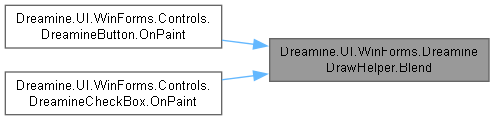
다음에 의해서 참조됨 : Dreamine.UI.WinForms.Controls.DreamineButton.OnPaint(), Dreamine.UI.WinForms.Controls.DreamineCheckBox.OnPaint().
이 함수를 호출하는 함수들에 대한 그래프입니다.:
◆ DrawCenteredText()
|
inlinestatic |
지정한 사각형 안에 텍스트를 가로 및 세로 중앙 정렬로 그립니다.
- 매개변수
-
g 그리기 대상 그래픽 컨텍스트입니다. text 그릴 텍스트입니다. font 텍스트 글꼴입니다. color 텍스트 색상입니다. rect 텍스트 배치 영역입니다.
DreamineDrawHelper.cs 파일의 320 번째 라인에서 정의되었습니다.
321 {
322 using var brush = new SolidBrush(color);
323 var sf = new StringFormat
324 {
325 Alignment = StringAlignment.Center,
326 LineAlignment = StringAlignment.Center,
327 Trimming = StringTrimming.EllipsisCharacter
328 };
329 g.TextRenderingHint = System.Drawing.Text.TextRenderingHint.ClearTypeGridFit;
330 g.DrawString(text, font, brush, rect, sf);
331 }
다음에 의해서 참조됨 : Dreamine.UI.WinForms.Controls.DreamineButton.OnPaint().
이 함수를 호출하는 함수들에 대한 그래프입니다.:

◆ DrawShineOverlay()
|
inlinestatic |
사각형 상단 절반에 투명 광택 그라데이션을 그립니다.
- 매개변수
-
g 그리기 대상 그래픽 컨텍스트입니다. shineColor 광택의 기준 색상입니다. rect 광택을 적용할 사각형입니다. radius 광택 경로의 기준 모서리 반지름입니다.
DreamineDrawHelper.cs 파일의 260 번째 라인에서 정의되었습니다.
261 {
262 if (rect.Width <= 0 || rect.Height <= 0) return;
263 var shineRect = new Rectangle(rect.X + 1, rect.Y + 1, rect.Width - 2, rect.Height / 2);
264 if (shineRect.Width <= 0 || shineRect.Height <= 0) return;
265 using var path = RoundedRect(shineRect, radius * 0.7f);
266 var c1 = Color.FromArgb(80, shineColor);
267 var c2 = Color.FromArgb(0, shineColor);
268 using var brush = new LinearGradientBrush(shineRect, c1, c2, LinearGradientMode.Vertical);
269 g.FillPath(brush, path);
270 }
다음을 참조함 : RoundedRect().
다음에 의해서 참조됨 : Dreamine.UI.WinForms.Controls.DreamineButton.OnPaint().
이 함수 내부에서 호출하는 함수들에 대한 그래프입니다.:

이 함수를 호출하는 함수들에 대한 그래프입니다.:

◆ FillRoundedGradient()
|
inlinestatic |
둥근 사각형을 위에서 아래 방향의 색상 그라데이션으로 채웁니다.
- 매개변수
-
g 그리기 대상 그래픽 컨텍스트입니다. top 그라데이션의 위쪽 색상입니다. bottom 그라데이션의 아래쪽 색상입니다. border 테두리 펜이거나 생략하려면 null입니다.rect 그릴 외곽 사각형입니다. radius 모서리 반지름입니다.
DreamineDrawHelper.cs 파일의 209 번째 라인에서 정의되었습니다.
211 {
212 if (rect.Width <= 0 || rect.Height <= 0) return;
213 g.SmoothingMode = SmoothingMode.AntiAlias;
214 using var path = RoundedRect(rect, radius);
215 using var brush = new LinearGradientBrush(rect, top, bottom, LinearGradientMode.Vertical);
216 g.FillPath(brush, path);
217 if (border != null) g.DrawPath(border, path);
218 }
다음을 참조함 : RoundedRect().
다음에 의해서 참조됨 : Dreamine.UI.WinForms.Controls.DreamineButton.OnPaint().
이 함수 내부에서 호출하는 함수들에 대한 그래프입니다.:

이 함수를 호출하는 함수들에 대한 그래프입니다.:

◆ FillRoundedRect()
|
inlinestatic |
둥근 사각형을 단색으로 채우고 선택적 테두리를 그립니다.
- 매개변수
-
g 그리기 대상 그래픽 컨텍스트입니다. fill 내부를 채울 브러시입니다. border 테두리 펜이거나 테두리를 생략하려면 null입니다.rect 그릴 외곽 사각형입니다. radius 모서리 반지름입니다.
DreamineDrawHelper.cs 파일의 144 번째 라인에서 정의되었습니다.
146 {
147 g.SmoothingMode = SmoothingMode.AntiAlias;
148 using var path = RoundedRect(rect, radius);
149 g.FillPath(fill, path);
150 if (border != null) g.DrawPath(border, path);
151 }
다음을 참조함 : RoundedRect().
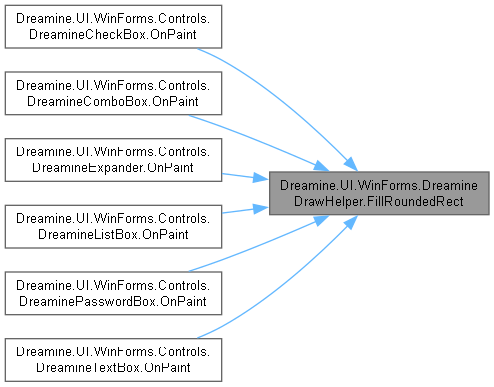
다음에 의해서 참조됨 : Dreamine.UI.WinForms.Controls.DreamineCheckBox.OnPaint(), Dreamine.UI.WinForms.Controls.DreamineComboBox.OnPaint(), Dreamine.UI.WinForms.Controls.DreamineExpander.OnPaint(), Dreamine.UI.WinForms.Controls.DreamineListBox.OnPaint(), Dreamine.UI.WinForms.Controls.DreaminePasswordBox.OnPaint(), Dreamine.UI.WinForms.Controls.DreamineTextBox.OnPaint().
이 함수 내부에서 호출하는 함수들에 대한 그래프입니다.:

이 함수를 호출하는 함수들에 대한 그래프입니다.:
◆ RoundedRect() [1/2]
|
inlinestatic |
정수 좌표 사각형과 반지름으로 둥근 사각형 경로를 만듭니다.
- 매개변수
-
r 경로의 외곽 사각형입니다. radius 모서리 반지름입니다.
- 반환값
- 호출자가 해제해야 하는 새 그래픽 경로입니다.
DreamineDrawHelper.cs 파일의 93 번째 라인에서 정의되었습니다.
94 => RoundedRect((RectangleF)r, radius);
◆ RoundedRect() [2/2]
|
inlinestatic |
지정한 사각형과 반지름으로 둥근 사각형 경로를 만듭니다.
- 매개변수
-
r 경로의 외곽 사각형입니다. radius 모서리 반지름입니다. 0 이하는 직각 사각형을 만듭니다.
- 반환값
- 호출자가 해제해야 하는 새 그래픽 경로입니다.
DreamineDrawHelper.cs 파일의 48 번째 라인에서 정의되었습니다.
49 {
50 if (radius <= 0) { var p = new GraphicsPath(); p.AddRectangle(r); return p; }
51 float d = radius * 2f;
52 var path = new GraphicsPath();
53 path.AddArc(r.X, r.Y, d, d, 180, 90);
54 path.AddArc(r.Right - d, r.Y, d, d, 270, 90);
55 path.AddArc(r.Right - d, r.Bottom - d, d, d, 0, 90);
56 path.AddArc(r.X, r.Bottom - d, d, d, 90, 90);
57 path.CloseFigure();
58 return path;
59 }
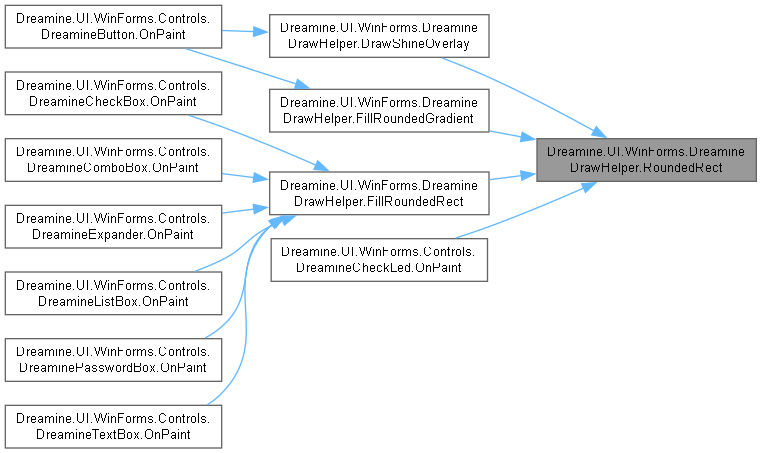
다음에 의해서 참조됨 : DrawShineOverlay(), FillRoundedGradient(), FillRoundedRect(), Dreamine.UI.WinForms.Controls.DreamineCheckLed.OnPaint().
이 함수를 호출하는 함수들에 대한 그래프입니다.:
이 클래스에 대한 문서화 페이지는 다음의 파일로부터 생성되었습니다.: