로딩중...
검색중...
일치하는것 없음
Dreamine.UI.WinForms.Controls.DreamineTextBox 클래스 참조
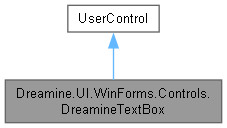
Dreamine.UI.WinForms.Controls.DreamineTextBox에 대한 상속 다이어그램 :
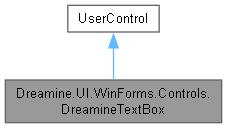
Dreamine.UI.WinForms.Controls.DreamineTextBox에 대한 협력 다이어그램:
Public 멤버 함수 | |
| void | InsertText (string text) |
| void | ReplaceTextTail (int replaceCount, string text) |
| void | Backspace () |
| string | GetTextBeforeCaret () |
| DreamineTextBox () | |
Protected 멤버 함수 | |
| override void | OnLayout (LayoutEventArgs e) |
| override void | OnPaint (PaintEventArgs e) |
속성 | |
| new string | Text [get, set] |
| string | Hint [get, set] |
| bool | IsReadOnly [get, set] |
| int | SelectionStart [get, set] |
| int | SelectionLength [get, set] |
| IntPtr | TextBoxHandle [get] |
| override Color | ForeColor [get, set] |
| new Font | Font [get, set] |
| override Padding | DefaultPadding [get] |
| override Size | DefaultSize [get] |
이벤트 | |
| new? EventHandler | TextChanged |
Private 멤버 함수 | |
| static IntPtr | SendMessage (IntPtr hWnd, int msg, IntPtr wParam, string lParam) |
Private 속성 | |
| readonly TextBox | _inner |
| bool | _isFocused |
| string | _hint = string.Empty |
정적 Private 속성 | |
| const int | EM_SETCUEBANNER = 0x1501 |
상세한 설명
힌트, 읽기 전용 상태, 선택 범위 편집 및 포커스 테두리를 제공하는 WinForms 텍스트 입력 래퍼입니다.
DreamineTextBox.cs 파일의 15 번째 라인에서 정의되었습니다.
생성자 & 소멸자 문서화
◆ DreamineTextBox()
|
inline |
내부 텍스트 상자, 힌트 처리, 이벤트 전달 및 Dreamine 테마 기본값을 구성합니다.
DreamineTextBox.cs 파일의 365 번째 라인에서 정의되었습니다.
366 {
367 // _inner must be created first — SetStyle and property setters below
368 // can trigger OnLayout / ForeColor / Font overrides before the field is set.
369 _inner = new TextBox
370 {
371 BorderStyle = BorderStyle.None,
372 BackColor = DreamineTheme.InputBackground,
373 ForeColor = DreamineTheme.TextPrimary,
374 Font = new Font("Segoe UI", 10f, FontStyle.Regular, GraphicsUnit.Point),
375 Dock = DockStyle.Fill,
376 Margin = Padding.Empty,
377 };
378
379 _inner.GotFocus += (_, _) => { _isFocused = true; Invalidate(); };
380 _inner.LostFocus += (_, _) => { _isFocused = false; Invalidate(); };
381 _inner.TextChanged += (s, e) => TextChanged?.Invoke(this, e);
382 _inner.HandleCreated += (_, _) =>
383 {
384 if (!string.IsNullOrEmpty(_hint))
385 SendMessage(_inner.Handle, EM_SETCUEBANNER, (IntPtr)1, _hint);
386 };
387
388 SetStyle(
389 ControlStyles.AllPaintingInWmPaint |
390 ControlStyles.UserPaint |
391 ControlStyles.DoubleBuffer |
392 ControlStyles.ResizeRedraw, true);
393
394 BackColor = DreamineTheme.InputBackground;
395 ForeColor = DreamineTheme.TextPrimary;
396 Font = _inner.Font;
397 Height = 36;
398 Padding = new Padding(2);
399
400 Controls.Add(_inner);
401 }
다음을 참조함 : _hint, _inner, _isFocused, EM_SETCUEBANNER, Font, ForeColor, Dreamine.UI.WinForms.DreamineTheme.InputBackground, SendMessage(), TextChanged, Dreamine.UI.WinForms.DreamineTheme.TextPrimary.
이 함수 내부에서 호출하는 함수들에 대한 그래프입니다.:

멤버 함수 문서화
◆ Backspace()
|
inline |
선택 영역 또는 캐럿 앞의 문자 하나를 삭제합니다.
DreamineTextBox.cs 파일의 311 번째 라인에서 정의되었습니다.
312 {
313 if (_inner.ReadOnly)
314 return;
315
316 var currentText = _inner.Text ?? string.Empty;
317 var selectionStart = Math.Clamp(_inner.SelectionStart, 0, currentText.Length);
318 var selectionLength = Math.Clamp(_inner.SelectionLength, 0, currentText.Length - selectionStart);
319
320 if (selectionLength > 0)
321 {
322 _inner.SelectedText = string.Empty;
323 }
324 else if (selectionStart > 0)
325 {
326 _inner.Text = currentText.Remove(selectionStart - 1, 1);
327 _inner.SelectionStart = selectionStart - 1;
328 }
329
330 _inner.Focus();
331 }
다음을 참조함 : _inner.
◆ GetTextBeforeCaret()
|
inline |
내부 텍스트 상자에서 캐럿 앞의 텍스트를 가져옵니다.
- 반환값
- 캐럿 앞의 텍스트입니다.
DreamineTextBox.cs 파일의 349 번째 라인에서 정의되었습니다.
350 {
351 var currentText = _inner.Text ?? string.Empty;
352 var caret = Math.Clamp(_inner.SelectionStart, 0, currentText.Length);
353 return currentText[..caret];
354 }
다음을 참조함 : _inner.
◆ InsertText()
|
inline |
읽기 전용이 아니면 현재 선택 위치에 텍스트를 삽입하고 입력 포커스를 복원합니다.
- 매개변수
-
text 삽입할 텍스트입니다.
DreamineTextBox.cs 파일의 245 번째 라인에서 정의되었습니다.
246 {
247 if (_inner.ReadOnly)
248 return;
249
250 _inner.SelectedText = text;
251 _inner.Focus();
252 }
다음을 참조함 : _inner.
◆ OnLayout()
|
inlineprotected |
내부 텍스트 상자를 래퍼의 현재 크기에 맞춰 배치합니다.
- 매개변수
-
e 레이아웃 이벤트 인수입니다.
DreamineTextBox.cs 파일의 429 번째 라인에서 정의되었습니다.
430 {
431 base.OnLayout(e);
432 if (_inner == null) return;
433 _inner.SetBounds(6, (Height - _inner.PreferredHeight) / 2,
434 Width - 12, _inner.PreferredHeight);
435 }
다음을 참조함 : _inner.
◆ OnPaint()
|
inlineprotected |
현재 포커스와 활성 상태에 맞게 둥근 배경과 테두리를 그립니다.
- 매개변수
-
e 컨트롤 그리기 이벤트 인수입니다.
DreamineTextBox.cs 파일의 453 번째 라인에서 정의되었습니다.
454 {
455 var g = e.Graphics;
456 var rect = new Rectangle(0, 0, Width - 1, Height - 1);
457
458 using var bgBrush = new SolidBrush(BackColor);
459 var borderColor = _isFocused ? DreamineTheme.BorderFocus : DreamineTheme.BorderNormal;
460 if (!Enabled) borderColor = Color.FromArgb(80, borderColor);
461 using var pen = new Pen(borderColor, 1.5f);
462 DreamineDrawHelper.FillRoundedRect(g, bgBrush, pen, rect, DreamineTheme.CornerRadiusSmall);
463 }
다음을 참조함 : _isFocused, Dreamine.UI.WinForms.DreamineTheme.BorderFocus, Dreamine.UI.WinForms.DreamineTheme.BorderNormal, Dreamine.UI.WinForms.DreamineTheme.CornerRadiusSmall, Dreamine.UI.WinForms.DreamineDrawHelper.FillRoundedRect().
이 함수 내부에서 호출하는 함수들에 대한 그래프입니다.:

◆ ReplaceTextTail()
|
inline |
선택 영역을 교체하거나 캐럿 앞의 지정 문자 수를 새 텍스트로 교체합니다.
- 매개변수
-
replaceCount 선택 영역이 없을 때 캐럿 앞에서 교체할 문자 수입니다. text 교체 위치에 삽입할 텍스트입니다.
DreamineTextBox.cs 파일의 278 번째 라인에서 정의되었습니다.
279 {
280 if (_inner.ReadOnly)
281 return;
282
283 var currentText = _inner.Text ?? string.Empty;
284 var selectionStart = Math.Clamp(_inner.SelectionStart, 0, currentText.Length);
285 var selectionLength = Math.Clamp(_inner.SelectionLength, 0, currentText.Length - selectionStart);
286
287 if (selectionLength > 0)
288 {
289 _inner.SelectedText = text;
290 }
291 else
292 {
293 var removeStart = Math.Max(0, selectionStart - replaceCount);
294 removeStart = Math.Min(removeStart, currentText.Length);
295 var removeLength = Math.Clamp(selectionStart - removeStart, 0, currentText.Length - removeStart);
296 _inner.Text = currentText.Remove(removeStart, removeLength).Insert(removeStart, text);
297 _inner.SelectionStart = removeStart + text.Length;
298 }
299
300 _inner.Focus();
301 }
다음을 참조함 : _inner.
◆ SendMessage()
|
private |
Win32 메시지를 내부 텍스트 상자에 보내 힌트 배너를 설정합니다.
- 매개변수
-
hWnd 대상 창 핸들입니다. msg 전송할 Win32 메시지 식별자입니다. wParam 메시지의 정수 포인터 매개변수입니다. lParam 메시지에 전달할 문자열입니다.
- 반환값
- 메시지 처리 결과입니다.
다음에 의해서 참조됨 : DreamineTextBox().
이 함수를 호출하는 함수들에 대한 그래프입니다.:

멤버 데이터 문서화
◆ _hint
|
private |
◆ _inner
|
private |
inner 값을 보관합니다.
DreamineTextBox.cs 파일의 85 번째 라인에서 정의되었습니다.
다음에 의해서 참조됨 : Backspace(), DreamineTextBox(), GetTextBeforeCaret(), InsertText(), OnLayout(), ReplaceTextTail().
◆ _isFocused
|
private |
is Focused 값을 보관합니다.
DreamineTextBox.cs 파일의 94 번째 라인에서 정의되었습니다.
다음에 의해서 참조됨 : DreamineTextBox(), OnPaint().
◆ EM_SETCUEBANNER
|
staticprivate |
EM SETCUEBANNER 값을 보관합니다.
DreamineTextBox.cs 파일의 25 번째 라인에서 정의되었습니다.
다음에 의해서 참조됨 : DreamineTextBox().
속성 문서화
◆ DefaultPadding
|
getprotected |
텍스트 입력 래퍼의 기본 내부 여백을 가져옵니다.
DreamineTextBox.cs 파일의 411 번째 라인에서 정의되었습니다.
◆ DefaultSize
|
getprotected |
텍스트 입력 래퍼의 기본 크기를 가져옵니다.
DreamineTextBox.cs 파일의 473 번째 라인에서 정의되었습니다.
◆ Font
|
getset |
래퍼와 내부 텍스트 상자의 글꼴을 가져오거나 설정합니다.
DreamineTextBox.cs 파일의 213 번째 라인에서 정의되었습니다.
214 {
215 get => base.Font;
216 set { base.Font = value; if (_inner != null) _inner.Font = value; }
217 }
다음에 의해서 참조됨 : DreamineTextBox().
◆ ForeColor
|
getset |
래퍼와 내부 텍스트 상자의 전경색을 가져오거나 설정합니다.
DreamineTextBox.cs 파일의 199 번째 라인에서 정의되었습니다.
200 {
201 get => base.ForeColor;
202 set { base.ForeColor = value; if (_inner != null) _inner.ForeColor = value; }
203 }
다음에 의해서 참조됨 : DreamineTextBox().
◆ Hint
|
getset |
입력 전 표시할 네이티브 힌트 배너를 가져오거나 설정합니다.
DreamineTextBox.cs 파일의 128 번째 라인에서 정의되었습니다.
129 {
130 get => _hint;
131 set
132 {
133 _hint = value;
134 if (_inner.IsHandleCreated)
135 SendMessage(_inner.Handle, EM_SETCUEBANNER, (IntPtr)1, _hint);
136 }
137 }
◆ IsReadOnly
|
getset |
사용자가 텍스트를 편집할 수 없는지 여부를 가져오거나 설정합니다.
DreamineTextBox.cs 파일의 147 번째 라인에서 정의되었습니다.
148 {
149 get => _inner.ReadOnly;
150 set { _inner.ReadOnly = value; Invalidate(); }
151 }
◆ SelectionLength
|
getset |
선택된 문자 수를 가져오거나 설정합니다.
DreamineTextBox.cs 파일의 175 번째 라인에서 정의되었습니다.
176 {
177 get => _inner.SelectionLength;
178 set => _inner.SelectionLength = Math.Clamp(value, 0, _inner.TextLength - _inner.SelectionStart);
179 }
◆ SelectionStart
|
getset |
선택 범위 또는 캐럿의 시작 인덱스를 가져오거나 설정합니다.
DreamineTextBox.cs 파일의 161 번째 라인에서 정의되었습니다.
162 {
163 get => _inner.SelectionStart;
164 set => _inner.SelectionStart = Math.Clamp(value, 0, _inner.TextLength);
165 }
◆ Text
|
getset |
내부 텍스트 상자의 현재 텍스트를 가져오거나 설정합니다.
DreamineTextBox.cs 파일의 105 번째 라인에서 정의되었습니다.
106 {
107 get => _inner.Text;
108 set => _inner.Text = value;
109 }
◆ TextBoxHandle
|
get |
내부 네이티브 텍스트 상자 창 핸들을 가져옵니다.
DreamineTextBox.cs 파일의 189 번째 라인에서 정의되었습니다.
이벤트 문서화
◆ TextChanged
| new? EventHandler Dreamine.UI.WinForms.Controls.DreamineTextBox.TextChanged |
이 클래스에 대한 문서화 페이지는 다음의 파일로부터 생성되었습니다.: