로딩중...
검색중...
일치하는것 없음
Dreamine.UI.WinForms.Controls.DreamineLightBulb 클래스 참조
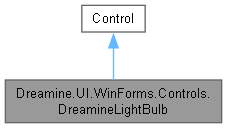
Dreamine.UI.WinForms.Controls.DreamineLightBulb에 대한 상속 다이어그램 :
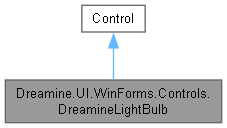
Dreamine.UI.WinForms.Controls.DreamineLightBulb에 대한 협력 다이어그램:
Public 멤버 함수 | |
| DreamineLightBulb () | |
Protected 멤버 함수 | |
| override void | OnPaint (PaintEventArgs e) |
속성 | |
| bool | IsOn [get, set] |
| float | Diameter [get, set] |
정적 Private 멤버 함수 | |
| static GraphicsPath | CreateGlassPath (float cx, float top, float d) |
| static void | FillRib (Graphics g, Brush brush, float cx, float y, float width) |
Private 속성 | |
| bool | _isOn |
| float | _diameter = 96f |
상세한 설명
플랫폼 간 공통 API로 상태를 직접 그리는 WinForms 전구 표시 컨트롤입니다.
DreamineLightBulb.cs 파일의 13 번째 라인에서 정의되었습니다.
생성자 & 소멸자 문서화
◆ DreamineLightBulb()
|
inline |
사용자 지정 그리기 스타일과 전구의 기본 크기를 구성합니다.
DreamineLightBulb.cs 파일의 70 번째 라인에서 정의되었습니다.
71 {
72 SetStyle(
73 ControlStyles.AllPaintingInWmPaint |
74 ControlStyles.UserPaint |
75 ControlStyles.DoubleBuffer |
76 ControlStyles.ResizeRedraw |
77 ControlStyles.SupportsTransparentBackColor, true);
78
79 BackColor = Color.Transparent;
80 Size = new Size(150, 180);
81 }
멤버 함수 문서화
◆ CreateGlassPath()
|
inlinestaticprivate |
전구 유리 외곽선을 나타내는 그래픽 경로를 만듭니다.
- 매개변수
-
cx 전구 중심의 X 좌표입니다. top 전구 위쪽 Y 좌표입니다. d 기준 지름입니다.
- 반환값
- 호출자가 해제해야 하는 닫힌 전구 유리 경로입니다.
DreamineLightBulb.cs 파일의 189 번째 라인에서 정의되었습니다.
190 {
191 var path = new GraphicsPath();
192 path.StartFigure();
193 path.AddBezier(cx, top + d * .02f, cx - d * .36f, top + d * .02f, cx - d * .52f, top + d * .27f, cx - d * .52f, top + d * .54f);
194 path.AddBezier(cx - d * .52f, top + d * .54f, cx - d * .52f, top + d * .74f, cx - d * .35f, top + d * .87f, cx - d * .25f, top + d * .96f);
195 path.AddLine(cx - d * .25f, top + d * .96f, cx + d * .25f, top + d * .96f);
196 path.AddBezier(cx + d * .25f, top + d * .96f, cx + d * .35f, top + d * .87f, cx + d * .52f, top + d * .74f, cx + d * .52f, top + d * .54f);
197 path.AddBezier(cx + d * .52f, top + d * .54f, cx + d * .52f, top + d * .27f, cx + d * .36f, top + d * .02f, cx, top + d * .02f);
198 path.CloseFigure();
199 return path;
200 }
다음에 의해서 참조됨 : OnPaint().
이 함수를 호출하는 함수들에 대한 그래프입니다.:

◆ FillRib()
|
inlinestaticprivate |
전구 소켓의 가로 홈 하나를 채웁니다.
- 매개변수
-
g 홈을 그릴 그래픽 컨텍스트입니다. brush 홈을 채울 브러시입니다. cx 홈 중심의 X 좌표입니다. y 홈의 Y 좌표입니다. width 홈 너비입니다.
DreamineLightBulb.cs 파일의 250 번째 라인에서 정의되었습니다.
251 {
252 g.FillRectangle(brush, cx - width / 2f, y, width, 7f);
253 }
다음에 의해서 참조됨 : OnPaint().
이 함수를 호출하는 함수들에 대한 그래프입니다.:

◆ OnPaint()
|
inlineprotected |
현재 켜짐 상태와 컨트롤 크기에 맞게 전구 유리, 필라멘트 및 소켓을 그립니다.
- 매개변수
-
e 컨트롤 그리기 이벤트 인수입니다.
DreamineLightBulb.cs 파일의 99 번째 라인에서 정의되었습니다.
100 {
101 base.OnPaint(e);
102
103 var g = e.Graphics;
104 g.SmoothingMode = SmoothingMode.AntiAlias;
105
106 var d = Math.Min(_diameter, Math.Min(Width * .85f, Height * .62f));
107 var cx = Width / 2f;
108 var top = 4f;
109
110 var glassFill = _isOn ? Color.FromArgb(255, 214, 102) : Color.FromArgb(42, 100, 116, 139);
111 var glassStroke = _isOn ? Color.FromArgb(255, 196, 0) : Color.FromArgb(102, 117, 139);
112 var filament = _isOn ? Color.FromArgb(122, 75, 0) : Color.FromArgb(100, 116, 139);
113 var baseFill = Color.FromArgb(112, 128, 152);
114 using var glassPath = CreateGlassPath(cx, top, d);
115
116 if (_isOn)
117 {
118 using var glow = new SolidBrush(Color.FromArgb(70, 255, 214, 102));
119 g.FillEllipse(glow, cx - d * .62f, top + d * .50f - d * .62f, d * 1.24f, d * 1.24f);
120 }
121
122 using var fill = new SolidBrush(glassFill);
123 using var stroke = new Pen(glassStroke, 4);
124 g.FillPath(fill, glassPath);
125 g.DrawPath(stroke, glassPath);
126
127 using var filamentPen = new Pen(filament, 4)
128 {
129 StartCap = LineCap.Round,
130 EndCap = LineCap.Round
131 };
132 g.DrawBezier(filamentPen, cx - d * .22f, top + d * .56f, cx - d * .12f, top + d * .38f, cx - d * .02f, top + d * .72f, cx + d * .10f, top + d * .53f);
133 g.DrawBezier(filamentPen, cx + d * .10f, top + d * .53f, cx + d * .16f, top + d * .44f, cx + d * .21f, top + d * .49f, cx + d * .25f, top + d * .55f);
134
135 var neckTop = top + d * .92f;
136 using var baseBrush = new SolidBrush(baseFill);
137 g.FillPolygon(baseBrush, new[]
138 {
139 new PointF(cx - d * .30f, neckTop),
140 new PointF(cx + d * .30f, neckTop),
141 new PointF(cx + d * .20f, neckTop + d * .26f),
142 new PointF(cx - d * .20f, neckTop + d * .26f)
143 });
144 FillRib(g, baseBrush, cx, neckTop + d * .10f, d * .44f);
145 FillRib(g, baseBrush, cx, neckTop + d * .22f, d * .36f);
146 FillRib(g, baseBrush, cx, neckTop + d * .34f, d * .27f);
147 }
다음을 참조함 : _diameter, _isOn, CreateGlassPath(), FillRib().
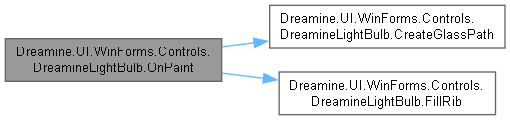
이 함수 내부에서 호출하는 함수들에 대한 그래프입니다.:
멤버 데이터 문서화
◆ _diameter
|
private |
◆ _isOn
|
private |
속성 문서화
◆ Diameter
|
getset |
최소 32픽셀로 제한되는 전구 유리 기준 지름을 가져오거나 설정합니다.
DreamineLightBulb.cs 파일의 56 번째 라인에서 정의되었습니다.
57 {
58 get => _diameter;
59 set { _diameter = Math.Max(32f, value); Invalidate(); }
60 }
◆ IsOn
|
getset |
전구가 켜져 있는지 여부를 가져오거나 설정합니다.
DreamineLightBulb.cs 파일의 42 번째 라인에서 정의되었습니다.
43 {
44 get => _isOn;
45 set { _isOn = value; Invalidate(); }
46 }
이 클래스에 대한 문서화 페이지는 다음의 파일로부터 생성되었습니다.: