로딩중...
검색중...
일치하는것 없음
Dreamine.UI.WinForms.Controls.DreamineComboBox 클래스 참조
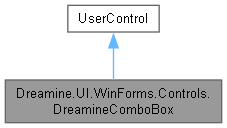
Dreamine.UI.WinForms.Controls.DreamineComboBox에 대한 상속 다이어그램 :
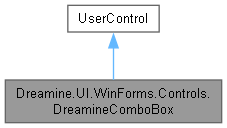
Dreamine.UI.WinForms.Controls.DreamineComboBox에 대한 협력 다이어그램:
Public 멤버 함수 | |
| DreamineComboBox () | |
Protected 멤버 함수 | |
| override void | OnLayout (LayoutEventArgs e) |
| override void | OnPaint (PaintEventArgs e) |
속성 | |
| ComboBox.ObjectCollection | Items [get] |
| object? | SelectedItem [get, set] |
| int | SelectedIndex [get, set] |
| override Color | ForeColor [get, set] |
| new Font | Font [get, set] |
| override Size | DefaultSize [get] |
이벤트 | |
| EventHandler? | SelectedIndexChanged |
Private 멤버 함수 | |
| void | OnDrawItem (object? sender, DrawItemEventArgs e) |
Private 속성 | |
| readonly ComboBox | _inner |
| bool | _isFocused |
상세한 설명
다크 테마 드롭다운 그리기와 포커스 테두리를 제공하는 WinForms 콤보 상자 래퍼입니다.
DreamineComboBox.cs 파일의 15 번째 라인에서 정의되었습니다.
생성자 & 소멸자 문서화
◆ DreamineComboBox()
|
inline |
내부 콤보 상자, 사용자 지정 그리기 및 Dreamine 테마 기본값을 구성합니다.
DreamineComboBox.cs 파일의 122 번째 라인에서 정의되었습니다.
123 {
124 // _inner must be created first — SetStyle / property setters trigger
125 // OnLayout and ForeColor/Font overrides before the field is otherwise set.
126 _inner = new ComboBox
127 {
128 FlatStyle = FlatStyle.Flat,
129 BackColor = DreamineTheme.InputBackground,
130 ForeColor = DreamineTheme.TextPrimary,
131 Font = new Font("Segoe UI", 10f, FontStyle.Regular, GraphicsUnit.Point),
132 DropDownStyle = ComboBoxStyle.DropDownList,
133 };
134
135 _inner.GotFocus += (_, _) => { _isFocused = true; Invalidate(); };
136 _inner.LostFocus += (_, _) => { _isFocused = false; Invalidate(); };
137 _inner.SelectedIndexChanged += (s, e) => SelectedIndexChanged?.Invoke(this, e);
138 _inner.DrawMode = DrawMode.OwnerDrawFixed;
139 _inner.DrawItem += OnDrawItem;
140
141 SetStyle(
142 ControlStyles.AllPaintingInWmPaint |
143 ControlStyles.UserPaint |
144 ControlStyles.DoubleBuffer |
145 ControlStyles.ResizeRedraw, true);
146
147 BackColor = DreamineTheme.InputBackground;
148 ForeColor = DreamineTheme.TextPrimary;
149 Font = _inner.Font;
150 Height = 36;
151
152 Controls.Add(_inner);
153 }
다음을 참조함 : _inner, _isFocused, Font, ForeColor, Dreamine.UI.WinForms.DreamineTheme.InputBackground, OnDrawItem(), SelectedIndexChanged, Dreamine.UI.WinForms.DreamineTheme.TextPrimary.
이 함수 내부에서 호출하는 함수들에 대한 그래프입니다.:

멤버 함수 문서화
◆ OnDrawItem()
|
inlineprivate |
드롭다운 항목을 선택 및 호버 상태에 맞는 다크 테마로 그립니다.
- 매개변수
-
sender 이벤트를 발생시킨 객체입니다. e 항목 그리기 이벤트 인수입니다.
DreamineComboBox.cs 파일의 203 번째 라인에서 정의되었습니다.
204 {
205 if (e.Index < 0) return;
206 var isSelected = (e.State & DrawItemState.Selected) != 0;
207 var isHover = (e.State & DrawItemState.HotLight) != 0;
208
209 var bg = isSelected
210 ? DreamineTheme.AccentBlue
211 : isHover
212 ? Color.FromArgb(0xFF, 0x1E, 0x4A, 0x80)
213 : DreamineTheme.InputBackground;
214
215 using var bgBrush = new SolidBrush(bg);
216 e.Graphics.FillRectangle(bgBrush, e.Bounds);
217
218 string? text = _inner.Items[e.Index]?.ToString();
219 if (!string.IsNullOrEmpty(text))
220 {
221 using var textBrush = new SolidBrush(DreamineTheme.TextPrimary);
222 var sf = new StringFormat { LineAlignment = StringAlignment.Center };
223 e.Graphics.TextRenderingHint = System.Drawing.Text.TextRenderingHint.ClearTypeGridFit;
224 e.Graphics.DrawString(text, e.Font!, textBrush,
225 new Rectangle(e.Bounds.X + 6, e.Bounds.Y, e.Bounds.Width - 6, e.Bounds.Height), sf);
226 }
227 }
다음을 참조함 : _inner, Dreamine.UI.WinForms.DreamineTheme.AccentBlue, Dreamine.UI.WinForms.DreamineTheme.InputBackground, Dreamine.UI.WinForms.DreamineTheme.TextPrimary.
다음에 의해서 참조됨 : DreamineComboBox().
이 함수를 호출하는 함수들에 대한 그래프입니다.:

◆ OnLayout()
|
inlineprotected |
내부 콤보 상자를 래퍼의 현재 크기에 맞춰 배치합니다.
- 매개변수
-
e 레이아웃 이벤트 인수입니다.
DreamineComboBox.cs 파일의 171 번째 라인에서 정의되었습니다.
172 {
173 base.OnLayout(e);
174 if (_inner == null) return;
175 _inner.SetBounds(0, (Height - _inner.PreferredHeight) / 2,
176 Width, _inner.PreferredHeight);
177 }
다음을 참조함 : _inner.
◆ OnPaint()
|
inlineprotected |
현재 포커스 상태에 맞게 둥근 배경과 테두리를 그립니다.
- 매개변수
-
e 컨트롤 그리기 이벤트 인수입니다.
DreamineComboBox.cs 파일의 245 번째 라인에서 정의되었습니다.
246 {
247 var g = e.Graphics;
248 var rect = new Rectangle(0, 0, Width - 1, Height - 1);
249 using var bgBrush = new SolidBrush(BackColor);
250 var borderColor = _isFocused ? DreamineTheme.BorderFocus : DreamineTheme.BorderNormal;
251 using var pen = new Pen(borderColor, 1.5f);
252 DreamineDrawHelper.FillRoundedRect(g, bgBrush, pen, rect, DreamineTheme.CornerRadiusSmall);
253 }
다음을 참조함 : _isFocused, Dreamine.UI.WinForms.DreamineTheme.BorderFocus, Dreamine.UI.WinForms.DreamineTheme.BorderNormal, Dreamine.UI.WinForms.DreamineTheme.CornerRadiusSmall, Dreamine.UI.WinForms.DreamineDrawHelper.FillRoundedRect().
이 함수 내부에서 호출하는 함수들에 대한 그래프입니다.:

멤버 데이터 문서화
◆ _inner
|
private |
inner 값을 보관합니다.
DreamineComboBox.cs 파일의 25 번째 라인에서 정의되었습니다.
다음에 의해서 참조됨 : DreamineComboBox(), OnDrawItem(), OnLayout().
◆ _isFocused
|
private |
is Focused 값을 보관합니다.
DreamineComboBox.cs 파일의 34 번째 라인에서 정의되었습니다.
다음에 의해서 참조됨 : DreamineComboBox(), OnPaint().
속성 문서화
◆ DefaultSize
|
getprotected |
콤보 상자 래퍼의 기본 크기를 가져옵니다.
DreamineComboBox.cs 파일의 263 번째 라인에서 정의되었습니다.
◆ Font
|
getset |
래퍼와 내부 콤보 상자의 글꼴을 가져오거나 설정합니다.
DreamineComboBox.cs 파일의 97 번째 라인에서 정의되었습니다.
98 {
99 get => base.Font;
100 set { base.Font = value; _inner.Font = value; }
101 }
다음에 의해서 참조됨 : DreamineComboBox().
◆ ForeColor
|
getset |
래퍼와 내부 콤보 상자의 전경색을 가져오거나 설정합니다.
DreamineComboBox.cs 파일의 83 번째 라인에서 정의되었습니다.
84 {
85 get => base.ForeColor;
86 set { base.ForeColor = value; _inner.ForeColor = value; }
87 }
다음에 의해서 참조됨 : DreamineComboBox().
◆ Items
|
get |
내부 콤보 상자의 항목 컬렉션을 가져옵니다.
DreamineComboBox.cs 파일의 45 번째 라인에서 정의되었습니다.
◆ SelectedIndex
|
getset |
현재 선택한 항목의 인덱스를 가져오거나 설정합니다.
DreamineComboBox.cs 파일의 69 번째 라인에서 정의되었습니다.
70 {
71 get => _inner.SelectedIndex;
72 set => _inner.SelectedIndex = value;
73 }
◆ SelectedItem
|
getset |
현재 선택한 항목을 가져오거나 설정합니다.
DreamineComboBox.cs 파일의 55 번째 라인에서 정의되었습니다.
56 {
57 get => _inner.SelectedItem;
58 set => _inner.SelectedItem = value;
59 }
이벤트 문서화
◆ SelectedIndexChanged
| EventHandler? Dreamine.UI.WinForms.Controls.DreamineComboBox.SelectedIndexChanged |
내부 콤보 상자의 선택 인덱스가 변경될 때 발생합니다.
DreamineComboBox.cs 파일의 111 번째 라인에서 정의되었습니다.
다음에 의해서 참조됨 : DreamineComboBox().
이 클래스에 대한 문서화 페이지는 다음의 파일로부터 생성되었습니다.: