로딩중...
검색중...
일치하는것 없음
Dreamine.UI.WinForms.Controls.DreamineCheckBox 클래스 참조
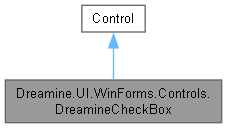
Dreamine.UI.WinForms.Controls.DreamineCheckBox에 대한 상속 다이어그램 :
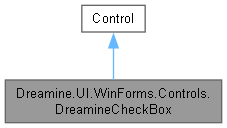
Dreamine.UI.WinForms.Controls.DreamineCheckBox에 대한 협력 다이어그램:
Public 멤버 함수 | |
| DreamineCheckBox () | |
Protected 멤버 함수 | |
| override void | OnMouseEnter (EventArgs e) |
| override void | OnMouseLeave (EventArgs e) |
| override void | OnMouseUp (MouseEventArgs e) |
| override void | OnPaint (PaintEventArgs e) |
속성 | |
| bool | IsChecked [get, set] |
| string | Content [get, set] |
| override Size | DefaultSize [get] |
이벤트 | |
| EventHandler? | CheckedChanged |
Private 속성 | |
| bool | _isHover |
| bool | _isChecked |
| string | _content = string.Empty |
정적 Private 속성 | |
| const int | BoxSize = 16 |
| const int | BoxMargin = 2 |
상세한 설명
직접 그린 체크 표시, 텍스트 콘텐츠 및 상태 변경 이벤트를 제공하는 WinForms 체크 상자입니다.
DreamineCheckBox.cs 파일의 15 번째 라인에서 정의되었습니다.
생성자 & 소멸자 문서화
◆ DreamineCheckBox()
|
inline |
사용자 지정 그리기 스타일과 Dreamine 테마 기본값을 구성합니다.
DreamineCheckBox.cs 파일의 116 번째 라인에서 정의되었습니다.
117 {
118 SetStyle(
119 ControlStyles.AllPaintingInWmPaint |
120 ControlStyles.UserPaint |
121 ControlStyles.DoubleBuffer |
122 ControlStyles.ResizeRedraw |
123 ControlStyles.SupportsTransparentBackColor, true);
124
125 BackColor = Color.Transparent;
126 ForeColor = DreamineTheme.TextPrimary;
127 Font = new Font("Segoe UI", 10f, FontStyle.Regular, GraphicsUnit.Point);
128 Height = 24;
129 Cursor = Cursors.Hand;
130 }
멤버 함수 문서화
◆ OnMouseEnter()
|
inlineprotected |
포인터 진입 상태를 기록하고 다시 그리도록 요청합니다.
- 매개변수
-
e 마우스 이벤트 인수입니다.
DreamineCheckBox.cs 파일의 148 번째 라인에서 정의되었습니다.
148{ base.OnMouseEnter(e); _isHover = true; Invalidate(); }
다음을 참조함 : _isHover.
◆ OnMouseLeave()
|
inlineprotected |
포인터 진입 상태를 해제하고 다시 그리도록 요청합니다.
- 매개변수
-
e 마우스 이벤트 인수입니다.
DreamineCheckBox.cs 파일의 165 번째 라인에서 정의되었습니다.
165{ base.OnMouseLeave(e); _isHover = false; Invalidate(); }
다음을 참조함 : _isHover.
◆ OnMouseUp()
|
inlineprotected |
활성 컨트롤 안에서 왼쪽 버튼을 놓으면 체크 상태를 전환합니다.
- 매개변수
-
e 마우스 버튼 이벤트 인수입니다.
DreamineCheckBox.cs 파일의 183 번째 라인에서 정의되었습니다.
184 {
185 base.OnMouseUp(e);
186 if (Enabled && e.Button == MouseButtons.Left && ClientRectangle.Contains(e.Location))
187 IsChecked = !IsChecked;
188 }
다음을 참조함 : IsChecked.
◆ OnPaint()
|
inlineprotected |
현재 체크, 호버 및 활성 상태에 맞게 상자, 체크 표시와 라벨을 그립니다.
- 매개변수
-
e 컨트롤 그리기 이벤트 인수입니다.
DreamineCheckBox.cs 파일의 206 번째 라인에서 정의되었습니다.
207 {
208 var g = e.Graphics;
209 g.SmoothingMode = SmoothingMode.AntiAlias;
210
211 int x = BoxMargin, y = (Height - BoxSize) / 2;
212 var boxRect = new Rectangle(x, y, BoxSize, BoxSize);
213
214 // Box background
215 var bg = _isChecked
216 ? DreamineTheme.AccentBlue
217 : DreamineTheme.InputBackground;
218 if (_isHover && !_isChecked)
219 bg = DreamineDrawHelper.Blend(bg, Color.White, 0.1f);
220
221 using var bgBrush = new SolidBrush(bg);
222 using var borderPen = new Pen(_isHover || _isChecked ? DreamineTheme.BorderFocus : DreamineTheme.BorderNormal, 1.5f);
223 DreamineDrawHelper.FillRoundedRect(g, bgBrush, borderPen, boxRect, 3f);
224
225 // Checkmark
226 if (_isChecked)
227 {
228 using var ckPen = new Pen(Color.White, 2f) { LineJoin = LineJoin.Round };
229 int cx = x + 3, cy = y + BoxSize / 2;
230 g.DrawLines(ckPen, new[]
231 {
232 new Point(cx, cy),
233 new Point(cx + 3, cy + 3),
234 new Point(cx + 8, cy - 3)
235 });
236 }
237
238 // Label text
239 using var brush = new SolidBrush(Enabled ? ForeColor : DreamineTheme.TextSecondary);
240 int textX = BoxMargin + BoxSize + 6;
241 var textRect = new Rectangle(textX, 0, Width - textX, Height);
242 var sf = new StringFormat { LineAlignment = StringAlignment.Center };
243 g.TextRenderingHint = System.Drawing.Text.TextRenderingHint.ClearTypeGridFit;
244 g.DrawString(_content, Font, brush, textRect, sf);
245 }
다음을 참조함 : _content, _isChecked, _isHover, Dreamine.UI.WinForms.DreamineTheme.AccentBlue, Dreamine.UI.WinForms.DreamineDrawHelper.Blend(), Dreamine.UI.WinForms.DreamineTheme.BorderFocus, Dreamine.UI.WinForms.DreamineTheme.BorderNormal, BoxMargin, BoxSize, Dreamine.UI.WinForms.DreamineDrawHelper.FillRoundedRect(), Dreamine.UI.WinForms.DreamineTheme.InputBackground, Dreamine.UI.WinForms.DreamineTheme.TextSecondary.
이 함수 내부에서 호출하는 함수들에 대한 그래프입니다.:

멤버 데이터 문서화
◆ _content
|
private |
◆ _isChecked
|
private |
◆ _isHover
|
private |
is Hover 값을 보관합니다.
DreamineCheckBox.cs 파일의 25 번째 라인에서 정의되었습니다.
다음에 의해서 참조됨 : OnMouseEnter(), OnMouseLeave(), OnPaint().
◆ BoxMargin
|
staticprivate |
◆ BoxSize
|
staticprivate |
속성 문서화
◆ Content
|
getset |
체크 표시 옆에 그릴 텍스트를 가져오거나 설정합니다.
DreamineCheckBox.cs 파일의 73 번째 라인에서 정의되었습니다.
74 {
75 get => _content;
76 set { _content = value; Invalidate(); }
77 }
◆ DefaultSize
|
getprotected |
체크 상자의 기본 크기를 가져옵니다.
DreamineCheckBox.cs 파일의 255 번째 라인에서 정의되었습니다.
◆ IsChecked
|
getset |
체크 상태를 가져오거나 설정합니다.
DreamineCheckBox.cs 파일의 44 번째 라인에서 정의되었습니다.
45 {
46 get => _isChecked;
47 set
48 {
49 if (_isChecked == value) return;
50 _isChecked = value;
51 Invalidate();
52 CheckedChanged?.Invoke(this, EventArgs.Empty);
53 }
54 }
다음에 의해서 참조됨 : OnMouseUp().
이벤트 문서화
◆ CheckedChanged
| EventHandler? Dreamine.UI.WinForms.Controls.DreamineCheckBox.CheckedChanged |
체크 상태가 실제로 변경될 때 발생합니다.
DreamineCheckBox.cs 파일의 87 번째 라인에서 정의되었습니다.
이 클래스에 대한 문서화 페이지는 다음의 파일로부터 생성되었습니다.: