로딩중...
검색중...
일치하는것 없음
Dreamine.UI.WinForms.Controls.DreamineButton 클래스 참조
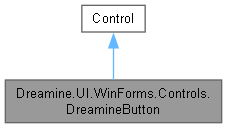
Dreamine.UI.WinForms.Controls.DreamineButton에 대한 상속 다이어그램 :
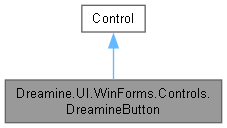
Dreamine.UI.WinForms.Controls.DreamineButton에 대한 협력 다이어그램:
Public 멤버 함수 | |
| DreamineButton () | |
Protected 멤버 함수 | |
| override void | OnMouseEnter (EventArgs e) |
| override void | OnMouseLeave (EventArgs e) |
| override void | OnMouseDown (MouseEventArgs e) |
| override void | OnMouseUp (MouseEventArgs e) |
| override void | OnPaint (PaintEventArgs e) |
속성 | |
| string | Content [get, set] |
| Color | ShineColor [get, set] |
| Color | BorderColor [get, set] |
| int | CornerRadius [get, set] |
| bool | IsSelected [get, set] |
| ICommand? | Command [get, set] |
| object? | CommandParameter [get, set] |
Private 멤버 함수 | |
| void | ExecuteCommand () |
| Color | GetEffectiveParentBackColor () |
Private 속성 | |
| bool | _isHover |
| bool | _isPressed |
| string | _content = string.Empty |
| Color | _shineColor = Color.Empty |
| Color | _borderColor = DreamineTheme.BorderNormal |
| int | _cornerRadius = DreamineTheme.CornerRadius |
| bool | _isSelected |
상세한 설명
둥근 모서리, 광택, 선택 상태 및 명령 실행을 지원하는 Dreamine WinForms 버튼입니다.
DreamineButton.cs 파일의 16 번째 라인에서 정의되었습니다.
생성자 & 소멸자 문서화
◆ DreamineButton()
|
inline |
사용자 지정 그리기 스타일과 Dreamine 테마 기본값을 구성합니다.
DreamineButton.cs 파일의 181 번째 라인에서 정의되었습니다.
182 {
183 SetStyle(
184 ControlStyles.AllPaintingInWmPaint |
185 ControlStyles.UserPaint |
186 ControlStyles.DoubleBuffer |
187 ControlStyles.ResizeRedraw |
188 ControlStyles.SupportsTransparentBackColor, true);
189
190 BackColor = DreamineTheme.NavBackground;
191 ForeColor = DreamineTheme.TextPrimary;
192 Font = new Font("Segoe UI", 10f, FontStyle.Regular, GraphicsUnit.Point);
193 Size = new Size(100, 34);
194 Cursor = Cursors.Hand;
195 }
다음을 참조함 : Dreamine.UI.WinForms.DreamineTheme.NavBackground, Dreamine.UI.WinForms.DreamineTheme.TextPrimary.
멤버 함수 문서화
◆ ExecuteCommand()
|
inlineprivate |
명령이 현재 매개변수로 실행 가능하면 명령을 호출합니다.
DreamineButton.cs 파일의 300 번째 라인에서 정의되었습니다.
301 {
302 if (Command?.CanExecute(CommandParameter) == true)
303 Command.Execute(CommandParameter);
304 }
다음을 참조함 : Command, CommandParameter.
다음에 의해서 참조됨 : OnMouseUp().
이 함수를 호출하는 함수들에 대한 그래프입니다.:

◆ GetEffectiveParentBackColor()
|
inlineprivate |
둥근 모서리 밖을 채울 첫 번째 불투명 조상 배경색을 찾습니다.
- 반환값
- 불투명 조상 또는 폼의 배경색이며 찾을 수 없으면 애플리케이션 기본 배경색입니다.
DreamineButton.cs 파일의 322 번째 라인에서 정의되었습니다.
323 {
324 for (Control? p = Parent; p != null; p = p.Parent)
325 {
326 if (p.BackColor.A == 255)
327 return p.BackColor;
328 }
329 return FindForm()?.BackColor ?? DreamineTheme.AppBackground;
330 }
다음을 참조함 : Dreamine.UI.WinForms.DreamineTheme.AppBackground.
다음에 의해서 참조됨 : OnPaint().
이 함수를 호출하는 함수들에 대한 그래프입니다.:

◆ OnMouseDown()
|
inlineprotected |
왼쪽 버튼 누름 상태를 기록합니다.
- 매개변수
-
e 마우스 버튼 이벤트 인수입니다.
DreamineButton.cs 파일의 259 번째 라인에서 정의되었습니다.
260 {
261 base.OnMouseDown(e);
262 if (e.Button == MouseButtons.Left) { _isPressed = true; Invalidate(); }
263 }
다음을 참조함 : _isPressed.
◆ OnMouseEnter()
|
inlineprotected |
포인터 진입 상태를 기록하고 다시 그리도록 요청합니다.
- 매개변수
-
e 마우스 이벤트 인수입니다.
DreamineButton.cs 파일의 214 번째 라인에서 정의되었습니다.
215 {
216 base.OnMouseEnter(e);
217 _isHover = true;
218 Invalidate();
219 }
다음을 참조함 : _isHover.
◆ OnMouseLeave()
|
inlineprotected |
포인터와 누름 상태를 해제하고 다시 그리도록 요청합니다.
- 매개변수
-
e 마우스 이벤트 인수입니다.
DreamineButton.cs 파일의 236 번째 라인에서 정의되었습니다.
237 {
238 base.OnMouseLeave(e);
239 _isHover = false;
240 _isPressed = false;
241 Invalidate();
242 }
다음을 참조함 : _isHover, _isPressed.
◆ OnMouseUp()
|
inlineprotected |
왼쪽 버튼을 컨트롤 안에서 놓으면 연결된 명령을 실행합니다.
- 매개변수
-
e 마우스 버튼 이벤트 인수입니다.
DreamineButton.cs 파일의 280 번째 라인에서 정의되었습니다.
281 {
282 base.OnMouseUp(e);
283 if (e.Button == MouseButtons.Left)
284 {
285 _isPressed = false;
286 Invalidate();
287 if (ClientRectangle.Contains(e.Location))
288 ExecuteCommand();
289 }
290 }
다음을 참조함 : _isPressed, ExecuteCommand().
이 함수 내부에서 호출하는 함수들에 대한 그래프입니다.:

◆ OnPaint()
|
inlineprotected |
현재 호버, 누름 및 선택 상태에 맞게 버튼 배경, 테두리, 광택과 텍스트를 그립니다.
- 매개변수
-
e 컨트롤 그리기 이벤트 인수입니다.
DreamineButton.cs 파일의 349 번째 라인에서 정의되었습니다.
350 {
351 var g = e.Graphics;
352 var rect = new Rectangle(1, 1, Width - 2, Height - 2);
353
354 // 둥근 사각형 바깥쪽(네 귀퉁이)을 부모의 실제 배경색으로 먼저 채운다.
355 // Win32 Region으로 잘라내는 방식은 안티앨리어싱이 없어 작은 반경에서 오히려
356 // 더 거칠게 보이므로, 대신 "부모 배경색 채우기 + AA 처리된 둥근 도형"으로
357 // 귀퉁이가 부모 배경에 자연스럽게 섞여 보이도록 한다(부모가 단색 배경일 때 효과적).
358 using (var cornerBrush = new SolidBrush(GetEffectiveParentBackColor()))
359 g.FillRectangle(cornerBrush, 0, 0, Width, Height);
360
361 // background color
362 var bg = BackColor;
363 if (_isPressed)
364 bg = DreamineDrawHelper.Blend(bg, DreamineTheme.PressOverlay, 0.6f);
365 else if (_isHover)
366 bg = DreamineDrawHelper.Blend(bg, DreamineTheme.HoverOverlay, 0.4f);
367
368 var topColor = _isSelected
369 ? DreamineDrawHelper.Blend(bg, DreamineTheme.AccentBlue, 0.3f)
370 : bg;
371
372 // border
373 var borderColor = _isSelected || _isHover
374 ? DreamineTheme.BorderFocus
375 : _borderColor;
376
377 using var borderPen = new Pen(borderColor, 1f);
378 DreamineDrawHelper.FillRoundedGradient(g, topColor, bg, borderPen, rect, _cornerRadius);
379
380 // shine overlay
381 if (_shineColor != Color.Empty)
382 DreamineDrawHelper.DrawShineOverlay(g, _shineColor, rect, _cornerRadius);
383
384 // selected indicator (bottom line)
385 if (_isSelected)
386 {
387 using var selPen = new Pen(DreamineTheme.AccentBlue, 2f);
388 int y = Height - 3;
389 g.DrawLine(selPen, _cornerRadius, y, Width - _cornerRadius, y);
390 }
391
392 // text
393 DreamineDrawHelper.DrawCenteredText(g, _content, Font, Enabled ? ForeColor : DreamineTheme.TextSecondary, rect);
394 }
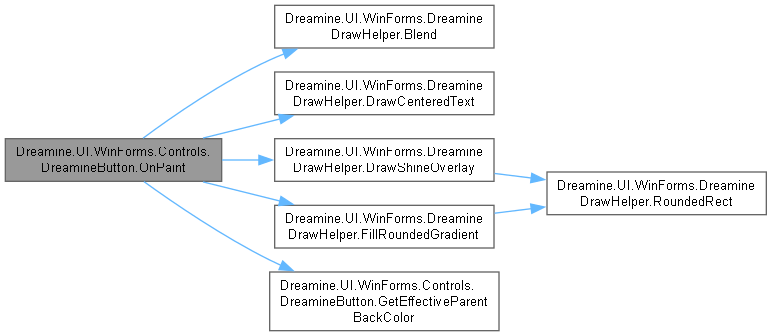
다음을 참조함 : _borderColor, _content, _cornerRadius, _isHover, _isPressed, _isSelected, _shineColor, Dreamine.UI.WinForms.DreamineTheme.AccentBlue, Dreamine.UI.WinForms.DreamineDrawHelper.Blend(), Dreamine.UI.WinForms.DreamineTheme.BorderFocus, Dreamine.UI.WinForms.DreamineDrawHelper.DrawCenteredText(), Dreamine.UI.WinForms.DreamineDrawHelper.DrawShineOverlay(), Dreamine.UI.WinForms.DreamineDrawHelper.FillRoundedGradient(), GetEffectiveParentBackColor(), Dreamine.UI.WinForms.DreamineTheme.HoverOverlay, Dreamine.UI.WinForms.DreamineTheme.PressOverlay, Dreamine.UI.WinForms.DreamineTheme.TextSecondary.
이 함수 내부에서 호출하는 함수들에 대한 그래프입니다.:
멤버 데이터 문서화
◆ _borderColor
|
private |
◆ _content
|
private |
◆ _cornerRadius
|
private |
◆ _isHover
|
private |
is Hover 값을 보관합니다.
DreamineButton.cs 파일의 26 번째 라인에서 정의되었습니다.
다음에 의해서 참조됨 : OnMouseEnter(), OnMouseLeave(), OnPaint().
◆ _isPressed
|
private |
is Pressed 값을 보관합니다.
DreamineButton.cs 파일의 35 번째 라인에서 정의되었습니다.
다음에 의해서 참조됨 : OnMouseDown(), OnMouseLeave(), OnMouseUp(), OnPaint().
◆ _isSelected
|
private |
◆ _shineColor
|
private |
속성 문서화
◆ BorderColor
|
getset |
기본 테두리 색상을 가져오거나 설정합니다.
DreamineButton.cs 파일의 101 번째 라인에서 정의되었습니다.
102 {
103 get => _borderColor;
104 set { _borderColor = value; Invalidate(); }
105 }
◆ Command
|
getset |
유효한 클릭 후 실행할 명령을 가져오거나 설정합니다.
DreamineButton.cs 파일의 161 번째 라인에서 정의되었습니다.
161{ get; set; }
다음에 의해서 참조됨 : ExecuteCommand().
◆ CommandParameter
|
getset |
명령의 실행 가능 여부 확인과 실행에 전달할 매개변수를 가져오거나 설정합니다.
DreamineButton.cs 파일의 170 번째 라인에서 정의되었습니다.
170{ get; set; }
다음에 의해서 참조됨 : ExecuteCommand().
◆ Content
|
getset |
버튼에 표시할 텍스트 콘텐츠를 가져오거나 설정합니다.
DreamineButton.cs 파일의 55 번째 라인에서 정의되었습니다.
56 {
57 get => _content;
58 set { _content = value; Invalidate(); }
59 }
◆ CornerRadius
|
getset |
버튼 모서리 반지름을 가져오거나 설정합니다.
DreamineButton.cs 파일의 124 번째 라인에서 정의되었습니다.
125 {
126 get => _cornerRadius;
127 set { _cornerRadius = value; Invalidate(); }
128 }
◆ IsSelected
|
getset |
버튼이 선택 상태로 강조되는지 여부를 가져오거나 설정합니다.
DreamineButton.cs 파일의 147 번째 라인에서 정의되었습니다.
148 {
149 get => _isSelected;
150 set { _isSelected = value; Invalidate(); }
151 }
◆ ShineColor
|
getset |
상단 광택 오버레이 색상을 가져오거나 설정합니다.
DreamineButton.cs 파일의 78 번째 라인에서 정의되었습니다.
79 {
80 get => _shineColor;
81 set { _shineColor = value; Invalidate(); }
82 }
이 클래스에 대한 문서화 페이지는 다음의 파일로부터 생성되었습니다.: