로딩중...
검색중...
일치하는것 없음
Dreamine.UI.Maui.DreamineVirtualKeyboard 클래스 참조
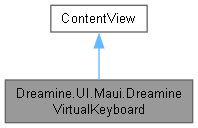
Dreamine.UI.Maui.DreamineVirtualKeyboard에 대한 상속 다이어그램 :
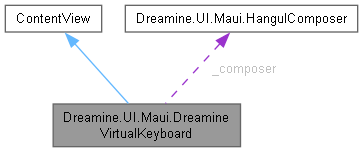
Dreamine.UI.Maui.DreamineVirtualKeyboard에 대한 협력 다이어그램:
Public 멤버 함수 | |
| DreamineVirtualKeyboard () | |
| void | Attach (Entry entry) |
Private 타입 | |
| enum | KeyKind { Text , Command } |
Private 멤버 함수 | |
| void | BuildKeyboard () |
| void | AddRow (IReadOnlyList< KeySpec > specs) |
| Button | MakeKey (KeySpec spec) |
| void | InsertKey (string key) |
| void | InsertRaw (string text) |
| void | ReplaceTextTail (int replaceCount, string text) |
| string | GetTextBeforeCaret () |
| void | Backspace () |
| void | ToggleShift () |
| void | ToggleCapsLock () |
| void | ToggleLanguage () |
| void | MoveLeft () |
| void | MoveRight () |
| void | HideKeyboard () |
| void | OnEnter () |
| void | RefreshKeys () |
| string | GetKeyText (string key) |
| record | KeyButton (Button Button, string BaseText) |
Private 속성 | |
| readonly List< KeyButton > | _textKeys = [] |
| readonly HangulComposer | _composer = new() |
| Entry? | _target |
| bool | _shift |
| bool | _capsLock |
| bool | _korean |
| Button? | _shiftButton |
| Button? | _capsButton |
| Button? | _languageButton |
정적 Private 속성 | |
| static readonly Color | KeyBackground = Color.FromArgb("#F1685E") |
| static readonly Color | KeySelectedBackground = Color.FromArgb("#F59584") |
| static readonly Dictionary< string, string > | ShiftKeys |
| static readonly Dictionary< string, string > | KoreanKeys |
| static readonly Dictionary< string, string > | KoreanShiftKeys |
상세한 설명
연결된 MAUI Entry를 직접 편집하는 5행 QWERTY 화면 키보드입니다.
운영체제 IME를 제어하지 않고 내부 한글 조합기를 사용하여 입력 값을 갱신합니다.
DreamineVirtualKeyboard.xaml.cs 파일의 19 번째 라인에서 정의되었습니다.
멤버 열거형 문서화
◆ KeyKind
|
private |
가상 키가 직접 텍스트를 입력하는지 명령을 실행하는지 지정합니다.
| 열거형 멤버 | |
|---|---|
| Text | 키가 변환된 텍스트를 입력함을 나타냅니다. |
| Command | 키가 연결된 동작을 실행함을 나타냅니다. |
DreamineVirtualKeyboard.xaml.cs 파일의 868 번째 라인에서 정의되었습니다.
869 {
878 Text,
887 Command
888 }
생성자 & 소멸자 문서화
◆ DreamineVirtualKeyboard()
|
inline |
키보드 UI를 만들고 초기 키 레이블과 상태를 적용합니다.
DreamineVirtualKeyboard.xaml.cs 파일의 131 번째 라인에서 정의되었습니다.
132 {
133 InitializeComponent();
134 BuildKeyboard();
135 RefreshKeys();
136 }
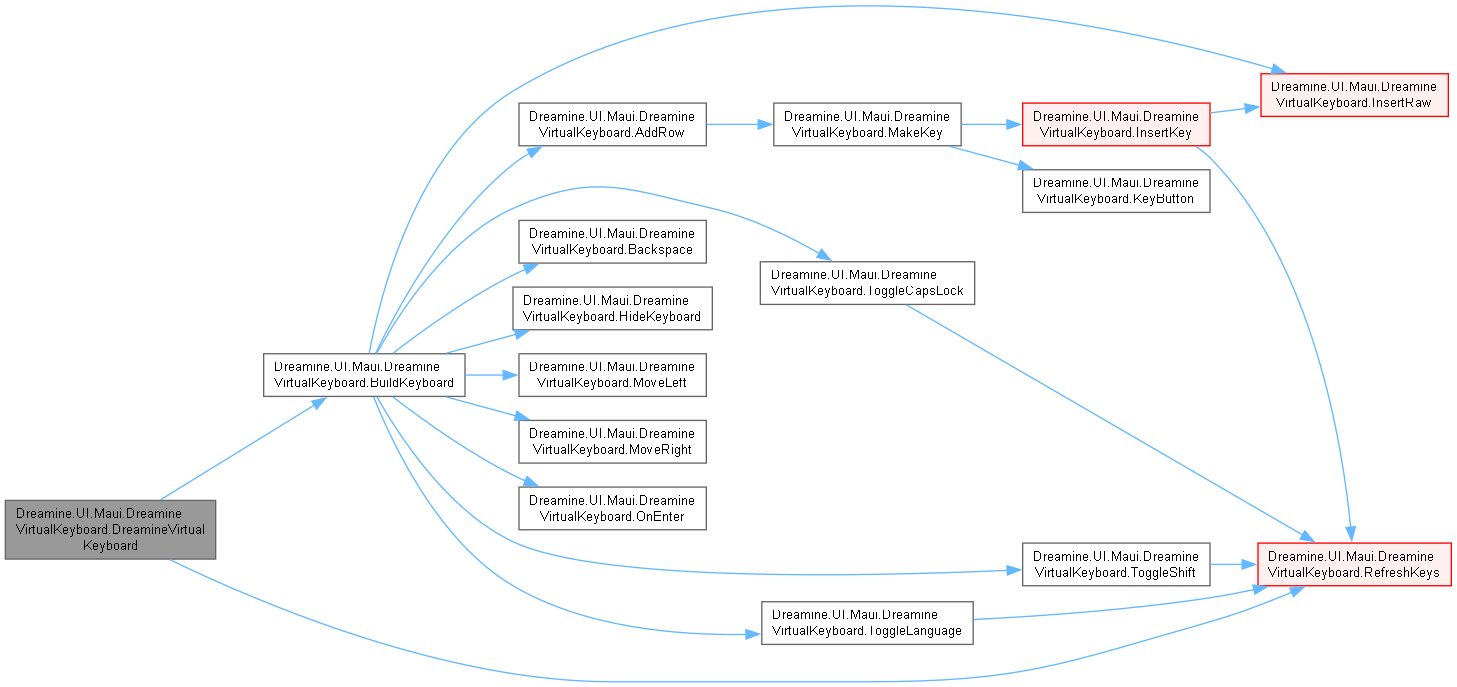
다음을 참조함 : BuildKeyboard(), RefreshKeys().
이 함수 내부에서 호출하는 함수들에 대한 그래프입니다.:
멤버 함수 문서화
◆ AddRow()
|
inlineprivate |
지정한 키 사양 목록을 하나의 키보드 행으로 만들어 호스트에 추가합니다.
- 매개변수
-
specs 행에 배치할 키 사양 목록입니다.
DreamineVirtualKeyboard.xaml.cs 파일의 239 번째 라인에서 정의되었습니다.
240 {
241 var row = new Grid
242 {
243 ColumnSpacing = 4,
244 HeightRequest = 54,
245 HorizontalOptions = LayoutOptions.Fill
246 };
247
248 for (var i = 0; i < specs.Count; i++)
249 {
250 var width = specs[i].Width;
251 row.ColumnDefinitions.Add(new ColumnDefinition { Width = new GridLength(width, GridUnitType.Star) });
252 var button = MakeKey(specs[i]);
253 row.Add(button, i, 0);
254 }
255
256 RowsHost.Children.Add(row);
257 }
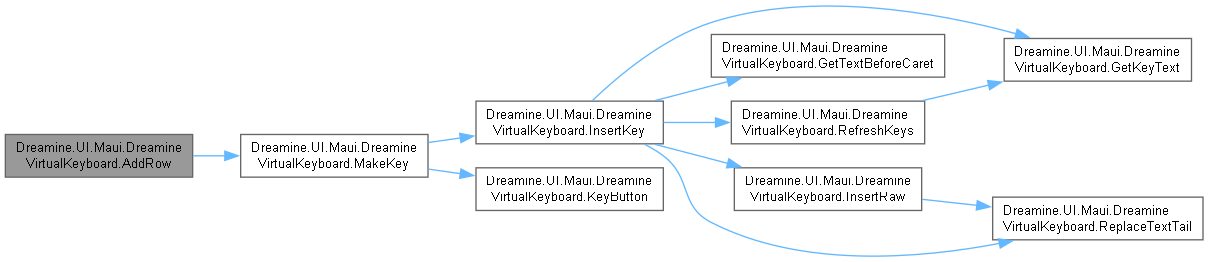
다음을 참조함 : MakeKey().
다음에 의해서 참조됨 : BuildKeyboard().
이 함수 내부에서 호출하는 함수들에 대한 그래프입니다.:
이 함수를 호출하는 함수들에 대한 그래프입니다.:

◆ Attach()
|
inline |
가상 키보드 입력을 받을 Entry를 연결합니다.
- 매개변수
-
entry 편집하고 포커스 시 키보드를 표시할 입력 항목입니다.
- 예외
-
NullReferenceException entry 가 null일 때 발생합니다.
DreamineVirtualKeyboard.xaml.cs 파일의 162 번째 라인에서 정의되었습니다.
163 {
164 _target = entry;
165 entry.Focused += (_, _) => IsVisible = true;
166 }
다음을 참조함 : _target.
◆ Backspace()
|
inlineprivate |
현재 선택 영역 또는 캐럿 앞의 문자 하나를 삭제합니다.
DreamineVirtualKeyboard.xaml.cs 파일의 464 번째 라인에서 정의되었습니다.
465 {
466 if (_target is null)
467 return;
468
469 _composer.Reset();
470 var current = _target.Text ?? string.Empty;
471 var selectionStart = Math.Clamp(_target.CursorPosition, 0, current.Length);
472 var selectionLength = Math.Clamp(_target.SelectionLength, 0, current.Length - selectionStart);
473
474 if (selectionLength > 0)
475 {
476 _target.Text = current.Remove(selectionStart, selectionLength);
477 _target.CursorPosition = selectionStart;
478 }
479 else if (selectionStart > 0)
480 {
481 _target.Text = current.Remove(selectionStart - 1, 1);
482 _target.CursorPosition = selectionStart - 1;
483 }
484 }
다음에 의해서 참조됨 : BuildKeyboard().
이 함수를 호출하는 함수들에 대한 그래프입니다.:

◆ BuildKeyboard()
|
inlineprivate |
다섯 행의 텍스트 및 명령 키 사양을 구성하여 화면 키보드를 만듭니다.
DreamineVirtualKeyboard.xaml.cs 파일의 176 번째 라인에서 정의되었습니다.
177 {
178 RowsHost.Children.Clear();
179
180 AddRow(
181 [
182 KeySpec.Command("Esc", 54, HideKeyboard),
183 KeySpec.Text("`"), KeySpec.Text("1"), KeySpec.Text("2"), KeySpec.Text("3"), KeySpec.Text("4"),
184 KeySpec.Text("5"), KeySpec.Text("6"), KeySpec.Text("7"), KeySpec.Text("8"), KeySpec.Text("9"),
185 KeySpec.Text("0"), KeySpec.Text("-"), KeySpec.Text("="),
186 KeySpec.Command("Backspace", 116, Backspace)
187 ]);
188
189 AddRow(
190 [
191 KeySpec.Command("Tab", 100, () => InsertRaw(" ")),
192 KeySpec.Text("q"), KeySpec.Text("w"), KeySpec.Text("e"), KeySpec.Text("r"), KeySpec.Text("t"),
193 KeySpec.Text("y"), KeySpec.Text("u"), KeySpec.Text("i"), KeySpec.Text("o"), KeySpec.Text("p"),
194 KeySpec.Text("["), KeySpec.Text("]"), KeySpec.Text("\\", 100)
195 ]);
196
197 AddRow(
198 [
199 KeySpec.Command("Caps Lock", 116, ToggleCapsLock),
200 KeySpec.Text("a"), KeySpec.Text("s"), KeySpec.Text("d"), KeySpec.Text("f"), KeySpec.Text("g"),
201 KeySpec.Text("h"), KeySpec.Text("j"), KeySpec.Text("k"), KeySpec.Text("l"),
202 KeySpec.Text(";"), KeySpec.Text("'"),
203 KeySpec.Command("Enter", 116, OnEnter)
204 ]);
205
206 AddRow(
207 [
208 KeySpec.Command("Shift", 138, ToggleShift),
209 KeySpec.Text("z"), KeySpec.Text("x"), KeySpec.Text("c"), KeySpec.Text("v"), KeySpec.Text("b"),
210 KeySpec.Text("n"), KeySpec.Text("m"), KeySpec.Text(","), KeySpec.Text("."), KeySpec.Text("/"),
211 KeySpec.Command("◀", 58, MoveLeft),
212 KeySpec.Command("▶", 58, MoveRight)
213 ]);
214
215 AddRow(
216 [
217 KeySpec.Command("Ctrl", 124, () => { }),
218 KeySpec.Command("Space", 696, () => InsertRaw(" ")),
219 KeySpec.Command("abc", 72, ToggleLanguage)
220 ]);
221 }
다음을 참조함 : AddRow(), Backspace(), HideKeyboard(), InsertRaw(), MoveLeft(), MoveRight(), OnEnter(), ToggleCapsLock(), ToggleLanguage(), ToggleShift().
다음에 의해서 참조됨 : DreamineVirtualKeyboard().
이 함수 내부에서 호출하는 함수들에 대한 그래프입니다.:
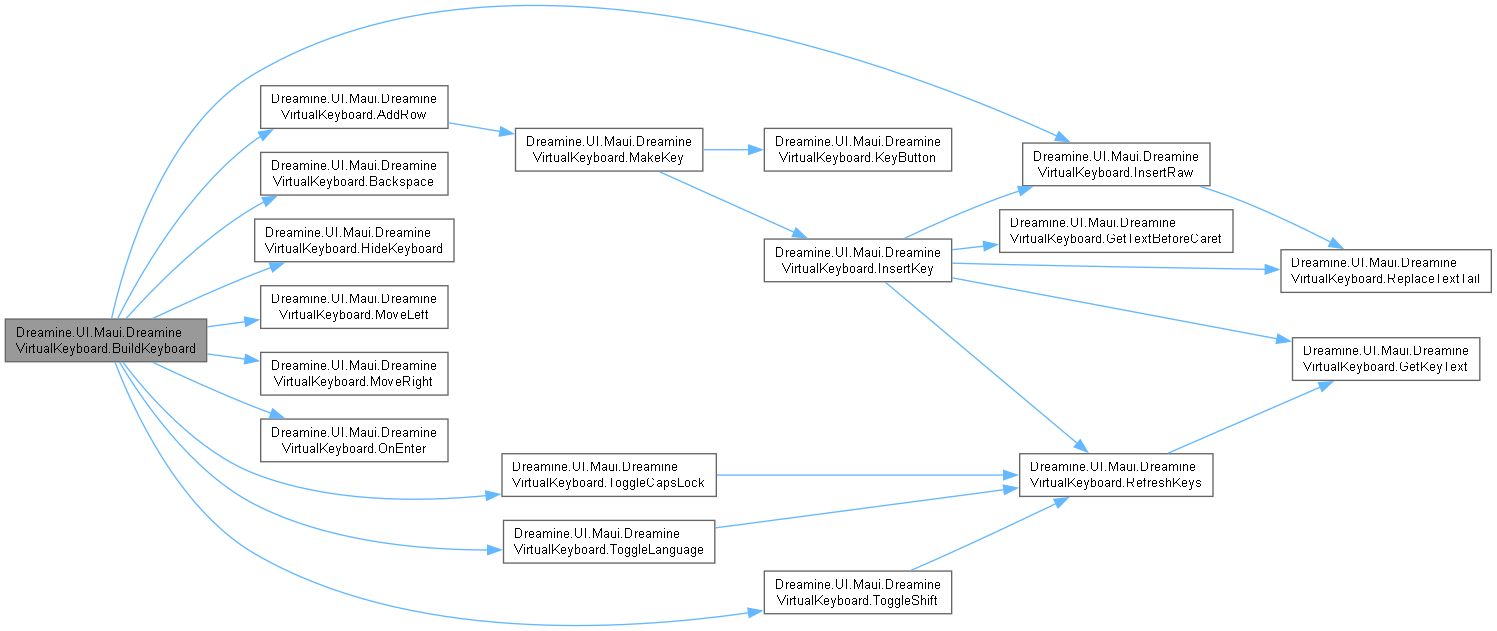
이 함수를 호출하는 함수들에 대한 그래프입니다.:

◆ GetKeyText()
|
inlineprivate |
현재 언어와 수정 키 상태에서 기본 키가 생성할 텍스트를 계산합니다.
- 매개변수
-
key 변환할 기본 키 값입니다.
- 반환값
- 화면에 표시하고 입력할 변환된 키 텍스트입니다.
- 예외
-
NullReferenceException key 가 null일 때 발생합니다.
DreamineVirtualKeyboard.xaml.cs 파일의 651 번째 라인에서 정의되었습니다.
652 {
653 if (_korean && KoreanKeys.TryGetValue(key, out var korean))
654 return _shift && KoreanShiftKeys.TryGetValue(key, out var koreanShift) ? koreanShift : korean;
655
656 if (_shift && ShiftKeys.TryGetValue(key, out var shifted))
657 return shifted;
658
659 if (key.Length == 1 && char.IsLetter(key[0]))
660 return _shift ^ _capsLock ? key.ToUpperInvariant() : key.ToLowerInvariant();
661
662 return key;
663 }
다음을 참조함 : _capsLock, _korean, _shift, KoreanKeys, KoreanShiftKeys, ShiftKeys.
다음에 의해서 참조됨 : InsertKey(), RefreshKeys().
이 함수를 호출하는 함수들에 대한 그래프입니다.:

◆ GetTextBeforeCaret()
|
inlineprivate |
연결된 입력 항목에서 캐럿 앞의 텍스트를 가져옵니다.
- 반환값
- 캐럿 앞 텍스트이며 연결된 항목이 없으면 빈 문자열입니다.
DreamineVirtualKeyboard.xaml.cs 파일의 446 번째 라인에서 정의되었습니다.
447 {
448 if (_target is null)
449 return string.Empty;
450
451 var text = _target.Text ?? string.Empty;
452 var caret = Math.Clamp(_target.CursorPosition, 0, text.Length);
453 return text[..caret];
454 }
다음을 참조함 : _target.
다음에 의해서 참조됨 : InsertKey().
이 함수를 호출하는 함수들에 대한 그래프입니다.:

◆ HideKeyboard()
|
inlineprivate |
한글 조합을 초기화하고 화면 키보드를 숨깁니다.
DreamineVirtualKeyboard.xaml.cs 파일의 572 번째 라인에서 정의되었습니다.
573 {
574 _composer.Reset();
575 IsVisible = false;
576 }
다음을 참조함 : _composer.
다음에 의해서 참조됨 : BuildKeyboard().
이 함수를 호출하는 함수들에 대한 그래프입니다.:

◆ InsertKey()
|
inlineprivate |
현재 언어 및 수정 키 상태에 따라 텍스트 키를 입력합니다.
- 매개변수
-
key 입력할 기본 키 값입니다.
DreamineVirtualKeyboard.xaml.cs 파일의 336 번째 라인에서 정의되었습니다.
337 {
338 var text = GetKeyText(key);
339 if (_korean && HangulComposer.IsComposableJamo(text))
340 {
341 var edit = _composer.Input(text, GetTextBeforeCaret());
342 ReplaceTextTail(edit.ReplaceCount, edit.Text);
343 }
344 else
345 {
346 _composer.Reset();
347 InsertRaw(text);
348 }
349
350 if (_shift)
351 {
352 _shift = false;
353 RefreshKeys();
354 }
355 }
다음을 참조함 : _composer, _korean, _shift, GetKeyText(), GetTextBeforeCaret(), InsertRaw(), RefreshKeys(), ReplaceTextTail().
다음에 의해서 참조됨 : MakeKey().
이 함수 내부에서 호출하는 함수들에 대한 그래프입니다.:
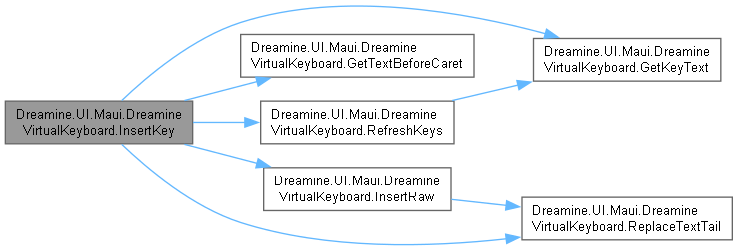
이 함수를 호출하는 함수들에 대한 그래프입니다.:

◆ InsertRaw()
|
inlineprivate |
한글 조합을 초기화하고 원시 텍스트를 현재 선택 또는 캐럿 위치에 삽입합니다.
- 매개변수
-
text 삽입할 원시 텍스트입니다.
DreamineVirtualKeyboard.xaml.cs 파일의 373 번째 라인에서 정의되었습니다.
374 {
375 if (_target is null)
376 return;
377
378 _composer.Reset();
379 ReplaceTextTail(0, text);
380 }
다음을 참조함 : _composer, _target, ReplaceTextTail().
다음에 의해서 참조됨 : BuildKeyboard(), InsertKey().
이 함수 내부에서 호출하는 함수들에 대한 그래프입니다.:

이 함수를 호출하는 함수들에 대한 그래프입니다.:

◆ KeyButton()
|
sealedprivate |
화면 버튼과 변환 전 기본 키 텍스트의 연결을 나타냅니다.
- 매개변수
-
Button 화면에 표시된 MAUI 버튼입니다. BaseText 언어 및 수정 키 변환 전 기본 텍스트입니다.
다음에 의해서 참조됨 : MakeKey().
이 함수를 호출하는 함수들에 대한 그래프입니다.:

◆ MakeKey()
|
inlineprivate |
키 사양에 맞는 MAUI 버튼과 클릭 동작을 만듭니다.
- 매개변수
-
spec 만들 키의 종류, 레이블, 너비 및 동작입니다.
- 반환값
- 구성된 키 버튼입니다.
DreamineVirtualKeyboard.xaml.cs 파일의 283 번째 라인에서 정의되었습니다.
284 {
285 var button = new Button
286 {
287 Text = spec.Label,
288 HeightRequest = 54,
289 Padding = 0,
290 FontSize = spec.Width > 90 ? 14 : 16,
291 BackgroundColor = KeyBackground,
292 TextColor = Colors.White,
293 CornerRadius = 4
294 };
295
296 if (spec.Kind == KeyKind.Text)
297 _textKeys.Add(new KeyButton(button, spec.Label));
298
299 if (spec.Label == "Shift")
300 _shiftButton = button;
301 else if (spec.Label == "Caps Lock")
302 _capsButton = button;
303 else if (spec.Label is "abc" or "가")
304 _languageButton = button;
305
306 button.Clicked += (_, _) =>
307 {
308 if (_target is null)
309 return;
310
311 if (spec.Kind == KeyKind.Text)
312 InsertKey(spec.Label);
313 else
314 spec.Action?.Invoke();
315 };
316
317 return button;
318 }
다음을 참조함 : _capsButton, _languageButton, _shiftButton, _target, _textKeys, InsertKey(), KeyBackground, KeyButton(), Text.
다음에 의해서 참조됨 : AddRow().
이 함수 내부에서 호출하는 함수들에 대한 그래프입니다.:
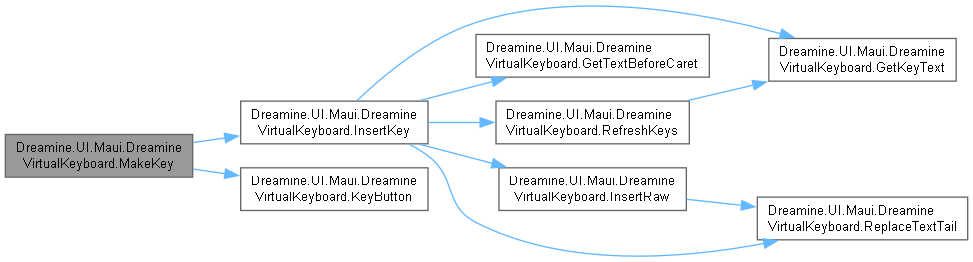
이 함수를 호출하는 함수들에 대한 그래프입니다.:

◆ MoveLeft()
|
inlineprivate |
연결된 입력 항목의 캐럿을 왼쪽으로 한 칸 이동하고 선택을 지웁니다.
DreamineVirtualKeyboard.xaml.cs 파일의 538 번째 라인에서 정의되었습니다.
539 {
540 if (_target is null)
541 return;
542
543 _target.CursorPosition = Math.Max(0, _target.CursorPosition - 1);
544 _target.SelectionLength = 0;
545 }
다음을 참조함 : _target.
다음에 의해서 참조됨 : BuildKeyboard().
이 함수를 호출하는 함수들에 대한 그래프입니다.:

◆ MoveRight()
|
inlineprivate |
연결된 입력 항목의 캐럿을 오른쪽으로 한 칸 이동하고 선택을 지웁니다.
DreamineVirtualKeyboard.xaml.cs 파일의 555 번째 라인에서 정의되었습니다.
556 {
557 if (_target is null)
558 return;
559
560 _target.CursorPosition = Math.Min((_target.Text ?? string.Empty).Length, _target.CursorPosition + 1);
561 _target.SelectionLength = 0;
562 }
다음을 참조함 : _target.
다음에 의해서 참조됨 : BuildKeyboard().
이 함수를 호출하는 함수들에 대한 그래프입니다.:

◆ OnEnter()
|
inlineprivate |
한 줄 입력을 완료하고 포커스를 해제한 뒤 키보드를 숨깁니다.
DreamineVirtualKeyboard.xaml.cs 파일의 586 번째 라인에서 정의되었습니다.
587 {
588 _composer.Reset();
589 _target?.Unfocus();
590 IsVisible = false;
591 }
다음에 의해서 참조됨 : BuildKeyboard().
이 함수를 호출하는 함수들에 대한 그래프입니다.:

◆ RefreshKeys()
|
inlineprivate |
현재 Shift, Caps Lock 및 언어 상태에 맞게 모든 키 레이블과 선택 색상을 갱신합니다.
DreamineVirtualKeyboard.xaml.cs 파일의 601 번째 라인에서 정의되었습니다.
602 {
603 foreach (var key in _textKeys)
604 key.Button.Text = GetKeyText(key.BaseText);
605
606 if (_shiftButton is not null)
607 _shiftButton.BackgroundColor = _shift ? KeySelectedBackground : KeyBackground;
608
609 if (_capsButton is not null)
610 _capsButton.BackgroundColor = _capsLock ? KeySelectedBackground : KeyBackground;
611
612 if (_languageButton is not null)
613 {
614 _languageButton.Text = _korean ? "가" : "abc";
615 _languageButton.BackgroundColor = _korean ? KeySelectedBackground : KeyBackground;
616 }
617 }
다음을 참조함 : _capsButton, _capsLock, _korean, _languageButton, _shift, _shiftButton, _textKeys, GetKeyText(), KeyBackground, KeySelectedBackground.
다음에 의해서 참조됨 : DreamineVirtualKeyboard(), InsertKey(), ToggleCapsLock(), ToggleLanguage(), ToggleShift().
이 함수 내부에서 호출하는 함수들에 대한 그래프입니다.:

이 함수를 호출하는 함수들에 대한 그래프입니다.:

◆ ReplaceTextTail()
|
inlineprivate |
선택 영역을 교체하거나 캐럿 앞의 지정 문자 수를 새 텍스트로 교체합니다.
- 매개변수
-
replaceCount 선택 영역이 없을 때 캐럿 앞에서 교체할 문자 수입니다. text 교체 위치에 삽입할 텍스트입니다.
DreamineVirtualKeyboard.xaml.cs 파일의 406 번째 라인에서 정의되었습니다.
407 {
408 if (_target is null)
409 return;
410
411 var current = _target.Text ?? string.Empty;
412 var selectionStart = Math.Clamp(_target.CursorPosition, 0, current.Length);
413 var selectionLength = Math.Clamp(_target.SelectionLength, 0, current.Length - selectionStart);
414
415 if (selectionLength > 0)
416 {
417 _target.Text = current.Remove(selectionStart, selectionLength).Insert(selectionStart, text);
418 _target.CursorPosition = selectionStart + text.Length;
419 }
420 else
421 {
422 var removeStart = Math.Max(0, selectionStart - replaceCount);
423 removeStart = Math.Min(removeStart, current.Length);
424 var removeLength = Math.Clamp(selectionStart - removeStart, 0, current.Length - removeStart);
425 _target.Text = current.Remove(removeStart, removeLength).Insert(removeStart, text);
426 _target.CursorPosition = removeStart + text.Length;
427 }
428 }
다음을 참조함 : _target.
다음에 의해서 참조됨 : InsertKey(), InsertRaw().
이 함수를 호출하는 함수들에 대한 그래프입니다.:

◆ ToggleCapsLock()
|
inlineprivate |
Caps Lock 상태를 전환하고 한글 조합과 키 레이블을 갱신합니다.
DreamineVirtualKeyboard.xaml.cs 파일의 508 번째 라인에서 정의되었습니다.
509 {
510 _capsLock = !_capsLock;
511 _composer.Reset();
512 RefreshKeys();
513 }
다음을 참조함 : _capsLock, _composer, RefreshKeys().
다음에 의해서 참조됨 : BuildKeyboard().
이 함수 내부에서 호출하는 함수들에 대한 그래프입니다.:

이 함수를 호출하는 함수들에 대한 그래프입니다.:

◆ ToggleLanguage()
|
inlineprivate |
영어와 한국어 입력 상태를 전환하고 한글 조합과 키 레이블을 갱신합니다.
DreamineVirtualKeyboard.xaml.cs 파일의 523 번째 라인에서 정의되었습니다.
524 {
525 _korean = !_korean;
526 _composer.Reset();
527 RefreshKeys();
528 }
다음을 참조함 : _composer, _korean, RefreshKeys().
다음에 의해서 참조됨 : BuildKeyboard().
이 함수 내부에서 호출하는 함수들에 대한 그래프입니다.:

이 함수를 호출하는 함수들에 대한 그래프입니다.:

◆ ToggleShift()
|
inlineprivate |
Shift 상태를 전환하고 키 레이블을 갱신합니다.
DreamineVirtualKeyboard.xaml.cs 파일의 494 번째 라인에서 정의되었습니다.
495 {
496 _shift = !_shift;
497 RefreshKeys();
498 }
다음을 참조함 : _shift, RefreshKeys().
다음에 의해서 참조됨 : BuildKeyboard().
이 함수 내부에서 호출하는 함수들에 대한 그래프입니다.:

이 함수를 호출하는 함수들에 대한 그래프입니다.:

멤버 데이터 문서화
◆ _capsButton
|
private |
caps Button 값을 보관합니다.
DreamineVirtualKeyboard.xaml.cs 파일의 112 번째 라인에서 정의되었습니다.
다음에 의해서 참조됨 : MakeKey(), RefreshKeys().
◆ _capsLock
|
private |
caps Lock 값을 보관합니다.
DreamineVirtualKeyboard.xaml.cs 파일의 85 번째 라인에서 정의되었습니다.
다음에 의해서 참조됨 : GetKeyText(), RefreshKeys(), ToggleCapsLock().
◆ _composer
|
private |
composer 값을 보관합니다.
DreamineVirtualKeyboard.xaml.cs 파일의 57 번째 라인에서 정의되었습니다.
다음에 의해서 참조됨 : Backspace(), HideKeyboard(), InsertKey(), InsertRaw(), OnEnter(), ToggleCapsLock(), ToggleLanguage().
◆ _korean
|
private |
korean 값을 보관합니다.
DreamineVirtualKeyboard.xaml.cs 파일의 94 번째 라인에서 정의되었습니다.
다음에 의해서 참조됨 : GetKeyText(), InsertKey(), RefreshKeys(), ToggleLanguage().
◆ _languageButton
|
private |
language Button 값을 보관합니다.
DreamineVirtualKeyboard.xaml.cs 파일의 121 번째 라인에서 정의되었습니다.
다음에 의해서 참조됨 : MakeKey(), RefreshKeys().
◆ _shift
|
private |
shift 값을 보관합니다.
DreamineVirtualKeyboard.xaml.cs 파일의 76 번째 라인에서 정의되었습니다.
다음에 의해서 참조됨 : GetKeyText(), InsertKey(), RefreshKeys(), ToggleShift().
◆ _shiftButton
|
private |
shift Button 값을 보관합니다.
DreamineVirtualKeyboard.xaml.cs 파일의 103 번째 라인에서 정의되었습니다.
다음에 의해서 참조됨 : MakeKey(), RefreshKeys().
◆ _target
|
private |
target 값을 보관합니다.
DreamineVirtualKeyboard.xaml.cs 파일의 66 번째 라인에서 정의되었습니다.
다음에 의해서 참조됨 : Attach(), Backspace(), GetTextBeforeCaret(), InsertRaw(), MakeKey(), MoveLeft(), MoveRight(), OnEnter(), ReplaceTextTail().
◆ _textKeys
|
private |
text Keys 값을 보관합니다.
DreamineVirtualKeyboard.xaml.cs 파일의 48 번째 라인에서 정의되었습니다.
다음에 의해서 참조됨 : MakeKey(), RefreshKeys().
◆ KeyBackground
|
staticprivate |
Key Background 값을 보관합니다.
DreamineVirtualKeyboard.xaml.cs 파일의 29 번째 라인에서 정의되었습니다.
다음에 의해서 참조됨 : MakeKey(), RefreshKeys().
◆ KeySelectedBackground
|
staticprivate |
Key Selected Background 값을 보관합니다.
DreamineVirtualKeyboard.xaml.cs 파일의 38 번째 라인에서 정의되었습니다.
다음에 의해서 참조됨 : RefreshKeys().
◆ KoreanKeys
|
staticprivate |
초기값:
= new()
{
["q"] = "ㅂ", ["w"] = "ㅈ", ["e"] = "ㄷ", ["r"] = "ㄱ", ["t"] = "ㅅ",
["y"] = "ㅛ", ["u"] = "ㅕ", ["i"] = "ㅑ", ["o"] = "ㅐ", ["p"] = "ㅔ",
["a"] = "ㅁ", ["s"] = "ㄴ", ["d"] = "ㅇ", ["f"] = "ㄹ", ["g"] = "ㅎ",
["h"] = "ㅗ", ["j"] = "ㅓ", ["k"] = "ㅏ", ["l"] = "ㅣ",
["z"] = "ㅋ", ["x"] = "ㅌ", ["c"] = "ㅊ", ["v"] = "ㅍ", ["b"] = "ㅠ",
["n"] = "ㅜ", ["m"] = "ㅡ",
}
Korean Keys 값을 보관합니다.
DreamineVirtualKeyboard.xaml.cs 파일의 690 번째 라인에서 정의되었습니다.
691 {
692 ["q"] = "ㅂ", ["w"] = "ㅈ", ["e"] = "ㄷ", ["r"] = "ㄱ", ["t"] = "ㅅ",
693 ["y"] = "ㅛ", ["u"] = "ㅕ", ["i"] = "ㅑ", ["o"] = "ㅐ", ["p"] = "ㅔ",
694 ["a"] = "ㅁ", ["s"] = "ㄴ", ["d"] = "ㅇ", ["f"] = "ㄹ", ["g"] = "ㅎ",
695 ["h"] = "ㅗ", ["j"] = "ㅓ", ["k"] = "ㅏ", ["l"] = "ㅣ",
696 ["z"] = "ㅋ", ["x"] = "ㅌ", ["c"] = "ㅊ", ["v"] = "ㅍ", ["b"] = "ㅠ",
697 ["n"] = "ㅜ", ["m"] = "ㅡ",
698 };
다음에 의해서 참조됨 : GetKeyText().
◆ KoreanShiftKeys
|
staticprivate |
초기값:
= new()
{
["q"] = "ㅃ", ["w"] = "ㅉ", ["e"] = "ㄸ", ["r"] = "ㄲ", ["t"] = "ㅆ",
["o"] = "ㅒ", ["p"] = "ㅖ",
}
Korean Shift Keys 값을 보관합니다.
DreamineVirtualKeyboard.xaml.cs 파일의 708 번째 라인에서 정의되었습니다.
709 {
710 ["q"] = "ㅃ", ["w"] = "ㅉ", ["e"] = "ㄸ", ["r"] = "ㄲ", ["t"] = "ㅆ",
711 ["o"] = "ㅒ", ["p"] = "ㅖ",
712 };
다음에 의해서 참조됨 : GetKeyText().
◆ ShiftKeys
|
staticprivate |
초기값:
= new()
{
["`"] = "~", ["1"] = "!", ["2"] = "@", ["3"] = "#", ["4"] = "$",
["5"] = "%", ["6"] = "^", ["7"] = "&", ["8"] = "*", ["9"] = "(",
["0"] = ")", ["-"] = "_", ["="] = "+", ["["] = "{", ["]"] = "}",
["\\"] = "|", [";"] = ":", ["'"] = "\"", [","] = "<", ["."] = ">",
["/"] = "?",
}
Shift Keys 값을 보관합니다.
DreamineVirtualKeyboard.xaml.cs 파일의 673 번째 라인에서 정의되었습니다.
674 {
675 ["`"] = "~", ["1"] = "!", ["2"] = "@", ["3"] = "#", ["4"] = "$",
676 ["5"] = "%", ["6"] = "^", ["7"] = "&", ["8"] = "*", ["9"] = "(",
677 ["0"] = ")", ["-"] = "_", ["="] = "+", ["["] = "{", ["]"] = "}",
678 ["\\"] = "|", [";"] = ":", ["'"] = "\"", [","] = "<", ["."] = ">",
679 ["/"] = "?",
680 };
다음에 의해서 참조됨 : GetKeyText().
이 클래스에 대한 문서화 페이지는 다음의 파일로부터 생성되었습니다.: