로딩중...
검색중...
일치하는것 없음
Dreamine.PLC.Wpf.ViewModels.PlcMonitorViewModel 클래스 참조sealed
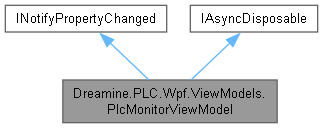
Dreamine.PLC.Wpf.ViewModels.PlcMonitorViewModel에 대한 상속 다이어그램 :
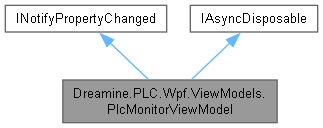
Dreamine.PLC.Wpf.ViewModels.PlcMonitorViewModel에 대한 협력 다이어그램:
Public 멤버 함수 | |
| PlcMonitorViewModel () | |
| PlcMonitorViewModel (IPlcClient client, string channelName="PLC") | |
| void | SetClient (IPlcClient client, string channelName) |
| void | AppendLog (string operation, string address, string values, bool isSuccess, string message) |
| async ValueTask | DisposeAsync () |
속성 | |
| ObservableCollection< PlcOperationLogItem > | Logs = [] [get] |
| ICommand | ConnectCommand [get] |
| ICommand | DisconnectCommand [get] |
| ICommand | ReadBitsCommand [get] |
| ICommand | ReadWordsCommand [get] |
| ICommand | WriteBitsCommand [get] |
| ICommand | WriteWordsCommand [get] |
| ICommand | ClearLogCommand [get] |
| string | ChannelName [get, set] |
| string | AddressText [get, set] |
| string | CountText [get, set] |
| string | BitValuesText [get, set] |
| string | WordValuesText [get, set] |
| PlcConnectionState | State [get, private set] |
| string | StatusMessage [get, set] |
이벤트 | |
| PropertyChangedEventHandler? | PropertyChanged |
Private 멤버 함수 | |
| async Task | ConnectAsync () |
| async Task | DisconnectAsync () |
| async Task | ReadBitsAsync () |
| async Task | ReadWordsAsync () |
| async Task | WriteBitsAsync () |
| async Task | WriteWordsAsync () |
| void | ClearLog () |
| bool | TryCreateReadRequest (out Abstractions.Devices.PlcAddress address, out int count) |
| bool | TryParseAddress (out Abstractions.Devices.PlcAddress address) |
| bool | TryParseBits (string text, out bool[] values) |
| bool | TryParseWords (string text, out short[] values) |
| void | AddLog (string operation, string address, string values, bool isSuccess, string message) |
| void | OnClientStateChanged (object? sender, PlcConnectionState e) |
| bool | SetField< T > (ref T field, T value, [CallerMemberName] string? propertyName=null) |
| void | OnPropertyChanged ([CallerMemberName] string? propertyName=null) |
정적 Private 멤버 함수 | |
| static bool | ParseBit (string text) |
Private 속성 | |
| readonly DefaultPlcAddressParser | _addressParser = new() |
| IPlcClient | _client |
| string | _channelName = "InMemory PLC" |
| string | _addressText = "D100" |
| string | _countText = "4" |
| string | _bitValuesText = "1,0,1,0" |
| string | _wordValuesText = "100,200,300,400" |
| string | _statusMessage = "Ready." |
| PlcConnectionState | _state = PlcConnectionState.Disconnected |
상세한 설명
제조사에 독립적인 PLC 모니터 ViewModel을 제공합니다.
PlcMonitorViewModel.cs 파일의 24 번째 라인에서 정의되었습니다.
생성자 & 소멸자 문서화
◆ PlcMonitorViewModel() [1/2]
|
inline |
메모리 PLC 클라이언트를 사용해 T:Dreamine.PLC.Wpf.ViewModels.PlcMonitorViewModel 클래스의 새 인스턴스를 초기화합니다.
PlcMonitorViewModel.cs 파일의 116 번째 라인에서 정의되었습니다.
117 : this(new InMemoryPlcClient(), "InMemory PLC")
118 {
119 }
◆ PlcMonitorViewModel() [2/2]
|
inline |
지정한 PLC 클라이언트를 사용해 T:Dreamine.PLC.Wpf.ViewModels.PlcMonitorViewModel 클래스의 새 인스턴스를 초기화합니다.
- 매개변수
-
client 모니터링할 PLC 클라이언트입니다. channelName UI에 표시할 채널 이름입니다.
- 예외
-
ArgumentNullException client 가 null일 때 발생합니다.
PlcMonitorViewModel.cs 파일의 153 번째 라인에서 정의되었습니다.
154 {
155 _client = client ?? throw new ArgumentNullException(nameof(client));
156 _client.StateChanged += OnClientStateChanged;
157 _state = _client.State;
158 _channelName = channelName;
159
160 ConnectCommand = new AsyncRelayCommand(ConnectAsync);
161 DisconnectCommand = new AsyncRelayCommand(DisconnectAsync);
162 ReadBitsCommand = new AsyncRelayCommand(ReadBitsAsync);
163 ReadWordsCommand = new AsyncRelayCommand(ReadWordsAsync);
164 WriteBitsCommand = new AsyncRelayCommand(WriteBitsAsync);
165 WriteWordsCommand = new AsyncRelayCommand(WriteWordsAsync);
166 ClearLogCommand = new RelayCommand(ClearLog);
167 }
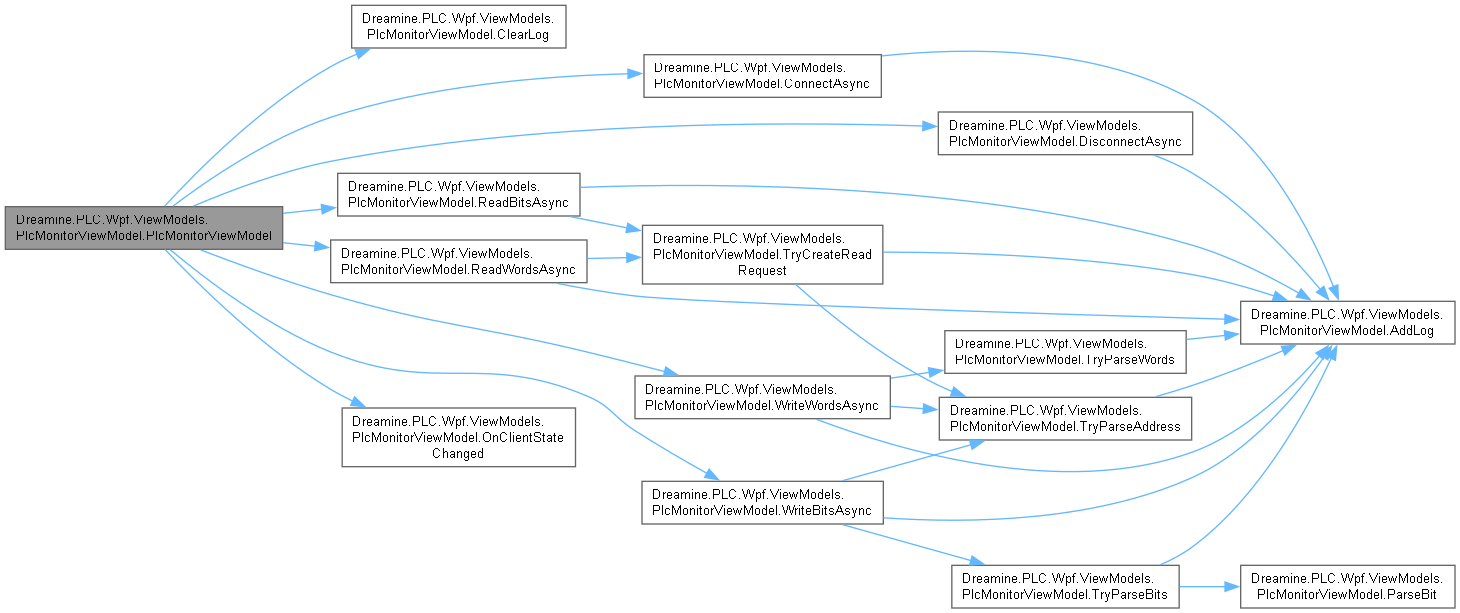
다음을 참조함 : _channelName, _client, _state, ClearLog(), ClearLogCommand, ConnectAsync(), ConnectCommand, DisconnectAsync(), DisconnectCommand, OnClientStateChanged(), ReadBitsAsync(), ReadBitsCommand, ReadWordsAsync(), ReadWordsCommand, WriteBitsAsync(), WriteBitsCommand, WriteWordsAsync(), WriteWordsCommand.
이 함수 내부에서 호출하는 함수들에 대한 그래프입니다.:
멤버 함수 문서화
◆ AddLog()
|
inlineprivate |
작업 로그의 앞에 항목을 추가하고 최대 500개로 제한합니다.
- 매개변수
-
operation 작업 이름입니다. address PLC 주소 텍스트입니다. values 값 텍스트입니다. isSuccess 작업 성공 여부입니다. message 결과 메시지입니다.
PlcMonitorViewModel.cs 파일의 952 번째 라인에서 정의되었습니다.
953 {
954 Logs.Insert(0, new PlcOperationLogItem
955 {
956 Time = DateTime.Now,
957 Operation = operation,
958 Address = address,
959 Values = values,
960 IsSuccess = isSuccess,
961 Message = message
962 });
963
964 while (Logs.Count > 500)
965 {
966 Logs.RemoveAt(Logs.Count - 1);
967 }
968 }
다음을 참조함 : Logs.
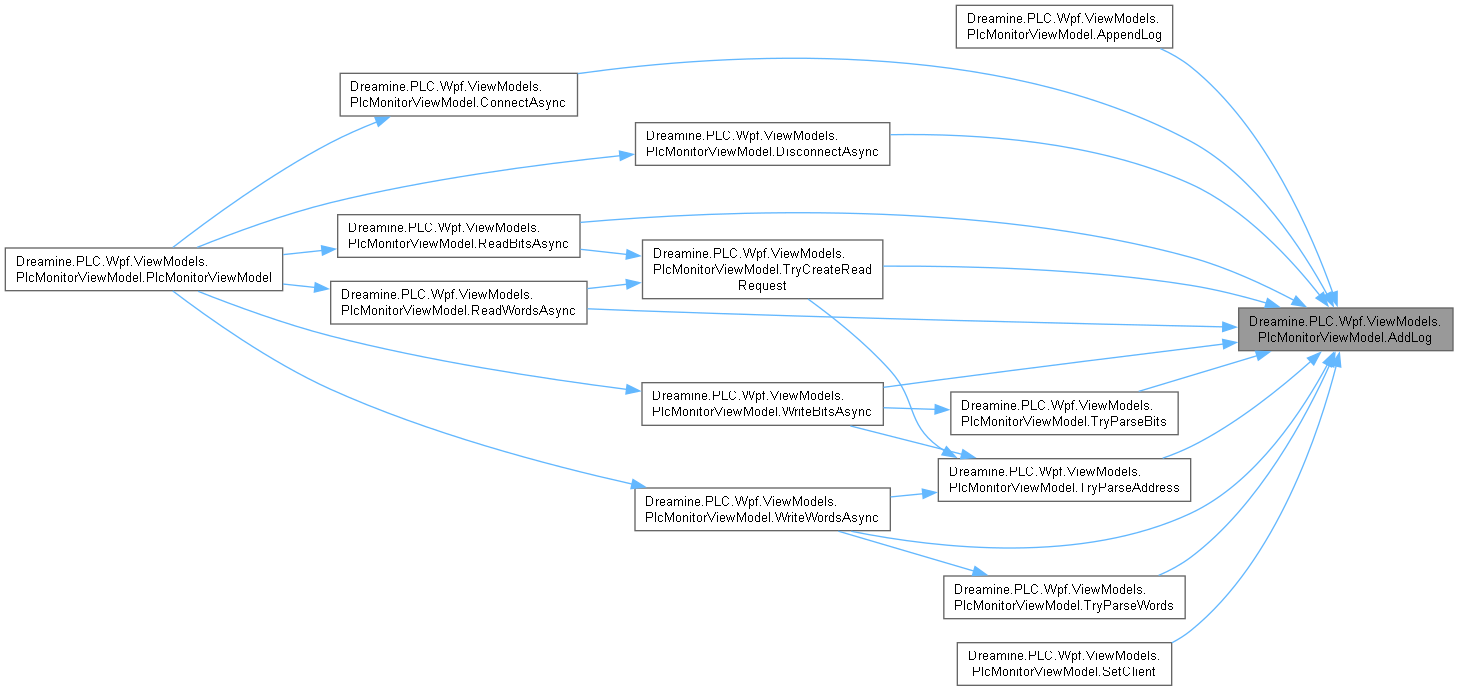
다음에 의해서 참조됨 : AppendLog(), ConnectAsync(), DisconnectAsync(), ReadBitsAsync(), ReadWordsAsync(), SetClient(), TryCreateReadRequest(), TryParseAddress(), TryParseBits(), TryParseWords(), WriteBitsAsync(), WriteWordsAsync().
이 함수를 호출하는 함수들에 대한 그래프입니다.:
◆ AppendLog()
|
inline |
외부 진단 로그 항목을 PLC 모니터에 추가합니다.
- 매개변수
-
operation 작업 이름입니다. address PLC 주소 텍스트입니다. values 작업 값 텍스트입니다. isSuccess 작업 성공 여부입니다. message 진단 메시지입니다.
PlcMonitorViewModel.cs 파일의 457 번째 라인에서 정의되었습니다.
458 {
459 AddLog(operation, address, values, isSuccess, message);
460 }
다음을 참조함 : AddLog().
이 함수 내부에서 호출하는 함수들에 대한 그래프입니다.:

◆ ClearLog()
|
inlineprivate |
모든 작업 로그를 지우고 상태 메시지를 갱신합니다.
PlcMonitorViewModel.cs 파일의 664 번째 라인에서 정의되었습니다.
665 {
666 Logs.Clear();
667 StatusMessage = "Log cleared.";
668 }
다음을 참조함 : Logs, StatusMessage.
다음에 의해서 참조됨 : PlcMonitorViewModel().
이 함수를 호출하는 함수들에 대한 그래프입니다.:

◆ ConnectAsync()
|
inlineprivate |
현재 PLC 클라이언트를 연결하고 상태와 로그를 갱신합니다.
- 반환값
- 비동기 연결 및 UI 갱신 작업입니다.
PlcMonitorViewModel.cs 파일의 500 번째 라인에서 정의되었습니다.
501 {
502 var result = await _client.ConnectAsync().ConfigureAwait(true);
503 StatusMessage = result.IsSuccess ? "Connected." : result.Message ?? "Connect failed.";
504 AddLog("Connect", string.Empty, string.Empty, result.IsSuccess, StatusMessage);
505 }
다음을 참조함 : _client, AddLog(), StatusMessage.
다음에 의해서 참조됨 : PlcMonitorViewModel().
이 함수 내부에서 호출하는 함수들에 대한 그래프입니다.:

이 함수를 호출하는 함수들에 대한 그래프입니다.:

◆ DisconnectAsync()
|
inlineprivate |
현재 PLC 클라이언트의 연결을 해제하고 상태와 로그를 갱신합니다.
- 반환값
- 비동기 연결 해제 및 UI 갱신 작업입니다.
PlcMonitorViewModel.cs 파일의 523 번째 라인에서 정의되었습니다.
524 {
525 var result = await _client.DisconnectAsync().ConfigureAwait(true);
526 StatusMessage = result.IsSuccess ? "Disconnected." : result.Message ?? "Disconnect failed.";
527 AddLog("Disconnect", string.Empty, string.Empty, result.IsSuccess, StatusMessage);
528 }
다음을 참조함 : _client, AddLog(), StatusMessage.
다음에 의해서 참조됨 : PlcMonitorViewModel().
이 함수 내부에서 호출하는 함수들에 대한 그래프입니다.:

이 함수를 호출하는 함수들에 대한 그래프입니다.:

◆ DisposeAsync()
|
inline |
상태 이벤트 구독을 해제하고 현재 PLC 클라이언트를 비동기로 정리합니다.
- 반환값
- 클라이언트의 비동기 정리 작업입니다.
PlcMonitorViewModel.cs 파일의 478 번째 라인에서 정의되었습니다.
479 {
480 _client.StateChanged -= OnClientStateChanged;
481 await _client.DisposeAsync().ConfigureAwait(false);
482 }
다음을 참조함 : _client, OnClientStateChanged().
이 함수 내부에서 호출하는 함수들에 대한 그래프입니다.:

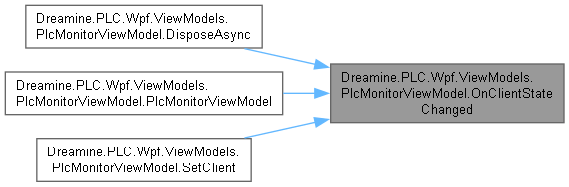
◆ OnClientStateChanged()
|
inlineprivate |
PLC 클라이언트 상태 변경을 ViewModel의 상태 속성에 반영합니다.
- 매개변수
-
sender 상태 이벤트를 발생시킨 클라이언트입니다. e 새 PLC 연결 상태입니다.
PlcMonitorViewModel.cs 파일의 994 번째 라인에서 정의되었습니다.
995 {
996 State = e;
997 }
다음을 참조함 : State.
다음에 의해서 참조됨 : DisposeAsync(), PlcMonitorViewModel(), SetClient().
이 함수를 호출하는 함수들에 대한 그래프입니다.:
◆ OnPropertyChanged()
|
inlineprivate |
지정한 속성 이름으로 PropertyChanged 이벤트를 발생시킵니다.
- 매개변수
-
propertyName 변경된 속성 이름입니다.
PlcMonitorViewModel.cs 파일의 1075 번째 라인에서 정의되었습니다.
1076 {
1077 PropertyChanged?.Invoke(this, new PropertyChangedEventArgs(propertyName));
1078 }
다음을 참조함 : PropertyChanged.
다음에 의해서 참조됨 : SetField< T >().
이 함수를 호출하는 함수들에 대한 그래프입니다.:

◆ ParseBit()
|
inlinestaticprivate |
단일 비트 텍스트를 부울 값으로 변환합니다.
- 매개변수
-
text 0,1또는 부울 문자열입니다.
- 반환값
- 구문 분석된 비트 값입니다.
- 예외
-
FormatException 텍스트가 지원되는 비트 형식이 아닐 때 발생합니다.
PlcMonitorViewModel.cs 파일의 893 번째 라인에서 정의되었습니다.
894 {
895 return text switch
896 {
897 "1" => true,
898 "0" => false,
899 _ when bool.TryParse(text, out var value) => value,
900 _ => throw new FormatException($"Invalid bit value: {text}")
901 };
902 }
다음에 의해서 참조됨 : TryParseBits().
이 함수를 호출하는 함수들에 대한 그래프입니다.:

◆ ReadBitsAsync()
|
inlineprivate |
UI 입력에서 비트 읽기 요청을 만들고 결과를 상태와 로그에 표시합니다.
- 반환값
- 비동기 비트 읽기 및 UI 갱신 작업입니다.
PlcMonitorViewModel.cs 파일의 546 번째 라인에서 정의되었습니다.
547 {
548 if (!TryCreateReadRequest(out var address, out var count))
549 {
550 return;
551 }
552
553 var result = await _client.ReadBitsAsync(address, count).ConfigureAwait(true);
554 var values = result.Value is null ? string.Empty : string.Join(',', result.Value.Select(x => x ? "1" : "0"));
555 StatusMessage = result.IsSuccess ? $"Read bits: {values}" : result.Message ?? "Read bits failed.";
556 AddLog("ReadBits", address.ToString(), values, result.IsSuccess, StatusMessage);
557 }
다음을 참조함 : _client, AddLog(), StatusMessage, TryCreateReadRequest().
다음에 의해서 참조됨 : PlcMonitorViewModel().
이 함수 내부에서 호출하는 함수들에 대한 그래프입니다.:

이 함수를 호출하는 함수들에 대한 그래프입니다.:

◆ ReadWordsAsync()
|
inlineprivate |
UI 입력에서 워드 읽기 요청을 만들고 결과를 상태와 로그에 표시합니다.
- 반환값
- 비동기 워드 읽기 및 UI 갱신 작업입니다.
PlcMonitorViewModel.cs 파일의 575 번째 라인에서 정의되었습니다.
576 {
577 if (!TryCreateReadRequest(out var address, out var count))
578 {
579 return;
580 }
581
582 var result = await _client.ReadWordsAsync(address, count).ConfigureAwait(true);
583 var values = result.Value is null ? string.Empty : string.Join(',', result.Value.Select(x => x.ToString(CultureInfo.InvariantCulture)));
584 StatusMessage = result.IsSuccess ? $"Read words: {values}" : result.Message ?? "Read words failed.";
585 AddLog("ReadWords", address.ToString(), values, result.IsSuccess, StatusMessage);
586 }
다음을 참조함 : _client, AddLog(), StatusMessage, TryCreateReadRequest().
다음에 의해서 참조됨 : PlcMonitorViewModel().
이 함수 내부에서 호출하는 함수들에 대한 그래프입니다.:

이 함수를 호출하는 함수들에 대한 그래프입니다.:

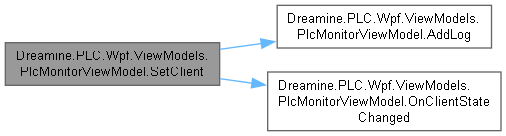
◆ SetClient()
|
inline |
현재 PLC 클라이언트와 상태 이벤트 구독을 새 클라이언트로 교체합니다.
- 매개변수
-
client 새로 모니터링할 PLC 클라이언트입니다. channelName 새 채널 표시 이름입니다.
- 예외
-
ArgumentNullException client 가 null일 때 발생합니다.
교체 전 클라이언트는 이 메서드에서 정리하지 않습니다.
PlcMonitorViewModel.cs 파일의 397 번째 라인에서 정의되었습니다.
398 {
399 ArgumentNullException.ThrowIfNull(client);
400
401 _client.StateChanged -= OnClientStateChanged;
402 _client = client;
403 _client.StateChanged += OnClientStateChanged;
404 ChannelName = channelName;
405 State = _client.State;
406 AddLog("Client", string.Empty, string.Empty, true, $"Client changed: {channelName}");
407 }
다음을 참조함 : _client, AddLog(), ChannelName, OnClientStateChanged(), State.
이 함수 내부에서 호출하는 함수들에 대한 그래프입니다.:
◆ SetField< T >()
|
inlineprivate |
필드 값이 달라진 경우 값을 갱신하고 속성 변경 알림을 발생시킵니다.
- 템플릿 파라메터
-
T 필드 값의 형식입니다.
- 매개변수
-
field 갱신할 필드 참조입니다. value 새 값입니다. propertyName 알림에 사용할 속성 이름입니다.
- 반환값
- 값이 변경되었으면
true입니다.
PlcMonitorViewModel.cs 파일의 1047 번째 라인에서 정의되었습니다.
1048 {
1049 if (EqualityComparer<T>.Default.Equals(field, value))
1050 {
1051 return false;
1052 }
1053
1054 field = value;
1055 OnPropertyChanged(propertyName);
1056 return true;
1057 }
다음을 참조함 : OnPropertyChanged().
이 함수 내부에서 호출하는 함수들에 대한 그래프입니다.:

◆ TryCreateReadRequest()
|
inlineprivate |
주소와 양수 개수 텍스트를 읽기 요청 값으로 구문 분석합니다.
- 매개변수
-
address 성공 시 구문 분석된 PLC 주소를 받습니다. count 성공 시 양수 읽기 개수를 받습니다.
- 반환값
- 두 입력이 모두 유효하면
true입니다.
PlcMonitorViewModel.cs 파일의 702 번째 라인에서 정의되었습니다.
703 {
704 address = default;
705 count = 0;
706
707 if (!TryParseAddress(out address))
708 {
709 return false;
710 }
711
712 if (!int.TryParse(CountText, NumberStyles.Integer, CultureInfo.InvariantCulture, out count) || count <= 0)
713 {
714 StatusMessage = "Count must be greater than zero.";
715 AddLog("Validate", AddressText, CountText, false, StatusMessage);
716 return false;
717 }
718
719 return true;
720 }
다음을 참조함 : AddLog(), AddressText, CountText, StatusMessage, TryParseAddress().
다음에 의해서 참조됨 : ReadBitsAsync(), ReadWordsAsync().
이 함수 내부에서 호출하는 함수들에 대한 그래프입니다.:

이 함수를 호출하는 함수들에 대한 그래프입니다.:

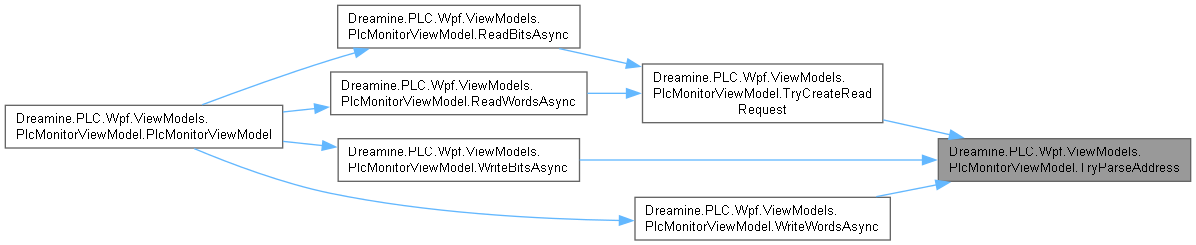
◆ TryParseAddress()
|
inlineprivate |
현재 주소 텍스트를 PLC 주소로 구문 분석하고 실패 상태를 기록합니다.
- 매개변수
-
address 성공 시 구문 분석된 PLC 주소를 받습니다.
- 반환값
- 주소가 유효하면
true입니다.
PlcMonitorViewModel.cs 파일의 746 번째 라인에서 정의되었습니다.
747 {
748 var result = _addressParser.Parse(AddressText);
749 if (!result.IsSuccess)
750 {
751 address = default;
752 StatusMessage = result.Message ?? "Invalid PLC address.";
753 AddLog("Validate", AddressText, string.Empty, false, StatusMessage);
754 return false;
755 }
756
757 address = result.Value;
758 return true;
759 }
다음을 참조함 : _addressParser, AddLog(), AddressText, StatusMessage.
다음에 의해서 참조됨 : TryCreateReadRequest(), WriteBitsAsync(), WriteWordsAsync().
이 함수 내부에서 호출하는 함수들에 대한 그래프입니다.:

이 함수를 호출하는 함수들에 대한 그래프입니다.:
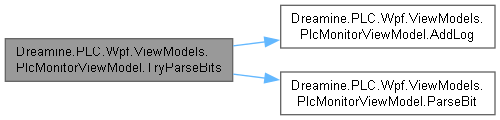
◆ TryParseBits()
|
inlineprivate |
쉼표 구분 비트 텍스트를 부울 배열로 구문 분석하고 오류를 로그에 기록합니다.
- 매개변수
-
text 구문 분석할 비트 값 텍스트입니다. values 성공 시 구문 분석된 비트 배열을 받습니다.
- 반환값
- 하나 이상의 값이 유효하게 구문 분석되면
true입니다.
PlcMonitorViewModel.cs 파일의 793 번째 라인에서 정의되었습니다.
794 {
795 values = [];
796 try
797 {
798 values = text.Split(',', StringSplitOptions.RemoveEmptyEntries | StringSplitOptions.TrimEntries)
799 .Select(ParseBit)
800 .ToArray();
801 return values.Length > 0;
802 }
803 catch (Exception ex)
804 {
805 StatusMessage = ex.Message;
806 AddLog("Validate", AddressText, text, false, StatusMessage);
807 return false;
808 }
809 }
다음을 참조함 : AddLog(), AddressText, ParseBit(), StatusMessage.
다음에 의해서 참조됨 : WriteBitsAsync().
이 함수 내부에서 호출하는 함수들에 대한 그래프입니다.:
이 함수를 호출하는 함수들에 대한 그래프입니다.:

◆ TryParseWords()
|
inlineprivate |
쉼표 구분 워드 텍스트를 16비트 정수 배열로 구문 분석하고 오류를 로그에 기록합니다.
- 매개변수
-
text 구문 분석할 워드 값 텍스트입니다. values 성공 시 구문 분석된 워드 배열을 받습니다.
- 반환값
- 하나 이상의 값이 유효하게 구문 분석되면
true입니다.
PlcMonitorViewModel.cs 파일의 843 번째 라인에서 정의되었습니다.
844 {
845 values = [];
846 try
847 {
848 values = text.Split(',', StringSplitOptions.RemoveEmptyEntries | StringSplitOptions.TrimEntries)
849 .Select(x => short.Parse(x, CultureInfo.InvariantCulture))
850 .ToArray();
851 return values.Length > 0;
852 }
853 catch (Exception ex)
854 {
855 StatusMessage = ex.Message;
856 AddLog("Validate", AddressText, text, false, StatusMessage);
857 return false;
858 }
859 }
다음을 참조함 : AddLog(), AddressText, StatusMessage.
다음에 의해서 참조됨 : WriteWordsAsync().
이 함수 내부에서 호출하는 함수들에 대한 그래프입니다.:

이 함수를 호출하는 함수들에 대한 그래프입니다.:

◆ WriteBitsAsync()
|
inlineprivate |
UI 입력의 비트 값을 구문 분석해 PLC에 쓰고 결과를 표시합니다.
- 반환값
- 비동기 비트 쓰기 및 UI 갱신 작업입니다.
PlcMonitorViewModel.cs 파일의 604 번째 라인에서 정의되었습니다.
605 {
606 if (!TryParseAddress(out var address))
607 {
608 return;
609 }
610
611 if (!TryParseBits(BitValuesText, out var values))
612 {
613 return;
614 }
615
616 var result = await _client.WriteBitsAsync(address, values).ConfigureAwait(true);
617 var valuesText = string.Join(',', values.Select(x => x ? "1" : "0"));
618 StatusMessage = result.IsSuccess ? $"Write bits: {valuesText}" : result.Message ?? "Write bits failed.";
619 AddLog("WriteBits", address.ToString(), valuesText, result.IsSuccess, StatusMessage);
620 }
다음을 참조함 : _client, AddLog(), BitValuesText, StatusMessage, TryParseAddress(), TryParseBits().
다음에 의해서 참조됨 : PlcMonitorViewModel().
이 함수 내부에서 호출하는 함수들에 대한 그래프입니다.:

이 함수를 호출하는 함수들에 대한 그래프입니다.:

◆ WriteWordsAsync()
|
inlineprivate |
UI 입력의 워드 값을 구문 분석해 PLC에 쓰고 결과를 표시합니다.
- 반환값
- 비동기 워드 쓰기 및 UI 갱신 작업입니다.
PlcMonitorViewModel.cs 파일의 638 번째 라인에서 정의되었습니다.
639 {
640 if (!TryParseAddress(out var address))
641 {
642 return;
643 }
644
645 if (!TryParseWords(WordValuesText, out var values))
646 {
647 return;
648 }
649
650 var result = await _client.WriteWordsAsync(address, values).ConfigureAwait(true);
651 var valuesText = string.Join(',', values.Select(x => x.ToString(CultureInfo.InvariantCulture)));
652 StatusMessage = result.IsSuccess ? $"Write words: {valuesText}" : result.Message ?? "Write words failed.";
653 AddLog("WriteWords", address.ToString(), valuesText, result.IsSuccess, StatusMessage);
654 }
다음을 참조함 : _client, AddLog(), StatusMessage, TryParseAddress(), TryParseWords(), WordValuesText.
다음에 의해서 참조됨 : PlcMonitorViewModel().
이 함수 내부에서 호출하는 함수들에 대한 그래프입니다.:

이 함수를 호출하는 함수들에 대한 그래프입니다.:

멤버 데이터 문서화
◆ _addressParser
|
private |
address Parser 값을 보관합니다.
PlcMonitorViewModel.cs 파일의 34 번째 라인에서 정의되었습니다.
다음에 의해서 참조됨 : TryParseAddress().
◆ _addressText
|
private |
address Text 값을 보관합니다.
PlcMonitorViewModel.cs 파일의 61 번째 라인에서 정의되었습니다.
◆ _bitValuesText
|
private |
bit Values Text 값을 보관합니다.
PlcMonitorViewModel.cs 파일의 79 번째 라인에서 정의되었습니다.
◆ _channelName
|
private |
channel Name 값을 보관합니다.
PlcMonitorViewModel.cs 파일의 52 번째 라인에서 정의되었습니다.
다음에 의해서 참조됨 : PlcMonitorViewModel().
◆ _client
|
private |
client 값을 보관합니다.
PlcMonitorViewModel.cs 파일의 43 번째 라인에서 정의되었습니다.
다음에 의해서 참조됨 : ConnectAsync(), DisconnectAsync(), DisposeAsync(), PlcMonitorViewModel(), ReadBitsAsync(), ReadWordsAsync(), SetClient(), WriteBitsAsync(), WriteWordsAsync().
◆ _countText
|
private |
count Text 값을 보관합니다.
PlcMonitorViewModel.cs 파일의 70 번째 라인에서 정의되었습니다.
◆ _state
|
private |
state 값을 보관합니다.
PlcMonitorViewModel.cs 파일의 106 번째 라인에서 정의되었습니다.
다음에 의해서 참조됨 : PlcMonitorViewModel().
◆ _statusMessage
|
private |
status Message 값을 보관합니다.
PlcMonitorViewModel.cs 파일의 97 번째 라인에서 정의되었습니다.
◆ _wordValuesText
|
private |
word Values Text 값을 보관합니다.
PlcMonitorViewModel.cs 파일의 88 번째 라인에서 정의되었습니다.
속성 문서화
◆ AddressText
|
getsetadd |
입력된 PLC 주소 텍스트를 가져오거나 설정합니다.
PlcMonitorViewModel.cs 파일의 281 번째 라인에서 정의되었습니다.
282 {
283 get => _addressText;
284 set => SetField(ref _addressText, value);
285 }
다음에 의해서 참조됨 : TryCreateReadRequest(), TryParseAddress(), TryParseBits(), TryParseWords().
◆ BitValuesText
|
getset |
쓸 비트 값의 쉼표 구분 텍스트를 가져오거나 설정합니다.
PlcMonitorViewModel.cs 파일의 309 번째 라인에서 정의되었습니다.
310 {
311 get => _bitValuesText;
312 set => SetField(ref _bitValuesText, value);
313 }
다음에 의해서 참조됨 : WriteBitsAsync().
◆ ChannelName
|
getset |
채널 표시 이름을 가져오거나 설정합니다.
PlcMonitorViewModel.cs 파일의 267 번째 라인에서 정의되었습니다.
268 {
269 get => _channelName;
270 set => SetField(ref _channelName, value);
271 }
다음에 의해서 참조됨 : SetClient().
◆ ClearLogCommand
|
get |
작업 로그 지우기 명령을 가져옵니다.
PlcMonitorViewModel.cs 파일의 257 번째 라인에서 정의되었습니다.
257{ get; }
다음에 의해서 참조됨 : PlcMonitorViewModel().
◆ ConnectCommand
|
get |
PLC 연결 명령을 가져옵니다.
PlcMonitorViewModel.cs 파일의 197 번째 라인에서 정의되었습니다.
197{ get; }
다음에 의해서 참조됨 : PlcMonitorViewModel().
◆ CountText
|
getset |
읽기 개수 입력 텍스트를 가져오거나 설정합니다.
PlcMonitorViewModel.cs 파일의 295 번째 라인에서 정의되었습니다.
296 {
297 get => _countText;
298 set => SetField(ref _countText, value);
299 }
다음에 의해서 참조됨 : TryCreateReadRequest().
◆ DisconnectCommand
|
get |
PLC 연결 해제 명령을 가져옵니다.
PlcMonitorViewModel.cs 파일의 207 번째 라인에서 정의되었습니다.
207{ get; }
다음에 의해서 참조됨 : PlcMonitorViewModel().
◆ Logs
|
get |
최신 항목이 앞에 위치하는 PLC 작업 로그를 가져옵니다.
PlcMonitorViewModel.cs 파일의 187 번째 라인에서 정의되었습니다.
187{ get; } = [];
다음에 의해서 참조됨 : AddLog(), ClearLog().
◆ ReadBitsCommand
|
get |
PLC 비트 읽기 명령을 가져옵니다.
PlcMonitorViewModel.cs 파일의 217 번째 라인에서 정의되었습니다.
217{ get; }
다음에 의해서 참조됨 : PlcMonitorViewModel().
◆ ReadWordsCommand
|
get |
PLC 워드 읽기 명령을 가져옵니다.
PlcMonitorViewModel.cs 파일의 227 번째 라인에서 정의되었습니다.
227{ get; }
다음에 의해서 참조됨 : PlcMonitorViewModel().
◆ State
|
getprivate set |
현재 PLC 연결 상태를 가져옵니다.
PlcMonitorViewModel.cs 파일의 337 번째 라인에서 정의되었습니다.
338 {
339 get => _state;
340 private set => SetField(ref _state, value);
341 }
다음에 의해서 참조됨 : OnClientStateChanged(), SetClient().
◆ StatusMessage
|
getset |
사용자에게 표시할 상태 메시지를 가져오거나 설정합니다.
PlcMonitorViewModel.cs 파일의 351 번째 라인에서 정의되었습니다.
352 {
353 get => _statusMessage;
354 set => SetField(ref _statusMessage, value);
355 }
다음에 의해서 참조됨 : ClearLog(), ConnectAsync(), DisconnectAsync(), ReadBitsAsync(), ReadWordsAsync(), TryCreateReadRequest(), TryParseAddress(), TryParseBits(), TryParseWords(), WriteBitsAsync(), WriteWordsAsync().
◆ WordValuesText
|
getset |
쓸 워드 값의 쉼표 구분 텍스트를 가져오거나 설정합니다.
PlcMonitorViewModel.cs 파일의 323 번째 라인에서 정의되었습니다.
324 {
325 get => _wordValuesText;
326 set => SetField(ref _wordValuesText, value);
327 }
다음에 의해서 참조됨 : WriteWordsAsync().
◆ WriteBitsCommand
|
get |
PLC 비트 쓰기 명령을 가져옵니다.
PlcMonitorViewModel.cs 파일의 237 번째 라인에서 정의되었습니다.
237{ get; }
다음에 의해서 참조됨 : PlcMonitorViewModel().
◆ WriteWordsCommand
|
get |
PLC 워드 쓰기 명령을 가져옵니다.
PlcMonitorViewModel.cs 파일의 247 번째 라인에서 정의되었습니다.
247{ get; }
다음에 의해서 참조됨 : PlcMonitorViewModel().
이벤트 문서화
◆ PropertyChanged
| PropertyChangedEventHandler? Dreamine.PLC.Wpf.ViewModels.PlcMonitorViewModel.PropertyChanged |
ViewModel 속성 값이 변경될 때 발생합니다.
PlcMonitorViewModel.cs 파일의 177 번째 라인에서 정의되었습니다.
다음에 의해서 참조됨 : OnPropertyChanged().
이 클래스에 대한 문서화 페이지는 다음의 파일로부터 생성되었습니다.: