로딩중...
검색중...
일치하는것 없음
Dreamine.Logging.Wpf.ViewModels.DreamineLogPanelViewModel 클래스 참조sealed
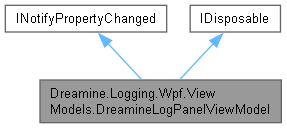
Dreamine.Logging.Wpf.ViewModels.DreamineLogPanelViewModel에 대한 상속 다이어그램 :
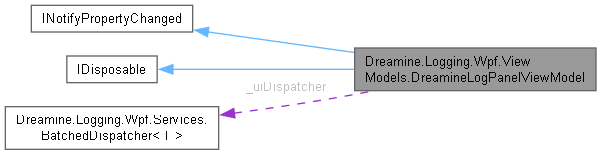
Dreamine.Logging.Wpf.ViewModels.DreamineLogPanelViewModel에 대한 협력 다이어그램:
클래스 | |
| class | LogEntryCollection |
Public 멤버 함수 | |
| DreamineLogPanelViewModel (IDreamineLogStore logStore, ILogUiDispatcher dispatcher) | |
| DreamineLogPanelViewModel (IDreamineLogStore logStore, ILogUiDispatcher dispatcher, int displayCapacity) | |
| void | Clear () |
| void | Dispose () |
정적 Public 속성 | |
| const int | DefaultDisplayCapacity = 1000 |
속성 | |
| ObservableCollection< DreamineLogEntry > | Entries = new LogEntryCollection() [get] |
| bool | AutoScroll [get, set] |
| DreamineLogEntry? | SelectedEntry [get, set] |
| string | SelectedDetailText [get] |
이벤트 | |
| PropertyChangedEventHandler? | PropertyChanged |
| EventHandler< DreamineLogEntry >? | EntryAppended |
Private 멤버 함수 | |
| void | OnLogAdded (object? sender, DreamineLogEntry entry) |
| void | OnEntriesBatch (IReadOnlyList< DreamineLogEntry?> batch) |
| void | OnPropertyChanged ([CallerMemberName] string? propertyName=null) |
Private 속성 | |
| readonly IDreamineLogStore | _logStore |
| readonly BatchedDispatcher< DreamineLogEntry?> | _uiDispatcher |
| readonly int | _displayCapacity |
| DreamineLogEntry? | _selectedEntry |
| bool | _autoScroll = true |
| bool | _disposed |
상세한 설명
Dreamine 로그 패널용 ViewModel을 제공합니다.
표시 항목 수를 제한하고 모든 스레드의 새 로그를 UI 배치로 합쳐 디스패처 적체를 방지합니다.
DreamineLogPanelViewModel.cs 파일의 30 번째 라인에서 정의되었습니다.
생성자 & 소멸자 문서화
◆ DreamineLogPanelViewModel() [1/2]
|
inline |
기본 표시 용량으로 T:Dreamine.Logging.Wpf.ViewModels.DreamineLogPanelViewModel을 초기화합니다.
- 매개변수
-
logStore 로그 저장소입니다. dispatcher WPF UI 디스패처 래퍼입니다.
DreamineLogPanelViewModel.cs 파일의 216 번째 라인에서 정의되었습니다.
219 : this(logStore, dispatcher, DefaultDisplayCapacity)
220 {
221 }
다음을 참조함 : DefaultDisplayCapacity.
◆ DreamineLogPanelViewModel() [2/2]
|
inline |
지정한 표시 용량으로 T:Dreamine.Logging.Wpf.ViewModels.DreamineLogPanelViewModel을 초기화합니다.
- 매개변수
-
logStore 로그 저장소입니다. dispatcher WPF UI 디스패처 래퍼입니다. displayCapacity 유지할 최대 표시 항목 수이며 0 이하면 기본값을 사용합니다.
- 예외
-
ArgumentNullException 저장소 또는 디스패처가 null인 경우 발생합니다.
DreamineLogPanelViewModel.cs 파일의 263 번째 라인에서 정의되었습니다.
267 {
268 _logStore = logStore ?? throw new ArgumentNullException(nameof(logStore));
269 ArgumentNullException.ThrowIfNull(dispatcher);
270
271 _displayCapacity = displayCapacity > 0 ? displayCapacity : DefaultDisplayCapacity;
272
273 _uiDispatcher = new BatchedDispatcher<DreamineLogEntry?>(
274 dispatcher.Dispatcher,
275 OnEntriesBatch,
276 DispatcherPriority.Background);
277
278 // Seed with whatever the store already has, capped to display capacity.
279 var existing = _logStore.GetEntries();
280 var skip = Math.Max(0, existing.Count - _displayCapacity);
281 for (var i = skip; i < existing.Count; i++)
282 {
283 Entries.Add(existing[i]);
284 }
285
286 _logStore.LogAdded += OnLogAdded;
287 }
Dispatcher Dispatcher
Definition ILogUiDispatcher.cs:24
다음을 참조함 : _displayCapacity, _logStore, _uiDispatcher, DefaultDisplayCapacity, Dreamine.Logging.Wpf.Services.ILogUiDispatcher.Dispatcher, Entries, OnEntriesBatch(), OnLogAdded().
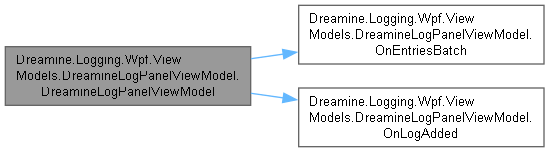
이 함수 내부에서 호출하는 함수들에 대한 그래프입니다.:
멤버 함수 문서화
◆ Clear()
|
inline |
표시된 로그 항목과 기본 저장소를 모두 지웁니다.
표시된 로그 항목과 기본 저장소를 모두 지웁니다.
DreamineLogPanelViewModel.cs 파일의 305 번째 라인에서 정의되었습니다.
306 {
307 _logStore.Clear();
308
309 // Sentinel: null indicates "clear" within the batch stream.
310 _uiDispatcher.Enqueue(null);
311 }
다음을 참조함 : _logStore, _uiDispatcher.
◆ Dispose()
|
inline |
로그 저장소 이벤트 구독을 해제합니다.
DreamineLogPanelViewModel.cs 파일의 321 번째 라인에서 정의되었습니다.
322 {
323 if (_disposed)
324 {
325 return;
326 }
327
328 _disposed = true;
329 _logStore.LogAdded -= OnLogAdded;
330 }
다음을 참조함 : _disposed, OnLogAdded().
이 함수 내부에서 호출하는 함수들에 대한 그래프입니다.:

◆ OnEntriesBatch()
|
inlineprivate |
UI 스레드에서 로그 배치 또는 지우기 신호를 적용하고 표시 용량을 제한합니다.
- 매개변수
-
batch 적용할 로그 항목 및 지우기 신호 배치입니다.
DreamineLogPanelViewModel.cs 파일의 383 번째 라인에서 정의되었습니다.
384 {
385 // UI thread.
386 if (_disposed)
387 {
388 return;
389 }
390
391 DreamineLogEntry? lastAppended = null;
392
393 foreach (var entry in batch)
394 {
395 if (entry is null)
396 {
397 // Clear sentinel.
398 Entries.Clear();
399 SelectedEntry = null;
400 lastAppended = null;
401 continue;
402 }
403
404 Entries.Add(entry);
405 lastAppended = entry;
406 }
407
408 // Enforce display cap. Trim from the front in one reset notification.
409 var overflow = Entries.Count - _displayCapacity;
410 if (overflow > 0 && Entries is LogEntryCollection logEntries)
411 {
412 logEntries.TrimStart(overflow);
413 }
414
415 if (lastAppended is not null)
416 {
417 if (_autoScroll)
418 {
419 SelectedEntry = lastAppended;
420 }
421
422 EntryAppended?.Invoke(this, lastAppended);
423 }
424 }
다음을 참조함 : _autoScroll, _displayCapacity, _disposed, Entries, EntryAppended, SelectedEntry.
다음에 의해서 참조됨 : DreamineLogPanelViewModel().
이 함수를 호출하는 함수들에 대한 그래프입니다.:

◆ OnLogAdded()
|
inlineprivate |
모든 스레드에서 수신한 새 로그 항목을 UI 배치 큐에 추가합니다.
- 매개변수
-
sender 이벤트 발생 원본입니다. entry 추가된 로그 항목입니다.
DreamineLogPanelViewModel.cs 파일의 356 번째 라인에서 정의되었습니다.
357 {
358 if (_disposed)
359 {
360 return;
361 }
362
363 // Producer side: any thread. Just enqueue.
364 _uiDispatcher.Enqueue(entry);
365 }
다음을 참조함 : _disposed, _uiDispatcher.
다음에 의해서 참조됨 : Dispose(), DreamineLogPanelViewModel().
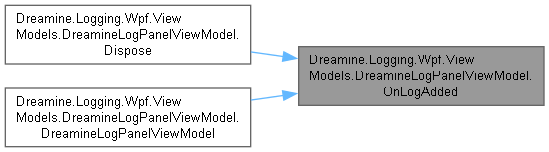
이 함수를 호출하는 함수들에 대한 그래프입니다.:
◆ OnPropertyChanged()
|
inlineprivate |
지정한 속성에 대한 변경 알림을 발생시킵니다.
- 매개변수
-
propertyName 변경된 속성 이름입니다.
DreamineLogPanelViewModel.cs 파일의 442 번째 라인에서 정의되었습니다.
443 {
444 PropertyChanged?.Invoke(this, new PropertyChangedEventArgs(propertyName));
445 }
다음을 참조함 : PropertyChanged.
다음에 의해서 참조됨 : Dreamine.Logging.Wpf.ViewModels.DreamineLogPanelViewModel.LogEntryCollection.TrimStart().
이 함수를 호출하는 함수들에 대한 그래프입니다.:

멤버 데이터 문서화
◆ _autoScroll
|
private |
auto Scroll 값을 보관합니다.
DreamineLogPanelViewModel.cs 파일의 86 번째 라인에서 정의되었습니다.
다음에 의해서 참조됨 : OnEntriesBatch().
◆ _displayCapacity
|
private |
display Capacity 값을 보관합니다.
DreamineLogPanelViewModel.cs 파일의 68 번째 라인에서 정의되었습니다.
다음에 의해서 참조됨 : DreamineLogPanelViewModel(), OnEntriesBatch().
◆ _disposed
|
private |
disposed 값을 보관합니다.
DreamineLogPanelViewModel.cs 파일의 95 번째 라인에서 정의되었습니다.
다음에 의해서 참조됨 : Dispose(), OnEntriesBatch(), OnLogAdded().
◆ _logStore
|
private |
log Store 값을 보관합니다.
DreamineLogPanelViewModel.cs 파일의 50 번째 라인에서 정의되었습니다.
다음에 의해서 참조됨 : Clear(), DreamineLogPanelViewModel().
◆ _selectedEntry
|
private |
selected Entry 값을 보관합니다.
DreamineLogPanelViewModel.cs 파일의 77 번째 라인에서 정의되었습니다.
◆ _uiDispatcher
|
private |
ui Dispatcher 값을 보관합니다.
DreamineLogPanelViewModel.cs 파일의 59 번째 라인에서 정의되었습니다.
다음에 의해서 참조됨 : Clear(), DreamineLogPanelViewModel(), OnLogAdded().
◆ DefaultDisplayCapacity
|
static |
P:Dreamine.Logging.Wpf.ViewModels.DreamineLogPanelViewModel.Entries에 유지할 기본 최대 항목 수입니다.
DreamineLogPanelViewModel.cs 파일의 40 번째 라인에서 정의되었습니다.
다음에 의해서 참조됨 : DreamineLogPanelViewModel(), DreamineLogPanelViewModel().
속성 문서화
◆ AutoScroll
|
getset |
가장 최근 항목을 자동 선택할지 여부를 가져오거나 설정합니다.
가장 최근 항목을 자동 선택할지 여부를 가져오거나 설정합니다.
DreamineLogPanelViewModel.cs 파일의 143 번째 라인에서 정의되었습니다.
144 {
145 get => _autoScroll;
146 set
147 {
148 if (_autoScroll == value)
149 {
150 return;
151 }
152
153 _autoScroll = value;
154 OnPropertyChanged();
155 }
156 }
◆ Entries
|
get |
로그 패널에 표시되는 로그 항목을 가져옵니다.
DreamineLogPanelViewModel.cs 파일의 125 번째 라인에서 정의되었습니다.
125{ get; } = new LogEntryCollection();
다음에 의해서 참조됨 : DreamineLogPanelViewModel(), OnEntriesBatch().
◆ SelectedDetailText
|
get |
선택된 로그 항목의 상세 텍스트를 가져옵니다.
DreamineLogPanelViewModel.cs 파일의 190 번째 라인에서 정의되었습니다.
◆ SelectedEntry
|
getset |
선택된 로그 항목을 가져오거나 설정합니다.
DreamineLogPanelViewModel.cs 파일의 166 번째 라인에서 정의되었습니다.
167 {
168 get => _selectedEntry;
169 set
170 {
171 if (ReferenceEquals(_selectedEntry, value))
172 {
173 return;
174 }
175
176 _selectedEntry = value;
177 OnPropertyChanged();
178 OnPropertyChanged(nameof(SelectedDetailText));
179 }
180 }
다음에 의해서 참조됨 : OnEntriesBatch().
이벤트 문서화
◆ EntryAppended
| EventHandler<DreamineLogEntry>? Dreamine.Logging.Wpf.ViewModels.DreamineLogPanelViewModel.EntryAppended |
배치가 추가된 후 가장 최근 항목과 함께 UI 스레드에서 발생합니다.
DreamineLogPanelViewModel.cs 파일의 115 번째 라인에서 정의되었습니다.
다음에 의해서 참조됨 : OnEntriesBatch().
◆ PropertyChanged
| PropertyChangedEventHandler? Dreamine.Logging.Wpf.ViewModels.DreamineLogPanelViewModel.PropertyChanged |
속성 값이 변경될 때 발생합니다.
DreamineLogPanelViewModel.cs 파일의 105 번째 라인에서 정의되었습니다.
다음에 의해서 참조됨 : OnPropertyChanged().
이 클래스에 대한 문서화 페이지는 다음의 파일로부터 생성되었습니다.: