로딩중...
검색중...
일치하는것 없음
PortfolioApp.Services.JsonPortfolioTenantStore 클래스 참조
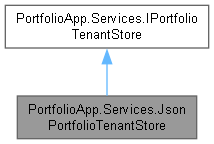
PortfolioApp.Services.JsonPortfolioTenantStore에 대한 상속 다이어그램 :
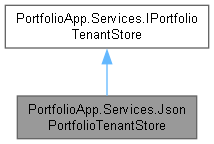
PortfolioApp.Services.JsonPortfolioTenantStore에 대한 협력 다이어그램:
Public 멤버 함수 | |
| JsonPortfolioTenantStore (PortfolioOptions opts) | |
| async Task< List< PortfolioConfig > > | GetAllAsync () |
| async Task< PortfolioConfig?> | GetAsync (string slug) |
| async Task | SaveAsync (PortfolioConfig config) |
| Task | DeleteAsync (string slug) |
Private 멤버 함수 | |
| string | ConfigPath (string slug) |
Private 속성 | |
| readonly string | _root |
정적 Private 속성 | |
| static readonly JsonSerializerOptions | _json = new() { WriteIndented = true } |
상세한 설명
Json Portfolio Tenant Store 기능과 관련 상태를 캡슐화합니다.
JsonPortfolioTenantStore.cs 파일의 15 번째 라인에서 정의되었습니다.
생성자 & 소멸자 문서화
◆ JsonPortfolioTenantStore()
|
inline |
지정한 설정으로 JsonPortfolioTenantStore 클래스의 새 인스턴스를 초기화합니다.
- 매개변수
-
opts opts에 사용할 PortfolioOptions값입니다.
JsonPortfolioTenantStore.cs 파일의 52 번째 라인에서 정의되었습니다.
53 {
54 _root = opts.ResolvedDataPath;
55 Directory.CreateDirectory(_root);
56 }
다음을 참조함 : _root, PortfolioApp.Services.PortfolioOptions.ResolvedDataPath.
멤버 함수 문서화
◆ ConfigPath()
|
inlineprivate |
Config Path 작업을 수행합니다.
- 매개변수
-
slug slug에 사용할 string값입니다.
- 반환값
- Config Path 작업에서 생성한
string결과입니다.
JsonPortfolioTenantStore.cs 파일의 82 번째 라인에서 정의되었습니다.
82=> Path.Combine(_root, slug, "config.json");
다음을 참조함 : _root.
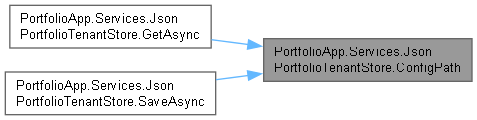
다음에 의해서 참조됨 : GetAsync(), SaveAsync().
이 함수를 호출하는 함수들에 대한 그래프입니다.:
◆ DeleteAsync()
|
inline |
Delete Async 작업을 수행합니다.
- 매개변수
-
slug slug에 사용할 string값입니다.
- 반환값
- Delete Async 작업에서 생성한
Task결과입니다.
PortfolioApp.Services.IPortfolioTenantStore를 구현.
JsonPortfolioTenantStore.cs 파일의 209 번째 라인에서 정의되었습니다.
210 {
211 var dir = Path.Combine(_root, slug);
212 if (Directory.Exists(dir))
213 Directory.Delete(dir, recursive: true);
214 return Task.CompletedTask;
215 }
다음을 참조함 : _root.
◆ GetAllAsync()
|
inline |
All Async 값을 가져옵니다.
- 반환값
- Get All Async 작업에서 생성한
Task<List<PortfolioConfig>>결과입니다.
PortfolioApp.Services.IPortfolioTenantStore를 구현.
JsonPortfolioTenantStore.cs 파일의 100 번째 라인에서 정의되었습니다.
101 {
102 var list = new List<PortfolioConfig>();
103 if (!Directory.Exists(_root)) return list;
104 foreach (var dir in Directory.GetDirectories(_root))
105 {
106 var cfg = Path.Combine(dir, "config.json");
107 if (!File.Exists(cfg)) continue;
108 try
109 {
110 var json = await File.ReadAllTextAsync(cfg);
111 var obj = JsonSerializer.Deserialize<PortfolioConfig>(json);
112 if (obj != null) list.Add(obj);
113 }
114 catch { }
115 }
116 return list;
117 }
다음을 참조함 : _root.
◆ GetAsync()
|
inline |
Async 값을 가져옵니다.
- 매개변수
-
slug slug에 사용할 string값입니다.
- 반환값
- Get Async 작업에서 생성한
Task<PortfolioConfig?>결과입니다.
PortfolioApp.Services.IPortfolioTenantStore를 구현.
JsonPortfolioTenantStore.cs 파일의 143 번째 라인에서 정의되었습니다.
144 {
145 var path = ConfigPath(slug);
146 if (!File.Exists(path)) return null;
147 var json = await File.ReadAllTextAsync(path);
148 return JsonSerializer.Deserialize<PortfolioConfig>(json);
149 }
다음을 참조함 : ConfigPath().
이 함수 내부에서 호출하는 함수들에 대한 그래프입니다.:

◆ SaveAsync()
|
inline |
Async 데이터를 저장합니다.
- 매개변수
-
config config에 사용할 PortfolioConfig값입니다.
- 반환값
- Save Async 작업에서 생성한
Task결과입니다.
PortfolioApp.Services.IPortfolioTenantStore를 구현.
JsonPortfolioTenantStore.cs 파일의 175 번째 라인에서 정의되었습니다.
176 {
177 var dir = Path.Combine(_root, config.Slug);
178 Directory.CreateDirectory(Path.Combine(dir, "projects"));
179 Directory.CreateDirectory(Path.Combine(dir, "media"));
180 Directory.CreateDirectory(Path.Combine(dir, "contacts"));
181 var json = JsonSerializer.Serialize(config, _json);
182 await File.WriteAllTextAsync(ConfigPath(config.Slug), json);
183 }
다음을 참조함 : _json, _root, ConfigPath(), PortfolioApp.Models.PortfolioConfig.Slug.
이 함수 내부에서 호출하는 함수들에 대한 그래프입니다.:

멤버 데이터 문서화
◆ _json
|
staticprivate |
json 값을 보관합니다.
JsonPortfolioTenantStore.cs 파일의 34 번째 라인에서 정의되었습니다.
34{ WriteIndented = true };
다음에 의해서 참조됨 : SaveAsync().
◆ _root
|
private |
root 값을 보관합니다.
JsonPortfolioTenantStore.cs 파일의 25 번째 라인에서 정의되었습니다.
다음에 의해서 참조됨 : ConfigPath(), DeleteAsync(), GetAllAsync(), JsonPortfolioTenantStore(), SaveAsync().
이 클래스에 대한 문서화 페이지는 다음의 파일로부터 생성되었습니다.: