로딩중...
검색중...
일치하는것 없음
FamiliesApp.Services.OgImageGenerator 클래스 참조
정적 Public 멤버 함수 | |
| static void | EnsureGenerated (string wwwrootPath) |
정적 Private 멤버 함수 | |
| static void | DrawCenteredText (Graphics g, string text, Font font, Color color, float cx, float cy) |
| static void | DrawCircle (Graphics g, float x, float y, float diameter, Color color) |
| static void | DrawRoundedRect (Graphics g, RectangleF rect, float radius, Color fill, Color stroke, float strokeWidth) |
| static void | FillRoundedRect (Graphics g, Brush brush, RectangleF rect, float radius) |
| static GraphicsPath | RoundedRectPath (RectangleF rect, float r) |
상세한 설명
앱 시작 시 wwwroot/img/og-platform.png 를 자동 생성한다.
OgImageGenerator.cs 파일의 16 번째 라인에서 정의되었습니다.
멤버 함수 문서화
◆ DrawCenteredText()
|
inlinestaticprivate |
Draw Centered Text 작업을 수행합니다.
- 매개변수
-
g g에 사용할 Graphics값입니다.text text에 사용할 string값입니다.font font에 사용할 Font값입니다.color color에 사용할 Color값입니다.cx cx에 사용할 float값입니다.cy cy에 사용할 float값입니다.
OgImageGenerator.cs 파일의 160 번째 라인에서 정의되었습니다.
161 {
162 using var brush = new SolidBrush(color);
163 var size = g.MeasureString(text, font);
164 g.DrawString(text, font, brush, cx - size.Width / 2f, cy - size.Height / 2f);
165 }
다음에 의해서 참조됨 : EnsureGenerated().
이 함수를 호출하는 함수들에 대한 그래프입니다.:

◆ DrawCircle()
|
inlinestaticprivate |
Draw Circle 작업을 수행합니다.
- 매개변수
-
g g에 사용할 Graphics값입니다.x x에 사용할 float값입니다.y y에 사용할 float값입니다.diameter diameter에 사용할 float값입니다.color color에 사용할 Color값입니다.
OgImageGenerator.cs 파일의 215 번째 라인에서 정의되었습니다.
216 {
217 using var brush = new SolidBrush(color);
218 g.FillEllipse(brush, x, y, diameter, diameter);
219 }
다음에 의해서 참조됨 : EnsureGenerated().
이 함수를 호출하는 함수들에 대한 그래프입니다.:

◆ DrawRoundedRect()
|
inlinestaticprivate |
Draw Rounded Rect 작업을 수행합니다.
- 매개변수
-
g g에 사용할 Graphics값입니다.rect rect에 사용할 RectangleF값입니다.radius radius에 사용할 float값입니다.fill fill에 사용할 Color값입니다.stroke stroke에 사용할 Color값입니다.strokeWidth stroke Width에 사용할 float값입니다.
OgImageGenerator.cs 파일의 277 번째 라인에서 정의되었습니다.
279 {
280 using var path = RoundedRectPath(rect, radius);
281 using var fillBrush = new SolidBrush(fill);
282 g.FillPath(fillBrush, path);
283 using var pen = new Pen(stroke, strokeWidth);
284 g.DrawPath(pen, path);
285 }
다음을 참조함 : RoundedRectPath().
다음에 의해서 참조됨 : EnsureGenerated().
이 함수 내부에서 호출하는 함수들에 대한 그래프입니다.:

이 함수를 호출하는 함수들에 대한 그래프입니다.:

◆ EnsureGenerated()
|
inlinestatic |
Ensure Generated 작업을 수행합니다.
- 매개변수
-
wwwrootPath wwwroot Path에 사용할 string값입니다.
OgImageGenerator.cs 파일의 34 번째 라인에서 정의되었습니다.
35 {
36 var imgDir = Path.Combine(wwwrootPath, "img");
37 var outPath = Path.Combine(imgDir, "og-platform.png");
38
39 if (File.Exists(outPath)) return;
40
41 Directory.CreateDirectory(imgDir);
42
43 const int W = 1200, H = 630;
44 using var bmp = new Bitmap(W, H, PixelFormat.Format32bppArgb);
45 using var g = Graphics.FromImage(bmp);
46 g.SmoothingMode = SmoothingMode.AntiAlias;
47 g.TextRenderingHint = System.Drawing.Text.TextRenderingHint.AntiAliasGridFit;
48
49 // ── 배경 그라데이션 (웜 오렌지) ──────────────────────────────
50 using (var bgBrush = new LinearGradientBrush(
51 new Point(0, 0), new Point(W, H),
52 Color.FromArgb(255, 147, 51), // #ff9333
53 Color.FromArgb(251, 191, 36))) // #fbbf24
54 {
55 g.FillRectangle(bgBrush, 0, 0, W, H);
56 }
57
58 // ── 장식 원 (반투명 흰색) ─────────────────────────────────────
59 DrawCircle(g, -100, -100, 380, Color.FromArgb(30, 255, 255, 255));
60 DrawCircle(g, 900, 380, 420, Color.FromArgb(20, 255, 255, 255));
61 DrawCircle(g, 980, -80, 180, Color.FromArgb(25, 255, 255, 255));
62 DrawCircle(g, 40, 430, 220, Color.FromArgb(20, 255, 255, 255));
63 DrawCircle(g, 500, -60, 140, Color.FromArgb(15, 255, 255, 255));
64
65 // ── 카드 (흰색 반투명) ────────────────────────────────────────
66 var cardRect = new RectangleF(160, 90, 880, 450);
67 DrawRoundedRect(g, cardRect, 28,
68 Color.FromArgb(210, 255, 255, 255),
69 Color.FromArgb(60, 255, 255, 255), 2f);
70
71 // ── 이모지 ───────────────────────────────────────────────────
72 using var iconFont = new Font("Segoe UI Emoji", 56, FontStyle.Regular, GraphicsUnit.Pixel);
73 DrawCenteredText(g, "👨👩👧👦", iconFont, Color.FromArgb(60, 40, 20), W / 2f, 198);
74
75 // ── 메인 타이틀 ───────────────────────────────────────────────
76 using var titleFont = new Font("맑은 고딕", 50, FontStyle.Bold, GraphicsUnit.Pixel);
77 DrawCenteredText(g, "무료 가족 앨범", titleFont, Color.FromArgb(45, 28, 8), W / 2f, 295);
78
79 // ── 서브타이틀 ────────────────────────────────────────────────
80 using var subFont = new Font("맑은 고딕", 22, FontStyle.Regular, GraphicsUnit.Pixel);
81 DrawCenteredText(g, "사진 · 동영상 · 이야기 · 반응 · 댓글", subFont,
82 Color.FromArgb(90, 60, 20), W / 2f, 360);
83
84 // ── 구분선 ────────────────────────────────────────────────────
85 using var linePen = new Pen(Color.FromArgb(80, 255, 200, 100), 1.5f);
86 g.DrawLine(linePen, 400, 394, 800, 394);
87
88 // ── 배지 ─────────────────────────────────────────────────────
89 var badgeRect = new RectangleF(440, 410, 320, 44);
90 using var badgeBrush = new SolidBrush(Color.FromArgb(220, 249, 115, 22));
91 FillRoundedRect(g, badgeBrush, badgeRect, 22);
92 using var badgeFont = new Font("맑은 고딕", 18, FontStyle.Bold, GraphicsUnit.Pixel);
93 DrawCenteredText(g, "5분이면 완성 · 완전 무료", badgeFont, Color.White, W / 2f, 438);
94
95 // ── 도메인 ────────────────────────────────────────────────────
96 using var domFont = new Font("Arial", 18, FontStyle.Regular, GraphicsUnit.Pixel);
97 DrawCenteredText(g, "families.codemaru.co.kr", domFont,
98 Color.FromArgb(100, 45, 28, 8), W / 2f, 503);
99
100 // ── PNG 저장 ──────────────────────────────────────────────────
101 bmp.Save(outPath, ImageFormat.Png);
102 }
다음을 참조함 : DrawCenteredText(), DrawCircle(), DrawRoundedRect(), FillRoundedRect().
다음에 의해서 참조됨 : FamiliesApp.Program.Main().
이 함수 내부에서 호출하는 함수들에 대한 그래프입니다.:
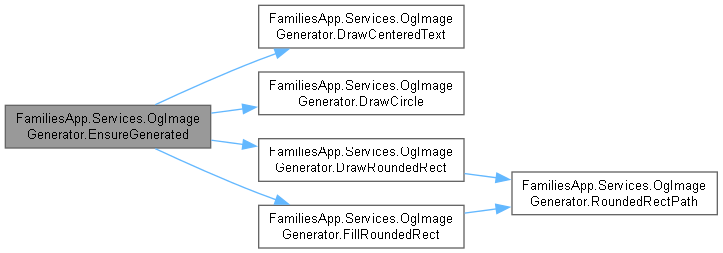
이 함수를 호출하는 함수들에 대한 그래프입니다.:

◆ FillRoundedRect()
|
inlinestaticprivate |
Fill Rounded Rect 작업을 수행합니다.
- 매개변수
-
g g에 사용할 Graphics값입니다.brush brush에 사용할 Brush값입니다.rect rect에 사용할 RectangleF값입니다.radius radius에 사용할 float값입니다.
OgImageGenerator.cs 파일의 327 번째 라인에서 정의되었습니다.
328 {
329 using var path = RoundedRectPath(rect, radius);
330 g.FillPath(brush, path);
331 }
다음을 참조함 : RoundedRectPath().
다음에 의해서 참조됨 : EnsureGenerated().
이 함수 내부에서 호출하는 함수들에 대한 그래프입니다.:

이 함수를 호출하는 함수들에 대한 그래프입니다.:

◆ RoundedRectPath()
|
inlinestaticprivate |
Rounded Rect Path 작업을 수행합니다.
- 매개변수
-
rect rect에 사용할 RectangleF값입니다.r r에 사용할 float값입니다.
- 반환값
- Rounded Rect Path 작업에서 생성한
GraphicsPath결과입니다.
OgImageGenerator.cs 파일의 365 번째 라인에서 정의되었습니다.
366 {
367 var path = new GraphicsPath();
368 path.AddArc(rect.X, rect.Y, r * 2, r * 2, 180, 90);
369 path.AddArc(rect.Right - r * 2, rect.Y, r * 2, r * 2, 270, 90);
370 path.AddArc(rect.Right - r * 2, rect.Bottom - r * 2, r * 2, r * 2, 0, 90);
371 path.AddArc(rect.X, rect.Bottom - r * 2, r * 2, r * 2, 90, 90);
372 path.CloseFigure();
373 return path;
374 }
다음에 의해서 참조됨 : DrawRoundedRect(), FillRoundedRect().
이 함수를 호출하는 함수들에 대한 그래프입니다.:

이 클래스에 대한 문서화 페이지는 다음의 파일로부터 생성되었습니다.: