로딩중...
검색중...
일치하는것 없음
DreamineVMS.Services.Streaming.FfmpegHlsStreamService 클래스 참조sealed
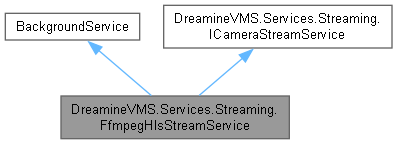
DreamineVMS.Services.Streaming.FfmpegHlsStreamService에 대한 상속 다이어그램 :
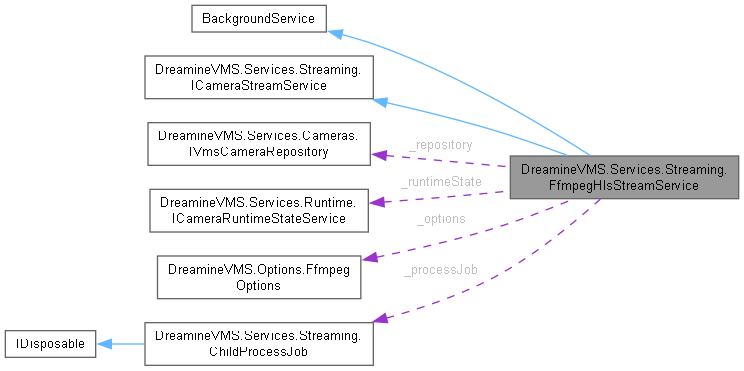
DreamineVMS.Services.Streaming.FfmpegHlsStreamService에 대한 협력 다이어그램:
Public 멤버 함수 | |
| FfmpegHlsStreamService (ILogger< FfmpegHlsStreamService > logger, IVmsCameraRepository repository, ICameraRuntimeStateService runtimeState, IOptions< FfmpegOptions > options) | |
| override async Task | StopAsync (CancellationToken cancellationToken) |
| override void | Dispose () |
| async Task | StartAllAsync (CancellationToken cancellationToken=default) |
| async Task | StopAllAsync (CancellationToken cancellationToken=default) |
| async Task | StartAsync (string cameraId, CancellationToken cancellationToken=default) |
| async Task | StopAsync (string cameraId, CancellationToken cancellationToken=default) |
Protected 멤버 함수 | |
| override async Task | ExecuteAsync (CancellationToken stoppingToken) |
Private 멤버 함수 | |
| async Task | StartInternalAsync (string cameraId, CancellationToken cancellationToken) |
| async Task | StopInternalAsync (string cameraId, CancellationToken cancellationToken) |
| async Task | WatchdogAsync (CancellationToken cancellationToken) |
| void | StartProcessUnsafe (CameraDevice camera) |
| async Task | ShutdownProcessAsync (string cameraId, Process process, CancellationToken cancellationToken) |
| void | ForceKillProcessUnsafe (string cameraId) |
| SemaphoreSlim | GetCameraOperationLock (string cameraId) |
| string | BuildArguments (CameraDevice camera) |
| void | InitWatchStats (string cameraId) |
| string | GetOutputRoot () |
| string | GetCameraOutputDirectory (string cameraId) |
| string | GetPlaylistPath (string cameraId) |
| void | PreparePlaylistForNewSession (string cameraId) |
| void | CleanupOldSegmentFiles (string cameraId, TimeSpan minimumAge) |
정적 Private 멤버 함수 | |
| static long DateTime writeTime | ReadSequenceAndWriteTime (string path) |
| static string | Quote (string value) |
Private 속성 | |
| readonly ILogger< FfmpegHlsStreamService > | _logger |
| readonly IVmsCameraRepository | _repository |
| readonly ICameraRuntimeStateService | _runtimeState |
| readonly FfmpegOptions | _options |
| readonly Dictionary< string, Process > | _processes = new() |
| readonly Dictionary< string, long > | _lastSequences = new() |
| readonly Dictionary< string, DateTime > | _lastWrites = new() |
| readonly ConcurrentDictionary< string, SemaphoreSlim > | _cameraOperationLocks = new() |
| readonly ConcurrentDictionary< string, byte > | _intentionalStops = new() |
| readonly SemaphoreSlim | _sync = new(1, 1) |
| readonly? ChildProcessJob | _processJob |
| bool | _disposed |
정적 Private 속성 | |
| static readonly Regex | MediaSeqRegex = new(@"#EXT-X-MEDIA-SEQUENCE:(\d+)", RegexOptions.Compiled) |
| static readonly TimeSpan | GracefulExitTimeout = TimeSpan.FromMilliseconds(800) |
| static readonly TimeSpan | KillWaitTimeout = TimeSpan.FromSeconds(2) |
| static long | sequence |
상세한 설명
FFmpeg 프로세스를 사용해서 RTSP 스트림을 HLS 스트림으로 변환하는 서비스입니다.
FfmpegHlsStreamService.cs 파일의 23 번째 라인에서 정의되었습니다.
생성자 & 소멸자 문서화
◆ FfmpegHlsStreamService()
|
inline |
FfmpegHlsStreamService 클래스의 새 인스턴스를 초기화합니다.
- 매개변수
-
logger 로거입니다. repository 카메라 저장소입니다. runtimeState 카메라 런타임 상태 서비스입니다. options FFmpeg 옵션입니다.
- 예외
-
ArgumentNullException 필수 입력 인자 중 하나가 null인 경우 발생합니다.
FfmpegHlsStreamService.cs 파일의 217 번째 라인에서 정의되었습니다.
222 {
223 _logger = logger ?? throw new ArgumentNullException(nameof(logger));
224 _repository = repository ?? throw new ArgumentNullException(nameof(repository));
225 _runtimeState = runtimeState ?? throw new ArgumentNullException(nameof(runtimeState));
226 _options = options?.Value ?? throw new ArgumentNullException(nameof(options));
227 }
다음을 참조함 : _logger, _options, _repository, _runtimeState.
멤버 함수 문서화
◆ BuildArguments()
|
inlineprivate |
Arguments 값을 구성합니다.
- 매개변수
-
camera camera에 사용할 CameraDevice값입니다.
- 반환값
- Build Arguments 작업에서 생성한
string결과입니다.
FfmpegHlsStreamService.cs 파일의 1135 번째 라인에서 정의되었습니다.
1136 {
1138
1140 string sessionStamp = DateTimeOffset.UtcNow.ToUnixTimeMilliseconds().ToString(System.Globalization.CultureInfo.InvariantCulture);
1141 string segmentPath = Quote(Path.Combine(GetCameraOutputDirectory(camera.Id), $"seg_{sessionStamp}_%05d.ts"));
1142 string videoCodec = (_options.VideoCodec ?? "libx264").ToLowerInvariant();
1143 string audioCodec = (_options.AudioCodec ?? "an").ToLowerInvariant();
1144 int segmentSeconds = Math.Max(1, _options.HlsSegmentSeconds);
1145 int listSize = Math.Max(4, _options.HlsListSize);
1146 int videoFps = Math.Max(1, _options.VideoFps);
1147 int keyFrameInterval = segmentSeconds * videoFps;
1148
1149 // dshow://video=장치이름 → -f dshow -i "video=장치이름"
1150 // rtsp://... → RTSP 전용 플래그 + -i "rtsp://..."
1151 string inputDevice = isDshow
1153 : Quote(camera.RtspUrl);
1154
1155 List<string> parts = new() { "-hide_banner", "-loglevel warning" };
1156
1157 if (isDshow)
1158 {
1159 parts.Add("-f dshow");
1160 }
1161 else
1162 {
1163 parts.Add("-rtsp_transport tcp");
1164 parts.Add("-rtsp_flags prefer_tcp");
1165 parts.Add("-analyzeduration 2000000");
1166 parts.Add("-probesize 2000000");
1167 }
1168
1169 parts.Add("-fflags +genpts+discardcorrupt+nobuffer");
1170 parts.Add("-flags low_delay");
1171 parts.Add("-i");
1172 parts.Add(inputDevice);
1173 parts.Add("-map 0:v:0");
1174 parts.Add("-map 0:a?");
1175 parts.Add("-dn");
1176 parts.Add("-sn");
1177
1178 if (videoCodec == "copy")
1179 {
1180 parts.Add("-c:v copy");
1181 }
1182 else
1183 {
1184 parts.Add("-c:v libx264");
1185 parts.Add("-preset ultrafast");
1186 parts.Add("-tune zerolatency");
1187 parts.Add("-profile:v baseline");
1188 parts.Add("-level:v 3.1");
1189 parts.Add("-pix_fmt yuv420p");
1190 if (_options.VideoMaxWidth > 0)
1191 {
1192 parts.Add($"-vf {Quote($"scale='min({_options.VideoMaxWidth},iw)':-2,fps={videoFps}")}");
1193 }
1194 else
1195 {
1196 parts.Add($"-r {videoFps}");
1197 }
1198 parts.Add($"-b:v {_options.VideoBitrate}");
1199 parts.Add($"-maxrate {_options.VideoMaxRate}");
1200 parts.Add($"-bufsize {_options.VideoBufferSize}");
1201 parts.Add($"-g {keyFrameInterval}");
1202 parts.Add($"-keyint_min {keyFrameInterval}");
1203 parts.Add("-sc_threshold 0");
1204 parts.Add("-bf 0");
1205 parts.Add($"-force_key_frames {Quote($"expr:gte(t,n_forced*{segmentSeconds})")}");
1206 }
1207
1208 if (audioCodec == "an")
1209 {
1210 parts.Add("-an");
1211 }
1212 else
1213 {
1214 parts.Add($"-c:a {audioCodec}");
1215 parts.Add($"-b:a {_options.AudioBitrate}");
1216 parts.Add($"-ar {_options.AudioRate}");
1217 parts.Add($"-ac {_options.AudioChannels}");
1218 }
1219
1220 parts.Add("-muxdelay 0");
1221 parts.Add("-muxpreload 0");
1222 parts.Add("-f hls");
1223 parts.Add("-hls_segment_type mpegts");
1224 parts.Add("-hls_allow_cache 0");
1225 parts.Add($"-hls_time {segmentSeconds}");
1226 parts.Add($"-hls_list_size {listSize}");
1227 // Windows + WebView2 환경에서는 video 태그가 .ts 파일 핸들을 오래 잡는 경우가 있습니다.
1228 // delete_segments를 사용하면 ffmpeg가 WebView2가 읽는 세그먼트를 삭제하려다
1229 // Permission denied가 발생하고 playlist/segment 수명이 꼬일 수 있습니다.
1230 // 실행 중 삭제는 하지 않고, 세션별 고유 파일명 + 지연 정리 방식으로 안정화합니다.
1231 parts.Add("-hls_flags omit_endlist+independent_segments+temp_file");
1232 parts.Add($"-hls_segment_filename {segmentPath}");
1233 parts.Add(playlistPath);
1234
1235 return string.Join(' ', parts);
1236 }
다음을 참조함 : _options, GetCameraOutputDirectory(), GetPlaylistPath(), DreamineVMS.Models.CameraDevice.Id, Quote(), DreamineVMS.Models.CameraDevice.RtspUrl.
다음에 의해서 참조됨 : StartProcessUnsafe().
이 함수 내부에서 호출하는 함수들에 대한 그래프입니다.:

이 함수를 호출하는 함수들에 대한 그래프입니다.:

◆ CleanupOldSegmentFiles()
|
inlineprivate |
Cleanup Old Segment Files 작업을 수행합니다.
- 매개변수
-
cameraId camera Id에 사용할 string값입니다.minimumAge minimum Age에 사용할 TimeSpan값입니다.
FfmpegHlsStreamService.cs 파일의 1458 번째 라인에서 정의되었습니다.
1459 {
1460 string directory = GetCameraOutputDirectory(cameraId);
1461 if (!Directory.Exists(directory))
1462 {
1463 return;
1464 }
1465
1466 DateTime thresholdUtc = DateTime.UtcNow - minimumAge;
1467
1468 foreach (string file in Directory.EnumerateFiles(directory, "seg_*.ts"))
1469 {
1470 try
1471 {
1472 if (File.GetLastWriteTimeUtc(file) > thresholdUtc)
1473 {
1474 continue;
1475 }
1476
1477 File.Delete(file);
1478 }
1479 catch (IOException)
1480 {
1481 // WebView2/Chrome이 읽는 중인 세그먼트는 다음 정리 주기에 다시 시도합니다.
1482 }
1483 catch (UnauthorizedAccessException)
1484 {
1485 // 파일 핸들 또는 백신/인덱서 점유 가능성이 있으므로 무시합니다.
1486 }
1487 }
1488 }
다음을 참조함 : GetCameraOutputDirectory().
다음에 의해서 참조됨 : StartInternalAsync(), StartProcessUnsafe(), StopInternalAsync().
이 함수 내부에서 호출하는 함수들에 대한 그래프입니다.:

이 함수를 호출하는 함수들에 대한 그래프입니다.:

◆ Dispose()
|
inline |
서비스 Dispose 시 남은 ffmpeg 프로세스와 Job Object를 정리합니다.
FfmpegHlsStreamService.cs 파일의 329 번째 라인에서 정의되었습니다.
330 {
331 if (_disposed)
332 {
333 base.Dispose();
334 return;
335 }
336
337 _disposed = true;
338
339 bool acquired = false;
340 try
341 {
342 acquired = _sync.Wait(TimeSpan.FromSeconds(2));
343
344 foreach (string cameraId in _processes.Keys.ToArray())
345 {
346 _intentionalStops.TryAdd(cameraId, 0);
347 ForceKillProcessUnsafe(cameraId);
348 }
349 }
350 catch
351 {
352 // 정리 단계의 예외는 무시합니다.
353 }
354 finally
355 {
356 if (acquired)
357 {
358 _sync.Release();
359 }
360 }
361
362 foreach (SemaphoreSlim cameraLock in _cameraOperationLocks.Values)
363 {
364 try { cameraLock.Dispose(); } catch { }
365 }
366 _cameraOperationLocks.Clear();
367
368 _processJob?.Dispose();
369 _sync.Dispose();
370
371 base.Dispose();
372 }
다음을 참조함 : _cameraOperationLocks, _disposed, _intentionalStops, _processes, _processJob, _sync, ForceKillProcessUnsafe().
이 함수 내부에서 호출하는 함수들에 대한 그래프입니다.:

◆ ExecuteAsync()
|
inlineprotected |
Execute Async 작업을 수행합니다.
- 매개변수
-
stoppingToken stopping Token에 사용할 CancellationToken값입니다.
- 반환값
- Execute Async 작업에서 생성한
Task결과입니다.
FfmpegHlsStreamService.cs 파일의 253 번째 라인에서 정의되었습니다.
254 {
255 Directory.CreateDirectory(GetOutputRoot());
256
257 if (_options.StartOnApplicationStartup)
258 {
259 await StartAllAsync(stoppingToken);
260 }
261
262 while (!stoppingToken.IsCancellationRequested)
263 {
264 try
265 {
266 await WatchdogAsync(stoppingToken);
267 }
268 catch (OperationCanceledException)
269 {
270 break;
271 }
272 catch (Exception ex)
273 {
274 _logger.LogError(ex, "WatchdogAsync 오류 발생 — 서비스 계속 실행.");
275 }
276
277 try
278 {
279 await Task.Delay(
280 TimeSpan.FromSeconds(Math.Max(1, _options.WatchdogIntervalSeconds)),
281 stoppingToken);
282 }
283 catch (OperationCanceledException)
284 {
285 break;
286 }
287 }
288 }
다음을 참조함 : _logger, _options, GetOutputRoot(), StartAllAsync(), WatchdogAsync().
이 함수 내부에서 호출하는 함수들에 대한 그래프입니다.:

◆ ForceKillProcessUnsafe()
|
inlineprivate |
Dispose 등 비동기 호출이 불가능한 시점에 사용하는 동기 강제 종료입니다.
- 매개변수
-
cameraId 카메라 ID입니다.
FfmpegHlsStreamService.cs 파일의 1055 번째 라인에서 정의되었습니다.
1056 {
1057 if (!_processes.TryGetValue(cameraId, out Process? process))
1058 {
1059 return;
1060 }
1061
1062 try
1063 {
1064 if (!process.HasExited)
1065 {
1066 process.Kill(entireProcessTree: true);
1067 process.WaitForExit(1000);
1068 }
1069 }
1070 catch (Exception ex)
1071 {
1072 _logger.LogWarning(ex, "Failed to force-kill FFmpeg process for {CameraId}.", cameraId);
1073 }
1074 finally
1075 {
1076 try { process.Dispose(); } catch { /* ignore */ }
1077 _processes.Remove(cameraId);
1078 }
1079 }
다음을 참조함 : _logger, _processes.
다음에 의해서 참조됨 : Dispose().
이 함수를 호출하는 함수들에 대한 그래프입니다.:

◆ GetCameraOperationLock()
|
inlineprivate |
Camera Operation Lock 값을 가져옵니다.
- 매개변수
-
cameraId camera Id에 사용할 string값입니다.
- 반환값
- Get Camera Operation Lock 작업에서 생성한
SemaphoreSlim결과입니다.
FfmpegHlsStreamService.cs 파일의 1106 번째 라인에서 정의되었습니다.
1107 {
1108 return _cameraOperationLocks.GetOrAdd(cameraId, _ => new SemaphoreSlim(1, 1));
1109 }
다음을 참조함 : _cameraOperationLocks.
다음에 의해서 참조됨 : StartAsync(), StopAsync().
이 함수를 호출하는 함수들에 대한 그래프입니다.:

◆ GetCameraOutputDirectory()
|
inlineprivate |
Camera Output Directory 값을 가져옵니다.
- 매개변수
-
cameraId camera Id에 사용할 string값입니다.
- 반환값
- Get Camera Output Directory 작업에서 생성한
string결과입니다.
FfmpegHlsStreamService.cs 파일의 1357 번째 라인에서 정의되었습니다.
1358 {
1359 return Path.Combine(GetOutputRoot(), cameraId);
1360 }
다음을 참조함 : GetOutputRoot().
다음에 의해서 참조됨 : BuildArguments(), CleanupOldSegmentFiles(), GetPlaylistPath(), PreparePlaylistForNewSession(), StartProcessUnsafe().
이 함수 내부에서 호출하는 함수들에 대한 그래프입니다.:

이 함수를 호출하는 함수들에 대한 그래프입니다.:

◆ GetOutputRoot()
|
inlineprivate |
Output Root 값을 가져옵니다.
- 반환값
- Get Output Root 작업에서 생성한
string결과입니다.
FfmpegHlsStreamService.cs 파일의 1326 번째 라인에서 정의되었습니다.
1327 {
1328 return Path.IsPathRooted(_options.OutputRoot)
1329 ? _options.OutputRoot
1330 : Path.Combine(AppContext.BaseDirectory, _options.OutputRoot);
1331 }
다음을 참조함 : _options.
다음에 의해서 참조됨 : ExecuteAsync(), GetCameraOutputDirectory().
이 함수를 호출하는 함수들에 대한 그래프입니다.:

◆ GetPlaylistPath()
|
inlineprivate |
Playlist Path 값을 가져옵니다.
- 매개변수
-
cameraId camera Id에 사용할 string값입니다.
- 반환값
- Get Playlist Path 작업에서 생성한
string결과입니다.
FfmpegHlsStreamService.cs 파일의 1386 번째 라인에서 정의되었습니다.
1387 {
1388 return Path.Combine(GetCameraOutputDirectory(cameraId), "index.m3u8");
1389 }
다음을 참조함 : GetCameraOutputDirectory().
다음에 의해서 참조됨 : BuildArguments(), InitWatchStats(), PreparePlaylistForNewSession(), WatchdogAsync().
이 함수 내부에서 호출하는 함수들에 대한 그래프입니다.:

이 함수를 호출하는 함수들에 대한 그래프입니다.:

◆ InitWatchStats()
|
inlineprivate |
Init Watch Stats 작업을 수행합니다.
- 매개변수
-
cameraId camera Id에 사용할 string값입니다.
FfmpegHlsStreamService.cs 파일의 1254 번째 라인에서 정의되었습니다.
1255 {
1256 string path = GetPlaylistPath(cameraId);
1257 if (File.Exists(path))
1258 {
1259 (long sequence, DateTime writeTime) = ReadSequenceAndWriteTime(path);
1260 _lastSequences[cameraId] = sequence;
1261 _lastWrites[cameraId] = writeTime;
1262 }
1263 else
1264 {
1265 _lastSequences[cameraId] = -1;
1266 _lastWrites[cameraId] = DateTime.UtcNow;
1267 }
1268 }
다음을 참조함 : _lastSequences, _lastWrites, GetPlaylistPath(), ReadSequenceAndWriteTime(), sequence.
다음에 의해서 참조됨 : StartProcessUnsafe().
이 함수 내부에서 호출하는 함수들에 대한 그래프입니다.:

이 함수를 호출하는 함수들에 대한 그래프입니다.:

◆ PreparePlaylistForNewSession()
|
inlineprivate |
Prepare Playlist For New Session 작업을 수행합니다.
- 매개변수
-
cameraId camera Id에 사용할 string값입니다.
FfmpegHlsStreamService.cs 파일의 1407 번째 라인에서 정의되었습니다.
1408 {
1409 string directory = GetCameraOutputDirectory(cameraId);
1410 Directory.CreateDirectory(directory);
1411
1412 string playlistPath = GetPlaylistPath(cameraId);
1413 string preparingPlaylist = string.Join(Environment.NewLine,
1414 "#EXTM3U",
1415 "#EXT-X-VERSION:3",
1416 "#EXT-X-TARGETDURATION:1",
1417 "#EXT-X-MEDIA-SEQUENCE:0",
1418 string.Empty);
1419
1420 try
1421 {
1422 File.WriteAllText(playlistPath, preparingPlaylist);
1423 }
1424 catch (IOException ex)
1425 {
1426 _logger.LogDebug(ex, "Playlist reset skipped because the file is currently locked: {CameraId}.", cameraId);
1427 }
1428 catch (UnauthorizedAccessException ex)
1429 {
1430 _logger.LogDebug(ex, "Playlist reset skipped because access was denied: {CameraId}.", cameraId);
1431 }
1432 }
다음을 참조함 : _logger, GetCameraOutputDirectory(), GetPlaylistPath().
다음에 의해서 참조됨 : StartProcessUnsafe().
이 함수 내부에서 호출하는 함수들에 대한 그래프입니다.:

이 함수를 호출하는 함수들에 대한 그래프입니다.:

◆ Quote()
|
inlinestaticprivate |
Quote 작업을 수행합니다.
- 매개변수
-
value 적용할 값입니다.
- 반환값
- Quote 작업에서 생성한
string결과입니다.
FfmpegHlsStreamService.cs 파일의 1514 번째 라인에서 정의되었습니다.
1515 {
1516 return $"\"{value}\"";
1517 }
다음에 의해서 참조됨 : BuildArguments().
이 함수를 호출하는 함수들에 대한 그래프입니다.:

◆ ReadSequenceAndWriteTime()
|
inlinestaticprivate |
FfmpegHlsStreamService.cs 파일의 1294 번째 라인에서 정의되었습니다.
1295 {
1296 DateTime writeTime = File.GetLastWriteTimeUtc(path);
1297 try
1298 {
1299 string text = File.ReadAllText(path);
1300 Match match = MediaSeqRegex.Match(text);
1301 long sequence = match.Success && long.TryParse(match.Groups[1].Value, out long value) ? value : -1;
1302 return (sequence, writeTime);
1303 }
1304 catch
1305 {
1306 return (-1, writeTime);
1307 }
1308 }
다음을 참조함 : MediaSeqRegex, sequence.
다음에 의해서 참조됨 : InitWatchStats(), WatchdogAsync().
이 함수를 호출하는 함수들에 대한 그래프입니다.:

◆ ShutdownProcessAsync()
|
inlineprivate |
ffmpeg 프로세스를 graceful → kill 순서로 비동기 종료합니다.
- 매개변수
-
cameraId 카메라 ID입니다. process 종료할 프로세스입니다. cancellationToken 취소 토큰입니다.
- 반환값
- 비동기 작업입니다.
FfmpegHlsStreamService.cs 파일의 970 번째 라인에서 정의되었습니다.
971 {
972 try
973 {
974 if (process.HasExited)
975 {
976 return;
977 }
978
979 // 1) stdin에 'q'를 보내 ffmpeg가 깨끗하게 종료할 기회를 줍니다.
980 // 파일이 깨지지 않게 마지막 세그먼트를 flush하고 빠져나옵니다.
981 bool gracefulOk = false;
982 try
983 {
984 if (process.StartInfo.RedirectStandardInput && !process.HasExited)
985 {
986 await process.StandardInput.WriteAsync('q');
987 await process.StandardInput.FlushAsync(cancellationToken);
988 process.StandardInput.Close();
989 }
990
991 using CancellationTokenSource gracefulCts = CancellationTokenSource.CreateLinkedTokenSource(cancellationToken);
992 gracefulCts.CancelAfter(GracefulExitTimeout);
993
994 try
995 {
996 await process.WaitForExitAsync(gracefulCts.Token);
997 gracefulOk = true;
998 }
999 catch (OperationCanceledException) when (!cancellationToken.IsCancellationRequested)
1000 {
1001 // graceful timeout — Kill로 폴백.
1002 }
1003 }
1004 catch (Exception ex)
1005 {
1006 _logger.LogDebug(ex, "Graceful stop attempt failed for {CameraId}.", cameraId);
1007 }
1008
1009 // 2) 아직 살아있으면 강제 종료.
1010 if (!gracefulOk && !process.HasExited)
1011 {
1012 try
1013 {
1014 process.Kill(entireProcessTree: true);
1015 }
1016 catch (Exception ex)
1017 {
1018 _logger.LogWarning(ex, "Kill failed for {CameraId}.", cameraId);
1019 }
1020
1021 try
1022 {
1023 using CancellationTokenSource killCts = CancellationTokenSource.CreateLinkedTokenSource(cancellationToken);
1024 killCts.CancelAfter(KillWaitTimeout);
1025 await process.WaitForExitAsync(killCts.Token);
1026 }
1027 catch (OperationCanceledException)
1028 {
1029 _logger.LogWarning("FFmpeg did not exit within timeout for {CameraId}.", cameraId);
1030 }
1031 }
1032 }
1033 finally
1034 {
1035 try { process.Dispose(); } catch { /* ignore */ }
1036 }
1037 }
다음을 참조함 : _logger, GracefulExitTimeout, KillWaitTimeout.
다음에 의해서 참조됨 : StartInternalAsync(), StopInternalAsync(), WatchdogAsync().
이 함수를 호출하는 함수들에 대한 그래프입니다.:

◆ StartAllAsync()
|
inline |
Start All Async 작업을 수행합니다.
- 매개변수
-
cancellationToken 취소 요청을 감시하는 토큰입니다.
- 반환값
- Start All Async 작업에서 생성한
Task결과입니다.
DreamineVMS.Services.Streaming.ICameraStreamService를 구현.
FfmpegHlsStreamService.cs 파일의 398 번째 라인에서 정의되었습니다.
399 {
400 // 직렬로 시작합니다. 시작 자체는 빠르고, FFmpeg 동시 spawn으로 인한
401 // 초기 burst를 줄이는 효과가 있습니다.
402 foreach (CameraDevice camera in _repository.GetAll().Where(camera => camera.Enabled && !camera.IsDirectHls))
403 {
404 await StartAsync(camera.Id, cancellationToken);
405 }
406 }
다음을 참조함 : _repository, DreamineVMS.Models.CameraDevice.Enabled, DreamineVMS.Models.CameraDevice.Id, DreamineVMS.Models.CameraDevice.IsDirectHls, StartAsync().
다음에 의해서 참조됨 : ExecuteAsync().
이 함수 내부에서 호출하는 함수들에 대한 그래프입니다.:

이 함수를 호출하는 함수들에 대한 그래프입니다.:

◆ StartAsync()
|
inline |
Start Async 작업을 수행합니다.
- 매개변수
-
cameraId camera Id에 사용할 string값입니다.cancellationToken 취소 요청을 감시하는 토큰입니다.
- 반환값
- Start Async 작업에서 생성한
Task결과입니다.
DreamineVMS.Services.Streaming.ICameraStreamService를 구현.
FfmpegHlsStreamService.cs 파일의 476 번째 라인에서 정의되었습니다.
477 {
478 SemaphoreSlim cameraLock = GetCameraOperationLock(cameraId);
479 await cameraLock.WaitAsync(cancellationToken);
480 try
481 {
482 await StartInternalAsync(cameraId, cancellationToken);
483 }
484 finally
485 {
486 cameraLock.Release();
487 }
488 }
다음을 참조함 : GetCameraOperationLock(), StartInternalAsync().
다음에 의해서 참조됨 : StartAllAsync().
이 함수 내부에서 호출하는 함수들에 대한 그래프입니다.:

이 함수를 호출하는 함수들에 대한 그래프입니다.:

◆ StartInternalAsync()
|
inlineprivate |
Start Internal Async 작업을 수행합니다.
- 매개변수
-
cameraId camera Id에 사용할 string값입니다.cancellationToken 취소 요청을 감시하는 토큰입니다.
- 반환값
- Start Internal Async 작업에서 생성한
Task결과입니다.
- 예외
-
InvalidOperationException 현재 객체 상태에서 Start Internal Async 작업을 수행할 수 없는 경우 발생합니다.
FfmpegHlsStreamService.cs 파일의 576 번째 라인에서 정의되었습니다.
577 {
578 CameraDevice? camera = _repository.GetAll().FirstOrDefault(item => item.Id == cameraId);
579 if (camera is null)
580 {
581 throw new InvalidOperationException($"Camera '{cameraId}' was not found.");
582 }
583
584 // StartAll 직전 StopAll이 눌렸거나 빠르게 Stop→Start가 반복되는 경우를 위해
585 // 같은 카메라의 Stop/Start는 cameraOperationLock으로 직렬화합니다.
586 Process? toStop = null;
587 await _sync.WaitAsync(cancellationToken);
588 try
589 {
591 {
592 if (!existing.HasExited)
593 {
594 _intentionalStops.TryAdd(camera.Id, 0);
595 _processes.Remove(camera.Id);
596 toStop = existing;
597 }
598 else
599 {
600 _processes.Remove(camera.Id);
601 try { existing.Dispose(); } catch { }
602 }
603 }
604 }
605 finally
606 {
607 _sync.Release();
608 }
609
610 if (toStop is not null)
611 {
612 _runtimeState.SetState(camera.Id, CameraConnectionState.Disconnected, $"Restarting camera: {camera.Name}");
613 await Task.Delay(TimeSpan.FromMilliseconds(700), cancellationToken);
614 await ShutdownProcessAsync(camera.Id, toStop, cancellationToken);
615 CleanupOldSegmentFiles(camera.Id, TimeSpan.FromMinutes(30));
616 }
617
618 await _sync.WaitAsync(cancellationToken);
619 try
620 {
621 _intentionalStops.TryRemove(camera.Id, out _);
622 _lastSequences.Remove(camera.Id);
623 _lastWrites.Remove(camera.Id);
624 StartProcessUnsafe(camera);
625 }
626 finally
627 {
628 _sync.Release();
629 }
630 }
다음을 참조함 : _intentionalStops, _lastSequences, _lastWrites, _processes, _repository, _runtimeState, _sync, CleanupOldSegmentFiles(), DreamineVMS.Models.CameraDevice.Id, ShutdownProcessAsync(), StartProcessUnsafe().
다음에 의해서 참조됨 : StartAsync().
이 함수 내부에서 호출하는 함수들에 대한 그래프입니다.:
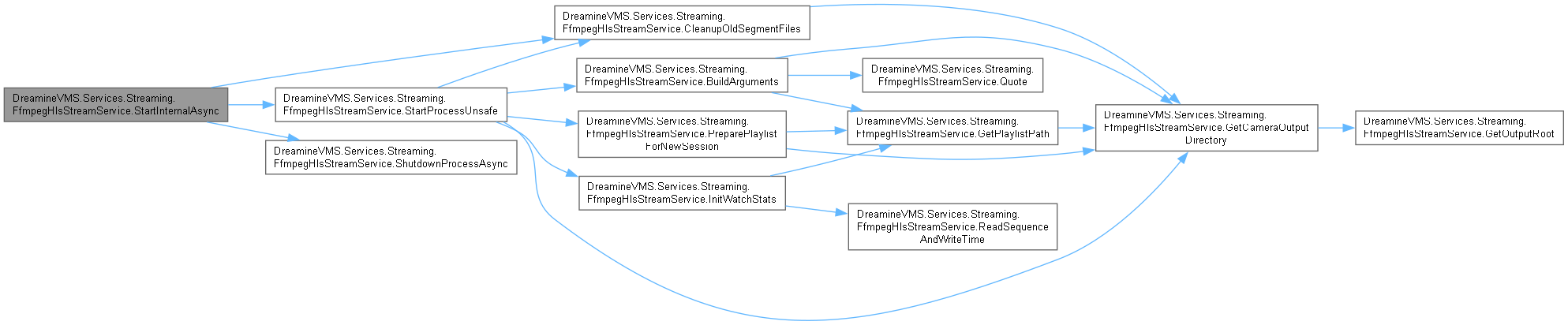
이 함수를 호출하는 함수들에 대한 그래프입니다.:

◆ StartProcessUnsafe()
|
inlineprivate |
Start Process Unsafe 작업을 수행합니다.
- 매개변수
-
camera camera에 사용할 CameraDevice값입니다.
FfmpegHlsStreamService.cs 파일의 850 번째 라인에서 정의되었습니다.
851 {
853 {
854 _runtimeState.SetState(camera.Id, CameraConnectionState.Connected, $"Direct HLS: {camera.Name}");
855 return;
856 }
857
858 if (string.IsNullOrWhiteSpace(camera.RtspUrl) || camera.RtspUrl.Contains("CHANGE_ME", StringComparison.OrdinalIgnoreCase))
859 {
860 _runtimeState.SetState(camera.Id, CameraConnectionState.Faulted, $"RTSP URL is not configured: {camera.Name}");
861 return;
862 }
863
864 if (!File.Exists(_options.Path))
865 {
866 _runtimeState.SetState(camera.Id, CameraConnectionState.Faulted, $"ffmpeg.exe was not found: {_options.Path}");
867 return;
868 }
869
870 Directory.CreateDirectory(GetCameraOutputDirectory(camera.Id));
871 PreparePlaylistForNewSession(camera.Id);
872 CleanupOldSegmentFiles(camera.Id, TimeSpan.FromMinutes(30));
873
874 string arguments = BuildArguments(camera);
875 ProcessStartInfo startInfo = new()
876 {
877 FileName = _options.Path,
878 Arguments = arguments,
879 UseShellExecute = false,
880 CreateNoWindow = true,
881 RedirectStandardError = true,
882 RedirectStandardOutput = true,
883 RedirectStandardInput = true // graceful 'q' 종료를 위해 추가
884 };
885
886 Process process = new() { StartInfo = startInfo, EnableRaisingEvents = true };
887 process.Exited += (_, _) =>
888 {
889 // 의도된 정지(StopAsync / Restart)에 의한 종료는 Faulted로 표시하지 않습니다.
891 {
892 return;
893 }
894
895 _runtimeState.SetState(camera.Id, CameraConnectionState.Faulted, $"FFmpeg exited: {camera.Name}");
896 };
897
898 process.ErrorDataReceived += (_, args) =>
899 {
900 if (string.IsNullOrWhiteSpace(args.Data))
901 {
902 return;
903 }
904
906 };
907 process.OutputDataReceived += (_, _) => { /* stdout은 사용하지 않습니다. */ };
908
909 try
910 {
911 _runtimeState.SetState(camera.Id, CameraConnectionState.Connecting, $"Starting HLS: {camera.Name}");
912 process.Start();
913
914 _processJob?.AddProcess(process);
915
916 process.BeginErrorReadLine();
917 process.BeginOutputReadLine();
918 _processes[camera.Id] = process;
919 InitWatchStats(camera.Id);
921 }
922 catch (Exception ex)
923 {
924 _runtimeState.SetState(camera.Id, CameraConnectionState.Faulted, $"Failed to start FFmpeg: {camera.Name}", ex.Message);
926 process.Dispose();
927 }
928 }
다음을 참조함 : _intentionalStops, _logger, _options, _processes, _processJob, _runtimeState, BuildArguments(), CleanupOldSegmentFiles(), GetCameraOutputDirectory(), DreamineVMS.Models.CameraDevice.Id, InitWatchStats(), DreamineVMS.Models.CameraDevice.IsDirectHls, PreparePlaylistForNewSession(), DreamineVMS.Models.CameraDevice.RtspUrl.
다음에 의해서 참조됨 : StartInternalAsync(), WatchdogAsync().
이 함수 내부에서 호출하는 함수들에 대한 그래프입니다.:
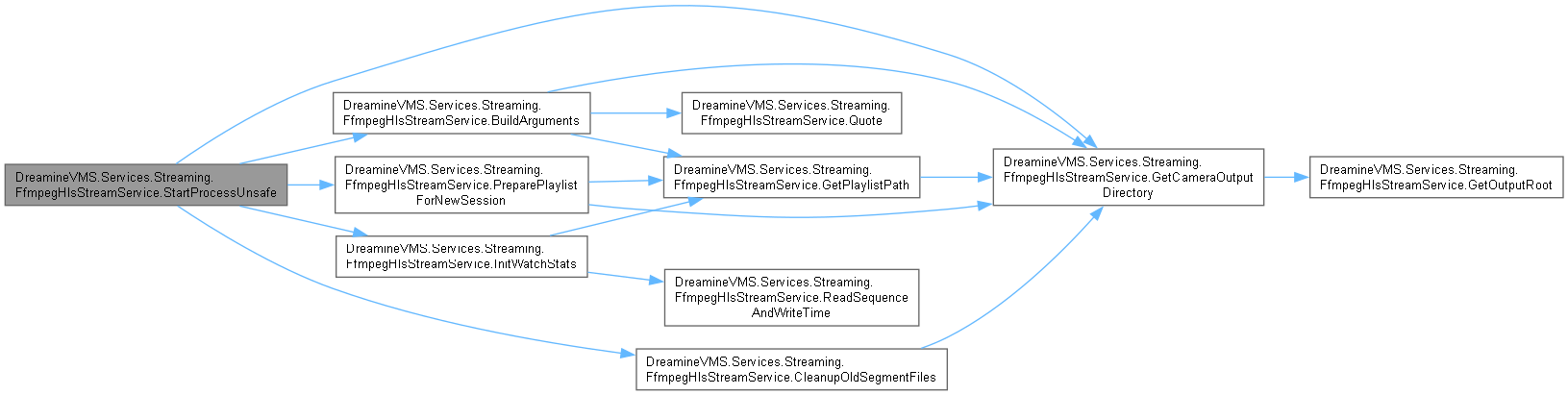
이 함수를 호출하는 함수들에 대한 그래프입니다.:

◆ StopAllAsync()
|
inline |
Stop All Async 작업을 수행합니다.
- 매개변수
-
cancellationToken 취소 요청을 감시하는 토큰입니다.
- 반환값
- Stop All Async 작업에서 생성한
Task결과입니다.
DreamineVMS.Services.Streaming.ICameraStreamService를 구현.
FfmpegHlsStreamService.cs 파일의 432 번째 라인에서 정의되었습니다.
433 {
434 // 카메라별 Stop을 병렬 실행합니다. 각 카메라의 Kill/WaitForExitAsync는
435 // 비동기이므로 N대 정지가 1대 정지와 거의 같은 시간 안에 완료됩니다.
436 CameraDevice[] cameras = _repository.GetAll().ToArray();
437 Task[] tasks = cameras
438 .Select(camera => StopAsync(camera.Id, cancellationToken))
439 .ToArray();
440
441 await Task.WhenAll(tasks);
442 }
다음을 참조함 : _repository, DreamineVMS.Models.CameraDevice.Id, StopAsync().
다음에 의해서 참조됨 : StopAsync().
이 함수 내부에서 호출하는 함수들에 대한 그래프입니다.:

이 함수를 호출하는 함수들에 대한 그래프입니다.:

◆ StopAsync() [1/2]
|
inline |
Stop Async 작업을 수행합니다.
- 매개변수
-
cancellationToken 취소 요청을 감시하는 토큰입니다.
- 반환값
- Stop Async 작업에서 생성한
Task결과입니다.
FfmpegHlsStreamService.cs 파일의 314 번째 라인에서 정의되었습니다.
315 {
316 await StopAllAsync(cancellationToken);
317 await base.StopAsync(cancellationToken);
318 _processJob?.Dispose();
319 }
다음을 참조함 : _processJob, StopAllAsync().
다음에 의해서 참조됨 : StopAllAsync().
이 함수 내부에서 호출하는 함수들에 대한 그래프입니다.:

이 함수를 호출하는 함수들에 대한 그래프입니다.:

◆ StopAsync() [2/2]
|
inline |
Stop Async 작업을 수행합니다.
- 매개변수
-
cameraId camera Id에 사용할 string값입니다.cancellationToken 취소 요청을 감시하는 토큰입니다.
- 반환값
- Stop Async 작업에서 생성한
Task결과입니다.
DreamineVMS.Services.Streaming.ICameraStreamService를 구현.
FfmpegHlsStreamService.cs 파일의 522 번째 라인에서 정의되었습니다.
523 {
524 SemaphoreSlim cameraLock = GetCameraOperationLock(cameraId);
525 await cameraLock.WaitAsync(cancellationToken);
526 try
527 {
528 await StopInternalAsync(cameraId, cancellationToken);
529 }
530 finally
531 {
532 cameraLock.Release();
533 }
534 }
다음을 참조함 : GetCameraOperationLock(), StopInternalAsync().
이 함수 내부에서 호출하는 함수들에 대한 그래프입니다.:

◆ StopInternalAsync()
|
inlineprivate |
Stop Internal Async 작업을 수행합니다.
- 매개변수
-
cameraId camera Id에 사용할 string값입니다.cancellationToken 취소 요청을 감시하는 토큰입니다.
- 반환값
- Stop Internal Async 작업에서 생성한
Task결과입니다.
FfmpegHlsStreamService.cs 파일의 664 번째 라인에서 정의되었습니다.
665 {
666 Process? toStop = null;
667 await _sync.WaitAsync(cancellationToken);
668 try
669 {
670 if (_processes.TryGetValue(cameraId, out toStop))
671 {
672 _intentionalStops.TryAdd(cameraId, 0);
673 _processes.Remove(cameraId);
674 }
675 }
676 finally
677 {
678 _sync.Release();
679 }
680
681 if (toStop is not null)
682 {
683 _runtimeState.SetState(cameraId, CameraConnectionState.Disconnected, $"Stopping camera: {cameraId}");
684 await Task.Delay(TimeSpan.FromMilliseconds(700), cancellationToken);
685 await ShutdownProcessAsync(cameraId, toStop, cancellationToken);
686 CleanupOldSegmentFiles(cameraId, TimeSpan.FromMinutes(30));
687 }
688
689 await _sync.WaitAsync(cancellationToken);
690 try
691 {
692 _lastSequences.Remove(cameraId);
693 _lastWrites.Remove(cameraId);
694 }
695 finally
696 {
697 _sync.Release();
698 }
699
700 _runtimeState.SetState(cameraId, CameraConnectionState.Disconnected, $"Camera stopped: {cameraId}");
701 _intentionalStops.TryRemove(cameraId, out _);
702 }
다음을 참조함 : _intentionalStops, _lastSequences, _lastWrites, _processes, _runtimeState, _sync, CleanupOldSegmentFiles(), ShutdownProcessAsync().
다음에 의해서 참조됨 : StopAsync().
이 함수 내부에서 호출하는 함수들에 대한 그래프입니다.:

이 함수를 호출하는 함수들에 대한 그래프입니다.:

◆ WatchdogAsync()
|
inlineprivate |
Watchdog Async 작업을 수행합니다.
- 매개변수
-
cancellationToken 취소 요청을 감시하는 토큰입니다.
- 반환값
- Watchdog Async 작업에서 생성한
Task결과입니다.
FfmpegHlsStreamService.cs 파일의 728 번째 라인에서 정의되었습니다.
729 {
730 foreach (CameraDevice camera in _repository.GetAll().Where(camera => camera.Enabled && camera.AutoReconnect && !camera.IsDirectHls))
731 {
732 if (cancellationToken.IsCancellationRequested)
733 {
734 return;
735 }
736
737 // 의도적 정지 진행 중인 카메라는 자동 재시작 대상에서 제외합니다.
739 {
740 continue;
741 }
742
743 Process? deadProcess = null;
744 bool needRestart = false;
745
746 await _sync.WaitAsync(cancellationToken);
747 try
748 {
750 {
752 {
754 deadProcess = _processes[camera.Id];
755 _processes.Remove(camera.Id);
756 needRestart = true;
757 }
758 else
759 {
760 // 한 번도 시작 안 됐거나 깨끗하게 정지된 카메라는 watchdog 대상 아님.
761 continue;
762 }
763 }
764 else
765 {
767 if (!File.Exists(m3u8Path))
768 {
769 continue;
770 }
771
772 (long sequence, DateTime writeTime) = ReadSequenceAndWriteTime(m3u8Path);
774 DateTime lastWrite = _lastWrites.GetValueOrDefault(camera.Id, DateTime.MinValue);
775
776 if (sequence > lastSequence || writeTime > lastWrite)
777 {
778 _lastSequences[camera.Id] = Math.Max(sequence, lastSequence);
779 _lastWrites[camera.Id] = writeTime > lastWrite ? writeTime : lastWrite;
780 _runtimeState.SetState(camera.Id, CameraConnectionState.Connected, $"HLS updated: {camera.Name}");
781 continue;
782 }
783
784 double idleSeconds = (DateTime.UtcNow - lastWrite.ToUniversalTime()).TotalSeconds;
785 int idleLimit = Math.Max(
786 _options.WatchdogIdleSeconds > 0 ? _options.WatchdogIdleSeconds : 6,
787 _options.HlsSegmentSeconds * _options.HlsListSize);
788
789 if (idleSeconds >= idleLimit)
790 {
792 deadProcess = process;
793 _processes.Remove(camera.Id);
794 needRestart = true;
795 }
796 }
797 }
798 finally
799 {
800 _sync.Release();
801 }
802
803 if (deadProcess is not null)
804 {
805 await ShutdownProcessAsync(camera.Id, deadProcess, cancellationToken);
806 }
807
808 if (needRestart)
809 {
810 try
811 {
812 await Task.Delay(
813 TimeSpan.FromSeconds(Math.Max(0, _options.RestartDelaySeconds)),
814 cancellationToken);
815 }
816 catch (OperationCanceledException)
817 {
818 return;
819 }
820
821 await _sync.WaitAsync(cancellationToken);
822 try
823 {
824 StartProcessUnsafe(camera);
825 }
826 finally
827 {
828 _sync.Release();
829 }
830 }
831 }
832 }
다음을 참조함 : _intentionalStops, _lastSequences, _lastWrites, _options, _processes, _repository, _runtimeState, _sync, DreamineVMS.Models.CameraDevice.AutoReconnect, DreamineVMS.Models.CameraDevice.Enabled, GetPlaylistPath(), DreamineVMS.Models.CameraDevice.Id, DreamineVMS.Models.CameraDevice.IsDirectHls, ReadSequenceAndWriteTime(), sequence, ShutdownProcessAsync(), StartProcessUnsafe().
다음에 의해서 참조됨 : ExecuteAsync().
이 함수 내부에서 호출하는 함수들에 대한 그래프입니다.:
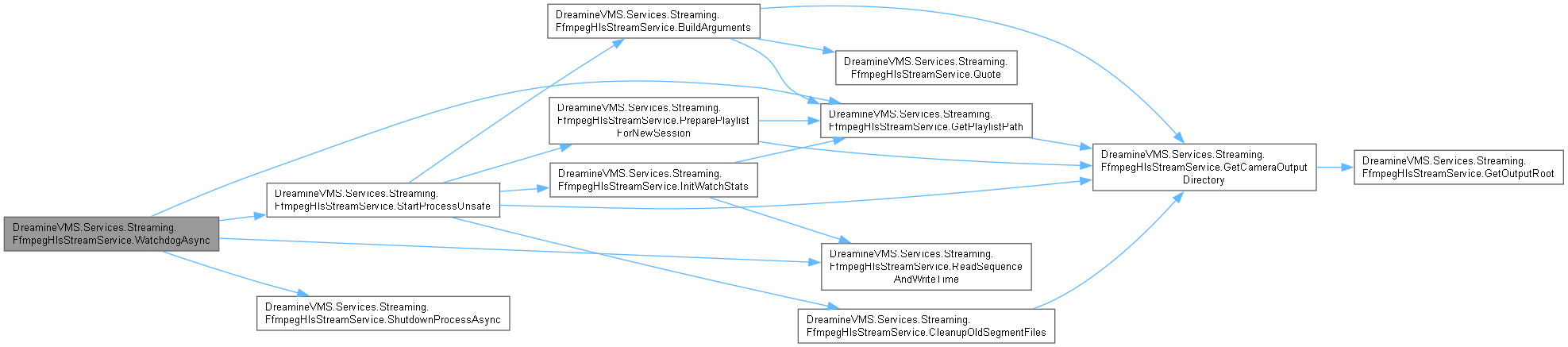
이 함수를 호출하는 함수들에 대한 그래프입니다.:

멤버 데이터 문서화
◆ _cameraOperationLocks
|
private |
camera Operation Locks 값을 보관합니다.
FfmpegHlsStreamService.cs 파일의 126 번째 라인에서 정의되었습니다.
다음에 의해서 참조됨 : Dispose(), GetCameraOperationLock().
◆ _disposed
|
private |
◆ _intentionalStops
|
private |
의도된 정지(StopAsync / Restart)로 인해 곧 종료될 프로세스의 카메라 ID 집합입니다. process.Exited 이벤트 핸들러는 이 집합에 포함된 카메라에 대해서는 Faulted 상태를 덮어쓰지 않습니다.
FfmpegHlsStreamService.cs 파일의 136 번째 라인에서 정의되었습니다.
다음에 의해서 참조됨 : Dispose(), StartInternalAsync(), StartProcessUnsafe(), StopInternalAsync(), WatchdogAsync().
◆ _lastSequences
|
private |
last Sequences 값을 보관합니다.
FfmpegHlsStreamService.cs 파일의 108 번째 라인에서 정의되었습니다.
다음에 의해서 참조됨 : InitWatchStats(), StartInternalAsync(), StopInternalAsync(), WatchdogAsync().
◆ _lastWrites
|
private |
last Writes 값을 보관합니다.
FfmpegHlsStreamService.cs 파일의 117 번째 라인에서 정의되었습니다.
다음에 의해서 참조됨 : InitWatchStats(), StartInternalAsync(), StopInternalAsync(), WatchdogAsync().
◆ _logger
|
private |
logger 값을 보관합니다.
FfmpegHlsStreamService.cs 파일의 63 번째 라인에서 정의되었습니다.
다음에 의해서 참조됨 : ExecuteAsync(), FfmpegHlsStreamService(), ForceKillProcessUnsafe(), PreparePlaylistForNewSession(), ShutdownProcessAsync(), StartProcessUnsafe().
◆ _options
|
private |
options 값을 보관합니다.
FfmpegHlsStreamService.cs 파일의 90 번째 라인에서 정의되었습니다.
다음에 의해서 참조됨 : BuildArguments(), ExecuteAsync(), FfmpegHlsStreamService(), GetOutputRoot(), StartProcessUnsafe(), WatchdogAsync().
◆ _processes
|
private |
processes 값을 보관합니다.
FfmpegHlsStreamService.cs 파일의 99 번째 라인에서 정의되었습니다.
다음에 의해서 참조됨 : Dispose(), ForceKillProcessUnsafe(), StartInternalAsync(), StartProcessUnsafe(), StopInternalAsync(), WatchdogAsync().
◆ _processJob
|
private |
초기값:
=
OperatingSystem.IsWindows() ? new ChildProcessJob() : null
자식 ffmpeg 프로세스를 부모와 묶는 Windows Job Object입니다.
FfmpegHlsStreamService.cs 파일의 156 번째 라인에서 정의되었습니다.
다음에 의해서 참조됨 : Dispose(), StartProcessUnsafe(), StopAsync().
◆ _repository
|
private |
repository 값을 보관합니다.
FfmpegHlsStreamService.cs 파일의 72 번째 라인에서 정의되었습니다.
다음에 의해서 참조됨 : FfmpegHlsStreamService(), StartAllAsync(), StartInternalAsync(), StopAllAsync(), WatchdogAsync().
◆ _runtimeState
|
private |
runtime State 값을 보관합니다.
FfmpegHlsStreamService.cs 파일의 81 번째 라인에서 정의되었습니다.
다음에 의해서 참조됨 : FfmpegHlsStreamService(), StartInternalAsync(), StartProcessUnsafe(), StopInternalAsync(), WatchdogAsync().
◆ _sync
|
private |
sync 값을 보관합니다.
FfmpegHlsStreamService.cs 파일의 146 번째 라인에서 정의되었습니다.
다음에 의해서 참조됨 : Dispose(), StartInternalAsync(), StopInternalAsync(), WatchdogAsync().
◆ GracefulExitTimeout
|
staticprivate |
ffmpeg에 'q'를 보내고 graceful exit를 기다리는 최대 시간입니다.
FfmpegHlsStreamService.cs 파일의 43 번째 라인에서 정의되었습니다.
다음에 의해서 참조됨 : ShutdownProcessAsync().
◆ KillWaitTimeout
|
staticprivate |
Kill 이후 프로세스 종료를 기다리는 최대 시간입니다.
FfmpegHlsStreamService.cs 파일의 53 번째 라인에서 정의되었습니다.
다음에 의해서 참조됨 : ShutdownProcessAsync().
◆ MediaSeqRegex
|
staticprivate |
Media Seq Regex 값을 보관합니다.
FfmpegHlsStreamService.cs 파일의 33 번째 라인에서 정의되었습니다.
다음에 의해서 참조됨 : ReadSequenceAndWriteTime().
◆ sequence
|
staticprivate |
Sequence And Write Time 데이터를 읽습니다.
- 매개변수
-
path path에 사용할 string값입니다.
- 반환값
- Read Sequence And Write Time 작업에서 생성한
(long sequence, DateTime writeTime)결과입니다.
FfmpegHlsStreamService.cs 파일의 1294 번째 라인에서 정의되었습니다.
다음에 의해서 참조됨 : InitWatchStats(), ReadSequenceAndWriteTime(), WatchdogAsync().
이 클래스에 대한 문서화 페이지는 다음의 파일로부터 생성되었습니다.: