로딩중...
검색중...
일치하는것 없음
DreamineVMS.Web.Services.Hls.HlsSegmentStore 클래스 참조sealed
Public 멤버 함수 | |
| HlsSegmentStore (IWebHostEnvironment env) | |
| string | GetCameraDir (string tenantId, string cameraId) |
| async Task | SaveSegmentAsync (string tenantId, string cameraId, string filename, Stream data) |
| Stream? string ContentType | GetFile (string tenantId, string cameraId, string filename) |
| void | ClearCameraHls (string tenantId, string cameraId) |
Public 속성 | |
| Stream? | Stream |
정적 Private 멤버 함수 | |
| static void | CleanupOldSegments (string dir) |
| static string | Sanitize (string s) |
| static bool | IsAllowedFilename (string f) |
Private 속성 | |
| readonly string | _root |
정적 Private 속성 | |
| const int | RetainedSegmentCount = 45 |
| static readonly TimeSpan | RetainedSegmentAge = TimeSpan.FromMinutes(2) |
상세한 설명
에이전트가 푸시한 HLS 세그먼트를 파일로 저장하고 서빙합니다.
HlsSegmentStore.cs 파일의 13 번째 라인에서 정의되었습니다.
생성자 & 소멸자 문서화
◆ HlsSegmentStore()
|
inline |
지정한 설정으로 HlsSegmentStore 클래스의 새 인스턴스를 초기화합니다.
- 매개변수
-
env env에 사용할 IWebHostEnvironment값입니다.
HlsSegmentStore.cs 파일의 60 번째 라인에서 정의되었습니다.
61 {
62 _root = Path.Combine(env.ContentRootPath, "App_Data", "hls");
63 Directory.CreateDirectory(_root);
64 }
다음을 참조함 : _root.
멤버 함수 문서화
◆ CleanupOldSegments()
|
inlinestaticprivate |
Cleanup Old Segments 작업을 수행합니다.
- 매개변수
-
dir dir에 사용할 string값입니다.
HlsSegmentStore.cs 파일의 286 번째 라인에서 정의되었습니다.
287 {
288 try
289 {
290 var thresholdUtc = DateTime.UtcNow - RetainedSegmentAge;
291 var segments = Directory.GetFiles(dir, "*.ts")
292 .OrderBy(File.GetLastWriteTimeUtc)
293 .ToArray();
294
295 foreach (var f in segments.Take(Math.Max(0, segments.Length - RetainedSegmentCount)))
296 {
297 try { File.Delete(f); } catch { }
298 }
299
300 foreach (var f in segments.Where(f => File.GetLastWriteTimeUtc(f) < thresholdUtc))
301 {
302 try { File.Delete(f); } catch { }
303 }
304 }
305 catch { }
306 }
다음을 참조함 : RetainedSegmentAge, RetainedSegmentCount.
다음에 의해서 참조됨 : SaveSegmentAsync().
이 함수를 호출하는 함수들에 대한 그래프입니다.:

◆ ClearCameraHls()
|
inline |
Clear Camera Hls 작업을 수행합니다.
- 매개변수
-
tenantId tenant Id에 사용할 string값입니다.cameraId camera Id에 사용할 string값입니다.
HlsSegmentStore.cs 파일의 256 번째 라인에서 정의되었습니다.
257 {
258 try
259 {
260 var dir = Path.Combine(_root, Sanitize(tenantId), Sanitize(cameraId));
261 if (!Directory.Exists(dir)) return;
262 foreach (var f in Directory.GetFiles(dir))
263 try { File.Delete(f); } catch { }
264 }
265 catch { }
266 }
다음을 참조함 : _root, Sanitize().
다음에 의해서 참조됨 : MapPost().
이 함수 내부에서 호출하는 함수들에 대한 그래프입니다.:

이 함수를 호출하는 함수들에 대한 그래프입니다.:

◆ GetCameraDir()
|
inline |
Camera Dir 값을 가져옵니다.
- 매개변수
-
tenantId tenant Id에 사용할 string값입니다.cameraId camera Id에 사용할 string값입니다.
- 반환값
- Get Camera Dir 작업에서 생성한
string결과입니다.
HlsSegmentStore.cs 파일의 98 번째 라인에서 정의되었습니다.
99 {
100 var dir = Path.Combine(_root, Sanitize(tenantId), Sanitize(cameraId));
101 Directory.CreateDirectory(dir);
102 return dir;
103 }
다음을 참조함 : _root, Sanitize().
다음에 의해서 참조됨 : SaveSegmentAsync().
이 함수 내부에서 호출하는 함수들에 대한 그래프입니다.:

이 함수를 호출하는 함수들에 대한 그래프입니다.:

◆ GetFile()
|
inline |
HlsSegmentStore.cs 파일의 212 번째 라인에서 정의되었습니다.
213 {
214 if (!IsAllowedFilename(filename)) return (null, "");
215 var path = Path.Combine(_root, Sanitize(tenantId), Sanitize(cameraId), filename);
216 if (!File.Exists(path)) return (null, "");
217 var ct = filename.EndsWith(".m3u8", StringComparison.OrdinalIgnoreCase)
218 ? "application/vnd.apple.mpegurl"
219 : "video/mp2t";
220 try
221 {
222 // MemoryStream으로 읽어 파일 핸들 즉시 해제 → 쓰기와 동시 접근 허용
223 using var fs = new FileStream(path, FileMode.Open, FileAccess.Read, FileShare.ReadWrite | FileShare.Delete);
224 var memory = new MemoryStream((int)Math.Min(fs.Length, int.MaxValue));
225 fs.CopyTo(memory);
226 memory.Position = 0;
227 return (memory, ct);
228 }
229 catch { return (null, ""); }
230 }
다음을 참조함 : _root, IsAllowedFilename(), Sanitize(), Stream.
다음에 의해서 참조됨 : MapGet().
이 함수 내부에서 호출하는 함수들에 대한 그래프입니다.:
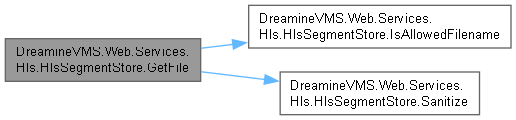
이 함수를 호출하는 함수들에 대한 그래프입니다.:

◆ IsAllowedFilename()
|
inlinestaticprivate |
Is Allowed Filename 조건을 확인합니다.
- 매개변수
-
f f에 사용할 string값입니다.
- 반환값
- Is Allowed Filename 조건이 충족되면
true이고, 그렇지 않으면false입니다.
HlsSegmentStore.cs 파일의 359 번째 라인에서 정의되었습니다.
359 =>
360 f.EndsWith(".m3u8", StringComparison.OrdinalIgnoreCase) ||
361 f.EndsWith(".ts", StringComparison.OrdinalIgnoreCase);
다음에 의해서 참조됨 : GetFile(), SaveSegmentAsync().
이 함수를 호출하는 함수들에 대한 그래프입니다.:

◆ Sanitize()
|
inlinestaticprivate |
Sanitize 작업을 수행합니다.
- 매개변수
-
s 이벤트를 발생시킨 객체입니다.
- 반환값
- Sanitize 작업에서 생성한
string결과입니다.
HlsSegmentStore.cs 파일의 332 번째 라인에서 정의되었습니다.
332 =>
333 string.Concat(s.Where(c => char.IsLetterOrDigit(c) || c is '-' or '_'));
다음에 의해서 참조됨 : ClearCameraHls(), GetCameraDir(), GetFile().
이 함수를 호출하는 함수들에 대한 그래프입니다.:

◆ SaveSegmentAsync()
|
inline |
Segment Async 데이터를 저장합니다.
- 매개변수
-
tenantId tenant Id에 사용할 string값입니다.cameraId camera Id에 사용할 string값입니다.filename filename에 사용할 string값입니다.data data에 사용할 Stream값입니다.
- 반환값
- Save Segment Async 작업에서 생성한
Task결과입니다.
HlsSegmentStore.cs 파일의 153 번째 라인에서 정의되었습니다.
154 {
155 if (!IsAllowedFilename(filename)) return;
156 var dir = GetCameraDir(tenantId, cameraId);
157 var path = Path.Combine(dir, filename);
158
159 // 임시 파일에 쓴 뒤 원자적 rename → 읽기 중 충돌 방지
160 var tmp = path + ".tmp";
161 await using (var fs = new FileStream(tmp, FileMode.Create, FileAccess.Write, FileShare.Read))
162 {
163 await data.CopyToAsync(fs);
164 }
165
166 File.Move(tmp, path, overwrite: true);
167
168 if (filename.EndsWith(".m3u8", StringComparison.OrdinalIgnoreCase))
169 CleanupOldSegments(dir);
170 }
다음을 참조함 : CleanupOldSegments(), GetCameraDir(), IsAllowedFilename(), Stream.
다음에 의해서 참조됨 : MapPost().
이 함수 내부에서 호출하는 함수들에 대한 그래프입니다.:
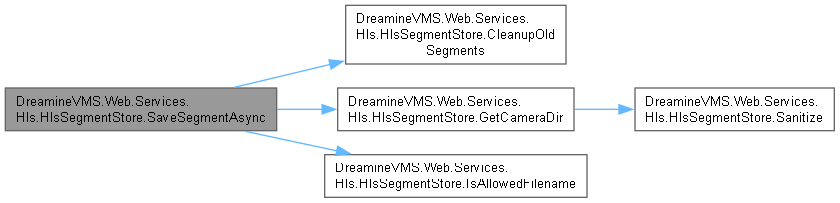
이 함수를 호출하는 함수들에 대한 그래프입니다.:

멤버 데이터 문서화
◆ _root
|
private |
root 값을 보관합니다.
HlsSegmentStore.cs 파일의 42 번째 라인에서 정의되었습니다.
다음에 의해서 참조됨 : ClearCameraHls(), GetCameraDir(), GetFile(), HlsSegmentStore().
◆ RetainedSegmentAge
|
staticprivate |
Retained Segment Age 값을 보관합니다.
HlsSegmentStore.cs 파일의 32 번째 라인에서 정의되었습니다.
다음에 의해서 참조됨 : CleanupOldSegments().
◆ RetainedSegmentCount
|
staticprivate |
Retained Segment Count 값을 보관합니다.
HlsSegmentStore.cs 파일의 23 번째 라인에서 정의되었습니다.
다음에 의해서 참조됨 : CleanupOldSegments().
◆ Stream
| Stream? DreamineVMS.Web.Services.Hls.HlsSegmentStore.Stream |
File 값을 가져옵니다.
- 매개변수
-
tenantId tenant Id에 사용할 string값입니다.cameraId camera Id에 사용할 string값입니다.filename filename에 사용할 string값입니다.
- 반환값
- Get File 작업에서 생성한
(Stream? Stream, string ContentType)결과입니다.
HlsSegmentStore.cs 파일의 212 번째 라인에서 정의되었습니다.
다음에 의해서 참조됨 : GetFile(), SaveSegmentAsync().
이 클래스에 대한 문서화 페이지는 다음의 파일로부터 생성되었습니다.: