로딩중...
검색중...
일치하는것 없음
Codemaru.Services.Certificates.ProcessRunner 클래스 참조sealed
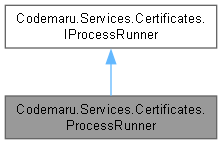
Codemaru.Services.Certificates.ProcessRunner에 대한 상속 다이어그램 :
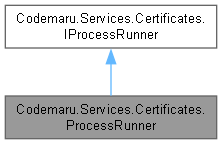
Codemaru.Services.Certificates.ProcessRunner에 대한 협력 다이어그램:
Public 멤버 함수 | |
| async Task< ProcessExecutionResult > | RunAsync (string fileName, string arguments, string? workingDirectory, TimeSpan timeout, int maxOutputChars, CancellationToken cancellationToken) |
정적 Private 멤버 함수 | |
| static string | ResolveWorkingDirectory (string fileName, string? workingDirectory) |
| static void | AppendLine (StringBuilder builder, string? line, int maxOutputChars) |
| static void | TryKill (Process process) |
상세한 설명
외부 프로세스를 실행하고 표준 출력/오류를 수집합니다.
ProcessRunner.cs 파일의 16 번째 라인에서 정의되었습니다.
멤버 함수 문서화
◆ AppendLine()
|
inlinestaticprivate |
Append Line 작업을 수행합니다.
- 매개변수
-
builder builder에 사용할 StringBuilder값입니다.line line에 사용할 string?값입니다.maxOutputChars max Output Chars에 사용할 int값입니다.
ProcessRunner.cs 파일의 279 번째 라인에서 정의되었습니다.
280 {
281 if (string.IsNullOrEmpty(line))
282 {
283 return;
284 }
285
286 if (builder.Length >= maxOutputChars)
287 {
288 return;
289 }
290
291 builder.AppendLine(line);
292
293 if (builder.Length > maxOutputChars)
294 {
295 builder.Length = maxOutputChars;
296 }
297 }
다음에 의해서 참조됨 : RunAsync().
이 함수를 호출하는 함수들에 대한 그래프입니다.:

◆ ResolveWorkingDirectory()
|
inlinestaticprivate |
Resolve Working Directory 작업을 수행합니다.
- 매개변수
-
fileName file Name에 사용할 string값입니다.workingDirectory working Directory에 사용할 string?값입니다.
- 반환값
- Resolve Working Directory 작업에서 생성한
string결과입니다.
ProcessRunner.cs 파일의 237 번째 라인에서 정의되었습니다.
238 {
239 if (!string.IsNullOrWhiteSpace(workingDirectory))
240 {
241 return workingDirectory;
242 }
243
244 return Path.GetDirectoryName(fileName) ?? Environment.CurrentDirectory;
245 }
다음에 의해서 참조됨 : RunAsync().
이 함수를 호출하는 함수들에 대한 그래프입니다.:

◆ RunAsync()
|
inline |
Run Async 작업을 수행합니다.
- 매개변수
-
fileName file Name에 사용할 string값입니다.arguments arguments에 사용할 string값입니다.workingDirectory working Directory에 사용할 string?값입니다.timeout timeout에 사용할 TimeSpan값입니다.maxOutputChars max Output Chars에 사용할 int값입니다.cancellationToken 취소 요청을 감시하는 토큰입니다.
- 반환값
- Run Async 작업에서 생성한
Task<ProcessExecutionResult>결과입니다.
Codemaru.Services.Certificates.IProcessRunner를 구현.
ProcessRunner.cs 파일의 82 번째 라인에서 정의되었습니다.
89 {
90 if (string.IsNullOrWhiteSpace(fileName))
91 {
92 return new ProcessExecutionResult
93 {
94 IsSuccess = false,
95 ExitCode = -1,
96 Message = "Executable path is empty."
97 };
98 }
99
100 if (!File.Exists(fileName))
101 {
102 return new ProcessExecutionResult
103 {
104 IsSuccess = false,
105 ExitCode = -1,
106 Message = $"Executable not found: {fileName}"
107 };
108 }
109
110 string resolvedWorkingDirectory = ResolveWorkingDirectory(fileName, workingDirectory);
111 if (!Directory.Exists(resolvedWorkingDirectory))
112 {
113 return new ProcessExecutionResult
114 {
115 IsSuccess = false,
116 ExitCode = -1,
117 Message = $"Working directory not found: {resolvedWorkingDirectory}"
118 };
119 }
120
121 StringBuilder output = new();
122 StringBuilder error = new();
123 int outputLimit = maxOutputChars <= 0 ? 6000 : maxOutputChars;
124
125 ProcessStartInfo startInfo = new()
126 {
127 FileName = fileName,
128 Arguments = arguments,
129 WorkingDirectory = resolvedWorkingDirectory,
130 UseShellExecute = false,
131 RedirectStandardOutput = true,
132 RedirectStandardError = true,
133 CreateNoWindow = true
134 };
135
136 using Process process = new() { StartInfo = startInfo, EnableRaisingEvents = true };
137
138 try
139 {
140 process.OutputDataReceived += (_, e) => AppendLine(output, e.Data, outputLimit);
141 process.ErrorDataReceived += (_, e) => AppendLine(error, e.Data, outputLimit);
142
143 if (!process.Start())
144 {
145 return new ProcessExecutionResult
146 {
147 IsSuccess = false,
148 ExitCode = -1,
149 Message = $"Failed to start process: {fileName}"
150 };
151 }
152
153 process.BeginOutputReadLine();
154 process.BeginErrorReadLine();
155
156 using CancellationTokenSource timeoutSource = new(timeout);
157 using CancellationTokenSource linkedSource = CancellationTokenSource.CreateLinkedTokenSource(
158 cancellationToken,
159 timeoutSource.Token);
160
161 try
162 {
163 await process.WaitForExitAsync(linkedSource.Token).ConfigureAwait(false);
164 }
165 catch (OperationCanceledException)
166 {
167 TryKill(process);
168
169 return new ProcessExecutionResult
170 {
171 IsSuccess = false,
172 ExitCode = -1,
173 Output = output.ToString(),
174 Error = error.ToString(),
175 Message = timeoutSource.IsCancellationRequested
176 ? $"Process timed out: {fileName} {arguments}"
177 : $"Process canceled: {fileName} {arguments}"
178 };
179 }
180
181 return new ProcessExecutionResult
182 {
183 IsSuccess = process.ExitCode == 0,
184 ExitCode = process.ExitCode,
185 Output = output.ToString(),
186 Error = error.ToString(),
187 Message = process.ExitCode == 0
188 ? "Process completed successfully."
189 : $"Process failed with exit code {process.ExitCode}."
190 };
191 }
192 catch (Exception ex)
193 {
194 return new ProcessExecutionResult
195 {
196 IsSuccess = false,
197 ExitCode = -1,
198 Output = output.ToString(),
199 Error = error.ToString(),
200 Message = ex.Message
201 };
202 }
203 }
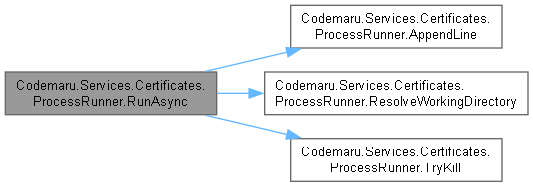
다음을 참조함 : AppendLine(), Codemaru.Models.Certificates.Error, ResolveWorkingDirectory(), TryKill().
이 함수 내부에서 호출하는 함수들에 대한 그래프입니다.:
◆ TryKill()
|
inlinestaticprivate |
Kill 작업을 시도하고 성공 여부를 반환합니다.
- 매개변수
-
process process에 사용할 Process값입니다.
ProcessRunner.cs 파일의 315 번째 라인에서 정의되었습니다.
316 {
317 try
318 {
319 if (!process.HasExited)
320 {
321 process.Kill(entireProcessTree: true);
322 }
323 }
324 catch
325 {
326 // Process cleanup best effort.
327 }
328 }
다음에 의해서 참조됨 : RunAsync().
이 함수를 호출하는 함수들에 대한 그래프입니다.:

이 클래스에 대한 문서화 페이지는 다음의 파일로부터 생성되었습니다.: